GA4 Revenue vs CRM Revenue: Reconcile the Difference Before Changing Budget
By Rajesh Kumar, Founder, Attribi ·
GA4 revenue and CRM revenue differ because they can measure different transactions, values and dates. Reconcile the definitions first, match the underlying records where identifiers exist, and separate explained differences from missing data. Only then compare channel performance or change budget.
A website purchase, a signed annual contract and a payment received are three different milestones. A lead-generation site can also show zero GA4 purchase revenue while the sales team closes substantial business. That alone says nothing about whether its campaigns work.
This guide gives you a manual reconciliation process for those situations: a comparison specification, a record-matching method and a worked revenue bridge. It applies whether your team uses a spreadsheet or a warehouse.

What are you actually comparing?
Start by writing the exact metric names beside the two totals.
In GA4, purchase revenue includes revenue from supported purchase events, less refunded transaction revenue. Total revenue has broader scope, including purchase, subscription and advertising revenue, net of refunds. A web-only purchase analysis therefore needs a defined stream and metric, rather than an assumption that every number labeled revenue represents the same thing. Google's metric definitions explain the distinction.
In your CRM, "revenue" might mean closed-won deal amount, annual contract value, total contract value or a custom field. Decide which one the report uses. Closed-won value is also different from accounting revenue recognition or cash collected. Use your billing or finance records when those are the measures you need.
For example, a $12,000 annual agreement paid in twelve installments could appear as one $12,000 CRM deal and a $1,000 website purchase. Both records can be correct.
If your website only collects demos, begin with lead-to-deal reconciliation. Assigning a value to a lead event does not make that value a paid purchase. GA4 can receive separately implemented offline events, but a CRM stage change does not automatically become GA4 revenue.
Using Attribi alongside these systems? Review what the GA4 integration currently compares before expecting a revenue-matching report.
Step 1: Agree on one comparison specification
Put this specification above the worksheet. It prevents the reconciliation from changing meaning halfway through the exercise.
| Decision | Define before exporting |
|---|---|
| Business scope | Website-paid orders, self-serve subscriptions, sales-assisted contracts, or another explicitly bounded set |
| Revenue basis | Booked deal value, invoiced amount, collected payment or another named measure |
| Value treatment | Discounts, tax, delivery charges, refunds, cancellations and renewals |
| Date basis | Purchase date, deal-won date, payment date or acquisition-cohort date |
| Time zone | One reporting time zone, including month-end boundaries |
| Currency | Original transaction currency, reporting currency and exchange-rate rule |
| Data snapshot | Export time, source report, filters and latest included date |
Choose the specification for the question. "Did checkout measurement miss purchases?" needs a purchase-date comparison. "Which acquisition month produced valuable customers?" needs a cohort view that follows those customers into later months.
For US and European operations, retain original currencies even when reporting in one currency. GA4 converts local transaction currencies into its reporting currency using the prior day's exchange rate. A CRM using a fixed monthly rate can therefore produce a legitimate conversion difference. Google's currency reference also notes that raw BigQuery transaction values remain in local currency.
Keep the original amounts, then show any common-currency adjustment separately. Never add USD and EUR amounts together because both exports use a column named Amount.
Step 2: Build a transaction ledger before a channel report
Export the relevant CRM deals and, where needed, their associated orders, invoices or payments. Export the matching GA4 transaction data available to you. Start with all channels combined so that attribution differences cannot hide a value or coverage problem.
Your worksheet needs, at minimum:
- A stable order or transaction ID and the associated CRM deal ID
- Purchase, payment and won dates, kept as separate fields
- Original amount and currency
- Tax, shipping, discount and refund adjustments where applicable
- Comparable net amount under the agreed specification
- Match status, difference reason, evidence and owner
One deal can produce several payments. Several contacts can belong to one deal. A refund can arrive after its purchase. These relationships need explicit rows or a mapping table; joining every contact to every payment can multiply revenue without any new business occurring.
Keep an unmatched bucket. A record that cannot be connected to a transaction still belongs in the accounting of the gap. Dropping it makes the reconciliation look cleaner while reducing its usefulness.
Save the two original exports alongside the worksheet. That lets another person reproduce the result even if a CRM amount or stage changes later.
Step 3: Match records using identifiers you actually collected
When a website purchase has an order ID
The strongest starting point is the same order ID in your commerce system and the GA4 purchase event's transaction_id. Google's purchase-event specification defines that identifier and requires currency when reporting value. It specifies purchase value separately from tax and shipping.
In an existing GA4 BigQuery export, the field is ecommerce.transaction_id. Purchase and refund amounts have separate fields. Join that transaction ID to the order record, then use your stored order-to-deal relationship to reach the CRM. These fields are documented in Google's BigQuery export schema.
Before summing, reduce each side to the intended transaction grain. Investigate repeated IDs and distinguish purchase rows from refund rows. Do not join item-level rows to deal totals and then sum the repeated deal amount.
When the sale closes after a lead submission
There may be no website purchase to match. A separate analytics-to-CRM analysis can use a consistently implemented, non-identifying User-ID that your organization maps to CRM records. Google identifies BigQuery Export as a supported route for joining Analytics data with first-party CRM data.
This requires identifiers and associations that already exist in the relevant data. It does not reconstruct anonymous historical visitors or prove that every contact caused a deal. Multiple contacts per opportunity still need a counting rule.
Do not place email addresses or phone numbers in User-ID, transaction IDs or custom dimensions to make matching easier. Follow Google's User-ID requirements and your organization's consent and data-handling requirements.
When you only have aggregate totals
Compare compatible date-and-channel aggregates and label the result accordingly. Date plus channel is not a person-level join. Two totals appearing on the same row do not establish which session produced which deal.
Also distinguish a raw-event reconciliation from a GA4 report reconciliation. Google documents differences between reporting surfaces, including modeling that is not included in BigQuery. A perfect order-ID match does not guarantee identical totals across every GA4 surface.
Step 4: Explain the gap with a revenue bridge
Here is a fictional example for a business with self-serve purchases and sales-assisted deals. All figures are illustrative USD amounts, not customer results.
The starting reports show $120,000 of September closed-won CRM value and $84,000 of GA4 web purchase revenue. The team chooses September website purchase and refund activity, excluding tax and shipping. Both sides use the same event-date refund rule, including eligible prior-month purchases refunded in September. The CRM starting value includes some amounts outside that scope.
| Reconciliation line | Adjustment | Running total |
|---|---|---|
| September closed-won CRM value | Starting amount | $120,000 |
| Remove sales-assisted deals with no website purchase in scope | -$20,000 | $100,000 |
| Remove remaining contract value scheduled for later purchases | -$12,000 | $88,000 |
| Add September website purchases from deals won earlier | +$5,000 | $93,000 |
| Remove tax and shipping included in the remaining amounts | -$3,000 | $90,000 |
| Apply September refunds of eligible website purchases | -$2,000 | $88,000 |
| Compare with GA4 web purchase revenue on the same basis | $84,000 | $4,000 unresolved |
The initial $36,000 difference falls to $4,000 after $32,000 of net, evidenced adjustments. The unresolved amount is approximately 4.5% of the $88,000 comparable business total.
Every adjustment must come from identified records. The rows above are mutually accounted for: an amount removed as an out-of-scope deal is not removed again as future contract value. Refund treatment must match on both sides, including which transactions and reporting dates are included.
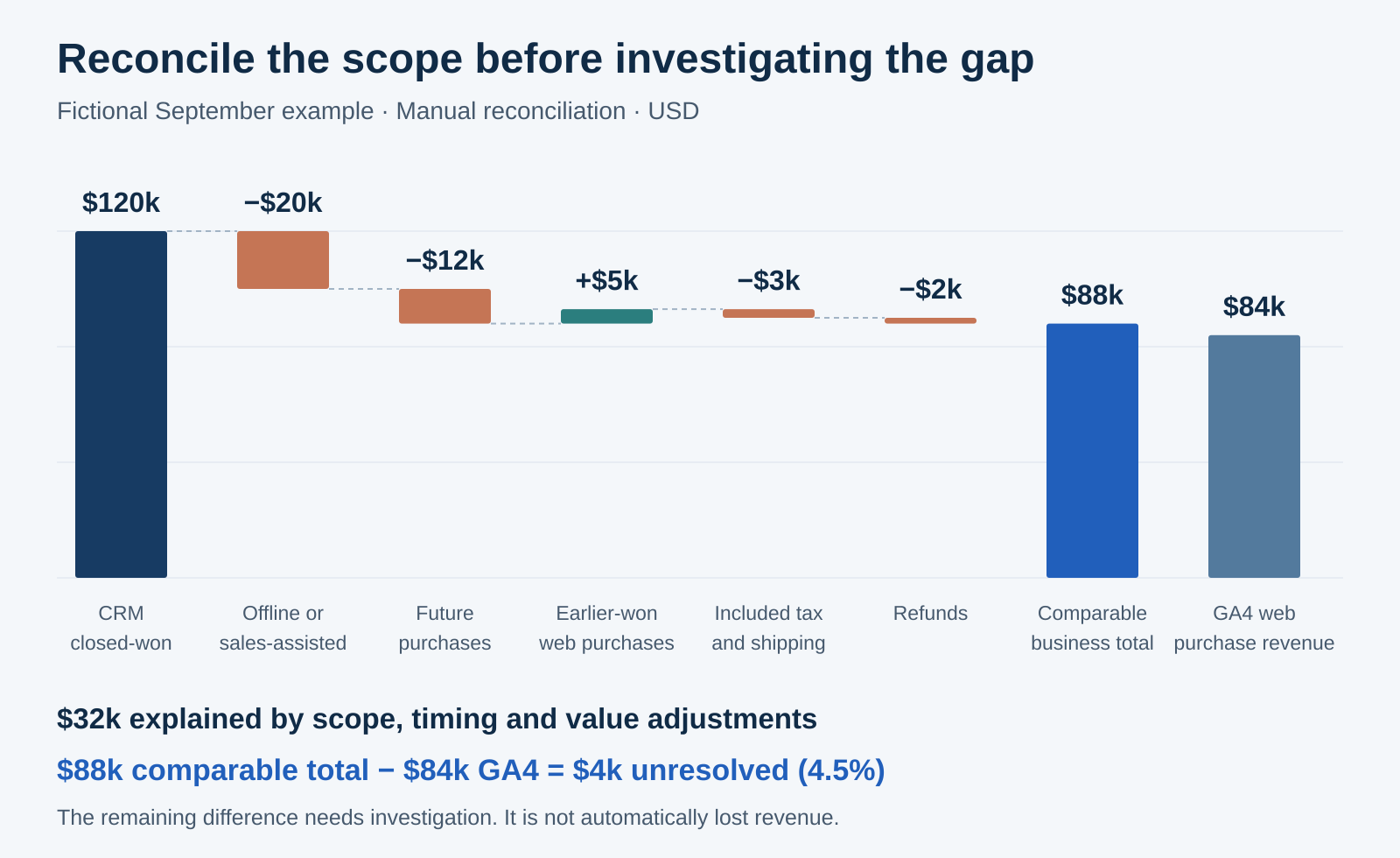
Fictional worked example. Adjustments explain $32,000 of the original $36,000 difference; $4,000 remains to investigate.
That residual is a research queue. It is not evidence that a channel wasted $4,000, and it should not be distributed across campaigns in proportion to their reported sales.
Step 5: Diagnose the unresolved records
Sort exceptions by value, then by repeated failure pattern. Five missing high-value purchases may matter more than fifty low-value discrepancies.
Purchase missing from GA4. Check whether the event was sent to the correct property and stream, whether the checkout path changed, and whether your permitted collection setup could observe it. Test successful checkout paths in DebugView, including redirects. An absent record alone does not prove that consent, a browser or a tag caused the loss.
Transaction present, value different. Inspect value, currency, discounted prices, partial payments and whether tax or shipping entered the wrong amount. Compare original currency before diagnosing an exchange-rate difference.
Refund or cancellation differs. Verify both the business adjustment and the analytics event. GA4 ecommerce refund measurement requires a refund event with the relevant transaction ID. Changing a CRM deal does not, by itself, send that event.
Recent dates keep moving. Record the extraction time and rerun the same specification after processing. Google says data processing can take 24 to 48 hours, with later revisions possible. Avoid declaring a yesterday-versus-today export difference a permanent tracking defect.
Assign each material exception an owner and next check. Separate "explained," "fixed going forward" and "historical gap remains." A successful tag repair does not prove that old missing purchases were recovered.
Step 6: Make the budget decision on a comparable cohort
Once the overall value bridge is understood, inspect channels. Check the channel definition, attribution model, lookback period and date basis before comparing revenue shares.
GA4's reporting attribution model affects event-scoped traffic dimensions. User- and session-scoped dimensions are unaffected by that setting. A session-channel report and an event-attribution report can therefore answer different questions. Google documents this scope distinction.
For a long sales cycle, this month's closed-won revenue may come from leads acquired months earlier. Compare spend with outcomes from the corresponding acquisition cohort, allowing a consistent maturity period. Use the CRM ROI guide to connect acquisition cohorts, deal value and spend once the revenue definitions are settled.
Before reallocating, ask:
- Does the channel comparison use the same outcome and value definition?
- Is unmatched revenue concentrated in one channel or customer segment?
- Could the unresolved amount reverse the proposed decision?
- Have both cohorts had comparable time to close?
There is no universal acceptable GA4-to-CRM gap. Set a tolerance based on the size of the decision and the distribution of missing data. A small overall difference can still conceal a large problem in one campaign.
Where Attribi fits
Attribi can bring CRM outcomes into its attribution workflow and provide a separate view of tracked journeys. Its GA4 connection is read-only and imports aggregate metrics by day and session channel.
The current GA4 comparison displays counts: sessions, key events and Attribi conversions. Although totalRevenue is imported with its currency, it is not displayed as a revenue comparison. The connection does not join GA4 sessions to individual CRM deals or write purchase and refund events back to GA4. The integration reference describes these boundaries.
Use the worksheet above for the revenue reconciliation. Use connected attribution data to investigate marketing outcomes within its documented coverage.
Start free with Attribi to explore your connected data. Check the current plan requirements for CRM revenue connections before choosing a plan.
Frequently asked questions
Why is GA4 revenue lower than CRM revenue?
The CRM may include offline deals, full contract values or transactions from a different date range. GA4 may also be missing relevant purchase events. Align scope, dates, refunds and currency first, then investigate unmatched transactions. The direction of the difference alone cannot identify its cause.
Which revenue number should I use for marketing budgets?
Use the agreed business outcome, such as closed-won bookings or collected revenue, joined to the acquisition cohort and corresponding spend. Validate the CRM field and billing relationships first. GA4 remains useful for website behavior and purchase measurement; the budget analysis needs clearly defined commercial outcomes.
Can Attribi automatically reconcile GA4 revenue with CRM revenue?
The current GA4 integration compares aggregate counts, not revenue totals. It imports revenue but does not display a revenue reconciliation or make user-level GA4-to-CRM joins. Use a separate worksheet or warehouse process for the record-level comparison described here.
Connect your CRM once. Every closed deal reaches your ad platforms.
Attribi pulls stage changes from your CRM, matches each deal to the lead it already recorded, and uploads qualified and closed won conversions to Google, Meta, LinkedIn, TikTok and Microsoft.
No credit card. Free up to 500 visitors a month. New workspaces start with 30 days on Pro.