Google Says 120. Meta Says 90. Your CRM Says 14. All Three Are Telling the Truth.
By Rajesh Kumar, Founder, Attribi · · Updated
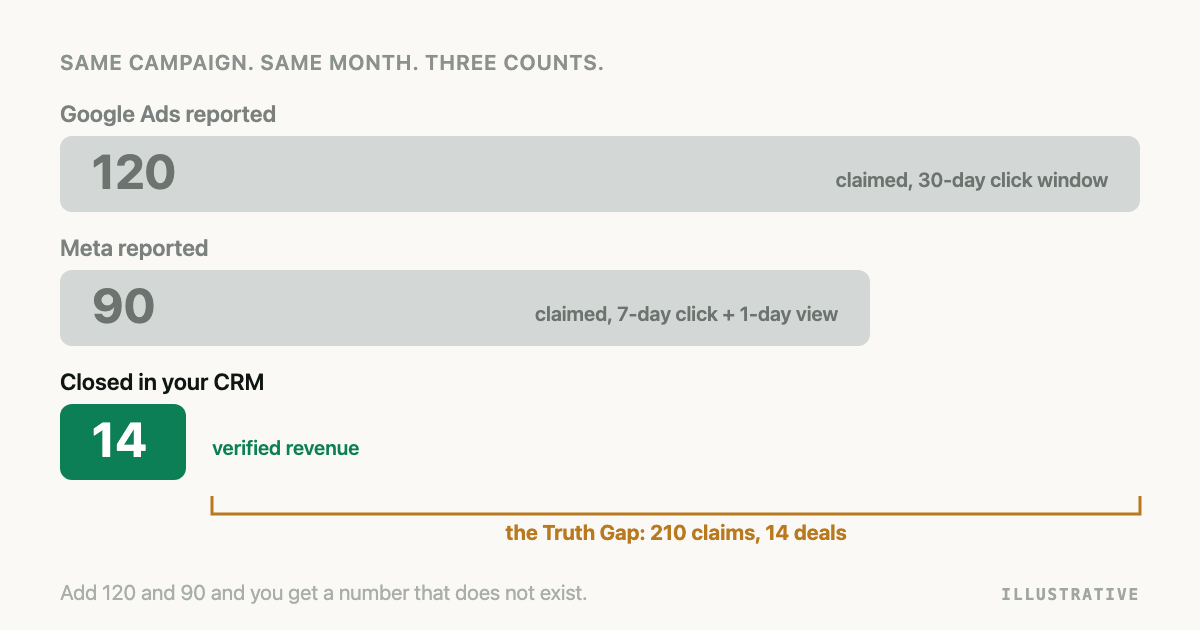
Three numbers for one month, and someone wants to know which one is real.
Why do Google Ads and Meta report different conversions? Because each counts under its own attribution window, its own rules for views and modelled results, its own reporting date and time zone, and neither sees the other's clicks. The CRM counts people and deals, not claims. Three numbers, three questions, so adding them up or picking a winner both fail.
What is a platform-reported conversion?
A platform-reported conversion is one ad platform's count of the conversion events it credited to its own ads, under its own attribution window, counting setting, reporting date and time zone, including conversions it modelled rather than observed. It is a count of claims, not of people, and it cannot include a touch on any other platform.
Take one invented lead-generation advertiser in April, the April ledger below, with every figure illustrative. Google Ads shows 120 conversions on the lead form action. Meta Ads Manager shows 90 results on the Lead event. The CRM, filtered to deals closed in April with a paid source, shows 14. Eight counting rules sit between those numbers.
Why do Google Ads and Meta report different conversions for the same month?
The attribution window is the number of days after an ad interaction during which a conversion can still be credited to it.
| Platform | Default click window | Default view window | Verified 2026-10-12 |
|---|---|---|---|
| Google Ads | 30 days (1 to 90 by source) | 1 day view-through, 3 days engaged-view | Conversion windows |
| Meta | 7-day click | 1-day view, 1-day engagement | Results metric |
| 30 days via the API; 90 in Campaign Manager | 7 days via the API; 90 in Campaign Manager | API schema, Campaign Manager |
LinkedIn has two defaults because an API rule created without window fields gets 30 and 7, while Campaign Manager gives 90 and 90; the LinkedIn offline conversion guide covers which you are on. A click on 3 April that converts on 28 April is inside Google's window and outside Meta's. That is a ruler of a different length, not a performance difference.
View-through conversions are conversions after an impression with no click. Meta's Results metric page states the default setting as "7-day click, 1-day view and 1-day engagement conversion", so views are in Meta's 90. Google's page on view-through conversions says they "aren't included in the Conversions column" outside Performance Max for store goals, App and Demand Gen campaigns (both read 2026-10-12).
Modelled conversions are conversions a platform estimates rather than observes. Google's page on modelled online conversions says the Conversions column includes both modelled and observed conversions and that modelled figures "can take up to 5 days to stabilise". Meta's page on modelled conversions says it models "for missing or partial data" and may "distribute conversions amongst ad breakdowns" (both read 2026-10-12). Neither labels them in the default report.
The reporting date is the day a conversion is filed under. Google's conversion tracking data page says the primary conversion columns "are calculated based on the time of the click", so a click last week that converts this week is reported to last week; the "by conv. time" columns file it on the day it happened (read 2026-10-12). Meta's Insights API action_report_time example: an ad seen on 1 January with a conversion on 2 January is reported on the 1st by impression and the 2nd by conversion (Ad account insights, read 2026-10-12). Your CRM files a lead under its created date.
Conversion counting is whether one click can produce one conversion or many. Google's conversion action offers "One" and "Every", and recommends "One" for leads so page refreshes do not double count (same page). An action left on "Every" counts a person who submitted twice as two.
Time zone is the quiet one. Google's time zone page says the account setting "determines how your campaign data is recorded and presented" (read 2026-10-12). A Meta ad account carries its own timezone_name (Ad account reference). A lead at 23:40 in Dubai is tomorrow in a UTC-stamped CRM.
Double claiming is one person counted by two platforms. Google's data-driven attribution page lists the interactions it looks at: "Search (including Shopping), YouTube, Display, and Demand Gen ads" (read 2026-10-12). All Google. Each platform divides credit among its own touches only.
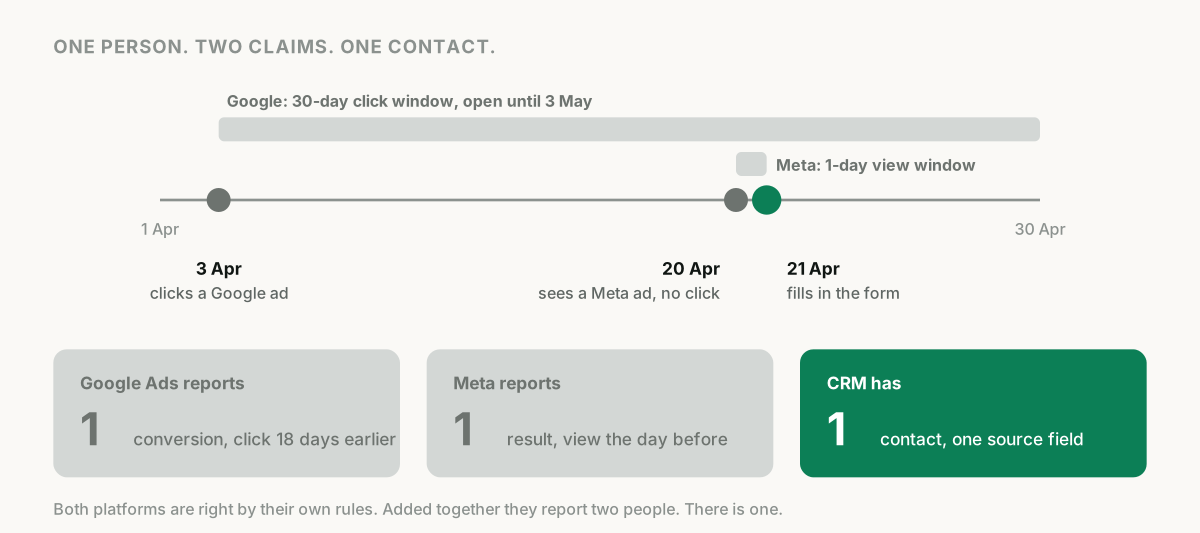
The CRM's own undercount is the forgotten one. A CRM only knows a lead came from Google if a click ID or source reached the record. Blank hidden fields, phone enquiries typed in by hand, declined consent: all real, all from ads, all filed as direct. Then duplicates get merged and deals take weeks. The CRM's 14 is a count of closed deals with a surviving paid source, never a count of form fills.
How do you reconcile 120, 90 and 14 line by line?
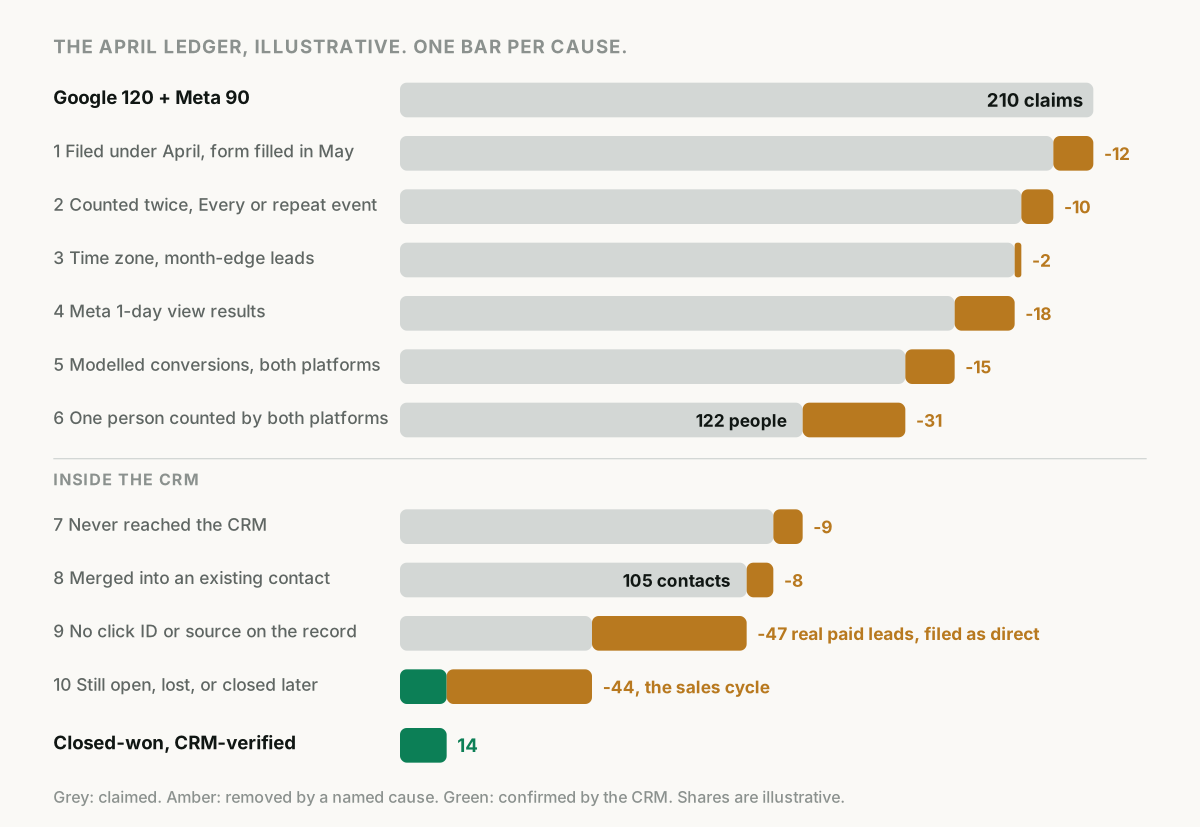
Here is the April ledger walked down one cause at a time. Every share is illustrative; your own come from the checks in the next section.
| Step | Cause | Meta | Running total | Illustrative share | |
|---|---|---|---|---|---|
| Start | Reported for April | 120 | 90 | 210 claims | |
| 1 | Reporting date: April click or impression, form filled in May | -9 | -3 | 198 | 6% of claims |
| 2 | Counting: "Every" on Google, duplicate Lead events on Meta | -6 | -4 | 188 | 5% |
| 3 | Time zone: month-edge leads the CRM files in March or May | -1 | -1 | 186 | 1% |
| 4 | View-through: Meta's 1-day view results; Google's are not in its Conversions column | 0 | -18 | 168 | 20% of Meta's count |
| 5 | Modelled conversions | -8 | -7 | 153 | 7% |
| 6 | Double-claimed people counted by both platforms inside both windows | 122 people | 31 people, 15% of claims | ||
| 7 | Never reached the CRM: spam, failed integration, tests | 113 contacts | 7% of people | ||
| 8 | Merged into an existing contact | 105 new contacts | 7% | ||
| 9 | No click ID or source on the record: blank field, no consent, phone leads | 58 attributed to paid | 45% of new contacts | ||
| 10 | Still open, lost, or closed after the report date | 14 closed-won | 76% of attributed leads |
Steps 1 to 5 are inside the platforms. They turn 210 claims into about 153 the CRM could ever hope to find, and the biggest line is Meta's view-through share, which is why Meta's count and Google's were never the same kind of number.
Step 6 is the one no platform can perform. Thirty-one people clicked a Google ad and then saw or clicked a Meta ad inside both windows. Each platform counted them once. The sum counted them twice. Only a record holding both touches against one person can take them out.
Steps 7 to 9 are the CRM undercounting its own paid leads: 47 lost their source on the way in, so the CRM credits 58 to Google and Meta when 105 came from them. Step 10 is the sales cycle, the largest step of all: of 58 attributed leads, 14 had closed when the report ran. One number counts outcomes. The other counts starts.
The honest comparisons are 122 people against 105 contacts against 58 attributed, which should land within a few percent of each other once the rules are known. The comparison of 120 against 14 was never a comparison.
Which of these causes can you check in your own account?
Three checks, each a few minutes.
-
The platform shares. In Google Ads, add "Conversions (by conv. time)" beside "Conversions" for last month; the difference is your reporting-date lag. Note each conversion action's window and whether counting is "One" or "Every". In Meta, the compare attribution settings feature adds a column per window, the only valid way to compare across settings according to Meta's page on attribution models and settings (read 2026-10-12); the 1-day view column over the total is your view-through share.
-
Claims against contacts. If Google plus Meta exceeds the CRM's new web-form contacts for the month, the excess is double claims, views and models combined. If it is smaller, the platforms are missing click IDs.
-
The source share. Filter last month's contacts to those with a GCLID, an fbclid or a UTM source. The share without is your undercount, and with phone enquiries it is routinely the biggest line of all. Capturing the GCLID in the CRM is the fix for the web-form part.
What should a reconciled report show?
A reconciled report is one in which every number is a count of the same thing, stated with its rule. Five lines are enough: platform claims, each with its window, view setting, counting setting, date basis and time zone printed beside it; people who converted after any paid touch, counted once whichever platforms touched them; CRM contacts created in the month, with duplicates merged and the share carrying a source; outcomes, meaning qualified and closed-won with the stage date and deal value taken from the CRM; and coverage, the share of outcomes with a recorded touch before the conversion.
Count a person once, and take the outcome and its value from the CRM, because a form fill is not revenue. Measuring ROI on paid leads that close in the CRM covers the value side; five attribution models on one deal covers splitting credit once the person has been counted once.
What should you stop doing?
Stop adding platform numbers together: the sum is a count of claims, and in the April ledger it overstates people by 72 percent. Stop comparing a 30-day account against a 7-day account as if the gap were performance. Stop judging the last two weeks on Google's standard columns, which are filed by click date and keep filling while the window is open; the sales-cycle article shows how far a month moves after it ends. And stop asking which number is right. Ask what each number counts.
How does offline conversion tracking change this?
It does not make the platforms agree, and anyone who says it will has not reconciled a month. It changes what each number is anchored to.
Offline conversion tracking sends CRM outcomes such as qualified and closed-won back to the platforms as conversion events, matched to the originating click by click ID or by hashed email and phone. The two closed-won counts still differ by window, date basis and double claiming, but both now count deals your CRM confirmed instead of form fills. Bidding changes only once the uploaded conversion is the campaign's goal and has enough volume; why ad platforms optimise on the wrong conversions covers that side.
The limits travel with it. Google's import guidelines say a conversion uploaded more than 90 days after the last click is not imported, 63 days for enhanced conversions for leads. Meta's server event reference says an event_time more than 7 days in the past fails the whole request (both read 2026-10-12). A phone number stored without its country code cannot be hashed into a match on any platform, so collect phones in international format. Setup: Salesforce to Meta and Google Ads.
How Attribi reports this, and what the Truth Gap is
I build Attribi, so read this as a description of code rather than a promise.
Attribi never reads Google's 120 or Meta's 90. It records each visitor's touches on your site with their source and click ID, and attaches the lead and then the CRM outcome to that journey. Each lead's value is consumed by one journey only, so nobody is counted twice, and coverage is reported as the share of conversions with at least one touch recorded before the conversion.
The Truth Gap on the attribution page is narrower than its name suggests. It is not platform claims against CRM deals. Over the last 30 days of journeys it sums the revenue last-touch attribution gives the six paid channels Attribi classifies (Google, Meta, LinkedIn, TikTok, Microsoft and Snapchat), sums what a time-weighted model gives the same channels, and reports claimed revenue, credited revenue, the difference and the difference as a percentage of the claim. Revenue means the deal values your CRM confirmed. It measures how much last-click over-credits paid channels: steps 6 and 10 above, in money.
Three limits, all in the code. The time-weighted model is a fixed seven-day half-life decay; the interface labels it data-driven and calls the result the true incremental contribution, and it is neither. The gap needs multi-touch journeys, so a workspace without the tracking script, which gets one synthetic touch per CRM lead, sees a gap of zero for a structural reason. And it is computed only on the Scale plan ($199) and above; every new workspace starts with 30 days on the Pro plan, no card required, so the trial shows it. To run the April ledger on your own data, start the 30-day trial and compare the leads page's contacts with a recorded click against your CRM's source field.
Frequently asked questions
Why do Google Ads and Meta report different numbers for the same campaign? Because each counts under its own rules. Google's default is a 30-day click window with view-through conversions kept out of the Conversions column; Meta's is 7-day click, 1-day view and 1-day engagement, with views included. Each includes unlabelled modelled conversions, files the conversion under the click or impression date, uses its own time zone, and cannot see the other platform's touches.
Can I add up conversions from Google, Meta and LinkedIn to get a total? No. Each platform counts every person it touched inside its own window, so one person who clicked a Google ad and saw a Meta ad is counted by both. The sum is a count of claims, not of people. Count people once against a record that holds every touch, such as your CRM with click IDs captured or an attribution dataset built from the journey.
Does Google Ads include view-through conversions in the Conversions column? Not for most campaign types. Google's view-through page says they are for reporting only and appear in the View-through conversions and All conversions columns, with Performance Max for store goals, App and Demand Gen campaigns as the exceptions. Meta's default results column does include 1-day view conversions, which is one reason the two columns are not comparable.
Should I compare Google Ads conversions by click date or by conversion date with my CRM? By conversion date. Google's primary columns file a conversion under the date of the click, while a CRM files a lead under the date the record was created. Add the "Conversions (by conv. time)" column for the comparison, and expect the standard column for a recent month to keep rising while the conversion window is open.
How does offline conversion tracking fix the disagreement between platforms? It does not make the platforms agree on one number. It sends CRM outcomes such as qualified and closed-won back to each platform as conversions, matched to the click or to a hashed email or phone, so each platform's count becomes a count of confirmed deals under its own window and date rules instead of a count of form fills. The rules still differ; the thing being counted no longer does.
The takeaway
Google counts what its clicks led to, Meta counts what its clicks and views led to, and the CRM counts deals with a source that survived the journey in. Reconcile them once and most of the gap is counting rules; the rest is the sales cycle. Then stop adding the platforms up, count each person once, and take the outcome from the CRM.
See which touchpoints your CRM actually verified.
Attribi records every touchpoint, matches closed deals back to them, and shows platform claims next to CRM verified revenue.
No credit card. Free up to 500 visitors a month. New workspaces start with 30 days on Pro.