GA4 vs GTM vs CRM: A SaaS Measurement Architecture
By Rajesh Kumar, Founder, Attribi ·

GA4 measures website and app activity. Google Tag Manager manages how tags collect and send that activity. Your CRM records the leads, sales stages and deal outcomes your team maintains. A useful SaaS measurement architecture connects those responsibilities without treating the three tools as interchangeable.
The integration question is less "which tool wins?" and more "which system knows that this happened, and who gets that information next?"
A demo submission, a qualified opportunity and a signed contract are different events. Installing a tag can help measure the first. The later outcomes need a route from the system where they are recorded.
This guide explains that architecture and the handoffs to test. If your stack is already connected and the question is why financial totals differ, use the separate GA4 revenue vs CRM revenue reconciliation guide.
GA4, GTM and CRM: give each tool a specific job
| Component | Primary responsibility in this design | Question it should answer | Suggested owner |
|---|---|---|---|
| Website or application | Produce a reliable signal when a defined action succeeds | Was the request actually accepted? | Engineering |
| Google Tag Manager | Configure tag triggers, variables and destinations | What information did we send, and when? | Analytics implementer |
| GA4 | Analyze measured website and app activity | Which acquisition sources and journeys precede key actions? | Marketing analytics |
| CRM | Maintain contact, opportunity and outcome records | Which leads progressed, and what did the deals become? | Revenue operations |
| Integration or attribution layer | Transfer selected data between systems under an explicit contract | Did the intended outcome reach the intended destination? | Named integration owner |
These are recommended ownership boundaries, not restrictions on everything each product can do. A CRM may have its own analytics features, and GA4 can receive additional server-side events when implemented deliberately.
Google describes GTM as a system for configuring and deploying tags. It supports tag organization, version control and troubleshooting. GA4 is a destination for measurement data, not another name for the tag manager. Google's GTM overview and GA4 tagging options explain the distinction.
You can also install the Google tag directly without GTM. If you use GTM for that job, do not add a second installation merely because another setup guide starts with gtag.js. Inventory the existing implementation before changing it.
Design separate paths for behavior and sales outcomes
Use three explicit data paths rather than one vague "GA4-CRM sync."
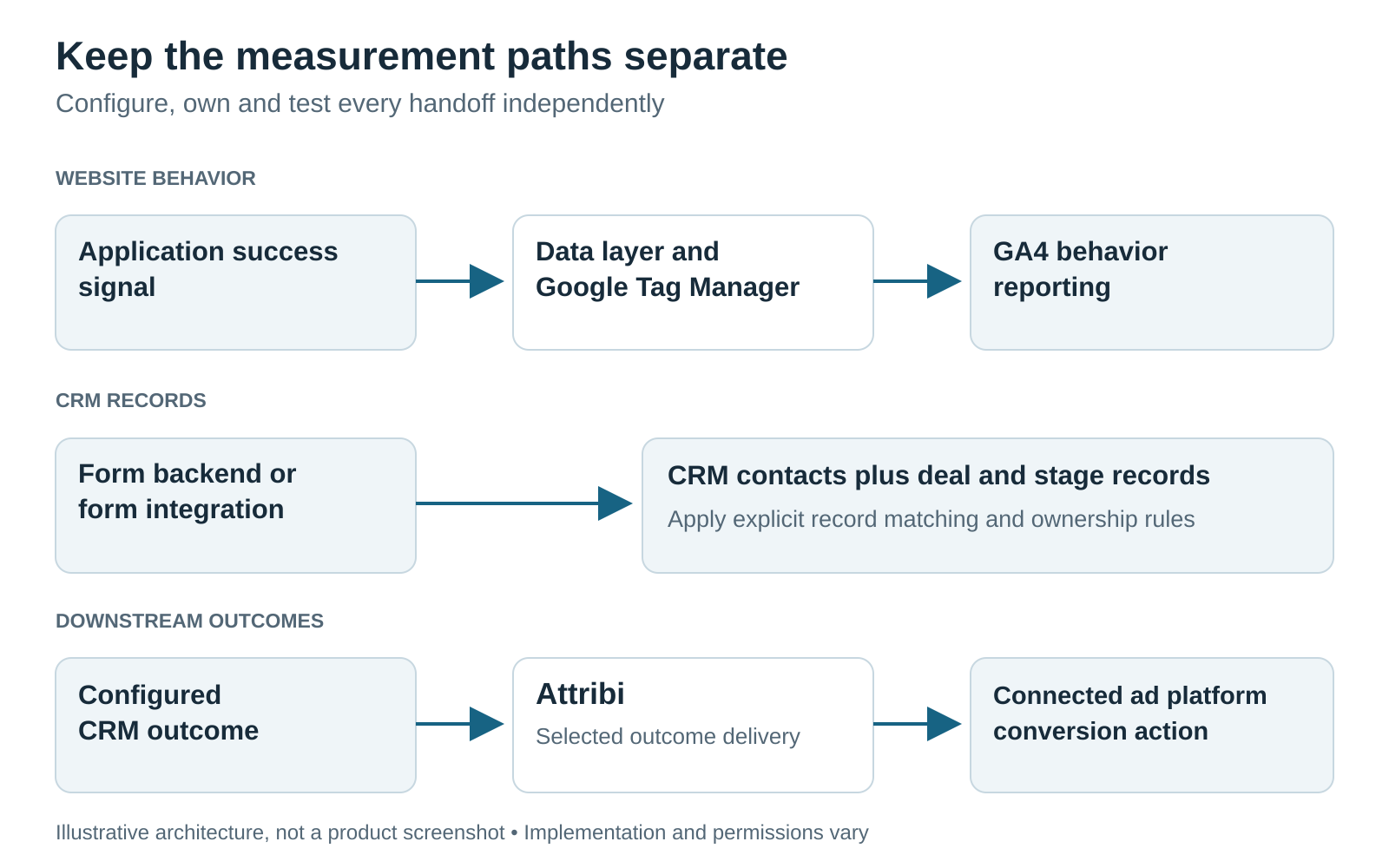
Illustrative architecture, not a product screenshot; implementation and permissions vary.
1. Website behavior into GA4
The application emits an agreed event. GTM reads its permitted parameters and sends the corresponding GA4 event.
For example, an accepted demo request can become a GA4 generate_lead event. Google documents generate_lead as a recommended event; its existence in the reference does not mean your particular form sends it correctly. GA4 recommended events
2. Lead information into the CRM
Your form backend or form integration creates or updates the appropriate CRM record. It carries the contact information and approved acquisition fields that this workflow needs.
Do not assume that a successful GA4 event proves a successful CRM submission. The analytics request and CRM write can succeed or fail independently. Preserve an internal request reference so your team can investigate either side without using an email address as an analytics parameter.
3. CRM outcomes into reporting and advertising
When a salesperson records a qualified or won outcome, a separately configured integration reads that change and sends the selected outcome to the approved destination.
For a Google Ads workflow, identify the conversion action that represents that business stage. For another ad platform, define its corresponding destination separately. A report receiving the outcome and an advertising system using it for bidding are separate decisions.
There is no requirement that every CRM outcome pass through GA4 first. Draw each actual connection, its direction and its owner. Leave undocumented connections off the diagram.
Write the implementation contract before configuring tags
An implementation contract is a short agreement between marketing, engineering and revenue operations. It defines what an event means and how another system can use it.
The following is an illustrative contract for a sales-led SaaS demo request. These names and rules are proposed design choices, not an Attribi configuration schema.
| Contract item | Example decision |
|---|---|
| Business event | A valid demo request has been accepted by the application |
| Browser signal | demo_request_accepted, emitted after the successful response |
| GA4 mapping | generate_lead, with approved non-identifying form context |
| Internal request reference | A generated identifier used in application and integration logs |
| CRM record rule | Update an existing contact or create one according to the agreed matching policy |
| Acquisition fields | Preserve approved campaign fields and available click identifiers in their specified CRM fields |
| Qualification rule | Use nominated CRM stage identifiers, not a browser button click |
| Won-value definition | Agreed deal value and explicit currency, with a documented treatment of recurring revenue |
| Retry rule | Retrying delivery must not create another business outcome |
| Operational ownership | Named owner, failure queue, alert destination and retest procedure |
Define "value" particularly carefully for SaaS. Annual contract value, monthly recurring revenue and cash collected answer different questions. Choose the measure for the conversion and document it. Do not let an integration silently substitute one for another.
Keep the data layer small and predictable
Google's data layer passes structured information to tags and makes events and variables available to triggers. Use that interface rather than asking each tag to interpret changing button text or page markup. Google's data-layer documentation
For this example, form type and page category may be useful analytics context. Contact details belong on the authorized CRM path, not in a general-purpose analytics payload. Separate destination-specific payloads instead of broadcasting the same object everywhere.
Do not assume that putting an event identifier in a payload automatically provides deduplication. Document which receiving system recognizes it and test the retry behavior of that particular route.
Where Attribi fits, and where it does not
Attribi can provide parts of the attribution and CRM-outcome connection. Its current public documentation describes distinct workflows, which should remain distinct in your implementation plan.
Supported: read GA4 aggregates for comparison
The Google Analytics integration imports sessions, users, key events and revenue by day and session channel group. It is read-only. The documentation describes historical backfill and ongoing daily refreshes.
This is aggregate reporting, not a join between an individual GA4 session and a CRM contact. Attribi does not write conversions back to GA4. Although it imports revenue, the current comparison table compares counts rather than displaying a reconciled revenue comparison.
Supported: connect CRM records and downstream outcomes
The HubSpot integration illustrates the separate CRM workflow. It documents attribution properties on contacts, CRM outcome reads and qualified-stage configuration. You nominate qualified stages using their IDs. Leaving that list empty disables qualified detection while closed-won detection continues.
It also distinguishes full mode, which can create a contact, from attribution-only mode, which enriches an existing contact without creating one. Choose deliberately if another integration already owns record creation. Other CRMs have their own field and setup details; do not assume the HubSpot behavior is universal.
Attribi's offline-conversion workflow sends CRM outcomes to connected advertising destinations. Uploading outcomes is distinct from configuring which conversions campaigns use for bidding. Review conversion mapping before enabling it: the documentation says mapping an existing conversion on Google or Microsoft can make it count toward bidding when saved.
Optional custom work: send CRM events into GA4
If your requirements include CRM lifecycle events inside GA4 itself, specify that as an additional integration. Google offers Measurement Protocol for server-to-server and offline events, designed to supplement tagging rather than replace it. Its implementation has identity, timing and attribution requirements that need a separate design. Google's Measurement Protocol overview and use-case requirements
This is a possible custom architecture, not a live Attribi GA4-writeback capability or a promised product feature.
Test a complete handoff, not just a firing tag
Consider an illustrative SaaS team with a marketing website, a demo form, GTM, GA4 and HubSpot. A prospect requests a demo, later qualifies and eventually signs a contract.
The release test should follow that lifecycle through separate checkpoints:
- Successful submission: Confirm the application accepts the request before it emits the success signal. A failed validation or rejected request must not count as a successful lead.
- Tag behavior: Use GTM Preview and Tag Assistant to inspect the trigger, permitted parameters and firing sequence. Check one accepted request, a failed request and a repeated submission. GTM preview documentation
- GA4 receipt: For a consented test device, inspect the expected event and parameters in DebugView. Tag firing and GA4 receipt are different checkpoints. GA4 DebugView documentation
- CRM receipt: Find the intended record and inspect the mapped fields. Confirm whether an existing contact was updated or a new one created.
- Stage interpretation: Move a designated test record through the configured stages and verify the integration interprets each one correctly.
- Destination receipt: Inspect the actual destination diagnostics. Distinguish an accepted upload from a matched or attributed conversion. A made-up click ID cannot prove ad attribution.
- Retry behavior: Reprocess the same internal test case in an isolated workflow. Confirm the business outcome is not counted twice.
- Evidence and cleanup: Record the container version, test references, expected results and observed results. Keep test outcomes out of live bidding and business reports using the controls appropriate to each destination.
If the last checkpoint fails, investigate that handoff first. Reinstalling a website tag will not repair a missing CRM stage mapping.
Treat privacy choices as part of the architecture
For US and European audiences, identify which regional rules and business policies the implementation must follow with the responsible privacy team. Avoid a universal "compliant by default" claim.
Google's consent mode communicates choices to tags and adjusts their behavior. It does not supply the consent banner itself. Test the selected behavior before a choice, after acceptance, after refusal and after a later change. Third-party tags need their own applicable controls. Consent mode overview
Inspect URLs and event parameters for accidental disclosure. Google prohibits sending personally identifiable information such as email addresses through ordinary Analytics collection. CRM fields should not simply be copied into GA4 event parameters, even when they are convenient matching keys. Google's PII guidance
Server-side GTM changes where tag processing happens; it does not remove these responsibilities or supply missing CRM data automatically. Use it when your requirements justify the additional infrastructure and ownership. Google's server-side tagging introduction
Agency handoff checklist
Before calling a client implementation finished, hand over:
- The systems map, with every connection's direction and owner.
- The event contract and CRM stage definitions.
- The inventory of existing tags and the approved container version.
- Field mappings, record-creation rules and value/currency definitions.
- The consent test results and destination-specific data restrictions.
- The end-to-end test evidence, including known gaps.
- The error-monitoring procedure and account-access owner.
Agree who owns each client workspace. Attribi's agency documentation describes separate client workspaces, not a combined portfolio dashboard, and no public API for a BI tool to pull from directly. Do not sell a consolidated reporting architecture before verifying the supported export route.
Frequently asked questions
Do I need GTM to use GA4?
No. Google supports direct Google-tag installation as well as GTM-based setup. GTM is useful when you need centralized tag configuration and change control. Choose and document the installation route rather than maintaining accidental duplicates.
Does connecting GA4 to a CRM automatically send offline conversions to Google Ads?
No. Name the integration that reads the CRM outcome, the conversion action it targets and the mechanism that delivers it. A connection label alone does not establish those steps.
Can I use Attribi without its website tracker?
Its documented CRM-only workflow can process qualified and closed-won outcomes, with available matching information. Without the tracker, you do not get the same website visit history or multi-touch path. Review the pixel-less setup guide and your CRM's integration requirements rather than assuming equivalent coverage.
What should I build first?
Start with one useful business event and prove its full path. Define an accepted lead, confirm the CRM record, map a meaningful sales stage and verify the intended destination. Expand the event inventory after that route is reliable.
The takeaway
Give GA4 the behavior questions, GTM the tag-deployment job and your CRM the sales-outcome record. Then assign someone to every handoff between them.
Before adding another connector, write the event contract and follow one test lead through the whole system. To assess Attribi's part in that design, compare your requirements with the current integrations and setup documentation.
Connect your CRM once. Every closed deal reaches your ad platforms.
Attribi pulls stage changes from your CRM, matches each deal to the lead it already recorded, and uploads qualified and closed won conversions to Google, Meta, LinkedIn, TikTok and Microsoft.
No credit card. Free up to 500 visitors a month. New workspaces start with 30 days on Pro.