HubSpot LinkedIn Attribution: Connect Ad Leads to Closed-Won Revenue
By Rajesh Kumar, Founder, Attribi ·
HubSpot LinkedIn attribution connects LinkedIn ad interactions with the contacts, deals, and revenue recorded in HubSpot. A useful setup preserves the ad source, associates the right contacts with each deal, and applies a clear rule for assigning revenue credit. If you also want LinkedIn to receive downstream outcomes, conversion syncing is a separate step.
That distinction matters when a campaign generates plenty of leads but sales needs three months to close them. Contact counts tell you whether people entered your database. Closed-won deals tell you what those relationships eventually produced. An attribution model determines how much credit LinkedIn receives alongside the other recorded interactions.
This guide shows how to build that connection, choose between HubSpot's native reporting and an additional attribution layer, and reconcile the numbers before using them to make budget decisions.
See how your LinkedIn leads connect to HubSpot revenue. Start your 30-day Attribi Pro trial, no credit card required. Ongoing CRM revenue connections are available on Growth and higher plans.

Separate the three jobs in HubSpot LinkedIn attribution
Start by naming the question your team needs answered. The same integration can support several workflows, but those workflows measure different things.
| Job | Question it answers | What to inspect |
|---|---|---|
| Ad reporting | Which LinkedIn ads are associated with contacts and eligible deals | Tracking, report filters, contact eligibility |
| Revenue attribution | How recorded interactions share credit for won revenue | Deal data, contact associations, model and period |
| Conversion syncing | Which CRM outcomes reach LinkedIn | Trigger, event definition, value, identifiers and delivery |
An event arriving in Campaign Manager does not establish how your internal revenue report should allocate credit. Equally, seeing revenue in a HubSpot report does not confirm that LinkedIn received a closed-won conversion.
Write one sentence for each report before building it. For example: "This view allocates revenue from deals closed this quarter across recorded marketing interactions." A second view might ask: "What happened to the contacts acquired by our September LinkedIn campaigns?" Those are both useful, but they use different cohorts and should have different labels.
What HubSpot can report natively
HubSpot's ads dashboard and its attribution report builder are separate reporting surfaces. Check the one you actually intend to use before evaluating another tool.
The ads dashboard
HubSpot's ads attribution documentation lists Last ad interaction for Free CRM and Marketing Hub Starter, with additional ads attribution report types on Marketing Hub Professional and Enterprise. Its deal attribution requirements include a won deal, an attributed contact, a qualifying close date, and the contact's default Customer lifecycle stage. A custom lifecycle stage can prevent inclusion in this specific report. See HubSpot's ads attribution requirements.
Also check whether your ads ROI settings use estimated revenue or revenue from deals. Those choices produce different interpretations of performance. An estimated customer value is useful for planning, but it should not be presented as the amount recorded on a signed deal. HubSpot explains these settings in its ad campaign reporting guide.
The attribution report builder
HubSpot distinguishes Contact Create Attribution, Deal Create Attribution, and Deal Revenue Attribution. Deal Create and Deal Revenue Attribution require Marketing Hub Enterprise. Access to an ads connection or basic ad reports does not imply access to those advanced reports. Review the current attribution report subscriptions against your portal.
If you already have the required subscription and your sales process is well recorded in HubSpot, start there. An additional platform becomes worth evaluating when you need another cross-channel reporting workflow, a CRM-to-ad-platform revenue connection, or a clearer way to inspect the journey outside HubSpot's native reports.
Build the contact to deal connection first
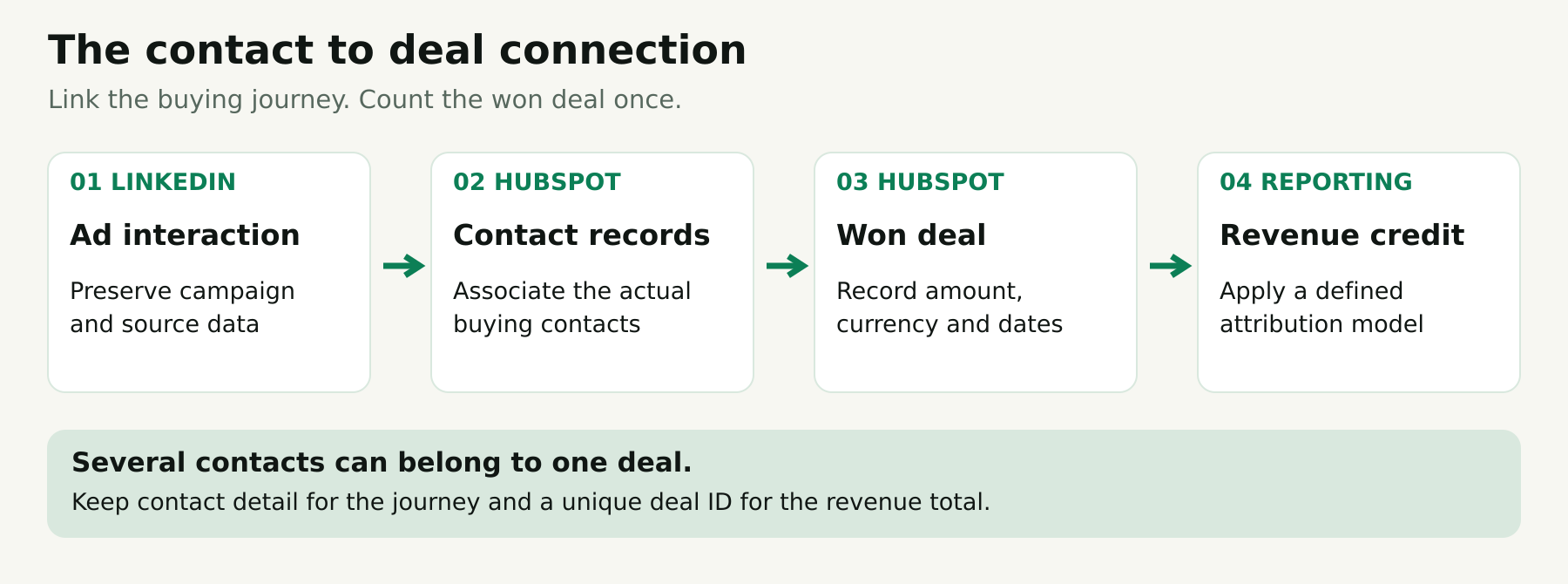
The practical foundation is a reliable chain: ad interaction, identified contact, associated deal, and recorded outcome. A polished dashboard cannot repair a missing link automatically.
Preserve the ad source when the contact arrives
Test your two acquisition routes separately: website forms and LinkedIn Lead Gen Forms. They have different handoffs. A successful website test does not demonstrate that a LinkedIn form is syncing its fields correctly.
For website ads, HubSpot uses its tracking code, supported form capture, and auto-tracking parameters to connect activity to contacts. Manually adding UTMs can identify a traffic source without producing specific-ad attribution. Auto-tracking also does not reconstruct earlier clicks. Follow HubSpot's ad tracking guidance and verify a new journey after setup.
For each route, inspect the resulting contact rather than stopping at a successful form submission. Record the campaign reference, creation time, available interaction history, and whether an existing contact was updated. Watch for redirects that remove parameters or a form integration that creates a second record instead of updating the first.
Keep a campaign naming convention that survives handoffs between regional teams. Store stable IDs where available and keep readable names for analysis. A campaign renamed during the quarter should remain traceable to its original records.
Associate the actual buying contacts with the deal
HubSpot's revenue attribution calculations require a won deal with an associated contact, Amount, Create date, and Close date. The report uses tracked interactions associated with those records. Its revenue attribution definitions explain the requirements.
Make association quality part of the sales process. If a marketer downloads a guide and a procurement colleague signs the contract, inspect which contacts belong to that opportunity. Do not assume that a company association supplies every missing person-to-deal connection.
There are two opposite mistakes to avoid. Too few associations can hide the journey. Adding every employee at an account to every deal can introduce unrelated activity. Agree on a repeatable buying-group rule with sales operations, then review exceptions.
Use deals as the unit of revenue
A contact can have several deals. A deal can have several contacts. A flat export containing one row per contact-deal combination can therefore repeat the same amount.
For a revenue control total, count each eligible deal ID once. Keep contact-level details available for diagnosis, but do not sum repeated deal amounts across contact rows. Separate renewals, expansion, and new business if they answer different acquisition questions.
Define what Amount means in your company. It might be annual contract value or total contract value. It is not automatically cash collected or accounting revenue recognized in the period. Agree with finance before labeling the chart.
Define qualified leads and won revenue differently
A lifecycle stage describes the contact's progress. A deal stage describes a particular sales opportunity. They can change at different times and should not be treated as interchangeable event triggers.
For example, a contact might already be a Customer when an expansion deal begins. Moving that deal to won does not necessarily create a new contact lifecycle transition. Conversely, several contacts becoming Customers around one contract should not automatically become several full-value purchases in your reporting design.
Create a short measurement specification before enabling uploads:
- Qualified lead: the exact business condition, its source field, and the first eligible event time
- Closed won: the deal outcome, unique deal reference, recorded amount, and currency
- Repeat outcomes: how renewals, reopened deals, and corrected amounts are reviewed
- Ownership: who fixes source data and who checks downstream reports
Use a modeled lead value only when that is intentional. If an SQL is assigned $500 for optimization, label it as an estimate. Keep it separate from a $30,000 closed-won contract. Adding estimated lead values and contract amounts produces a number that is difficult to defend.
Choose the right route for sending HubSpot outcomes to LinkedIn
HubSpot already offers native LinkedIn conversion syncing. Evaluate it fairly before adding another route.
The native workflow uses contact lifecycle changes, configured event values, and selected sharing settings. Only lifecycle changes made after the event is created count. HubSpot also says LinkedIn ingests events from the last 90 days and attributes them inside a lookback window that defaults to 90 days from the ad click or view. HubSpot currently lists Starter, Professional, and Enterprise eligibility, while LinkedIn's help page lists Professional and Enterprise. Confirm availability in your portal before purchasing a plan for this feature. See HubSpot's event setup guide and LinkedIn's HubSpot integration guidance.
This can suit a team whose primary goal is feeding defined lifecycle milestones back to LinkedIn. A deal-based workflow deserves separate evaluation when the required outcome is each won opportunity and its own recorded amount.
Document which system owns each event. If native HubSpot syncing, an attribution platform, and a custom integration all describe the same sale, do not assume their events will reconcile automatically. Map the overlap before enabling parallel production feeds. Using one owner per business event is a simpler starting point.
For the API mechanics, identifiers, and platform-side troubleshooting, use our LinkedIn offline conversion tracking guide. Here, the key decision is whether your CRM trigger represents the outcome you want to measure.
Connect HubSpot and LinkedIn with Attribi
Attribi's HubSpot integration supports two contact behaviors: create or enrich contacts in full mode, or enrich existing contacts in attribution-only mode. It provides 16 attribution properties covering source and journey information. Qualified outcomes use the deal stage IDs you select; won outcomes use HubSpot's closed-won flag and the deal's amount and currency. A won deal without an amount does not fire a revenue conversion.
Use this rollout sequence:
- Choose the contact behavior that fits your database rules, then create the attribution properties through the connection setup.
- Identify the qualified deal stage IDs your sales team actually uses. Keep their meaning consistent across pipelines.
- Connect the LinkedIn Ads integration and map the appropriate conversion rules.
- Trace a permitted test record through the CRM and downstream reporting before expanding the rollout.
Attribi's conversion setup guide describes Lead, Qualified, and Closed Won mappings. Its LinkedIn creation flow uses a 30-day post-click window and automatically associates new rules with all campaigns. Inspect the resulting rule in Campaign Manager rather than assuming it fits your reporting policy or sales cycle.
LinkedIn supports longer windows for eligible imported conversion categories, but platform capability does not establish the settings your connector created. Review the current window options and the rule actually in use.
The operational benefit is a recurring connection between CRM outcomes and ad reporting. Attribi's offline conversion workflow describes scheduled CRM checks, value and currency on won conversions, and upload failure records. Those features provide places to inspect the handoff; they do not guarantee that every event will match a LinkedIn member or receive campaign credit.
Evaluate the connection with your own HubSpot records. Start your 30-day Attribi Pro trial, no credit card required. Check one contact, one associated deal, and the resulting LinkedIn conversion before judging coverage.
A worked B2B example
This is a fictional example to illustrate the reporting logic, not an Attribi customer result or a performance benchmark.
A software buyer clicks a LinkedIn campaign and downloads a guide in September. In October, the buyer attends a webinar and joins a sales call. The team associates that contact with a deal. The opportunity closes in November for $24,000.
| View | What it records | Interpretation |
|---|---|---|
| September acquisition cohort | One acquired contact and its later $24,000 deal | Follow the cohort as it matures |
| November won-deal ledger | One $24,000 won deal | Count the deal once in the close period |
| Illustrative three-touch linear model | $8,000 credit to each of three selected interactions | LinkedIn receives one third under this example's rules |
| LinkedIn conversion reporting | Credit depends on matching, eligible interactions and rule settings | The CRM amount alone cannot predict the report |
The equal split assumes exactly three included interactions for teaching purposes. A real model may include different interactions and allocate credit differently. The example does not imply that an ad click, webinar, and sales call will automatically receive these weights in your software.
Now add a second contact to the same deal. The company still has one $24,000 contract. Your CRM control total should remain $24,000, although the additional contact's recorded interactions may affect attribution.
For a European contract, preserve the original currency in the same way. A €24,000 deal and a $24,000 deal are separate currency amounts. If management needs one reporting currency, agree on the exchange-rate source and conversion date before combining them.
Reconcile HubSpot and LinkedIn without forcing a match
Expect to investigate differences. The aim is an explainable relationship between systems, not identical totals from reports with different rules.
Start from an eligible deal list
Build a control list with deal ID, won status, close date, amount, currency, associated contacts, and the reporting inclusion decision. Keep excluded records visible with a reason. This is easier to audit than trying to reconstruct the denominator from a chart.
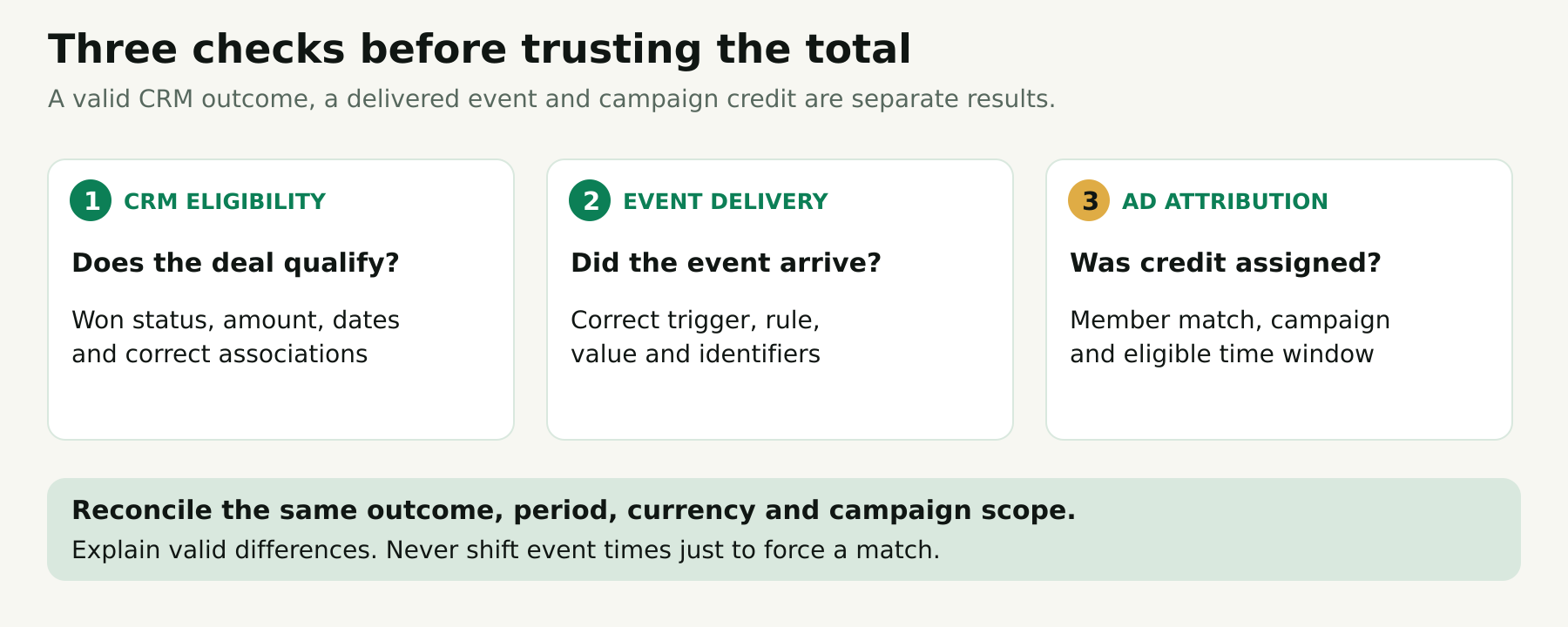
Split the investigation into three questions. Was the CRM record eligible? Was the event delivered correctly? Did LinkedIn attribute it? A problem at one stage does not prove a problem at all three.
Align periods and models
Compare the same business event, time zone, campaign scope, and currency. Distinguish the month a lead arrived from the month its deal closed. Review click-through and view-through settings before comparing a platform total with a click-based CRM journey.
LinkedIn distinguishes identity matching from attribution matching: an event can match a member without finding an eligible campaign interaction. Its documentation allows up to 72 hours for complete Conversions API reporting. Avoid declaring a same-day difference a permanent failure. See LinkedIn's Conversions FAQ.
Diagnose at record level
| Symptom | First check |
|---|---|
| Contact appears but deal revenue is missing | Deal association, won status, amount and relevant date filters |
| One deal seems to appear several times | Repeated contact rows, duplicate feeds and event definitions |
| Uploaded outcome has no campaign credit | Member matching, campaign association and attribution window |
| One region has an unexpected revenue total | Currency treatment, time zone and regional pipeline definitions |
| Recent results look incomplete | Processing time, sync status and sales-cycle maturity |
Avoid changing timestamps or relabeling stages just to make the totals align. Correct genuinely wrong source data and keep a note of the correction. If the difference comes from valid reporting rules, explain the difference alongside the report.
Use revenue attribution to improve decisions
Once the connection is reliable, compare campaigns on more than cost per contact. Review qualified opportunities, won-deal count, attributed revenue, and time to close. Keep the cohort's maturity visible so a recent campaign is not penalized simply because its opportunities are still open.
Use these measures to ask better questions. Does one audience generate many contacts but few opportunities? Does another create fewer deals with larger contract values? Is a regional difference caused by lead quality, sales capacity, or a missing association rule?
Treat attribution as an allocation of observed revenue under a chosen model. It does not prove how much revenue would disappear without LinkedIn. Causal claims require an appropriate experiment or other incrementality design.
Sending outcomes also does not automatically change your LinkedIn bidding. Attribi's funnel graduation page explicitly lists automatic LinkedIn optimization-target changes as unavailable. Your media team still needs to decide which available conversion goal to use, with enough relevant signal and a controlled review plan.
Check data handling before launch
For US, UK, and European teams, include the privacy owner in the rollout. Review what identifiers leave the CRM, why they are shared, retention, access, applicable consent requirements, and how objections or deletion requests are handled. Requirements depend on your operation and jurisdictions; a connector is not a substitute for that review.
Do not describe hashed matching identifiers as automatically anonymous. The ICO's pseudonymisation guidance explains that pseudonymisation does not generally remove data protection obligations. Attribi also states that it stores received contact details and hashes them on its servers; consult its data handling page when reviewing the proposed flow.
Frequently asked questions
Can HubSpot attribute LinkedIn ads to revenue?
Yes, subject to the reporting feature, subscription, tracking, and record requirements described above. Start by distinguishing the ads dashboard's deal-based metrics from the Enterprise Deal Revenue Attribution report builder.
Is a LinkedIn lead automatically a won deal in HubSpot?
No. The person needs to progress through your sales process, and the actual opportunity needs a valid outcome and amount. Preserve the contact-to-deal association so the revenue has a traceable relationship to the journey.
Which attribution model should we start with?
Choose a model that fits a written question and that your team can explain. Use one primary model consistently, then compare another to understand sensitivity. A large difference is a reason to inspect the journey and assumptions before changing budgets.
Can we use HubSpot without Enterprise?
Yes, for available ads reporting and other workflows within your subscription. Enterprise is the documented requirement for HubSpot's Deal Revenue Attribution builder. Evaluate connector needs and native reporting access separately rather than assuming one unlocks the other.
How should we evaluate an Attribi trial?
Test whether the source, contact, deal, amount, currency, and downstream event can be traced and explained. A 30-day trial can validate the connection even if your full sales cycle is longer. It cannot establish the final revenue performance of a newly launched campaign that has not had time to mature.
Make the revenue connection auditable
Reliable HubSpot LinkedIn attribution begins with a small set of consistent decisions: what counts as qualified, which contacts belong to a deal, what its amount means, and how revenue credit is allocated. Verify those decisions on individual records before relying on aggregate charts.
Then use the connection to make campaign discussions more specific. You can review which journeys accompany qualified opportunities and won revenue, understand reporting gaps, and give LinkedIn eligible downstream signals from the CRM.
Connect your HubSpot pipeline to your LinkedIn measurement workflow. Start your 30-day Attribi Pro trial, no credit card required. Review current pricing for ongoing CRM revenue access on Growth and higher plans.