LinkedIn Offline Conversion Tracking: Send Qualified Leads and Closed-Won Revenue from Your CRM
By Rajesh Kumar, Founder, Attribi ·
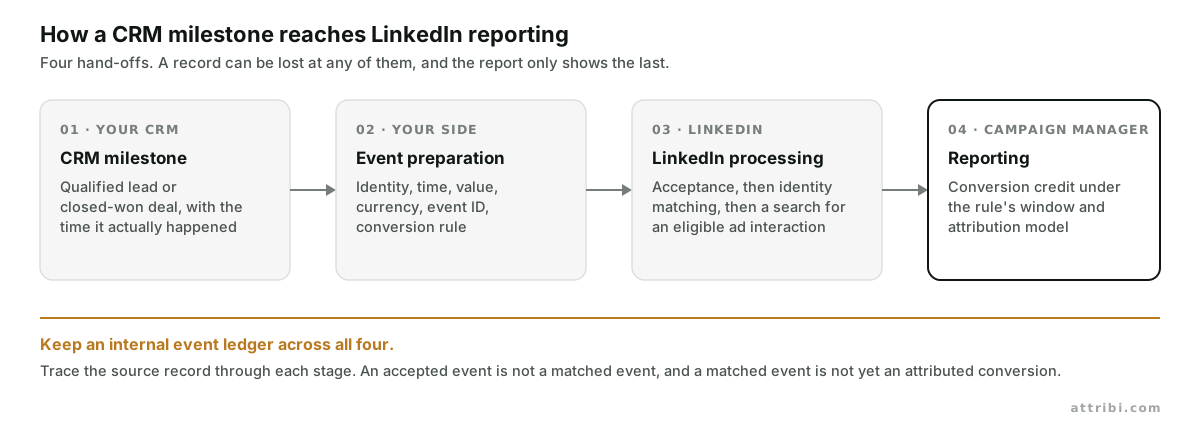
LinkedIn offline conversion tracking connects what happens after an ad interaction to the outcomes recorded in your CRM. You send events such as a qualified lead or a closed-won deal, along with permitted matching information. LinkedIn then decides whether it can associate those events with members and eligible ad interactions.
The practical starting point is simple: define one meaningful qualification milestone, track closed-won revenue separately, and verify the data before you change any campaign goal. A successful upload on its own does not tell you that LinkedIn matched the person, attributed the conversion, or that the campaign produced incremental revenue.
This guide covers how to choose an import method, prepare your CRM records, connect conversion rules, and investigate missing results. It also says where Attribi fits when you want CRM outcomes and advertising costs in the same workflow, and where it does not. If you would rather see your own deals land in Campaign Manager than read about it, every new workspace gets 30 days on the Pro plan with no card.
What does LinkedIn offline conversion tracking do?
An offline conversion is a business event reported from outside the browser tracking flow. In B2B marketing that usually means a salesperson qualifies a lead, an opportunity advances, or a deal becomes closed-won. The event can happen entirely in software. "Offline" does not require a phone call or an in-person sale.
LinkedIn accepts imported conversions through CSV uploads and through its Conversions API, usually shortened to CAPI. LinkedIn's own guidance is to keep the Insight Tag for the website events you need and use CAPI for events the tag cannot see. CRM events describe progress further into the sales process, which is exactly what the tag cannot see.
This matters when two campaigns produce similar lead counts but different sales outcomes. A webinar download, a sales-accepted lead, and a signed contract answer different questions. Keep their conversion rules separate so that an inexpensive form submission does not hide an expensive, low-quality pipeline.
Should you use CSV uploads or a Conversions API connection?
Choose the route your team can operate consistently. The import method matters less than sending the correct milestone, preserving identity, and noticing failures.
CSV for a small, controlled start
A manual upload is useful when you have a small number of events and want to inspect every row. LinkedIn provides a CSV template and upload instructions in Campaign Manager. Follow the current template exactly, including its date and identifier requirements, and make sure the currency matches the ad account currency. LinkedIn recommends refreshing manual data daily or weekly.
Give the process an owner and record which events have already been exported. A spreadsheet that nobody remembers to upload is a reporting gap waiting to happen. As volume grows, recurring exports, duplicate checks, and failure handling start to justify an automated connection.
An integration for an ongoing CRM workflow
An existing integration can reduce the work of moving CRM events into LinkedIn. LinkedIn's setup guide lists integration routes including HubSpot, Make, and Zapier, and its Conversions API FAQ names partners such as Google Tag Manager, Zapier, Dreamdata, Supermetrics, Tealium and Adobe. Availability and behaviour vary by connector. Check whether yours supports the exact CRM object, milestone, identifiers, dynamic value, and retry behaviour you need.
"Connects to Salesforce" is only the beginning of the evaluation. Ask whether a deal-stage update sends an event once, which contact is associated with the deal, and how the connector handles a reopened opportunity. Those three questions are more useful than counting connector logos.
A direct connection when you need custom control
A direct CAPI implementation gives developers control over event selection and delivery. It also creates ongoing work around authentication, supported API versions, monitoring, retries, and changing CRM schemas. LinkedIn's developer guide requires the rw_conversions and r_ads permissions and a supported ad-account role for the user who authorises the connection. The FAQ puts a direct build at one to two weeks on average, which in my experience is the optimistic end once retries and corrections are in scope.
How do you set up LinkedIn CRM conversion tracking in seven steps?
1. Agree on the milestone before building the integration
Write a definition that marketing and sales can apply consistently. "Qualified" might mean the account fits your customer profile and a salesperson has confirmed a relevant buying need. A lead score passing a threshold is a different definition. Either can be useful, but switching between them changes what the resulting numbers mean.
For each milestone, document the source field, trigger condition, timestamp, record owner, and the rule for repeat events. Decide how to treat disqualified leads, duplicate contacts, reopened deals, and renewals. An exported status is easy to produce; a stable business definition takes more care.
Start with a qualified milestone and closed-won revenue. Add more stages only when they answer a real reporting question. Too many similar rules make the account harder to audit and raise the chance that a campaign is evaluated against the wrong event.
2. Preserve the connection between the lead and the outcome
A closed-won deal needs a reliable link back to the relevant person. Check the contact-to-deal association in your CRM before exporting anything. When several contacts belong to one opportunity, define which event represents the commercial outcome. Sending the full deal value once for every contact inflates your own event ledger before attribution even begins.
Capture LinkedIn's li_fat_id click identifier where it is available and permitted, and carry it through your form and CRM workflow. LinkedIn's click ID documentation explains enhanced conversion tracking and URL or cookie capture. LinkedIn keeps the mapping from a li_fat_id to a member for 365 days, so the identifier is still useful after the browser cookie has expired. Test redirects, embedded forms, and domain changes so the identifier survives the actual journey.
For email-based matching, LinkedIn's event schema specifies lowercasing, removing whitespace, and SHA-256 hashing. Hashing belongs at the step your chosen connector requires. Check that a tool expecting a raw email is not receiving an already-hashed value, or vice versa. Note that the current schema lists hashed email, the click ID, IP address and a few others as identifiers. A hashed phone number is not on that list, however often it appears on vendor pages.
Review your collection notices, consent choices, contractual obligations, and data-sharing permissions with the appropriate internal owner. Send only fields approved for this purpose. Hashing changes the representation of an identifier; it does not remove the need to decide whether sharing is appropriate.
3. Create separate conversion rules and associate ad sets
A conversion rule tells LinkedIn which outcome you are reporting. Use names that make the stage and source obvious, such as "CRM Qualified Lead" and "CRM Closed Won". Choose the supported category that represents the event, then document the choice so later reporting uses the same definition.
For a qualification milestone, review the Qualified Lead category. For a closed-won event that represents a completed purchase, review Purchase. Confirm the categories your integration actually supports. A friendly rule name such as "Closed Won" does not itself set the underlying conversion category.
In Campaign Manager, LinkedIn's current CAPI setup instructions start under Measure, then Conversion tracking, then Create conversion. Configure the category, value treatment, click and view windows, and attribution model. Follow your integration's instructions for connecting the source.
Confirm that the rule is attached to the intended ad sets. LinkedIn's API documentation uses campaign associations for this connection, and current Campaign Manager help refers to ad sets. Whichever route you use, inspect the resulting associations instead of assuming a new rule covers every campaign automatically. The API only auto-associates campaigns when you ask it to.
4. Map the event fields and define revenue consistently
Keep an internal event ledger that lets you trace a CRM record to an outbound event. The following is a mapping checklist, not an upload template or an API payload.
| Field to map | What to preserve |
|---|---|
| Conversion rule | The destination rule for this specific milestone |
| Event time | The original occurrence time; CAPI uses epoch milliseconds |
| Person identifiers | Permitted matching data, such as hashed email and li_fat_id |
| Event ID | A stable identifier for this occurrence and its retries |
| Value and currency | The stated monetary amount and ISO currency code |
| Internal source reference | CRM record and stage reference for your own reconciliation |
For closed-won events, agree on one value basis, for example first-year contract value, and keep it consistent with the revenue metric you show to finance. Do not mix annual contract value, lifetime value, and collected cash in a single revenue column. Label a qualification-stage estimate as an estimate, and keep it separate from booked revenue.
Use the time the milestone occurred. A nightly sync should preserve that time rather than replace it with the time of export. Store the time zone explicitly in your own records. These choices make reconciliation possible when sales and marketing work in different regions.
5. Choose attribution windows separately from upload timing
Two clocks matter. The upload-age limit describes how old an event can be when you send it. The attribution window describes how far before that event LinkedIn looks for an eligible ad interaction.
The current CAPI schema requires the conversion timestamp to be within the past 90 days. LinkedIn's conversion window guidance says Campaign Manager defaults to a 90-day click and 90-day view window, with 180-day and 365-day options for CAPI and CSV conversions in eligible categories, including Lead, Qualified Lead, and Purchase. The API schema separately lists its own defaults of 30 days post-click and 7 days post-view when a rule is created without specifying them. Verify both settings on the rule you are actually using; connector presets can differ from either.
Suppose an ad click happens in January and a deal closes in June. A sufficiently long, eligible attribution window can accommodate that sales cycle, provided the other conditions are met. It does not mean you should wait until December to upload the June event. Send fresh outcomes promptly and choose windows that reflect your measurement policy.
6. Prevent duplicate sends and distinguish different milestones
Generate a stable internal event key for each real milestone occurrence. For example, combine the CRM record ID, stage, and occurrence version. Reuse the key on a delivery retry. Record the outcome of each send so an interrupted export can resume without creating a new business event.
Browser and server deduplication needs its own setup. LinkedIn's deduplication guide calls for separate browser and server conversion rules and the same eventId for the same occurrence. When LinkedIn identifies the redundant pair, it counts the Insight Tag event and discards the CAPI duplicate in campaign reporting.
A form fill and a later qualification are different occurrences. Give them separate rules and event identities. Also decide how corrections work before production: a deal value amendment should not accidentally become a second sale. Confirm the supported correction process for your connector rather than assuming a new upload overwrites an old event.
7. Validate the full path before using it for decisions
Inspect a small, authorised set of records from source to destination. Verify the CRM milestone, contact association, original timestamp, currency, value, conversion rule, and outbound identifier. Keep synthetic checks out of production performance reporting and use supported testing facilities where available.
Review delivery errors before looking for attributed conversions. LinkedIn's FAQ says ingestion can take up to 24 hours and reporting a further 48, so up to 72 hours in total. Allow that time, then investigate the specific stage that failed. Repeatedly resending an accepted event is not a useful first response to an empty report.
That is the whole setup. If you want to run it against your own pipeline rather than build it, start a 30-day Pro trial, connect LinkedIn Ads and your CRM, and send one milestone before you expand.
Why does LinkedIn show fewer conversions than your CRM?
Ask three separate questions when a result appears to be missing. This stops a delivery fix being applied to an attribution problem.
- Was the event accepted? Check the source export, connector logs, account authorisation, conversion rule, required fields, and event timestamp. An API success response confirms a technical step; it does not establish advertising credit.
- Was the person matched? Review identifier availability and formatting. A CRM contact is not automatically a LinkedIn member match. Work-email differences, missing click IDs, and broken contact associations deserve investigation.
- Was the event attributed? Confirm an eligible ad interaction, the selected click or view window, the relevant rule association, and the attribution model. A matched person may have no qualifying interaction with the ads being measured.
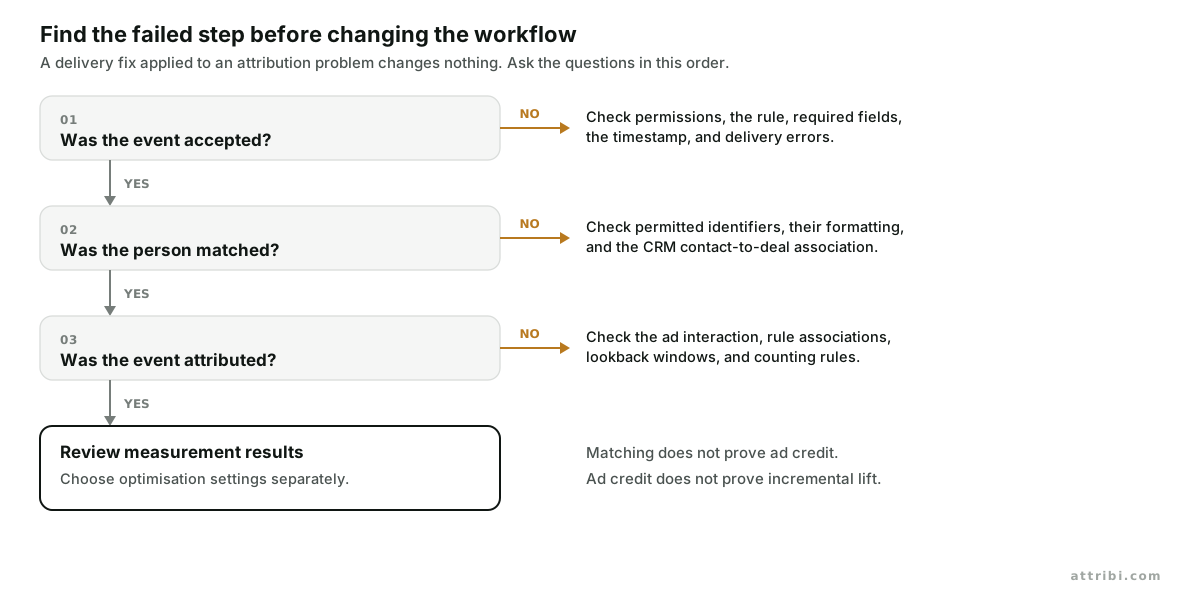
LinkedIn itself distinguishes identity matching from attribution matching: first it matches the identifiers you sent to a member, then it searches for that member among people served your ads inside the window. Track your own counts for eligible CRM events, attempted sends, and accepted sends, then compare them with the diagnostic and reporting data your integration exposes. Do not invent a match-rate target simply to make every column converge.
If LinkedIn and your CRM show different revenue, align the population first. Compare the same milestone, time period, currency, revenue definition, and attribution policy. LinkedIn's attribution model documentation distinguishes credit to each eligible campaign from credit to a single campaign. Summing credited rows can therefore differ from counting unique CRM deals.
Cross-channel reports introduce another difference: Google, Meta, and LinkedIn can each claim an interaction with the same buyer. Our guide to how ad platforms count and report conversions differently explains why adding platform totals is a poor substitute for reconciling outcomes.
Why use qualified leads and closed-won revenue for different decisions?
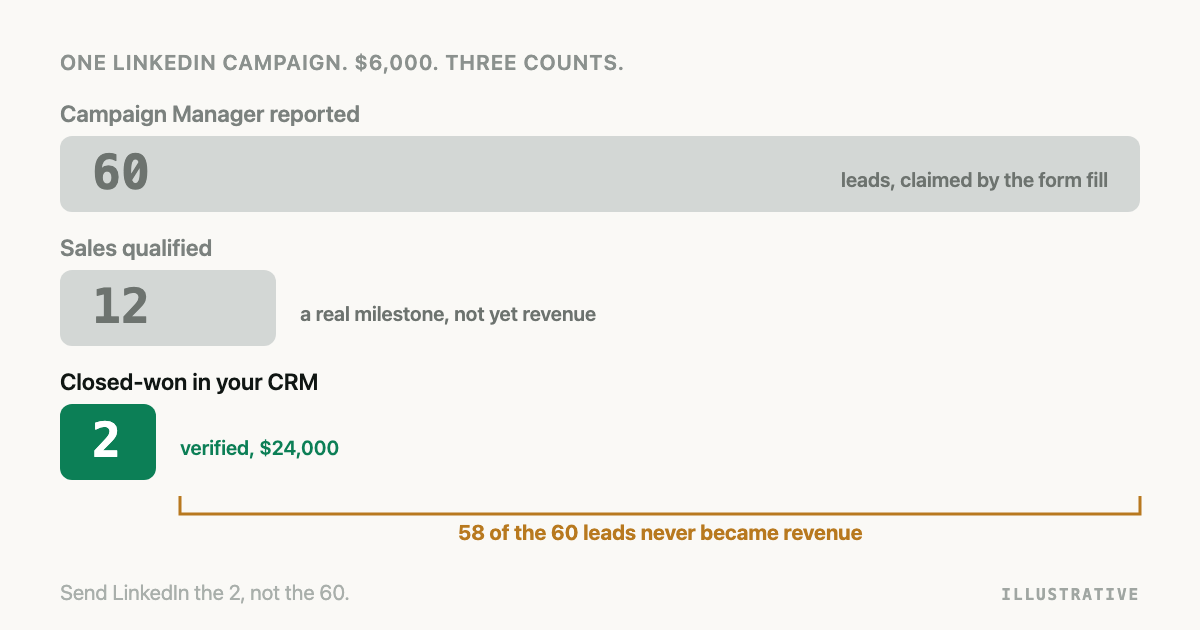
Consider a fictional example. Over a mature cohort with the same reporting period, Campaign A spends 6,000 dollars and generates 60 leads, 12 qualified leads, and two closed-won deals worth 24,000 dollars. Campaign B spends 6,000 dollars and generates 100 leads, 10 qualified leads, and one closed-won deal worth 8,000 dollars.
| Fictional cohort metric | Campaign A | Campaign B |
|---|---|---|
| Spend | $6,000 | $6,000 |
| Leads | 60 | 100 |
| Cost per lead | $100 | $60 |
| Qualified leads | 12 | 10 |
| Cost per qualified lead | $500 | $600 |
| Closed-won deals | 2 | 1 |
| Closed-won value | $24,000 | $8,000 |
| Value divided by spend | 4.0× | 1.33× |
Campaign B looks better on cost per lead. Campaign A looks better on qualified-lead cost and on the stated revenue comparison. The example shows why downstream stages matter; it does not prove that the campaign caused the sales or predict future returns. Small deal counts and one unusually large contract can change the picture quickly.
Evaluate cohorts only after enough time has passed for the stage you are measuring. Comparing fresh leads from this week with closed-won revenue from last quarter punishes the newest campaign for a sales cycle it has not had time to complete.
Measurement and optimisation also require separate decisions. Importing closed-won events gives you another reporting signal. Whether an ad set can optimise toward a particular conversion depends on LinkedIn's supported objective and settings; Qualified Lead, for instance, is an optimisation target only inside the Lead Generation and Website Conversion objectives. If wins arrive infrequently, a well-defined earlier milestone may provide more timely feedback. Check account eligibility and signal quality before changing the goal, then monitor the change deliberately.
Where does Attribi fit in the LinkedIn workflow?
Since I make it, here is what Attribi does on LinkedIn and what it does not.
Attribi's LinkedIn Ads integration connects advertising cost data with CRM outcomes and supports separate form-fill, qualified, and closed-won conversion rules. It records li_fat_id when a visitor lands, imports daily LinkedIn cost, click, and impression data, and sends closed-won value and currency through the conversion workflow.
A practical rollout is to connect LinkedIn Ads, connect a supported CRM, map your stages, and review the conversion-rule mapping. Check the specific HubSpot or Salesforce requirements for your setup. Attribi can create the LinkedIn conversion rules for you, but only when the connecting LinkedIn user holds a Campaign Manager or Account Manager role on the ad account and the connection carries the conversions permission. If either is missing, LinkedIn refuses the create and you map a rule you already have instead; the uploads are identical either way.
Keep timing expectations realistic. CRM synchronisation runs on a schedule, so a salesperson changing a field does not produce an immediate LinkedIn report update. And funnel graduation makes a distinction worth repeating here: Attribi uploads qualified and closed-won outcomes to LinkedIn, but it does not change the LinkedIn optimisation target for you. On Google Ads and Meta it can; on LinkedIn you change the goal yourself once the outcomes are there.
Begin with a single CRM pipeline and a clearly defined qualification event. Reconcile a small batch, inspect closed-won value handling, and expand after the data is dependable. The broader offline conversions workflow can then carry the same approach across your other advertising channels.
After launch, assign someone to review failed sends and unexpected volume changes. Include the CRM administrator when a pipeline field or stage definition changes, and the paid-media owner when a new ad set is introduced. Keep a dated record of mapping changes, attribution windows, and value policies. That record will explain a reporting shift without anyone assuming performance suddenly improved or deteriorated.
Frequently asked questions
Can I send CRM conversions to LinkedIn without a click ID? Yes. LinkedIn supports other identifiers, including SHA-256-hashed email. A missing li_fat_id does not make an event invalid, but matching and attribution are still conditional. Preserve the identifiers you are permitted to use and follow the requirements of your chosen import route.
Does uploading closed-won revenue change LinkedIn bidding? Treat uploading and goal selection as separate steps. Verify the conversion's eligibility for your campaign objective and review the ad-set settings. Attribi's LinkedIn workflow uploads the outcomes and leaves the optimisation-target change to you.
Should qualified leads carry the full deal value? Use a value policy that matches what you know at that stage. If a lead has not closed, a projected value is an estimate. Keep qualified-lead estimates separate from actual closed-won values so the revenue report stays interpretable.
Why is LinkedIn showing fewer conversions than my CRM? Your CRM can contain outcomes with no eligible LinkedIn ad interaction. Other causes include failed sends, missing identifiers, unmatched people, attribution-window limits, rule associations, counting rules, and processing delay. Diagnose those layers in order before changing the integration.
Is a 365-day attribution window a 365-day upload allowance? No. The attribution window looks backward from the conversion to an ad interaction. The CAPI timestamp limit concerns the age of the event at upload, currently 90 days. Choose an eligible window for the sales cycle and send new milestones promptly.
Start with one milestone you can trust
Pick the CRM event that sales and marketing agree represents genuine progress. Preserve its identity, time, and value, attach it to the right LinkedIn conversion rule, and verify acceptance, matching, and attribution separately. Once that path is dependable, qualified-lead and closed-won reporting can inform budget decisions instead of cost per lead doing it alone.
If you want that path without building it, put your CRM outcomes beside your LinkedIn spend for 30 days on Pro, no card required. Current plans are on the pricing page.