HubSpot Revenue Attribution Reporting: Connect Campaigns, Contacts and Closed Deals
By Rajesh Kumar, Founder, Attribi ·
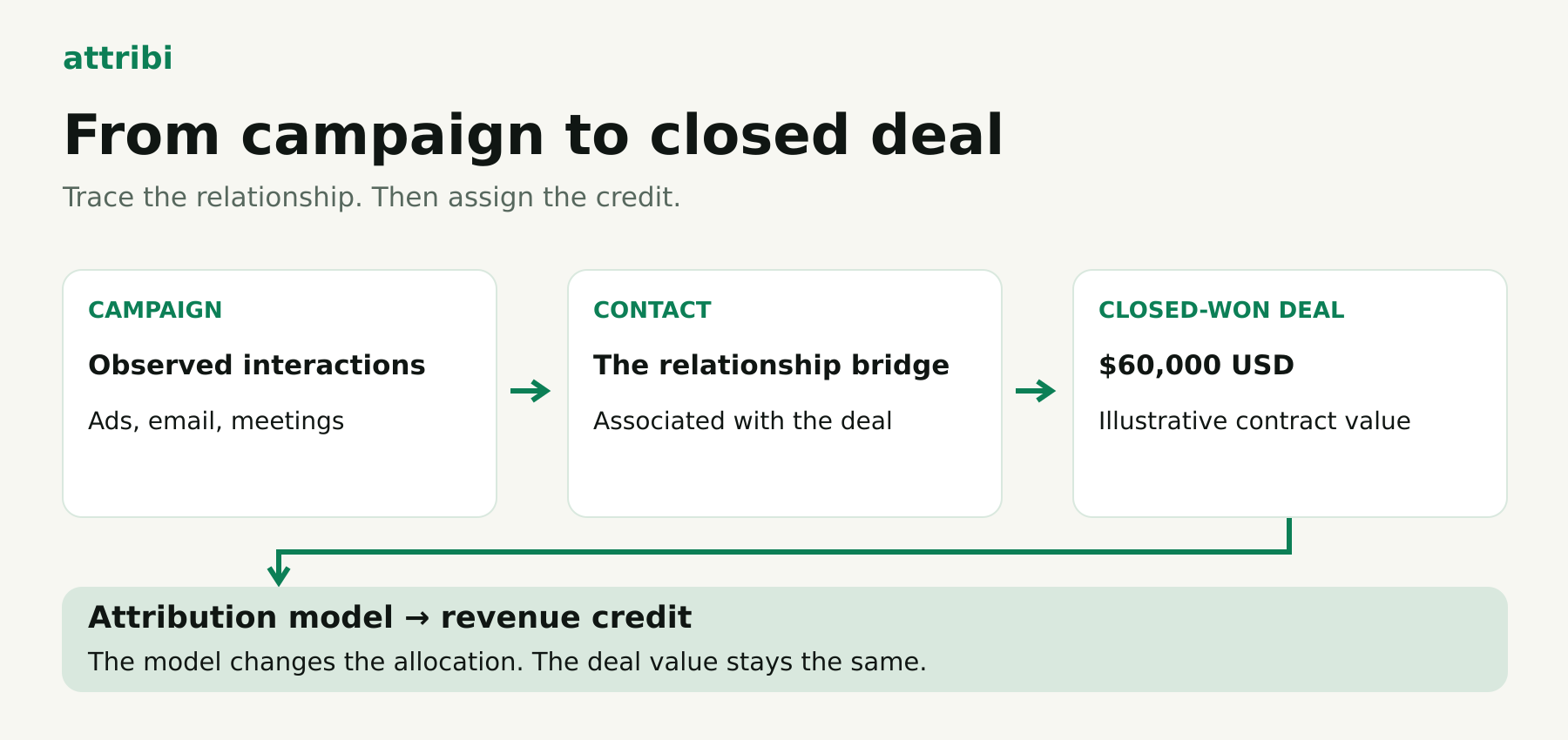
A campaign generated 80 contacts. Sales opened 12 deals. Three closed for $120,000. Which marketing activity should receive credit for that revenue?
HubSpot revenue attribution reporting answers that question by connecting recorded interactions to contacts, associating those contacts with deals, and distributing closed-deal value using an attribution model. The useful work starts before the chart: agree on the revenue definition, check the relationships, and decide which interactions belong in the analysis.
There are also two different product decisions. HubSpot's native Deal Revenue Attribution report has its own subscription requirements. Attribi can add marketing context to HubSpot contact records and bring CRM outcomes into its own attribution and conversion-upload workflow. Installing that connection does not unlock HubSpot's Enterprise reporting features.
This guide follows one synthetic B2B deal from campaign to close, then shows how to validate a report and decide what to send back to advertising platforms.
Start with the decision the report needs to support
Write down the question before selecting a model. These three questions need different evidence:
- Which campaigns bring new people into our database?
- Which campaigns are involved in creating sales opportunities?
- Which campaigns receive credit for business we actually won?
HubSpot calls the corresponding reports Contact Create Attribution, Deal Create Attribution and Deal Revenue Attribution. Native Deal Create and Deal Revenue Attribution require Marketing Hub Enterprise. Contact attribution has broader availability, including eligible Marketing Hub and Content Hub Professional subscriptions. Check the report-specific requirements in HubSpot's attribution report setup guide.
One important exception prevents an unnecessary upgrade assumption: Marketing Hub Professional also has a campaign Revenue report. The model-selectable campaign Revenue Attribution report requires Enterprise. These are distinct reports with different capabilities, as HubSpot's campaign reporting documentation explains.
For a weekly acquisition review, contact creation may be a useful leading indicator. For a quarterly budget review, start with won revenue and retain pipeline as a separate measure. Combining open pipeline and won business into one total makes campaign performance harder to interpret.
Choose a cohort, too. "Revenue closed in September" and "eventual revenue from contacts acquired in September" describe different groups. A long sales cycle can make their results diverge for months.
Check the deal-to-contact connection before building a dashboard
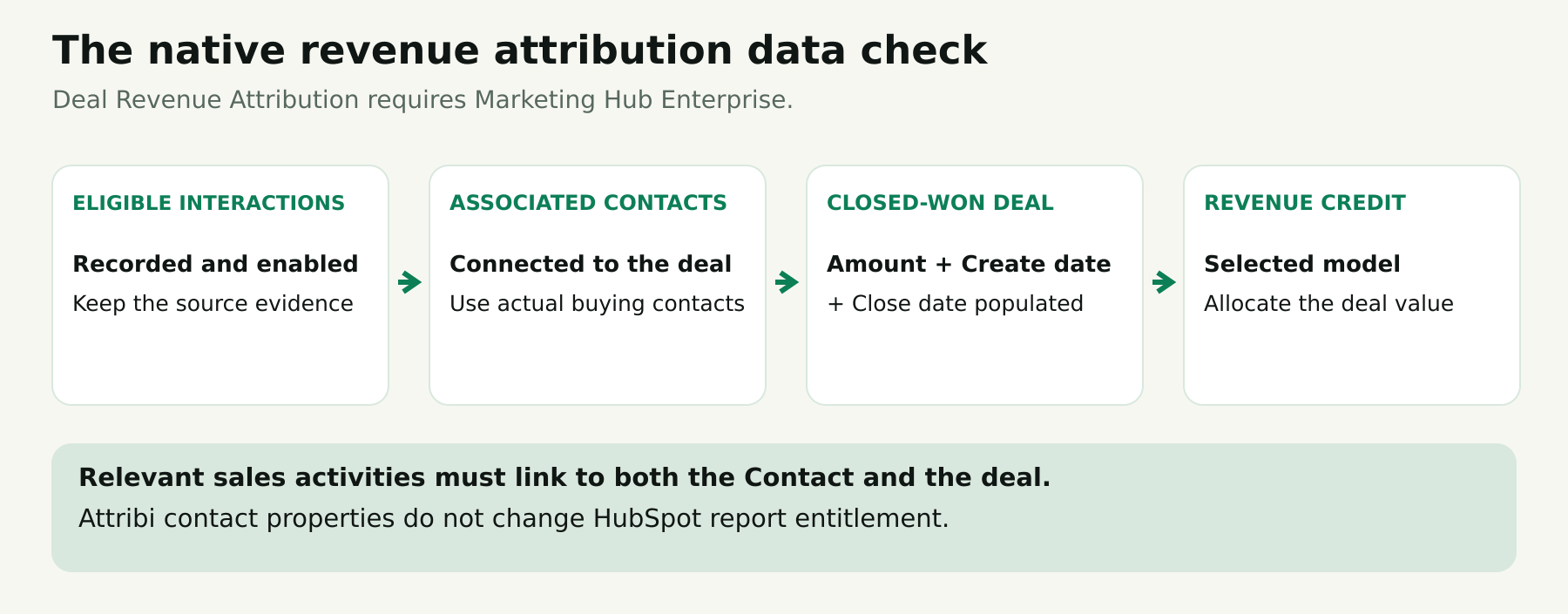
For native revenue attribution, HubSpot requires a closed-won deal, at least one associated contact, and populated Amount, Create date and Close date properties. Relevant sales activities must be associated with both the contact and the deal; an unanswered one-to-one email does not qualify merely because it was sent. See HubSpot's revenue attribution data requirements.
Use those requirements to build a small audit before reviewing channels.
Check five recent wins individually
Pick a sample that includes a straightforward inbound deal, a sales-assisted deal and a deal with several people involved. For each, record:
- Deal ID and the commercial transaction it represents.
- Associated contacts and their actual involvement.
- Amount, currency and the team's definition of that amount.
- Create date, close date and the pipeline's won status.
- The marketing and sales evidence you expect to explain the journey.
Start with records that sales can recognize. If the first disputed result belongs to a familiar customer, you can ask a specific question: was the webinar attendee ever associated with this deal? That is easier to resolve than an argument about the entire dashboard.
Avoid attaching every employee at the account just to increase attribution coverage. Define which buying participants belong on the deal and have sales operations own that convention. An association should reflect a real relationship.
Agree on what "revenue" means
HubSpot defines Amount as the deal's total value in its currency. ARR, MRR and total contract value are separate properties with their own calculations. Its company-currency amount uses the account's configured exchange rates. HubSpot's deal property definitions make these distinctions explicit.
For your reporting policy, choose whether the deal amount represents the initial contract, annual value or another agreed booking measure. Document treatment of implementation fees, discounts and taxes. A $90,000 three-year agreement and $30,000 annual subscription should not silently mean different things in the same metric.
For a US and European team, retain the original USD, EUR or GBP amount in the audit and specify the common reporting currency. Never add 40,000 USD and 40,000 EUR as if the total were 80,000 of one currency. Also distinguish booked deal value from collected cash or accounting revenue recognition.
Make campaign and interaction data usable
Give every campaign an owner and a naming convention. A practical scheme can include market, offer and launch period, such as "us-security-webinar-2026q3." Keep a separate stable identifier when names may change.
Maintain a campaign register with the destination URLs, tracking parameters, associated assets and launch date. Test links after redirects and test a submission from the actual landing page. A parameter present in an advertising spreadsheet is only a plan; the recorded visit is the evidence.
HubSpot's campaign overview metrics generally start counting asset data from the time the asset is associated with the campaign, while individual asset reports can contain earlier history. Associate assets before launch and review each metric's scope before expecting retroactive results. HubSpot documents this campaign timing distinction.
Decide which interactions count
Check Settings → Tracking & Analytics → Attribution. HubSpot includes enabled interaction types; some event-related and custom interactions need manual activation. Common inputs include tracked page views, forms, ad clicks, email clicks, calls and meetings. Saving changes can trigger reprocessing that takes up to two days. Review the current interaction settings.
Make this a written measurement choice. If marketing is evaluated on a report that includes sales meetings, identify sales activity as its own contribution. Removing sales activity to make marketing's share look larger weakens the report's usefulness.
Keep an interaction-settings change log. A sudden change in campaign credit may follow a measurement change rather than a change in buyer behavior. Record the effective date and reprocessing status alongside the report.
Inspect how marketing context reaches CRM records with one controlled contact as your first test. Start an Attribi workspace. New workspaces currently receive a 30-day Pro trial without a card. Continued CRM revenue connections require a paid plan.
Build a report that someone else can reproduce
In HubSpot, open Reporting → Reports → Create report → Attribution report, then choose the Revenue data source. Select the model, dimensions and filters, and save the report. Labels may vary with navigation updates; use the current HubSpot setup instructions.
The configuration deserves more attention than the chart style. Use this practical starting specification:
- Question: which observed interactions receive credit for last quarter's new-business wins?
- Population: one agreed pipeline and new-business cohort.
- Outcome: closed-deal value under the documented amount policy.
- Period: a fixed close-date range, with its time zone recorded.
- First view: a broad channel or interaction-source breakdown.
- Second view: the campaign or asset detail needed to investigate that breakdown.
- Comparison: identical data and settings under a second attribution model.
Use the same population when comparing models. Changing the date range or deal types at the same time prevents you from knowing why the result moved.
Name the saved report precisely: "New-business wins | Q3 2026 closes | linear | reviewed October 9." Add the owner and definitions to the dashboard description or accompanying documentation. A label such as "Marketing ROI" leaves too many assumptions hidden.
Begin with a total won-deal control report and a list of eligible deal IDs. Reconcile from that list into attribution. Only then narrow the attribution chart to selected campaigns. A campaign-filtered view is a slice of the total, so treating it as a complete revenue ledger creates unnecessary confusion.
Follow one $60,000 deal through three models
Here is a simplified, synthetic example. None of these figures represent an Attribi customer or a measured result.
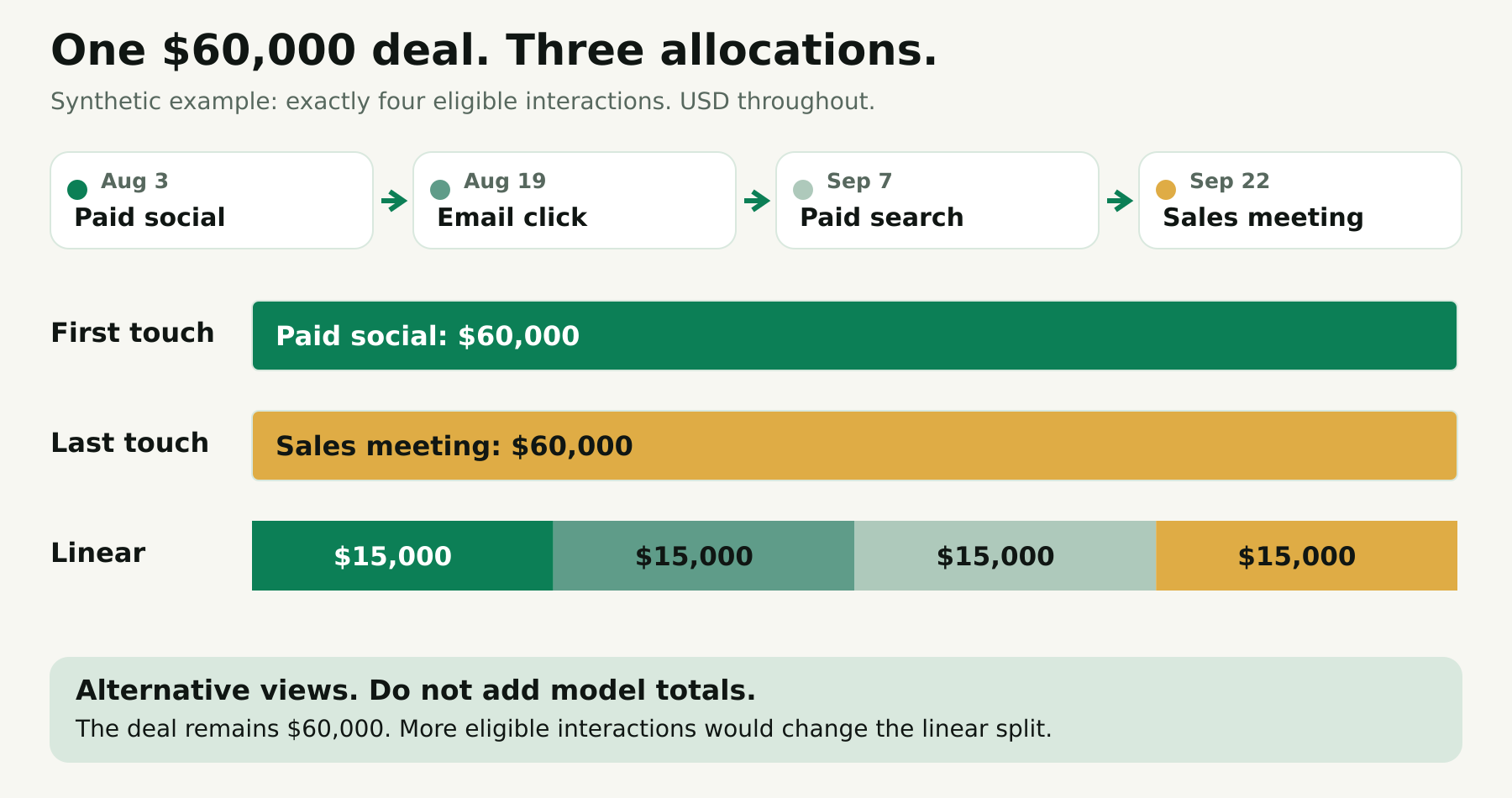
A US software company closes a $60,000 contract on September 25. One buying contact is associated with the deal. For illustration, assume the report contains exactly these four eligible interactions, with no additional page views, creation events or other activities:
| Date | Recorded interaction | Campaign or activity |
|---|---|---|
| August 3 | Paid social ad click | Security assessment campaign |
| August 19 | Marketing email click | Security webinar follow-up |
| September 7 | Paid search ad click | Branded product search |
| September 22 | Sales meeting | Commercial review |
The deal was created on September 9. The amount is USD 60,000, and September 25 is its recorded close date.
First-touch interpretation
All $60,000 goes to the first eligible interaction: the paid social click. This view helps the team ask where observed winning journeys began.
The next question is whether that finding is consistent across enough deals to matter. One large win should lead to investigation, not an automatic transfer of the next quarter's entire budget.
Last-touch interpretation
All $60,000 goes to the September 22 sales meeting. The branded search click receives no credit under this view because it was not the last eligible interaction before the outcome.
This is a useful correction to a common assumption: "last touch" does not necessarily mean "last advertisement." The eligible interaction set controls what the model can select.
Linear interpretation
Each of the four interactions receives $15,000. Paid social, email, paid search and the sales meeting therefore receive equal shares in this deliberately simplified path.
That split is arithmetic, not evidence that each interaction caused exactly one-quarter of the sale. If a real report includes additional eligible events, the denominator changes. Counting four campaign names while ignoring the underlying interaction records will not reproduce the result.
Across all three views, the underlying deal remains $60,000. The allocation changes; the contract does not. The three model totals are alternatives and should never be added into $180,000 of revenue.
Keep each product's available models and interaction rules separate when comparing outputs. A matching model name is not enough to make two reports comparable if their underlying interaction sets differ.
Use model disagreement to ask better questions
HubSpot's August 2026 setup guide lists First Touch, Last Touch, Linear, Time Decay and Empirical. Empirical weights interaction types using their frequency across conversion paths and replaces the listed U-shaped, W-shaped, J-shaped and Inverse J-shaped options. Older documentation and screenshots may still show legacy models, so verify your portal's current selector. Source: HubSpot's model update.
For the first review, choose a simple primary model that the team can explain, then compare a second perspective. Agree on the choice before seeing which campaign wins.
A large gap between first-touch and last-touch credit creates a research agenda:
- Are early campaigns introducing accounts that later return through branded search?
- Is a late-stage activity genuinely useful, or simply common in nearly every completed sale?
- Are several campaigns missing early interactions because tracking began late?
- Does one market have a longer sales cycle than another?
- Is the apparent winner mostly serving customers who were already in active opportunities?
Take those questions to campaign planning and, where practical, controlled tests. Attribution describes the credit assigned to observed paths. Establishing how many additional sales a campaign caused requires a different kind of evidence.
Do not label missing history as poor performance. A prospect may have heard about the business at an event before any trackable visit. Preserve self-reported discovery as an additional research signal, with its origin clear, instead of manufacturing historical clicks.
Where Attribi fits in the HubSpot workflow
The Attribi HubSpot connection adds 16 contact properties, including first and last touch, journey and landing-page information. Full mode can create missing contacts; attribution-only mode enriches existing matches. These fields work within your HubSpot plan's capabilities and do not unlock native Enterprise reports.
Attribi polls changed deals daily, detects HubSpot's won flag and uses configured stage IDs for qualification. Revenue uses deal amount and currency, with company-currency fallback. Unresolved currency delays the upload; a won deal without an amount generates no revenue conversion.
There is an important counting boundary: each contact is reported once per stage. A later won deal for a contact already reported as won is not uploaded as another conversion today.
That boundary should be in the pilot specification. Test both a new customer's first win and a renewal associated with the same person. For businesses with expansions, repeat purchases or several deals per buyer, retain a deal-level control ledger and quantify the outcomes outside the feed's scope. Do not assume an acquisition-oriented conversion count equals total customer lifetime revenue.
Capture identifiers deliberately
A CRM-only workflow also needs a clear identity plan. Follow the click-ID form setup guide to populate both mta_clickid and mta_clickid_type in HubSpot. Capturing one click does not reconstruct the website's multi-touch history. Attribi reads these properties on the person's first deal import; they are not a guaranteed click-ID backfill for an existing lead. Test a new person and an existing person separately.
Check the plan that supports the complete HubSpot revenue workflow before committing to the integration. Try the HubSpot revenue workflow. CRM revenue sources start on Growth, currently $99 USD per workspace per month for up to 10,000 monthly visitors. See current plans. New workspaces receive a 30-day Pro trial without a card. Taxes may apply.
Separate reporting from conversion activation
A campaign report answers a measurement question. Sending an outcome to an advertising platform creates a separate delivery and matching workflow.
The existing guide to sending HubSpot deal revenue to Google Ads covers that next step. Decide which event represents qualification, which represents a won deal, and which identifier links it to an advertising interaction. Review the destination's conversion settings before making it an optimization goal.
An accepted upload alone does not establish that a conversion matched, appeared in the expected report or became a bidding signal. Validate each stage separately. Keep the CRM outcome, upload result and platform reporting result in separate columns of your audit.
Run an acceptance test before using the report for budgets
Use a small, permitted test dataset and document expected results first. These cases reveal different failure modes:
| Test | What to inspect | Acceptance criterion |
|---|---|---|
| Clean new-business win | Contact, deal and interaction trail | The deal can be traced from the control ledger into the intended view |
| Missing contact association | Deal's relationship data | The missing link is detected and assigned to an owner |
| Missing amount | Deal value and downstream result | Missing value is visible; no invented revenue is introduced |
| Two currencies | Original amount and reporting conversion | Totals use one stated currency policy |
| Repeat win for one contact | Deal ledger versus conversion feed | The documented Attribi counting limit is visible |
| Recently changed interaction settings | Reprocessing and report snapshot | Comparison waits for processing and records the settings change |
For the synthetic deal above, manually calculate expected first-touch, last-touch and linear allocations. If the actual report differs, inspect the eligible interaction list before calling the calculation wrong. An extra event can explain the difference.
Next, establish three recurring control numbers: total won deals in the agreed cohort, deals represented in the attribution view, and outcomes represented in the outbound feed. Retain an explanation for each gap. Different populations can be legitimate; unexplained movement deserves attention.
When advertising platforms disagree with the CRM, compare platform claims with CRM outcomes. Align event definitions, time periods, currencies and attribution scope before interpreting a difference as wasted spend.
For teams working across the US and Europe, add a privacy review to the implementation checklist. Ask the responsible owner to confirm the approved collection, notice, retention and advertising-sharing setup for each market. Keep personal information out of campaign names and URLs. A technically successful match does not establish that the data flow is appropriate.
Put one defensible report into use
A useful first release is modest: one cohort, a clear revenue definition, two model views and a short exception list. Marketing operations owns campaign tracking, sales operations owns deal relationships and values, and paid media owns destination reporting checks. Agree who resolves gaps before the dashboard becomes part of a leadership meeting.
Review a few individual deals every month. Record measurement changes alongside campaign changes. Expand the scope only after the team can explain the initial numbers without guessing.
Test one HubSpot cohort and verify a first win, its attribution context and its downstream result. Start an Attribi trial. New workspaces get 30 days on Pro with no card required. Include a repeat-deal test before deciding whether the paid revenue workflow covers your business model.