HubSpot Tells Google Ads a Contact Became a Customer. It Does Not Say for How Much.
By Rajesh Kumar, Founder, Attribi ·
HubSpot has a built-in way to send conversions to Google Ads, and for a lot of teams it is the right place to start. It is in the Ads tool, it takes an afternoon, and it uses enhanced conversions for leads under the hood.
It also has a ceiling that is easy to miss until you try to bid on revenue. The built-in sync reports that a contact changed lifecycle stage. The money is not on the contact. It is on the deal, and the deal amount does not make the trip.
This guide covers both routes: what the built-in sync does and where it stops, and how to send the deal itself, with its real amount, when you need to.
The short answer
HubSpot to Google Ads offline conversions can be sent two ways. HubSpot's built-in ad conversion events sync lifecycle stage changes on the contact, each at a fixed value you type in. To send actual revenue, read the won deal from HubSpot, find its contact, and upload the deal amount to Google Ads with the click ID and hashed email.
If you are still deciding whether this is worth the effort at all, Attribi will show you HubSpot deals next to the Google Ads campaigns that produced them before you build anything.
Route 1: HubSpot's built-in ad conversion events
In HubSpot's Ads tool you can create an ad conversion event for a connected Google Ads account. HubSpot's knowledge base lists what you get:
| Built-in ad conversion events | |
|---|---|
| HubSpot plan needed | Marketing Hub Starter, Professional or Enterprise |
| What can trigger an event | A lifecycle stage change, or a HubSpot form submission |
| Conversion value | A fixed amount you enter for the event |
| How many events | 5 on Starter, 50 on Professional, 100 on Enterprise |
| What a contact needs to sync | A value in the Google ad click id property, or contact data such as email or phone shared with Google |
| History | Only stage changes after you create the event are counted |
| Hashing | HubSpot hashes contact data with SHA-256 before sending |
Two of those rows deserve a second look.
Only changes after creation count. If you create the event on the first of the month, the 40 contacts who became customers last month are not sent. There is no backfill. Create the events before you need the data, not on the day you want to switch bidding.
A contact needs a click ID or shareable contact data. HubSpot fills its Google ad click id
property (internal name hs_google_click_id) when its own tracking code sees the GCLID on a visit
that ends in a known contact. If your leads arrive some other way, through a non-HubSpot form, an
import, or a rep typing them in, that property is empty and the match depends on email and phone
alone.
For plenty of businesses this route is enough. If every customer is worth roughly the same, a fixed value per stage is an honest description of reality. Use it and stop reading.
Where the built-in route runs out
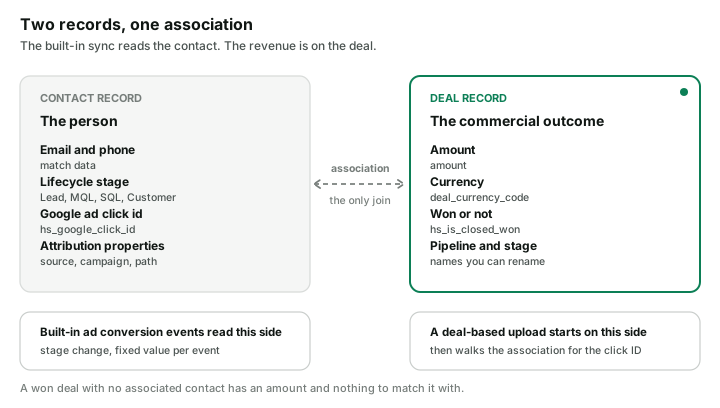
HubSpot keeps two different records, and the built-in sync reads one of them.
The contact holds the person: email, phone, lifecycle stage, and the click ID. The deal holds the commercial outcome: amount, currency, pipeline, stage, and whether it was won. A lifecycle stage of Customer tells you a deal was won somewhere. It does not carry the number.
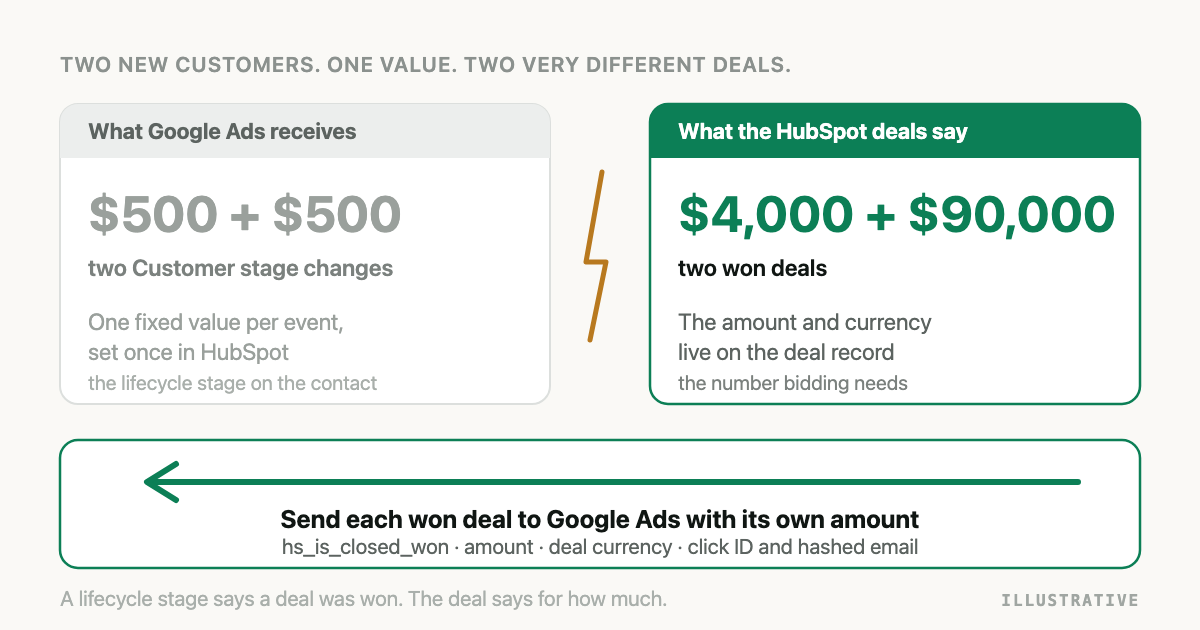
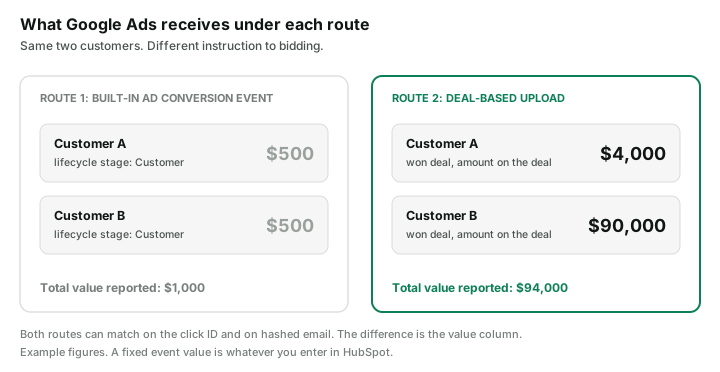
So take two contacts who both become customers this week. One signed a 4,000 dollar starter contract. The other signed for 90,000. With a fixed value of, say, 500 on the Customer event, Google Ads records two conversions of 500 each. As far as bidding is concerned, the keyword that found the 90,000 deal and the keyword that found the 4,000 deal performed identically.
That matters in exactly one situation, and it is a common one: your deal sizes vary a lot, and you want Google to bid on value. If you run Maximize conversion value or a target ROAS, the value column is the instruction. A flat number in that column is a flat instruction.
Three other limits follow from the same design:
- It is contact-level. One contact with three won deals over a year changes lifecycle stage once.
- The stage has to be a lifecycle stage. Google's setup page for its HubSpot connection also builds its import conditions on the Lifecycle Stage field. If your sales process lives in deal stages, you have to mirror the moment you care about into a lifecycle stage first.
- It is Google only per event. Meta and LinkedIn have their own separate events in HubSpot, each configured again.
Route 2: send the deal itself
This is more work. It is also the only way the real amount reaches Google. The outline:
1. Find won deals by the flag, not the stage name. Every HubSpot deal carries a property
called hs_is_closed_won. It is true for any stage your pipeline settings mark as won, whatever
that stage is called. Query on that. A filter on a stage named "Closed Won" breaks the day someone
renames it to "Signed", and nothing errors when it does.
2. Read the amount and its currency. The properties are amount and deal_currency_code. A
deal with no currency code is in your portal's company currency, which is not necessarily dollars.
Do not default it. A 50,000 dirham deal uploaded as 50,000 dollars is worse than no upload.
3. Walk from the deal to the contact. The deal does not hold an email or a click ID. Use the
associations endpoint, /crm/v4/objects/deals/{dealId}/associations/contacts, to get the contact,
then read the contact's email, phone and Google ad click id.
4. Upload with both keys. Send the conversion to a Google Ads conversion action with the GCLID when you have it and the hashed email and phone as the second key. New integrations do this through Google's Data Manager API. The payload, including the fields that trip people up, is in Import Salesforce Closed-Won Deals into Google Ads. The Google half is identical whatever CRM the deal came from.
5. Make it safe to run twice. Use a transaction ID built from the deal ID and the stage, so a retried job cannot book the same revenue again.
What breaks this in production
A deal with no contact. Reps create deals straight from a company record. No associated contact means no email and no click ID, so nothing to match. Decide now whether those deals are skipped or flagged.
A won deal with no amount. It happens more than anyone admits. There is no figure to send. Skip it and count it, so you can see how many you are losing.
The clock. Google will not import a conversion uploaded more than 90 days after the click, or 63 days when matching on email and phone alone. If your cycle is longer, the won deal will often arrive too late, and a mid-funnel stage is the conversion that actually lands. The reasoning is in Enhanced Conversions for Leads Fixes the Match.
Deals edited after they are won. Amounts get corrected. If you upload on every modification without a stable transaction ID, each correction is a new conversion.
Which route should you use?
| Built-in ad conversion events | Deal-based upload | |
|---|---|---|
| Sends | A lifecycle stage change | A won deal, and optionally a qualified stage |
| Value | Fixed per event | The deal amount, in the deal's currency |
| Second deal from the same contact | Not counted again | Can be sent, if you build for it |
| Setup | An afternoon in HubSpot | An integration to build or buy |
| Needs | Marketing Hub Starter or above | API access to deals and contacts |
| Good fit | Similar deal sizes, counting conversions | Varied deal sizes, bidding on value |
They are not mutually exclusive. A reasonable setup uses the built-in event for an early stage such as marketing qualified lead, where a fixed value is fine, and a deal-based upload for revenue. Just do not point both at the same conversion action, or you will count customers twice.
Doing this with Attribi
Attribi is the deal-based route, built. Since I make it, here is what it does and what it does not.
You connect HubSpot and Google Ads. Once a day Attribi reads the deals that changed, picks out the won ones using HubSpot's own closed-won flag, and uploads each to Google Ads with the deal amount in the deal's currency. When a deal has no currency it uses your portal's company currency, and if it cannot read either it holds that upload back instead of guessing. If you give it the IDs of the deal stages you count as qualified, those upload as a separate conversion.
Where it differs from building it yourself:
- The click ID does not depend on HubSpot's tracking. Attribi's own script records the GCLID at the ad click and keeps it against the visitor, so the match works for leads that reached HubSpot through any form.
- Reps see the source on the contact. Attribi creates 16 properties in an MTA Attribution group on the contact and fills in first touch, last touch and the path between them.
- The same won deal goes to every ad platform you connect, not only Google.
And the limits, so you can plan around them:
- Deals are read daily, so a deal won this morning uploads on the next run, not instantly.
- A won deal with a blank amount uploads no revenue.
- Each contact is reported once per stage today. A second won deal for the same contact is not uploaded yet.
- A free HubSpot portal may refuse to create custom properties. Attribi tells you which one was blocked.
- CRM connections are on the Growth plan, 99 dollars a month. Every new workspace gets 30 days on the Pro plan with no card, which is long enough to see your own won deals arrive in Google Ads.
The full list of what moves in each direction is on the HubSpot integration page.
Frequently asked questions
Can HubSpot send offline conversions to Google Ads without a third-party tool? Yes. HubSpot's ad conversion events can sync lifecycle stage changes and HubSpot form submissions to a connected Google Ads account, on Marketing Hub Starter and above. Each event carries a fixed value that you enter, not the amount of the deal.
Does HubSpot send the deal amount to Google Ads? Not through the built-in ad conversion events. Those are triggered by a contact's lifecycle stage or a form submission and use a value you set per event. To send the real deal amount you need an upload that reads the deal record and its currency.
Where does HubSpot store the GCLID? In a contact property called Google ad click id, with the internal name hs_google_click_id. HubSpot sets it when its tracking code sees a Google click identifier on a visit tied to that contact. It is on the contact, not on the deal.
Why are my HubSpot conversions missing from Google Ads after I created the event? The most common reasons are that the stage changes happened before the event was created, since only later changes are counted, or that the contacts have neither a Google ad click id nor contact data shared with Google to match on.
Should I use a HubSpot lifecycle stage or a deal stage as my Google Ads conversion? Use a lifecycle stage if a fixed value per conversion describes your business. Use the deal if deal sizes vary and you bid on conversion value, because only the deal carries the amount.
How do I find won deals in HubSpot if we renamed the Closed Won stage? Filter on the deal property hs_is_closed_won, which is true for every stage your pipeline settings mark as won, regardless of the stage name or how many pipelines you run.
The takeaway
Start with HubSpot's built-in events if you have never sent Google anything past the form fill. It is a real improvement and it is already paid for. Move to the deal when you notice that a 90,000 dollar customer and a 4,000 dollar customer look the same in your conversion value column. At that point the fix is not a setting. It is reading a different record. You can build that read, or let Attribi do it.