Microsoft Ads Offline Conversion Tracking: Connect CRM Revenue to Bing Ads
By Rajesh Kumar, Founder, Attribi ·
Microsoft Ads offline conversion tracking sends outcomes from your CRM back to Microsoft Advertising, so an ad click can receive credit for a qualified lead or a deal that closes later. The essential work is connecting the right identifier to the right outcome, preserving its original timestamp, and uploading it to the correct conversion goal.
For paid search and RevOps teams, that closes a familiar reporting gap. Microsoft sees the form submission. Sales sees whether the person is qualified, whether an opportunity exists, and whether money was won. Until those records connect, a cheap lead can look like a good investment long after sales has disqualified it.
This guide walks through the connection: capture MSCLKID, define CRM stage events, configure goals, send revenue, and verify what Microsoft actually attributed. It also explains where Attribi handles the workflow and where your media buyer still needs to make a decision.
Start with one account and one clearly defined CRM outcome. Start your 30-day Attribi Pro trial, no credit card required.
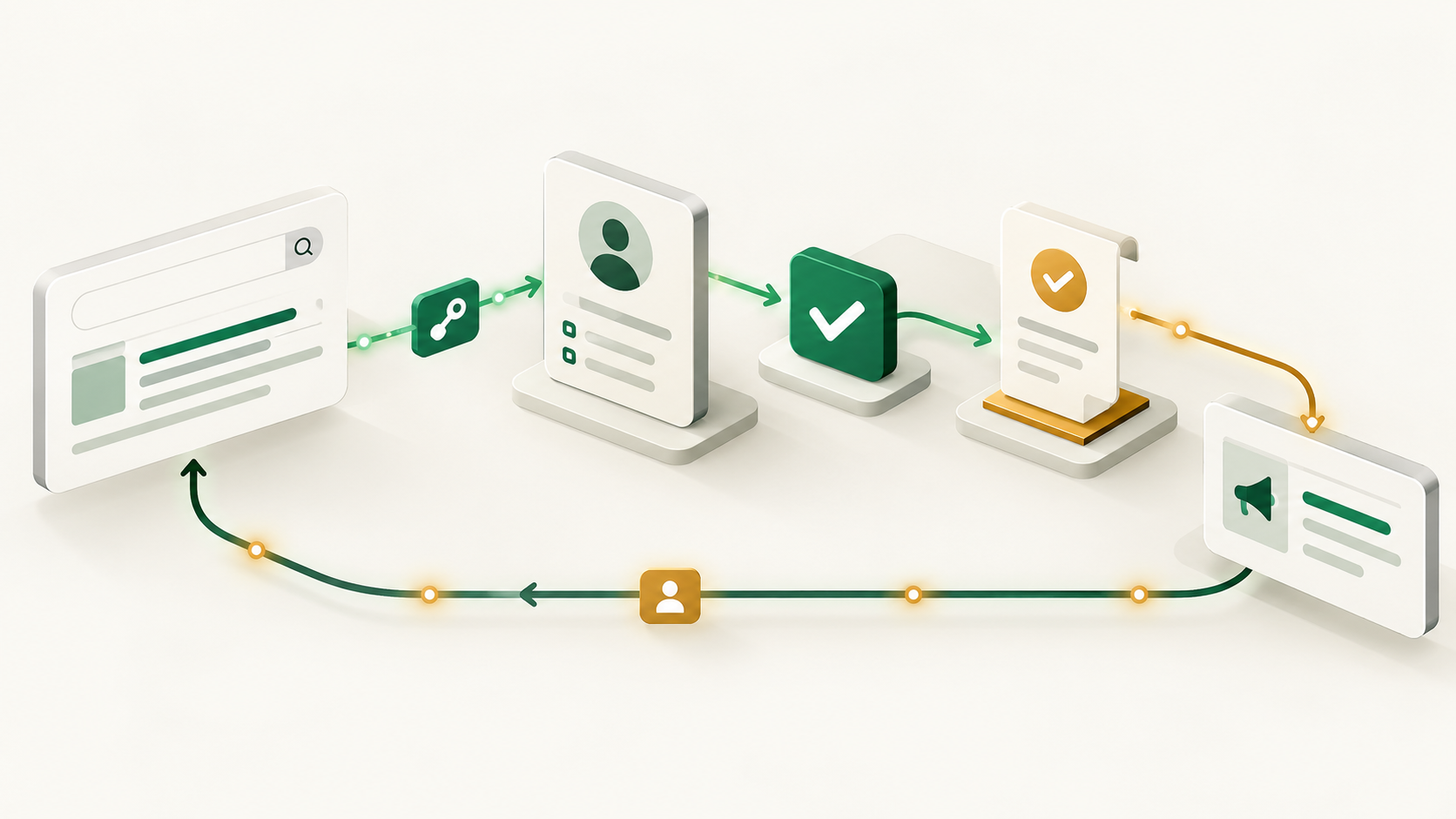
What Microsoft Ads offline conversion tracking measures
An offline conversion is a business outcome reported after the original website visit. In B2B, that might be a sales-qualified lead or a closed-won opportunity. "Offline" describes where the outcome is recorded; the customer does not need to visit a physical store.
Think of the workflow as two connected records. The advertising record identifies a click. The CRM record says what happened to the prospect afterward. Your implementation supplies the connection and the event details. Microsoft then evaluates whether the submitted outcome can be attributed under its rules.
Keep three states separate when reviewing the results:
- Submitted means your system sent the event.
- Accepted means the receiving system processed it without the relevant upload error.
- Attributed means Microsoft could associate it with eligible advertising activity and count it under the goal's rules.
A successful request is useful evidence, but it is not proof that every row became an attributed conversion. Microsoft's offline conversion attribution diagnostics include missing matches, inactive goals, account mismatches, and events outside the goal window. Build your reporting around the whole journey rather than the upload response alone.
Capture MSCLKID before the prospect becomes a lead
MSCLKID is the Microsoft Click ID. With click-ID auto-tagging enabled, Microsoft appends it to the landing-page URL after an ad click. Confirm that auto-tagging is enabled in the advertising account and inspect an actual landing journey, including any redirects. Microsoft's offline conversion goal documentation describes how creating or updating conversion goals enables MSCLKID auto-tagging.
For a custom implementation, the objective is straightforward: preserve the identifier beyond the first page view. Capture the msclkid query parameter, retain it in your approved first-party tracking design, and connect it to the lead when the form is submitted. Keep the original identifier intact; a campaign name or UTM parameter does not substitute for a click ID.
Test the path customers actually use. A redirect might discard query parameters. A booking widget might open on another domain. A prospect might browse several pages before submitting a form. Each handoff deserves a specific test, because an identifier visible on the first URL can still disappear before it reaches the CRM.
Avoid relying on a single, constantly overwritten text field as your entire attribution history. If someone returns through another campaign, preserve enough visit context to understand which record your upload uses. Write down the selection rule. Otherwise, the marketing team and the integration developer can both follow reasonable assumptions and produce different answers.
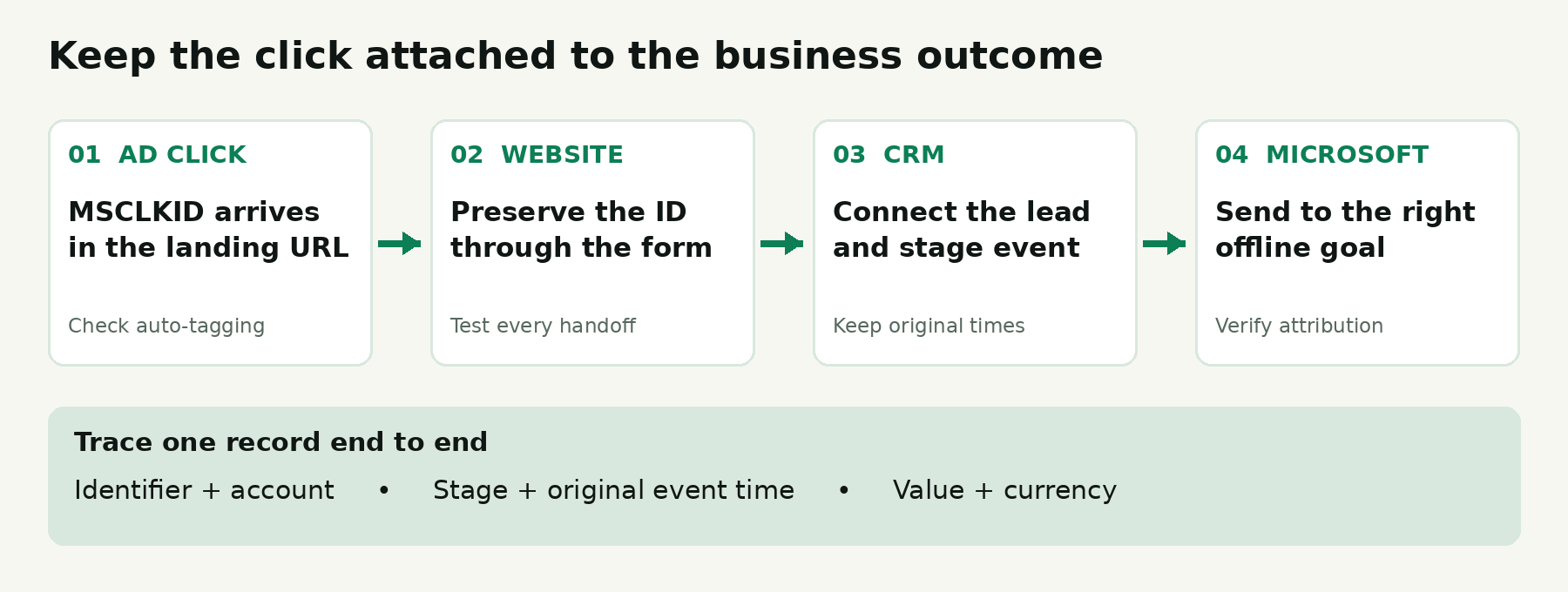
At minimum, trace one authorized test lead from arrival to CRM creation. Check the stored click ID, the lead association, the event time, and the destination account. Use synthetic data for plumbing tests. A made-up click ID can test field transport, but it cannot establish that Microsoft will attribute a real conversion.
What if the lead has no MSCLKID
Microsoft's OfflineConversion specification allows a hashed email address or hashed phone number for enhanced conversions without a Microsoft Click ID. That provides another matching route; it does not guarantee a match.
Confirm that enhanced conversions are enabled for the intended goal. Keep collection, normalization, hashing, and permission handling in your implementation review. Hashing changes the representation of personal data. It does not remove your responsibility to collect and share it appropriately. Send only the identifiers the integration needs through the supported process, and keep them out of casual debugging screenshots and shared spreadsheets.
Define CRM events before creating conversion goals
The hardest part is often agreeing on what "qualified" means. If one sales rep applies the label after a connected call and another waits for budget approval, the upload may be technically perfect while the signal is inconsistent.
Write a short event contract for each stage. Include the qualifying condition, the source field, the event timestamp, the value policy, and the person who owns corrections. Choose conditions that sales can apply consistently and RevOps can audit.
A practical starting map looks like this:
| CRM event | Example trigger | Value policy | Separate Microsoft goal |
|---|---|---|---|
| Lead | A valid inquiry is created | Defined lead value or no revenue value | Lead |
| Qualified | Sales confirms the agreed qualification criteria | Optional, explicitly modeled value | Qualified |
| Closed Won | The opportunity meets your won definition | Approved actual deal amount and currency | Closed Won |
These are example definitions, not mandatory stage names. Your CRM may call the middle stage "Sales accepted" or "Qualified opportunity." What matters is mapping your real process consistently and avoiding a situation where a renamed field silently stops generating events.
For a stage change, use the time the stage was reached rather than the next time an integration checked the CRM. For closed won, agree whether the amount represents contract value, first-year revenue, or another measure. Those numbers can all be useful, but switching between them makes a revenue report misleading.
Also decide what happens when someone moves backward in the funnel. If a rep changes Qualified to New and then back again, should that produce a second qualification event? Usually, teams want one first qualification per lead. Make that rule explicit in the source system or event pipeline rather than assuming downstream deduplication will understand the business intent.
Configure the offline goals and upload fields
Create or select an offline conversion goal for each outcome you want to distinguish. Keep a configuration record with the account, goal name, window, counting rule, and bidding inclusion. A second person should be able to inspect it without guessing what an abbreviated label means.
Microsoft's goal configuration reference documents a conversion window of up to 90 days. It also distinguishes All, which counts eligible events at different times, from Unique, which counts the first conversion after an ad click. Choose deliberately for each goal; the appropriate rule for recurring purchases can differ from the rule for a qualified lead.
For the standard click-ID workflow, review these core fields:
| Field | What to verify |
|---|---|
| MicrosoftClickId | The original captured MSCLKID, when available |
| ConversionName | Exact name of the intended existing goal |
| ConversionTime | When the business event occurred; UTC for API submission |
| ConversionValue | The amount approved for that event |
| ConversionCurrencyCode | Currency matching the submitted amount |
The Microsoft field specification explains that value and currency can fall back to goal defaults when omitted. That makes a missing field particularly easy to overlook. A row can appear plausible while carrying the wrong financial meaning. Validate the final payload, not just the CRM screen.
Keep modeled lead values separate from actual revenue. If a qualified lead receives an estimated value of $300 and later becomes a $12,000 contract, $12,300 is not actual booked revenue. Segment reporting by goal and value type so a blended total cannot quietly become the headline number in a board slide.
Check both timing windows
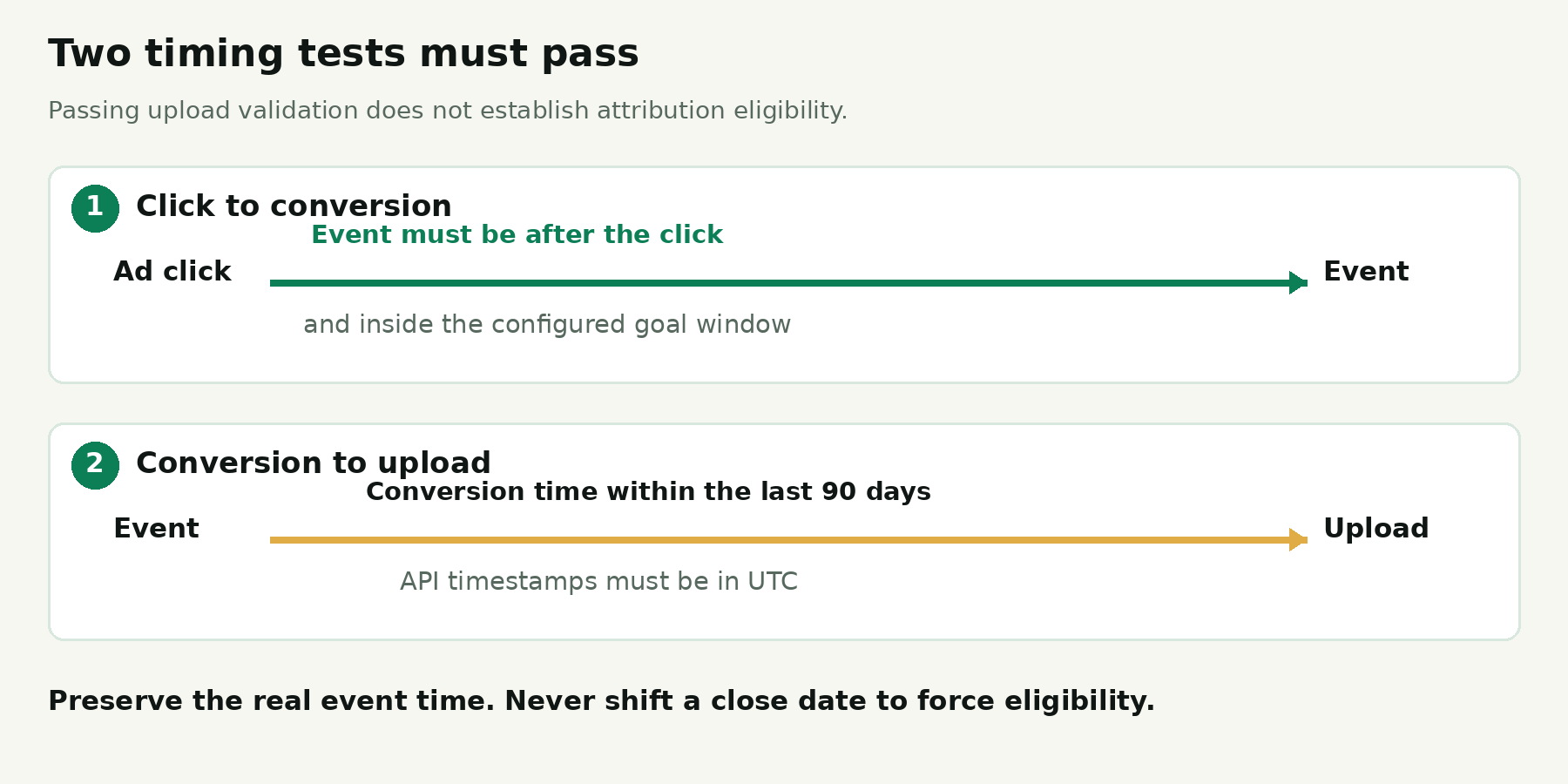
There are two different clocks. Microsoft requires the submitted conversion time to be within the previous 90 days. Separately, the event must occur after the associated click and inside the goal's conversion window. Passing the upload-age check does not establish eligibility under the click-to-conversion window. The conversion timing reference describes both tests.
Long sales cycles make this distinction important. A CRM can legitimately record revenue that Microsoft cannot count against an older click. Keep that revenue in your business reporting and label the difference. Do not change the close date to force an old sale inside a window.
Connect the workflow with Attribi
The Attribi Microsoft Ads integration captures MSCLKID and supports separate Lead, Qualified, and Closed Won outcomes, with deal value and currency on closed-won uploads.
The connection route is:
- Open Connections in Attribi, sign in with the Microsoft identity that can access the advertising account, and select the intended account.
- Create or map the offline conversion goal for each supported stage. Confirm the account and goal before saving.
- Connect your CRM and verify the stage definitions and revenue fields using a real, permitted test workflow.
- Review the resulting upload and Microsoft reporting before expanding to more accounts.
One setup detail deserves attention: Attribi's documentation says mapping an existing Microsoft goal sets it to count toward bidding when the mapping is saved. Coordinate that step with whoever owns the ad account. It can affect which outcomes the account considers alongside existing conversions.
Connect the CRM outcome you want to measure and validate the path end to end. Start your 30-day Attribi Pro trial, no credit card required.
Attribi's offline conversion workflow reads CRM outcomes on a schedule and records delivery by platform and stage. That reduces the recurring work of preparing separate upload files. It still pays to audit your source definitions: automation repeats the rules you give it.
Check the current pricing for ongoing plan requirements. CRM revenue sources are included from Growth upward, and every new workspace starts with 30 days on Pro without a credit card.
Be clear about the current boundary: Attribi does not import Microsoft Ads spend, so Microsoft campaigns do not appear in its ROAS reporting. Also, its funnel graduation feature does not change Microsoft campaign optimization targets for you. Plan the reporting and bidding review with those limits in mind.
Validate delivery before using the signal for bidding
For a new goal, Microsoft says to wait two hours before submitting offline conversions. After submission, reporting can take up to six hours. Its ApplyOfflineConversions reference also limits each API request to 1,000 events. Those are platform rules, not a promise about an integration's exact synchronization schedule.
Run a small, controlled validation before a historical backfill. Compare the CRM event, outbound record, upload result, and platform reporting. Review value and currency as carefully as the count. Ten conversions with a default value can be less useful than one correctly valued sale.
Make retries repeatable. Retain the original event timestamp and a stable internal event identity. If a retry substitutes the current time, it changes the event rather than faithfully resending it. Microsoft's duplicate handling is a safeguard, but it cannot substitute for a clear source-of-truth record.
Microsoft's upload documentation says duplicate conversions are ignored and a click can be associated with multiple goals. Maintain a delivery log by account, goal, CRM record, stage, and original event time. Record whether an attempt was new, retried, rejected, or subsequently verified in reporting.
If a deal value changes after the initial upload, investigate the supported correction process rather than inventing a new timestamp and sending a second sale. The same principle applies to cancelled deals. Decide who owns revenue corrections before those corrections become a monthly reconciliation argument.
A B2B example from click to closed revenue
Consider a fictional software company selling annual contracts. This example illustrates the workflow; it is not an Attribi customer result or a claim about expected performance.
On September 1, a prospect clicks a Microsoft search ad and submits a demo request. The landing journey preserves MSCLKID and connects it to the new CRM lead. The Lead event records the form submission under its own goal.
On September 4, sales confirms that the company fits the target profile and has a funded project. The CRM reaches the agreed qualification stage. The Qualified event uses September 4 as its event time, even if the upload happens later.
On September 22, the opportunity closes at $12,000 USD. The Closed Won event carries that amount and currency. The team checks that the goal window covers the elapsed time, then verifies delivery and attribution. Three stage events describe one customer journey; they do not represent three customers or three separate sales.
The media buyer can now compare the kinds of leads campaigns produced. However, a single won deal is weak evidence for a sweeping budget change. A larger contract, a delayed close, or one unusually successful salesperson can distort a small sample. Review cohorts that have had time to progress and inspect the underlying records before drawing a conclusion.
Diagnose missing conversions in the right order
Start with the earliest point where evidence disappears. Searching through bid settings will not fix an identifier lost at the form.
| Symptom | First check |
|---|---|
| No identifier on the lead | Landing redirect, capture behavior, form handoff, CRM association |
| Goal error | Exact goal name, active status, and intended account |
| Accepted upload but no attribution | Matching identifiers, click eligibility, goal window, reporting delay |
| Time-related error | Original event time, UTC conversion, future dates, upload age |
| Duplicate warning | Replay of the same event or unstable retry logic |
| Revenue total looks wrong | Goal defaults, source amount, currency, modeled values mixed with sales |
Microsoft's diagnostic reason list distinguishes cases such as AccountMismatch, GoalNotFoundOrInactive, NoMatchingClickFound, and OutsideGoalLookbackWindow. Use the specific reason to narrow the investigation. "The API worked" and "Microsoft counted the sale" answer different questions.
For recurring operations, assign an owner to failed events and review a sample of successful ones. Watch for sudden changes after a website release, CRM field rename, new form vendor, or account reconnection. A simple change log often explains a reporting break faster than a fresh dashboard does.
Keep optimization decisions separate from tracking setup
Offline conversion tracking improves the information available for campaign decisions. A bidding strategy still depends on the goals it uses, the quality and frequency of the signal, and the account's settings.
Before changing the optimization target, ask whether the event happens often enough to evaluate, arrives promptly enough to be useful, and represents a meaningful commercial outcome. A well-defined qualified lead can be a more practical operating signal than a handful of delayed wins. Keep closed-won reporting available even when qualification is the event used for optimization.
For a broader discussion, read what to do when you do not have enough conversions for Smart Bidding. That article discusses Google and Meta examples; do not transplant their thresholds into Microsoft as if they were Microsoft requirements.
Frequently asked questions
Is Bing Ads offline conversion tracking the same thing?
Yes. "Bing Ads offline conversion tracking" is a common search phrase for this Microsoft Advertising workflow. The goal is to connect advertising activity with later outcomes recorded outside the original website session.
Can I upload conversions without a click ID?
Microsoft supports hashed identifiers through enhanced conversions. Their presence creates a possible matching route, not assured attribution. Validate the supported setup and review unmatched outcomes instead of assuming every CRM contact can be tied to an ad.
Do offline conversion uploads automatically improve performance?
No performance improvement is guaranteed. Clean uploads supply business-outcome data. Results depend on how the account uses those goals, the signal's quality, the sales cycle, and campaign execution.
Can I use opportunity value as closed revenue?
Use the amount from a genuinely closed-won opportunity under your agreed revenue definition. An open opportunity is pipeline. Keep it separate from a won deal, and make the financial definition visible wherever the figure is reported.
What should a successful first implementation prove?
It should prove that an eligible event can travel from a known CRM record through the correct account and goal with its original time, value, and currency. Then confirm its reporting outcome. An upload count alone is an incomplete acceptance test.
The launch checklist
- Confirm MSCLKID survives the landing journey and connects to the lead.
- Document qualification, closed-won, timestamp, and value definitions.
- Verify each destination account, goal, window, counting rule, and bidding inclusion.
- Test a permitted event and reconcile source, upload, and attributed result.
- Keep retries stable and assign ownership for errors and revenue corrections.
- Review campaign decisions separately from the tracking implementation.
The useful outcome is a record your marketing and sales teams can both explain: which event happened, which campaign can receive credit, what value was sent, and why a particular conversion did or did not count. Get that foundation working before asking the bidding system to learn from it.
Bring your CRM outcomes into the Microsoft Ads conversion workflow. Start your 30-day Attribi Pro trial, no credit card required.