MSCLKID Missing from Your CRM? Trace the Microsoft Ads Click ID End to End
By Rajesh Kumar, Founder, Attribi ·

When MSCLKID is missing from your CRM, find the last place the identifier was present and the first place it was absent. Check the arrival URL, redirects, capture storage, submitted form, connector output, and the exact CRM record your conversion integration reads. Fix that handoff, then repeat the journey to confirm the value survives later updates.
A campaign source labeled "Microsoft" proves less than it seems. A CRM can retain campaign labels while losing the click identifier needed for a click-ID-based conversion upload. Conversely, a blank field on one CRM screen does not prove the identifier has disappeared from every connected system.
This guide is for paid-search and RevOps teams investigating that specific gap. For goal setup and the broader workflow, use the Microsoft Ads offline conversion tracking guide.
If you are evaluating how to connect website journeys with CRM outcomes, start an Attribi workspace and validate one lead path before expanding the setup.
Separate the URL parameter from the CRM field
MSCLKID is the Microsoft Click ID. Microsoft adds it to the landing-page URL when click-ID auto-tagging is enabled. Its documented URL example uses the parameter name msclkid; the offline conversion API calls the corresponding field MicrosoftClickId. Your CRM custom field can have another name, provided the mapping is explicit. Microsoft's account-property reference
Treat the captured value as an identifier to preserve. Do not lowercase it, shorten it, or generate a replacement from campaign information. Record the actual field names at every boundary, including any connector alias. A display label such as "Microsoft Click ID" does not tell you which internal property an integration reads.
Also separate two tests:
- A transport test checks whether a value survives the journey into the intended record.
- An attribution test checks whether Microsoft can match an eligible, genuine conversion to advertising activity.
Passing the first test makes the second possible. It does not establish a match.
Build a small, privacy-safe evidence trail
Choose one affected journey and one working comparison, if available. Note the landing route, form version, browser, consent state, submission time, and destination CRM object. Keep the comparison narrow enough to isolate a difference.
For a controlled transport test, use an unmistakably synthetic marker such as TEST_MSCLKID_A in an isolated test environment. Disable production conversion uploads and sales automations for that test record. The marker is deliberately not a valid advertising identifier and must never be submitted as a real conversion.
For an existing live journey, inspect only records you are authorized to access. Keep raw identifiers in the approved, access-controlled diagnostic system. Shared tickets should use a trace label, timestamps, field names, and present/absent findings. Redact email addresses, phone numbers, cookies, tokens, and full query strings from screenshots or exported request logs.
Here is a fictional trace ledger. "Same marker" means the value was compared in the restricted test record; the identifier itself need not appear in the shared table.
| Checkpoint | Evidence to inspect | Fictional result | What it establishes |
|---|---|---|---|
| Arrival request | Initial URL received by the site | Same marker | Site received the parameter |
| Final landing | URL after all redirects | Same marker | Redirect chain retained it |
| Capture store | Approved browser or server-side record | Same marker | Capture completed |
| Form submission | Actual submitted payload | Same marker | Form sent the value |
| Connector output | Request sent toward the CRM | Field absent | First observed gap |
| CRM record | Intended object's stored property | Empty | Downstream consequence |
In this example, investigate the form-to-CRM connector mapping first. Reinstalling every tracking tag would add changes without addressing the evidence.
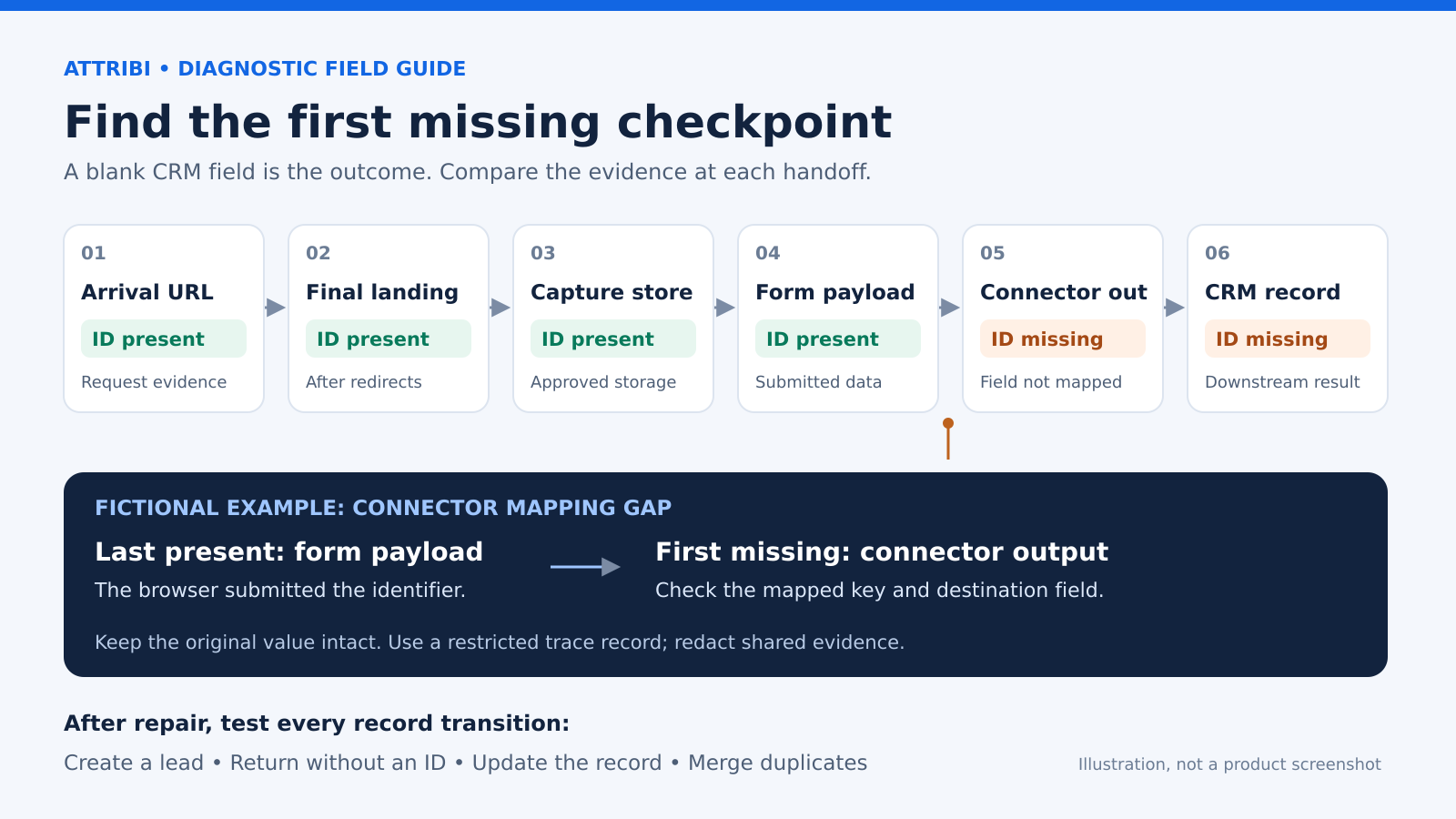
Original diagnostic diagram. This fictional example isolates a connector-mapping gap; it is not a product screenshot.
Branch 1: MSCLKID is absent from the arrival URL
First verify that the journey actually began with a Microsoft ad click. A manually entered address, an organic search result, or a bookmarked page is not evidence of a missing ad parameter.
Next inspect the click-ID setting in the correct advertising account. Microsoft says MSCLKID auto-tagging is enabled by default, but it can be disabled. Check its current state rather than relying on the default. Microsoft's auto-tagging documentation
Do not use the presence of UTMs as the test. Microsoft documents UTM auto-tagging separately. A URL containing utm_source or utm_campaign can still lack msclkid.
Inspect the earliest request evidence available. The address bar shows the URL after navigation, and a site may already have redirected or cleaned it. If the earliest site request contains the parameter, move to the next branch. If you cannot observe what arrived, mark that checkpoint "unknown"; absence from a later screenshot cannot establish where the loss occurred.
Branch 2: The parameter disappears during navigation
Compare each incoming URL with the next redirect destination. Look for a particular rewrite that preserves the path while dropping the query string, or an allowlist that retains UTMs but excludes the click ID.
Test the routes customers actually reach:
- HTTP-to-HTTPS and hostname redirects
- Country or language routing
- Trailing-slash and legacy landing-page redirects
- A short link or tracking intermediary
- Client-side navigation that replaces the visible URL
These are diagnostic candidates, not claims that any one route always removes parameters. The useful evidence is a before-and-after comparison for the same request chain.
For a synthetic test, add an unrelated harmless query parameter alongside the marker. If both disappear, investigate general query-string handling. If only the marker disappears, inspect selective filtering or field-specific logic.
Define the repair narrowly: preserve the required parameter through the authorized landing journey. Avoid forwarding every query string to every destination, especially where a URL may contain personal data or authentication material. Retest the redirect path without weakening existing privacy controls.
Branch 3: The URL has MSCLKID, but capture does not
Inspect the moment capture runs. Is the parameter still available then? Does the code execute on this landing page? Is capture waiting for consent? Did a script fail before the value was recorded?
A delayed script can encounter a different URL from the one the server initially received. Likewise, a form can render before its tracking fields are populated. Compare timestamps and execution order instead of assuming that seeing both elements on the page proves they interacted.
Then check persistence against the documented design. Record where the value should live, which origin can read it, and when it should be replaced or removed. Test a second page and a later visit without another click parameter.
One especially useful check is a blank overwrite: the original visit has a value, but a later page has none and writes an empty value over the stored identifier. That is different from never capturing it. Keep the original evidence so the two cases remain distinguishable.
If a new genuine ad click arrives, follow your documented selection rule and retain enough history to explain the chosen identifier. Do not quietly change that rule while repairing a transport bug.
Branch 4: Capture works, but the form does not send the ID
Inspect the submitted request, not only the hidden field in the page. A value can appear in the rendered form while the form library submits a separate data model that omits it.
Compare three things immediately before submission:
- The captured identifier available to the page.
- The form's internal field value.
- The network payload actually sent.
If the first two contain the value but the third does not, investigate serialization, field registration, and the form vendor's supported submission mechanism. If the field becomes empty after rendering, inspect whether a component rerender resets it.
For a multi-step form, test the final submission. A value present on step one does not prove it survives a fresh component, a new page, or the transition that creates the lead.
Cross-origin forms require an explicit, supported handoff. Do not assume a tracking script on the parent page can inspect a separately hosted iframe or that storage automatically follows a visitor to another domain. Use the form provider's documented integration path and verify the received payload.
Attribi's tracker script reference specifically identifies cross-origin iframes and certain multi-step flows as cases requiring manual conversion capture. Its automatic capture can fire when an email field loses focus, so an Attribi lead and a completed form submission are not necessarily the same event. Compare the correct event before calling the records inconsistent.
Branch 5: The form sends MSCLKID, but the CRM is blank
Compare the connector's inbound and outbound records for the same submission. Check the mapping at the exact point where the identifier stops appearing.
The highest-value questions are specific:
- Does the incoming key match the configured mapping, including spelling and case where the software requires it?
- Is the destination the intended object's internal property, rather than a similarly named display field?
- Does the connection have permission to write that property?
- Does the connector omit unrecognized fields or transform the value?
- Does an update action behave differently from a create action?
A successful connector run may mean it created a contact using the fields it recognized. It does not establish that every input field was written. Inspect the destination record directly and read field-level errors or warnings when available.
Next confirm the record association. The identifier might be on a contact while the conversion workflow reads an opportunity, or on a duplicate lead that later gets merged. Trace the actual object IDs through the integration in your restricted diagnostic record.
If the value was initially present, inspect field history or successive payloads. A scheduled sync, enrichment step, merge rule, or later blank submission may have replaced it. Repair the specific update behavior and test both new-record and existing-record paths. Do not bulk backfill until you know the source and destination association is correct.
Considering a different connection workflow? Review Attribi's Microsoft Ads integration against the capture and CRM handoffs you have documented.
Branch 6: The CRM has the ID, but the uploader cannot use it
The final checkpoint is the source record and field the uploader actually reads. Compare that read with the outbound conversion payload. If your integration uses Microsoft's offline conversion API, verify that the original value reaches MicrosoftClickId. Microsoft's field specification
Once the value reaches the correct outbound field unchanged, the missing-ID investigation has a clear stopping point. If reporting still differs, investigate account, goal, event timing, matching, and platform diagnostics separately using the broader setup guide.
Keep a transport failure separate from an attribution rejection in your incident record. Otherwise, a correctly repaired CRM mapping can look broken simply because a different eligibility issue remains.
What Attribi covers, and what still needs verification
Attribi documents capture of MSCLKID on arrival and offline conversion uploads for Lead, Qualified, and Closed Won outcomes. Its Microsoft integration also documents matching identifiers beyond the click ID. Those capabilities do not establish that an arbitrary redirect, external form, or custom CRM mapping has preserved the original journey. Validate your specific path.
Two boundaries matter when evaluating the setup: Microsoft Ads spend import is not currently live in Attribi, and mapping an existing Microsoft conversion goal makes it count toward bidding. Review that change with the account owner. Current integration details
Verify the repair across record transitions
Repeat the failed path with one controlled change. Keep the same browser, consent state, route, and form version where practical. Then expand testing to the variants that could trigger the bug again:
- Create a new lead and confirm the intended field.
- Return without a click parameter and check that no unintended clearing occurs.
- Update an existing lead through the same form.
- Follow the real contact-to-opportunity association.
- Merge test duplicates using the normal workflow.
- Confirm the uploader reads the expected record and original value.
For genuine attribution validation, use a permitted process with legitimately captured advertising activity and an eligible business event. Synthetic transport results cannot prove attribution; Microsoft also says sandbox offline conversions are not attributed in sandbox performance reporting. Offline conversion testing notes
Close the issue when the failed handoff is explained, the repaired path passes, and the relevant update paths preserve the intended association. Save a redacted before-and-after trace and the responsible owner.
Need help evaluating the website-to-CRM connection? Book an Attribi demo with your redacted trace and the handoff you want to validate.
Frequently asked questions
Can I recover MSCLKID from UTMs?
No. Campaign labels cannot recreate a unique click identifier. Check authorized original request, form, or connector records for the captured value. Recovery requires evidence connecting that value to the correct journey and CRM record.
Does a missing MSCLKID prevent every offline conversion upload?
Microsoft's offline conversion specification allows MSCLKID to be omitted when supported hashed email or phone identifiers are provided for enhanced conversions. That is a separate matching route, with its own implementation and permission requirements, and does not guarantee attribution.
Should I retain the identifier for exactly 90 days?
Do not infer a universal storage lifetime from an advertising conversion window. Document retention for your implementation and privacy requirements. Microsoft's upload-age and goal-window rules determine conversion eligibility; they do not, by themselves, define your CRM field's retention policy.
What should I send to support?
Provide a redacted trace, affected route and form, timestamps, relevant field names, and the last-present/first-missing boundary. Include whether the failure affects creation, updates, or merges. Share sensitive raw evidence only through an approved secure support process.
Upload closed deals to Microsoft Ads automatically.
Attribi captures the msclkid, follows the lead through your CRM, and sends offline conversions as deals qualify and close.
No credit card. Free up to 500 visitors a month. New workspaces start with 30 days on Pro.