Import Salesforce Closed-Won Deals into Google Ads
By Rajesh Kumar, Founder, Attribi · · Updated
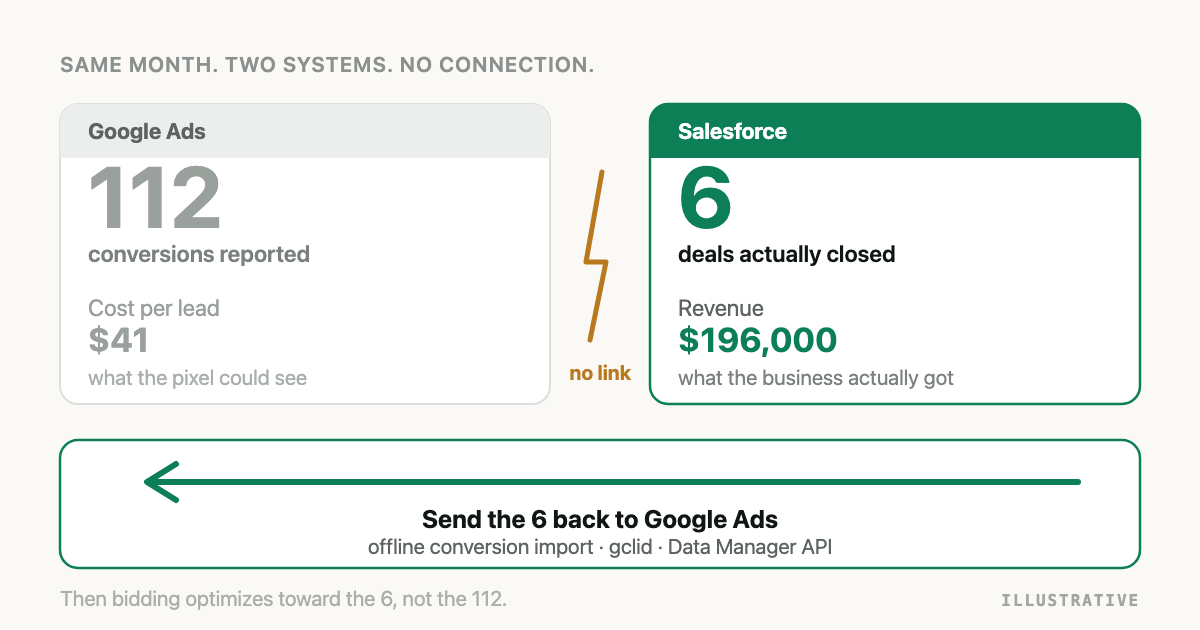
Google Ads counts a form fill and stops there. Your revenue arrives weeks later, in Salesforce, attached to an opportunity that Google has never heard of. Importing offline conversions closes that gap: when a deal reaches a won stage, you send it back to Google Ads with the click identifier that produced it, so Smart Bidding optimizes toward deals instead of forms. This guide covers the current setup end to end, including the two routes that have been retired and the one place the whole thing usually breaks.
The short answer
Capture the GCLID at the ad click, store it against the person, and when the Salesforce opportunity is won, upload the conversion through the Data Manager API into a Google Ads conversion action. If you have no click identifier, use enhanced conversions for leads, which matches on hashed email and phone instead, after you accept the customer data terms in Google Ads.
Two routes that no longer work
Most of the guides you will find describe one of these. Both are dead.
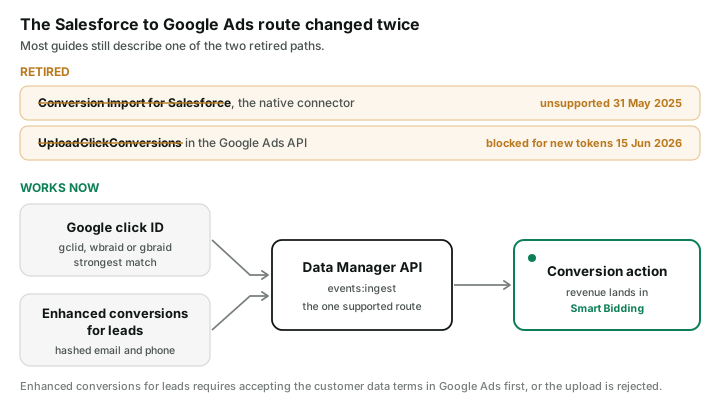
The native Salesforce connector. Google Ads used to offer Conversion Import for Salesforce, a built-in link that read your opportunities directly. Google stopped supporting it on 31 May 2025 and directs users to Data Manager instead. If your account still has a linked Salesforce data source from years ago, it is not doing anything for you.
UploadClickConversions in the Google Ads API. Since 15 June 2026, these requests fail if the developer token sent no offline conversion upload requests between 17 December 2025 and that date. Existing integrations that were uploading in that window keep working, so this reads as "everything is fine" right up until you build something new and it does not work. New builds go to the Data Manager API.
Step 1: Create the conversion action
In Google Ads, create a conversion action with Import as the source, then choose whether it records a value. Two settings matter more than the rest:
- Count: use "one" for a closed deal. "Every" is for repeatable purchases and will inflate a B2B pipeline.
- Click-through conversion window: set it to match your sales cycle, up to the 90 day maximum. A deal that closes outside the window is not counted, no matter how correct your upload is.
Note the numeric conversion action ID. You will need it, and the Data Manager API wants the plain
number, not the full customers/.../conversionActions/... resource name.
Step 2: Capture the GCLID, and keep it alive
This is where almost every Salesforce implementation loses.
The GCLID arrives as a query parameter on the ad click. You capture it into a hidden form field and store it on the Salesforce Lead. So far so good. Then the Lead is converted, and a Contact and an Opportunity are created from it.
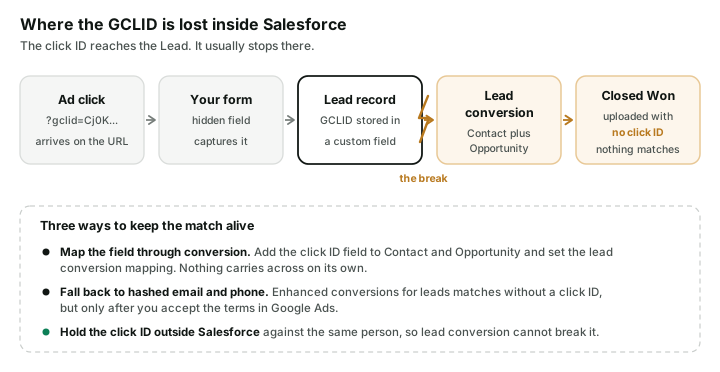
Custom Lead fields do not travel through conversion on their own. You have to create the matching field on Contact or Opportunity and configure the lead conversion field mapping. If you skip it, the GCLID sits on a converted Lead record nobody queries, the Opportunity has no click identifier, and every upload matches nothing. The uploads still succeed. Google reports the file as processed. Nothing appears in your conversion column, and the reason is three objects upstream.
Two more constraints worth knowing before you design around GCLID:
- 90 days. A conversion uploaded more than 90 days after the last click will not be imported. For B2B cycles that regularly run past a quarter, some of your best deals are structurally unmatchable this way.
- Enhanced conversions for leads is stricter at 63 days, so the fallback path has a shorter reach than the click ID path, not a longer one.
Step 3: Decide between click ID and enhanced conversions
You do not have to choose. Send both when you have both.
| GCLID import | Enhanced conversions for leads | |
|---|---|---|
| Matches on | The click itself | Hashed email and phone |
| Match quality | Highest | Good, lower than a click ID |
| Upload deadline after click | 90 days | 63 days |
| Survives a missing click ID | No | Yes |
| Extra setup | Capture and store the GCLID | Accept the customer data terms in Google Ads |
The terms acceptance is not optional and not cosmetic. If you send user-provided data without
having accepted them, Google rejects the entire request, not the offending event, with
DESTINATION_ACCOUNT_ENHANCED_CONVERSIONS_TERMS_NOT_SIGNED. One unaccepted checkbox can take down
a whole night's batch.
Step 4: Send the conversion
Post to the Data Manager ingest endpoint:
POST https://datamanager.googleapis.com/v1/events:ingest
Authorization: Bearer {OAUTH_ACCESS_TOKEN}
{
  "destinations": [
    {
      "operatingAccount": {
        "accountType": "GOOGLE_ADS",
        "accountId": "1234567890"
      },
      "productDestinationId": "987654321"
    }
  ],
  "encoding": "HEX",
  "events": [
    {
      "eventTimestamp": "2026-08-20T14:03:00Z",
      "transactionId": "0065g00000ABCDE:closed_won",
      "conversionValue": 48000,
      "currency": "USD",
      "eventSource": "WEB",
      "adIdentifiers": { "gclid": "Cj0KCQjw_EXAMPLE" },
      "userData": {
        "userIdentifiers": [
          { "emailAddress": "b642b4217b34b1e8d3bd915fc65c4452" },
          { "phoneNumber": "b0b6d1a4c1b6a9d8f5e2c3a1b7d4e6f8" }
        ]
      }
    }
  ]
}
Details that cost people a day each:
conversionValueis the currency amount, not micros. The Google Ads API used micros for years, so this is an easy reflex to get wrong. 48000 means 48,000, not 0.048.productDestinationIdis the bare numeric conversion action ID. The resource name is rejected.- The Data Manager API takes only the OAuth bearer token. No developer token header, no login-customer-id header. It is simpler than the Google Ads API, which surprises people who have worked with the latter.
transactionIdis your deduplication key. Make it deterministic per deal and stage so a retried job cannot book the same revenue twice.- Hash email and phone with SHA-256, and format the phone in E.164 with the leading plus sign. Meta wants digits with no plus. If you are sending to both platforms from one codebase, these two rules will collide at some point. The Meta half of this loop is covered in Send Salesforce Closed-Won Deals Back to Meta Ads.
- The OAuth scope is
https://www.googleapis.com/auth/datamanager, which is separate from the olderadwordsscope. An existing integration's token does not carry it.
Step 5: Confirm it actually matched
Check the conversion action's status in Google Ads, not the API response. A 200 means Google accepted your request, not that it credited a click. Give it up to a few hours, then look for a rising count on that conversion action. If it stays at zero while your uploads succeed, work backwards: is the click identifier present on the record you uploaded, was the click inside the window, and did the deal close inside the conversion window you configured in step 1.
Doing this with Attribi
Attribi connects Salesforce and Google Ads and runs this loop for you. Connect Salesforce, pick the stages that mean qualified and won in your own org, connect Google Ads, and won deals upload automatically.
The part that matters most is step 2, and Attribi solves it structurally rather than with better field mapping.
The click identifier lives outside Salesforce. Attribi's tracker records the GCLID against the visitor at the moment of the click, on a first-party cookie set from your own domain, and keeps it attached to that person. When a Salesforce opportunity is won, Attribi matches the deal to that person and uploads with the click identifier it already holds. Lead conversion cannot break the link, because the link was never stored on a Lead record. This also means the click identifier survives the Opportunity and Contact objects never carrying it, which is the specific reason Salesforce implementations tend to fall back to email-only matching.
Two more things you get:
Multi-touch attribution. The upload tells Google what happened. It does not tell you where to spend. Attribi records the whole journey across channels and lets you read the same closed deal through first touch, last touch, linear, position-based, and data-driven models, so you can see which channel opened the deal and not just which one closed it.
Salesforce gets the attribution written back. Attribi provisions 16 custom fields on the Salesforce Lead object and fills them at capture: first and last touch source, medium and campaign, the attribution path, touchpoint count, landing page, referrer, and the click identifier. Your reps see the origin of every lead inside the record they already work in.
The same connection covers Meta, LinkedIn, Microsoft, TikTok, and Snapchat, each with its own hashing and payload rules handled for you.
Connect Salesforce and Google Ads free.
Attribi compared with a direct Salesforce to Google Ads build
| Direct build | Attribi | |
|---|---|---|
| Route | You build on Data Manager | Connect and map stages |
| GCLID survives Lead conversion | Only with correct field mapping | Held against the visitor, outside Salesforce |
| Enhanced conversions fallback | You implement it | Automatic, with the terms state surfaced |
| Whole-request terms rejection | You debug it | Detected, retried on the click ID path, flagged in the UI |
| Micros and E.164 formatting | You get it right per platform | Handled per platform |
| Other ad platforms | A separate build each | Same connection covers six |
| Multi-touch attribution | Not included | Five models across all channels |
| Attribution written into Salesforce | Not included | 16 fields on the Lead object |
| Renamed won stage | Silently stops | Read from the org's own won flag |
| Cost | Engineering time | Free tier, then paid plans |
If you run Google Ads only, your sales cycle fits inside 90 days, and you have engineering time to own the field mapping and the retries, a direct build is a reasonable choice. The recurring cost is maintenance, and it is paid in silence: these integrations fail without erroring.
Frequently asked questions
Does the Salesforce to Google Ads conversion import still work? The legacy native connector is no longer supported as of 31 May 2025. Google directs Salesforce users to Data Manager, and new API-based integrations use the Data Manager API rather than UploadClickConversions.
Why do my uploads succeed while my conversion count stays at zero? Almost always a missing click identifier on the uploaded record. The most common cause in Salesforce is that the GCLID was stored on the Lead and never mapped through lead conversion to the Contact or Opportunity.
Can I import a Salesforce deal that closed six months after the click? Not with a GCLID. Google will not import a conversion uploaded more than 90 days after the last click, and enhanced conversions for leads is limited to 63 days. Long-cycle deals need a mid-funnel signal, such as a qualified stage, in addition to the won event.
What does DESTINATION_ACCOUNT_ENHANCED_CONVERSIONS_TERMS_NOT_SIGNED mean? You sent user-provided data before accepting the customer data terms in your Google Ads conversion settings. Google rejects the entire request rather than the single event, so the whole batch fails until the terms are accepted.
Should I send the click ID or hashed customer data? Send both when the record has both. The click identifier gives the strongest match and the hashed data covers the records where the click identifier is missing or the click has aged out.
Is conversionValue in micros? No. The Data Manager API takes the plain currency amount. Micros are a Google Ads API convention and sending them here inflates values by a million.
The takeaway
Two of the three routes into Google Ads have closed in the last eighteen months, so the first job is making sure you are building on the one that is still open. After that, everything depends on whether a click identifier can survive the trip from the ad to a won opportunity, across a Lead conversion that discards custom fields by default. Solve that, and Smart Bidding starts optimizing toward revenue instead of forms. Try Attribi free, or follow the steps above and build it yourself.