Send Salesforce Closed-Won Deals Back to Meta Ads
By Rajesh Kumar, Founder, Attribi · · Updated
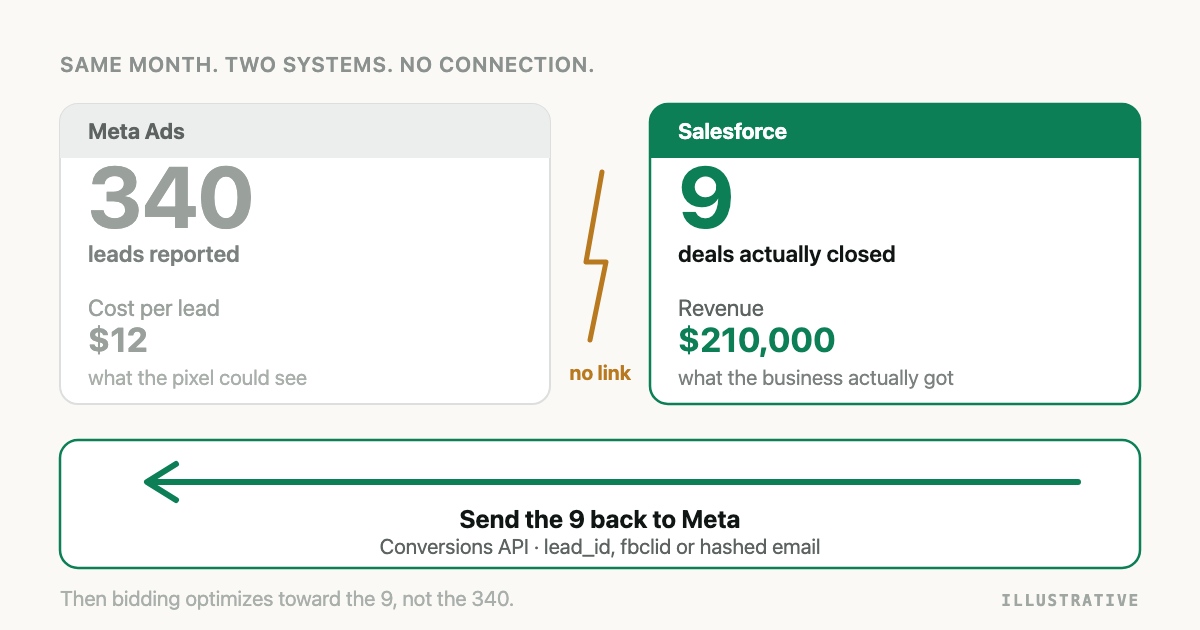
If your Meta ads generate leads that your sales team closes in Salesforce weeks later, Meta never finds out. It optimizes toward whoever fills in the form, because a form fill is the last thing it can see. The fix is to send the Salesforce outcome back: when an opportunity reaches a won stage, post a conversion event to Meta through the Conversions API with an identifier that ties it to the original ad click. This guide covers the whole setup by hand, including the parts that usually break, and then shows where a tool saves you the maintenance.
The short answer
There is no native Salesforce connector for Meta. You send the data yourself through the
Conversions API, using a dataset in Events Manager, and you match the event to a person using
the Meta lead ID, the fbclid from the ad click, or a hashed email and phone number. Salesforce
triggers the send when an opportunity changes stage.
What changed in 2025, and why most guides are wrong
If you find a tutorial that tells you to create an offline event set and upload a CSV, close it. That path no longer exists.
- Meta's Offline Conversions API was discontinued on 14 May 2025. Graph API v16.0 was the last version that supported it.
- Offline event sets were migrated into datasets. What used to be called a Pixel ID is now a Dataset ID, and it is the same identifier you use for web events.
- Every offline conversion, including CRM events, now goes through the standard Conversions API. There is no separate endpoint and no separate event set to create.
The practical consequence: your Salesforce integration and your website tracking send to the same dataset. That is a feature, not a quirk, because Meta deduplicates and attributes across both.
What you need before you start
- A Meta dataset in Events Manager and its Dataset ID
- A system user access token with the
ads_managementpermission - Agreement on which Salesforce stages mean "qualified" and which mean "won"
- At least one identifier stored on the Salesforce record (this is the part that decides whether any of this works)
- A place to run the code: a Salesforce Flow calling an external service, an Apex callout, or a middleware job that polls Salesforce
Step 1: Work out which identifier you can actually send
This is the step that determines your results, and it is the step most teams skip. Meta can only credit an ad if it can tie your event back to a person it showed that ad to.
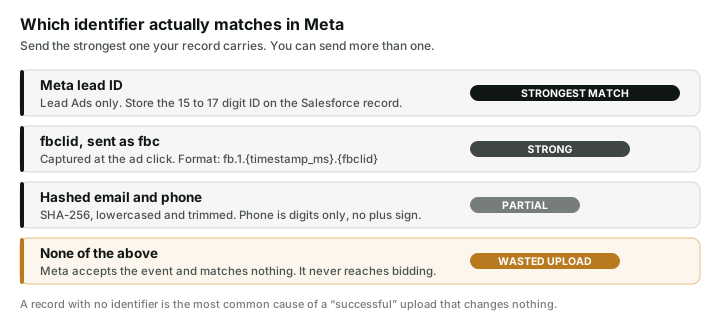
If your leads come from Meta Instant Forms, store the Meta lead ID (a 15 to 17 digit number) on the Salesforce record when the lead is created. Sending it back later is close to a guaranteed match, because it identifies the exact form submission.
If your leads come from your own landing page, capture the fbclid query parameter into a
hidden form field and store it on the Lead record. Meta expects it wrapped in the fbc format:
fb.1.{timestamp_in_milliseconds}.{fbclid}.
Always send hashed email and phone as well. They cost nothing to include and they catch the cases where the click identifier is missing or stale. Hash with SHA-256 after lowercasing and trimming. For Meta, phone numbers are digits only, with no plus sign and no spaces, which is different from what Google and Microsoft expect. Getting this wrong produces a hash that matches nothing, and Meta will not tell you.
Step 2: Map Salesforce stages to Meta events
Meta has no configurable conversion actions. Events are identified by name, so the mapping is a decision you make rather than something you set up in the interface.
A workable default:
| Salesforce stage | Meta event | Why |
|---|---|---|
| Qualified, SQL, Discovery | Lead | Enough volume to train bidding |
| Closed Won | Purchase | Carries the real revenue value |
Two cautions. First, do not detect the won stage by comparing against the literal text
Closed Won. Many orgs rename it, and a rename silently stops your revenue events. Read the
IsWon flag on OpportunityStage instead, which is true regardless of the label. Second, closed
deals are often too few to train Meta's bidding on their own. Sending a qualified-stage event as
well gives the algorithm a higher-volume signal to learn from while the revenue event supplies the
value.
Step 3: Build the event
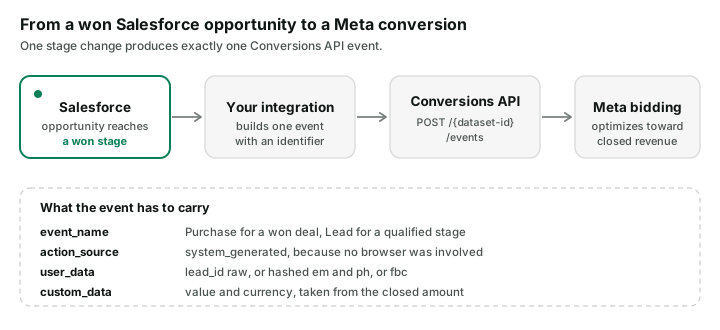
Post to the dataset's events edge:
POST https://graph.facebook.com/v21.0/{DATASET_ID}/events?access_token={TOKEN}
{
  "data": [
    {
      "event_name": "Purchase",
      "event_time": 1756339200,
      "action_source": "system_generated",
      "event_id": "0065g00000ABCDE:closed_won",
      "user_data": {
        "lead_id": "1234567890123456",
        "em": ["b642b4217b34b1e8d3bd915fc65c4452"],
        "ph": ["b0b6d1a4c1b6a9d8f5e2c3a1b7d4e6f8"]
      },
      "custom_data": {
        "value": 48000,
        "currency": "USD",
        "lead_event_source": "Salesforce",
        "event_source": "crm"
      }
    }
  ]
}
The fields that trip people up:
action_sourcemust besystem_generated, notwebsite. No browser was involved. Sendingwebsitefor a CRM event misrepresents where it happened.event_timeis a Unix timestamp in seconds, and it should be the moment the deal closed, not the moment you ran the job. Meta rejects events older than seven days, which matters if you are backfilling.lead_idis sent raw, not hashed. Every other identifier inuser_datais hashed. This one is not, and hashing it by mistake breaks the strongest match you have.lead_event_sourceandevent_sourcetell Meta the event came from a CRM. Omit them and your CRM events will not be usable for lead optimization.event_idis your deduplication key. Use something deterministic and unique per deal and stage, like the opportunity ID plus the stage name, so a retry does not double-count revenue.
Step 4: Verify, and keep verifying
Send one event and check Events Manager. Look for three things, in this order:
- The event appears at all. Meta returns HTTP 200 with
events_received: 1even when nothing matched, so a successful response proves delivery and nothing more. - The match rate. Events Manager shows how many events were matched to a person. If this is near zero, your identifiers are the problem, not your code.
- Event Match Quality. Meta scores each event source. A low score means your hashes are malformed or you are sending too few identifiers.
A 200 response with a zero match rate is the single most common outcome of a first attempt, and it looks exactly like success from the outside.
If an existing connection stops producing the results you expect, use our Salesforce to Meta troubleshooting guide to work from the missing evidence to the next test.
What breaks this in production
The Lead-to-Opportunity conversion. Your fbclid and Meta lead ID live on the Lead record. When
a Lead converts, custom fields do not travel to the Contact or the Opportunity unless you map them
explicitly. Most teams discover this months later, when they wonder why only self-serve deals ever
match.
Renamed stages. A sales ops change to a stage name silently ends your revenue events. Nothing errors.
Token expiry. System user tokens can be invalidated by permission changes and password resets. The sends fail quietly unless you are watching for it.
Retries and duplicates. Without a stable event_id, a retried job books the same deal twice,
and your reported return on ad spend drifts upward.
Currency. Multi-currency orgs report opportunity amounts in the record currency. Send the currency with the value, or a deal worth 48,000 AED is read as 48,000 USD.
One platform at a time. Everything above is Meta only. Google, LinkedIn, and Microsoft each have a different endpoint, a different payload, and different hashing rules. Phone formatting alone differs across all of them. Google's route is the most disrupted of the set, having changed twice since 2025, and it is covered in Import Salesforce Closed-Won Deals into Google Ads.
Doing this with Attribi
Attribi connects Salesforce and Meta and runs the loop above for you. Connect Salesforce, pick the stages that mean qualified and won in your own org, connect Meta, and closed deals upload automatically as offline conversions.
Three things you get that a hand-built Meta integration does not give you.
First-party click capture that survives lead conversion. Attribi's tracker records the click identifier against the visitor at the moment of the click and holds it outside Salesforce, on a first-party cookie set from your own domain. The identifier is attached to the person, so a Lead being converted into a Contact and an Opportunity cannot break the link. This is the failure mode that quietly costs the most, and it is structural rather than something you can fix with a better script.
Multi-touch attribution, not just an upload. The upload tells Meta what happened. It does not tell you where to spend. Attribi records the full journey across channels and lets you read the same closed deal through first touch, last touch, linear, position-based, and data-driven models, so you can see which channel opened the deal rather than only which one closed it.
Your Salesforce records get richer. Attribi provisions 16 custom fields on the Salesforce Lead object and fills them at capture time: first and last touch source, medium and campaign, the full attribution path, touchpoint count, landing page, referrer, and the click identifier. Your sales team sees where each lead actually came from inside the record they already work in.
The same connection also feeds Google, LinkedIn, Microsoft, TikTok, and Snapchat, so the work you do once for Meta covers the other five.
Connect Salesforce and Meta free.
Attribi compared with a direct Salesforce to Meta build
| Direct build | Attribi | |
|---|---|---|
| Build and maintain the CAPI integration | You write and own it | Connect and map stages |
| Click identifier survives Lead conversion | Only if you map fields correctly | Held against the visitor, outside Salesforce |
| Hashing rules per platform | You implement each one | Handled per platform |
| Other ad platforms | A separate build for each | Same connection covers six |
| Multi-touch attribution | Not included | Five models across all channels |
| Attribution written back into Salesforce | Not included | 16 fields on the Lead object |
| Retry, deduplication, failure visibility | You build it | Built in, per platform and per stage |
| Renamed won stage | Silently stops | Read from the org's own won flag |
| Cost | Engineering time | Free tier, then paid plans |
A direct build is genuinely the right answer in one case: you run Meta and nothing else, your leads come from Instant Forms so the lead ID is always present, and you have engineering time to own it. Outside that case, the maintenance is the expensive part, and it is recurring.
Frequently asked questions
Does Salesforce have a native Meta offline conversions integration? No. Meta provides no first-party Salesforce connector. You send events yourself through the Conversions API, or you use a tool that does it for you.
Is the Meta Offline Conversions API still available? No. It was discontinued on 14 May 2025, and Graph API v16.0 was the last version to support it. Offline event sets became datasets, and all offline events now go through the standard Conversions API.
Which action_source should a CRM conversion use? Use system_generated. The event did not
happen in a browser, so website is inaccurate and can distort how Meta interprets the event.
Can Meta match a closed deal without any click ID? Yes, using hashed email and phone, though the
match rate is lower than with a Meta lead ID or an fbclid. Send every identifier the record
carries rather than choosing one.
Why does Meta report my events as received but nothing changes in the ad account? Meta returns a success response for a well-formed event even when it matches nobody. Check the match rate and Event Match Quality in Events Manager rather than trusting the API response.
How do I stop a retried job double-counting revenue? Set a deterministic event_id per deal and
stage, such as the opportunity ID combined with the stage. Meta deduplicates on it.
The takeaway
Sending Salesforce outcomes to Meta is not difficult in the way people expect. The API call is short. The hard parts are keeping an identifier attached to the person from the ad click all the way through to a won opportunity, and noticing when it silently stops working. Get the identifier right and the rest follows. Try Attribi free if you would rather not own that maintenance, or use the steps above if you would.