Zoho CRM to Google Ads Offline Conversions: Match Won Deals to Ad Clicks
By Rajesh Kumar, Founder, Attribi ·
A salesperson marks a Zoho Deal as won. The amount is correct, the customer is real, and the campaign report still shows a collection of form submissions.
Connecting Zoho CRM to Google Ads offline conversions can close that reporting gap. It also creates several places for a valid sale to disappear: the click identifier, the relationship between the Contact and Deal, the stage definition, and Google's processing rules.
Start with one question: can you follow a single eligible won deal from its original identifier to the conversion action that should receive its value? This guide shows how to build that trail, choose an upload route, and verify the result before using it to guide spend.

Can Zoho CRM send offline conversions to Google Ads?
Yes. There are three supported routes worth evaluating:
- Zoho's Google Ads integration. Zoho documents importing campaign information and exporting CRM sales outcomes. Its setup includes authorization, conversion configuration, auto-tagging, and website/form tracking. Zoho's integration overview
- Google Ads Data Manager's Zoho connection. Google supports Zoho as a direct source for offline conversions and enhanced conversions for leads. Its instructions include lifecycle-stage selection, field mapping, and enabling Zoho history tracking with Module Customization permission. Those are requirements for this Google-managed route. Google's Zoho setup guide
- Attribi. Connect Zoho and Google Ads to read CRM outcomes and upload them through Google's Data Manager API, with separate conversion actions for funnel stages. Attribi's Google Ads integration
If the requirement is confined to Google Ads, assess the direct routes first. If you also want campaign context in the CRM and an attribution workflow across connected ad platforms, evaluate Attribi against those needs.
Choose one production uploader for each business event. Two integrations sending the same sale through different conversion actions can inflate your total even when each integration handles its own retries correctly.
Considering the Attribi route? Review the Zoho integration against your pipeline before connecting it.
Separate four checkpoints
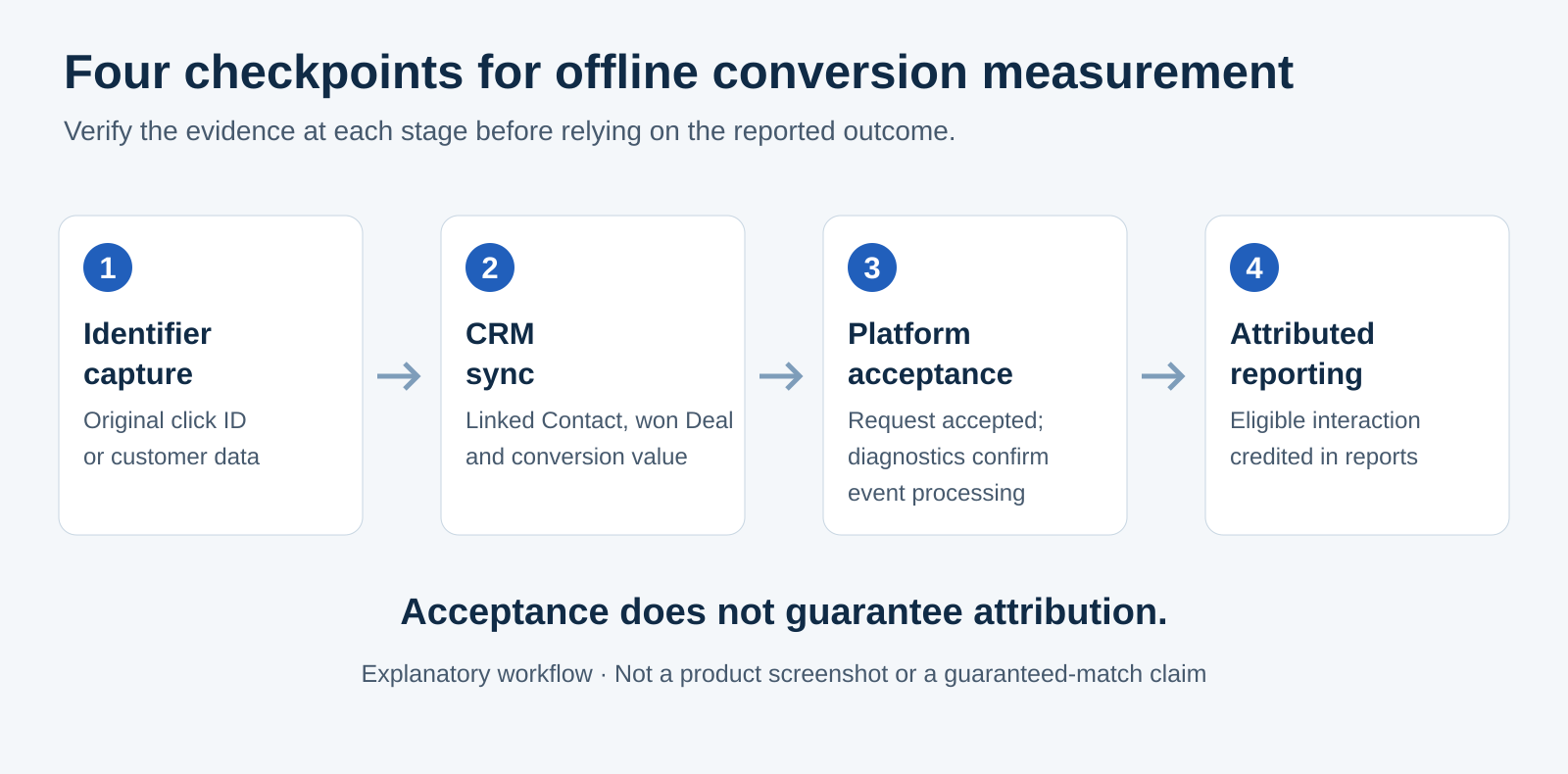
"The integration works" is too broad to test. Use four checkpoints:
- Identifier capture: the original Google identifier survives the landing page, form, and CRM handoff, or eligible customer data is available for enhanced matching.
- CRM sync: the uploader finds the intended Deal, linked person, stage, and value.
- Platform acceptance: Google accepts the request; subsequent diagnostics establish which events were processed.
- Attributed reporting: Google credits an eligible ad interaction and includes the conversion in the report you are reading.
A populated CRM field proves the first checkpoint only. A successful sync proves that a record moved. Neither establishes that Google attributed revenue.
Google's Data Manager API processes accepted requests asynchronously and provides separate diagnostics for completed processing. That distinction belongs in your agency's QA checklist and your client's reporting vocabulary. Google's diagnostics documentation
Write the mapping before changing settings
Use this worksheet with the person responsible for Zoho and the person responsible for paid media. The labels below are a planning template, not a claim that every connector exposes an editable mapping for every field.
| Mapping decision | What to document | Pass condition |
|---|---|---|
| Conversion owner | Google Ads account and conversion action | The action belongs to the correct client or conversion-owning manager account |
| Qualified outcome | Exact CRM stage and business definition | Sales applies the definition consistently |
| Won outcome | Exact final stage and when it becomes true | A genuine sale triggers the event once |
| Person relationship | Contact linked to the Deal | The identifier belongs to that person |
| Identifier | Captured click ID/type and eligible customer data | Values reach the uploader without truncation or substitution |
| Event time | Source of the actual milestone timestamp and timezone | It describes the milestone, not the upload job |
| Value | Amount, currency, and revenue definition | Finance and marketing interpret the same number the same way |
| Repeat events | Retry, reopened-deal, and repeat-purchase behavior | No unplanned extra conversion or lost distinct sale |
For a SaaS contract, decide whether Amount means annual contract value, total committed contract value, or something else. Do not alternate between monthly recurring revenue and annual value because different reps fill the field differently. Likewise, keep USD and EUR explicit; an amount without its currency is incomplete.
Set up the Attribi path without losing the CRM details
1. Confirm the Zoho organization and stage definitions
In Attribi, select the correct Zoho region and decide whether new Contacts may be created or only existing records enriched.
Qualified stage names must match Zoho exactly; an empty list disables qualified detection. The default won stage is Closed Won. Custom won names require onboarding configuration; there is currently no self-service won-stage picker.
Attribi creates 16 Contact fields. Automatic creation requires Zoho Standard or above; Free and Trial organizations need the listed fields added manually. A blank or zero Deal Amount produces no revenue conversion. These details are documented on the Zoho integration page.
Before rollout, review a sample of recent wins with sales operations. Include a normal win, a renamed final stage, a Deal without a linked Contact, and a Contact with multiple Deals. The purpose is to uncover your organization's exceptions before they become reporting exceptions. Ask how the connector handles any case the documentation does not establish.
2. Verify click capture independently
For GCLID-based imports, enable auto-tagging and preserve the identifier exactly, including case. Google requires the identifier to remain associated with the prospect. Google's GCLID setup requirements
With Attribi's CRM-side recovery path, your form supplies the Contact's MTA Click ID and MTA Click ID Type, documented as mta_clickid and mta_clickid_type. Attribi reads those fields; it does not populate them for you. Creating the fields therefore does not complete capture. Zoho click-ID recovery setup
Inspect the whole route: landing URL, redirects, embedded form, submitted payload, CRM Lead if used, Contact, and linked Deal. A form that writes only to a Lead field needs its downstream handoff checked. Test the actual paths visitors use, including navigating to another page before submitting.
For enhanced conversions for leads, follow Google's current tagging and data requirements. Google recommends retaining available GCLIDs and says they are required when a tag is not collecting user-provided data. Hashed customer data adds another matching input; it does not guarantee a match. Google's enhanced-conversion guidance
3. Map the Google actions and check bidding settings
Connect the intended Google Ads account, then create or map separate conversion actions for the stages you will measure. Attribi reads connected CRM outcomes daily and sends closed-won value through the Data Manager API. Hashed email and phone require Google's Enhanced Conversions terms; Attribi otherwise falls back to click-ID-only uploads. Google Ads connection details
Agree on the bidding impact before creating or mapping actions. When your account has no active conversion action in the same category, Attribi marks a newly created Google action Primary for its goal. When one already exists, the new action starts as Secondary so the existing action keeps driving bidding. Mapping an existing action promotes it to Primary without demoting other actions. Review the resulting settings with the account owner. Attribi's conversion-creation guide
For a measurement-only pilot, verify the action is secondary and absent from any active custom goal. Google can use a secondary action for bidding when it belongs to a custom goal. Review campaign goals as well as the action's label. Primary and secondary actions
Check Attribi's Google Ads integration with your account owner before saving the stage mappings.
4. Keep consent and timing in the implementation review
Confirm that your collection notices, permissions, and use of customer data meet Google's policies and the rules applicable to your business. Hashing is a processing step, not a substitute for permission. Teams handling EEA traffic should review Google's consent requirements alongside the offline-upload implementation. Google's EEA guidance
Timing is another eligibility check. Google's published guidelines exclude standard offline uploads more than 90 days after the associated last click and enhanced-conversions-for-leads uploads more than 63 days after it. Check the conversion action's own window too. For longer sales cycles, define an earlier meaningful milestone; retain the eventual win in CRM revenue reporting. Google's import guidelines
Trace one deal before reviewing an entire month
The following record is fictional. Its identifier is a placeholder, not a value to upload.
| Field | Illustrative record |
|---|---|
| Internal QA reference | ZOHO-QA-014 |
| Contact and Deal | One linked Contact; one new Deal |
| Ad click | October 5, 2026, 10:00 UTC |
| Identifier | The actual captured GCLID would be retained here |
| Qualified milestone | October 8, 2026, 14:00 UTC |
| Won milestone | October 16, 2026, 16:30 UTC |
| Won value | 12,000 EUR, defined as first-year contract value |
| Destination | The intended client's closed-won action |
First rehearse the field handoffs with clearly labeled synthetic data outside production uploads. A made-up GCLID can help test storage, but cannot demonstrate Google attribution. Validate attribution using an authorized, genuine eligible event, without manufacturing a sale or clicking your own ads to create evidence.
For that real record, capture four pieces of evidence: the identifier's original source, the linked CRM outcome, the upload result, and the relevant Google reporting result after processing. If your connector does not expose a timestamp or payload detail, ask for it rather than assuming which CRM date it used.
Attribi's published troubleshooting guide states that its success status means Google accepted the request; later processing failures are not currently retrieved into Attribi. Check Google's offline diagnostics as well. Attribi's upload-status limitations
Troubleshoot the first missing deal
Work from the earliest checkpoint without evidence:
- No identifier reaches the Contact: compare form and CRM values. Check field mapping, redirects, and Lead-to-Contact conversion before changing the Google action.
- No CRM outcome is selected: compare the recorded stage with the configured definition, then inspect amount, record relationship, and sync timing.
- Google rejects the upload: read the returned reason. Check conversion ownership, action configuration, identifier formatting, and event time. For agencies, a valid click from another client account is still the wrong click.
- Google accepts it, but reports no conversion: allow processing time, check diagnostics, inspect the date range, and review attribution eligibility and counting settings.
- Revenue appears twice: inventory every uploader and conversion action covering the same outcome. Separate retry duplication from two systems independently representing one sale.
Google says processing typically takes less than 12 hours, but GBRAID- and WBRAID-keyed conversions can take up to 72 hours. "Unknown clicks" can be expected for some enhanced-conversion uploads because the uploaded population may include organic or other-channel customers. An unexpectedly widespread failure warrants investigation. Google's troubleshooting guidance
Do not change a real conversion date or invent a click ID to make a rejected record pass.
Measure the result with the right denominator
Maintain separate counts for CRM wins, eligible outcomes, submitted events, processing failures, and Google-attributed conversions. They answer different questions.
For operational monitoring, track identifier completeness, missing values, time from stage change to upload, and unresolved failures. For marketing decisions, compare mature cohorts using qualified-lead cost and attributed won value, with a consistent revenue definition.
Use Google's "All conv. (by conv. time)" column when validating imports against milestone dates. Standard reports can place conversions against the earlier ad interaction, so an October win may affect an earlier campaign period. Import validation guidance
Avoid treating every gap between total CRM revenue and Google-attributed revenue as lost tracking. Other channels, eligibility, and attribution rules also affect the comparison. Establish a stable baseline before changing bidding goals, and keep qualified outcomes and won revenue readable as separate stages.
Frequently asked questions
Do we need Attribi to connect Zoho CRM to Google Ads?
No. Zoho's own integration and Google's direct Data Manager connection are alternatives. Choose based on the reporting scope, ownership, and maintenance your team needs.
Can this work without the Attribi website script?
Attribi supports CRM-only qualified and won uploads. You still need eligible identifiers and Google's applicable setup requirements. CRM-only operation also lacks the website journey history collected by the script, as the pixel-less setup guide explains.
Should every won deal appear in Google Ads?
No. A genuine CRM sale may be outside the eligible window, originate elsewhere, or lack sufficient matching data. Reconcile the expected eligible population before assessing a discrepancy.
Start with a verified revenue trail
Begin with one pipeline, one conversion-owning account, and one genuine outcome you can trace. Expand after the identifiers, stage selection, value, and reporting agree.
Start an Attribi workspace to evaluate the workflow with your team. Check the current plans for CRM revenue connections and ad-platform uploads before selecting your production setup.
Connect your CRM once. Every closed deal reaches your ad platforms.
Attribi pulls stage changes from your CRM, matches each deal to the lead it already recorded, and uploads qualified and closed won conversions to Google, Meta, LinkedIn, TikTok and Microsoft.
No credit card. Free up to 500 visitors a month. New workspaces start with 30 days on Pro.