Google Ads Offline Conversion Errors Tell You the Cause. The Silent Ones Don't.
By Rajesh Kumar, Founder, Attribi ·
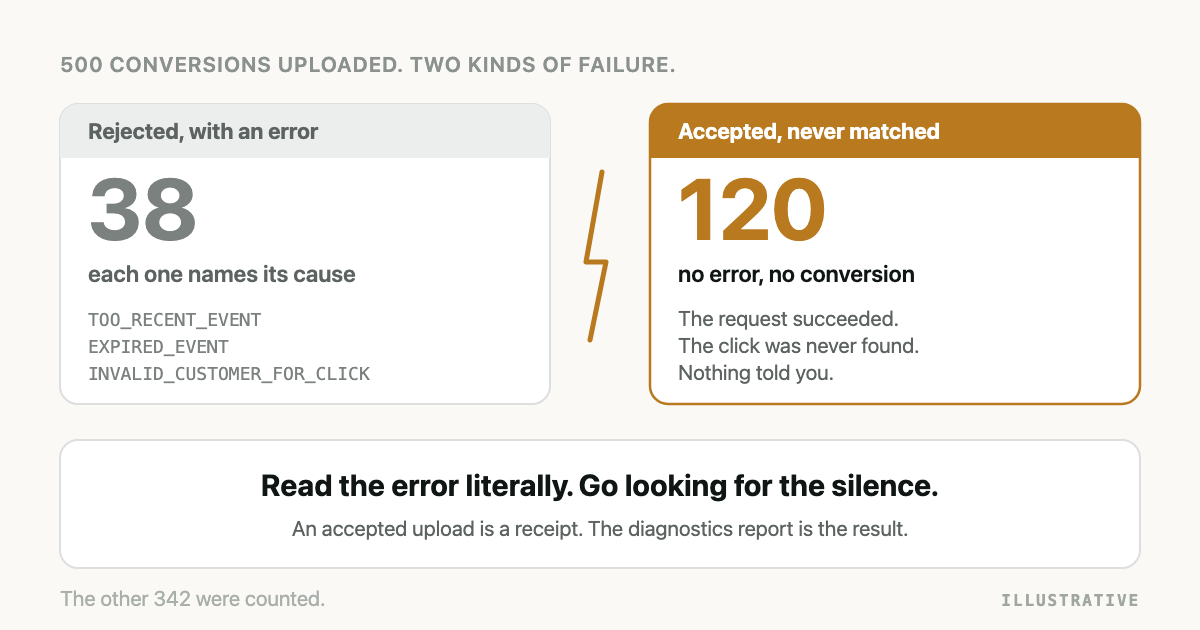
You upload a batch of CRM conversions to Google Ads and some of it comes back red. The error name looks like it was written by a compiler. You search for it, find three forum threads that disagree, and start changing things.
You do not need the forum. Almost all Google Ads offline conversion import errors come from four causes: Google cannot place the click, the timing is wrong, the account is not set up, or the row is malformed. The error name says which, if you read it literally. The dangerous failures are uploads Google accepts and never matches, which return no error.
Error names below are from Google's documentation as checked on 2026-10-05.
What is a Google Ads offline conversion import error?
A Google Ads offline conversion import error is a code Google returns when it refuses a conversion you uploaded from outside the website, such as a qualified lead or a won deal from your CRM. Each code names one specific reason: the click could not be found, the conversion is dated wrongly, the conversion action is not usable, or the data is malformed.
The same refusal has up to three names, depending on how you upload:
- The Google Ads API returns a value from the
ConversionUploadError enum,
such as
EXPIRED_EVENT. - The Data Manager API, where Google now sends new integrations, returns an
ErrorReason when
it rejects a request, and a
ProcessingErrorReasonlater, once it has processed the rows. - The Google Ads interface shows a plain label, listed on the Help page Fix discrepancies and errors in offline conversion imports.
If you have not chosen an upload route yet, start with the guide to Google Ads offline conversion import. The move from the old API to the new one is in the Data Manager API article.
How do you work out which error you have?
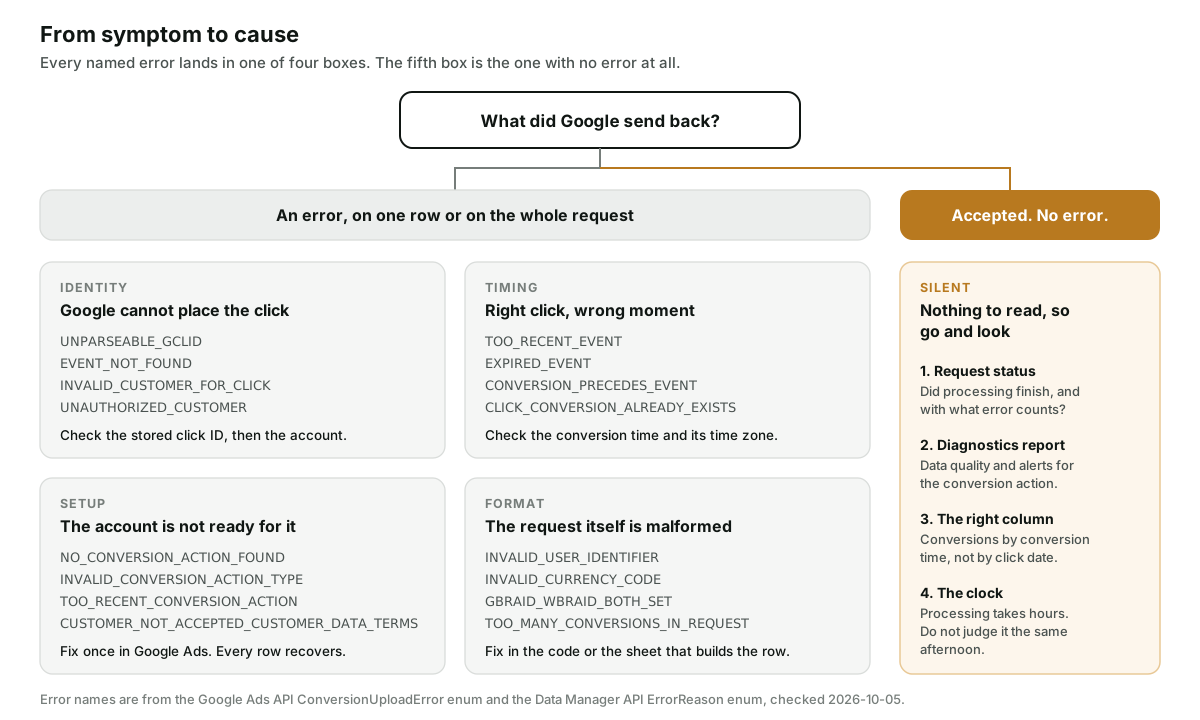
Ask one question first: did Google send anything back?
If it did, read the name literally. CONVERSION_PRECEDES_EVENT does not mean "something is wrong
with dates". It means the conversion time you sent is earlier than the click time Google holds.
That is one field and usually one time zone.
Then sort it into one of the four boxes. Setup errors are fixed once in Google Ads and every later row recovers. Format errors are fixed in whatever builds the row.
Google Ads offline conversion import errors, by cause
The first column gives the Google Ads API name. Where the Data Manager API or the interface calls it something else, that name follows in brackets.
Identity: Google cannot place the click
| Error | What it means | Usual cause | Fix |
|---|---|---|---|
UNPARSEABLE_GCLID (Data Manager: PROCESSING_ERROR_REASON_INVALID_GCLID) | The click ID could not be decoded. | The value was cut short by a field limit or altered on its way into the CRM. | Compare the stored value with the one on the landing page URL. |
EVENT_NOT_FOUND (interface: "Unknown clicks") | The conversion could not be attributed to a click. | A test value, another platform's click ID, or a lead that was never from Google Ads. | A few rows: ignore. Every row: the capture is broken. |
CLICK_NOT_FOUND | The email or phone could not be matched to a click. | Normal when the upload includes leads from other sources. | Google says to ignore it unless the count is higher than you expect. |
INVALID_CUSTOMER_FOR_CLICK (Data Manager: INVALID_AD_IDENTIFIER_FOR_ACCOUNT) | The click belongs to a different Google Ads account. | Uploading to a client account when conversions are tracked at the manager account, or the reverse. | Upload to the account that owns conversion tracking for that click. |
UNAUTHORIZED_CUSTOMER | The click belongs to an account your login cannot reach. | An agency login with no link to the client account. | Link the account, or use a login that has access. |
The fourth row eats afternoons, because the click ID is perfectly valid. With cross-account conversion tracking, conversion actions live on the manager account, and the upload has to go there. Google's Help page says it plainly: if your manager account created the conversion action, use it to upload.
Which of Google's three click IDs you hold also matters. See GCLID, GBRAID and WBRAID.
Timing: right click, wrong moment
| Error | What it means | Usual cause | Fix |
|---|---|---|---|
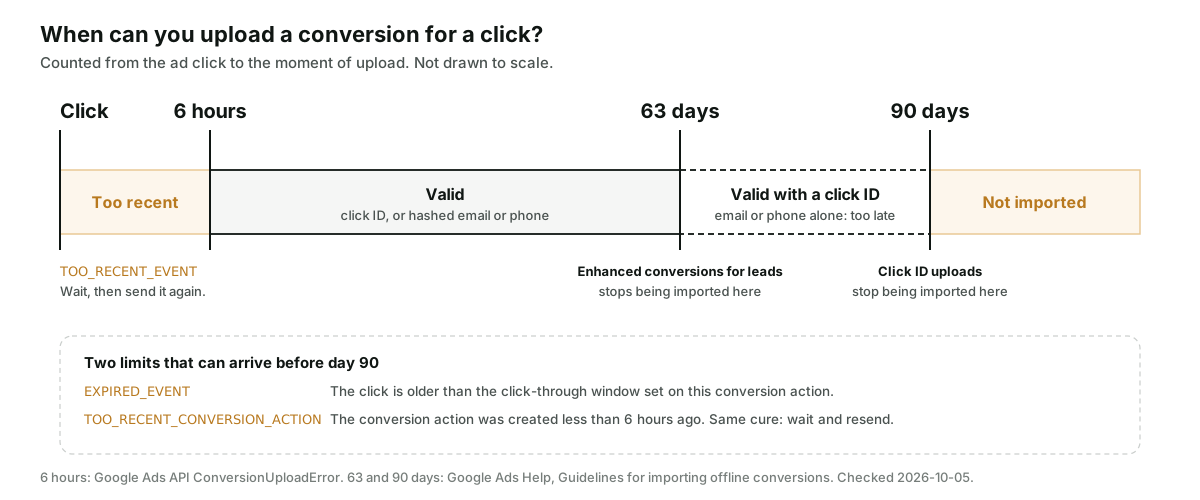
TOO_RECENT_EVENT (Data Manager: PROCESSING_ERROR_REASON_TOO_RECENT_CLICK) | The click happened less than 6 hours ago. | An upload fired the moment the form was submitted. | Send it again after 6 hours. |
EXPIRED_EVENT | The click is older than this conversion action's click-through window. | A deal that closed long after the click, or a short window. | Upload sooner, or upload an earlier stage. |
CONVERSION_PRECEDES_EVENT (interface: "Invalid conversion times") | The conversion time is earlier than the click. | A time zone error, or a date with no time that defaults to midnight. | Send the real conversion time with its offset. |
CLICK_CONVERSION_ALREADY_EXISTS (Data Manager: PROCESSING_ERROR_REASON_DUPLICATE_GCLID) | The same click and conversion time are already recorded. | A job that ran twice. | Nothing. The first one counted. |
There are two clocks at the far end, and people mix them up. One is Google's hard limit. Its
guidelines for importing offline conversions
say a conversion uploaded more than 90 days after the last click is not imported, and for enhanced
conversions for leads the limit is 63 days. The other clock is yours: the click-through window on
the conversion action. EXPIRED_EVENT is about that one, so it can fire well before day 90. If
your deals routinely close after either limit, no error fix helps, and
the article on sales cycles longer than 90 days
is the one to read.
For CONVERSION_PRECEDES_EVENT, Google's Help page suggests adding one or two days to the
conversion time or checking the time zone. Check the time zone. Padding the date clears the error
and files the conversion under the wrong day. The Google Ads API wants conversion_date_time as
yyyy-mm-dd HH:mm:ss+|-HH:mm,
offset included.
Setup: the account is not ready
| Error | What it means | Usual cause | Fix |
|---|---|---|---|
NO_CONVERSION_ACTION_FOUND (Data Manager: INVALID_CONVERSION_ACTION_ID) | The conversion action does not exist in this account. | Wrong account, a removed action, or a name where an ID belongs. | Confirm the action is enabled in the account you upload to. |
INVALID_CONVERSION_ACTION_TYPE | The conversion action is not set up for uploads. | The upload points at a website (tag) conversion action. | Use an action whose source is import from clicks. In the API its type is UPLOAD_CLICKS. |
TOO_RECENT_CONVERSION_ACTION (Data Manager: CONVERSION_ACTION_TOO_RECENTLY_CREATED) | The conversion action was only just created. | Creating it and testing it in the same sitting. | Wait 6 hours and send again. |
CONVERSION_TRACKING_NOT_ENABLED_AT_IMPRESSION_TIME (interface: "Conversion actions not active") | Conversion tracking was not enabled when the click happened. | Uploading history from before the account had a conversion action. | Nothing for those clicks. New clicks are fine. |
CUSTOMER_NOT_ACCEPTED_CUSTOMER_DATA_TERMS (Data Manager: DESTINATION_ACCOUNT_ENHANCED_CONVERSIONS_TERMS_NOT_SIGNED) | The customer data terms have not been accepted. | Hashed email or phone is in the upload and nobody ticked the box. | Accept the terms in the conversion settings. |
Setup errors are the cheapest to fix and the most expensive to miss, because they fail every row at once. The last one only appears when the upload carries hashed email or phone. That family of failures has its own article: enhanced conversions for leads not working.
Format: the row itself is malformed
| Error | What it means | Usual cause | Fix |
|---|---|---|---|
INVALID_USER_IDENTIFIER (interface: "User-provided data not hashed") | The hashed email or phone is not valid SHA-256 built to Google's rules. | Unhashed data, or hashing before normalising. | Normalise, then hash. |
GBRAID_WBRAID_BOTH_SET | Both gbraid and wbraid were sent on one conversion. | Code that fills every click ID field it has. | Send one. |
ONE_PER_CLICK_CONVERSION_ACTION_NOT_PERMITTED_WITH_BRAID | A gbraid or wbraid went to an action that counts one conversion per click. | A lead action set to count "One". | Use an action that counts every conversion. |
INVALID_CURRENCY_CODE (Data Manager) | The currency code is not supported. | A symbol or a blank where a code belongs. | Send the three-letter code from the deal. |
TOO_MANY_CONVERSIONS_IN_REQUEST (Data Manager: TOO_MANY_EVENTS) | The batch is too large. | Backfills. | At most 2,000 conversions per Google Ads API request, or 10,000 events per Data Manager request. |
An email hashed without Google's normalisation gives a string that looks valid and matches nobody. The exact rules are in how to hash emails for conversion uploads.
What about uploads that return no error at all?
This part matters more than the tables.
A success response is a receipt. Google's API
troubleshooting guide
says so: "A successful import response from the API does not necessarily mean the conversions have
been attributed." With the Data Manager API, a successful response means the request was accepted.
The rows are processed afterwards, and identity and timing failures surface only then, under names
like PROCESSING_ERROR_REASON_CLICK_NOT_FOUND.
A partial failure can hide inside a success. The Google Ads API can return HTTP 200 for a
batch in which some rows were refused, with the refusals listed in a partial failure error. A job
that only checks the status code logs the whole batch as sent. On the Data Manager side the
equivalent is a final status of PARTIAL_SUCCESS.
The reports lag. Google's guidelines say imported conversions take about 3 hours to show up. Its errors page says processing typically takes less than 12 hours and can take up to 72 hours for conversions keyed on GBRAID or WBRAID. Do not judge an upload the same afternoon.
You may be looking at the wrong date. The standard columns report a conversion on the date of the click. A deal uploaded today for a click three weeks ago lands three weeks back. Google recommends the "All conv. (by conv. time)" column for verifying imports.
The counting setting can discard it. If the conversion action counts "One" per click, a second conversion for the same click is dropped without an error.
Where do you see what Google did with an upload?
Three places, in the order I would check them.
- Offline data diagnostics, in the Google Ads interface. Open the Conversion summary page, hover over the status of the conversion action and choose Go to diagnostics. Google grades the data as Excellent (90 percent or more of events well-formed and valid), Good (70 to 90) or Needs attention (below 70), groups alerts by error type, and shows the last 7 days or the last 7 jobs.
- The request status, on the Data Manager API. Keep the
requestIdfrom each response and callrequestStatus:retrieve. Google's diagnostics guide says to wait 30 minutes before the first check. The answer isPROCESSING,SUCCESS,PARTIAL_SUCCESSorFAILED, with a record count per error reason. - The count, by conversion time. After the delay, compare "All conv. (by conv. time)" for the conversion action with the number your CRM says you sent. A gap with no errors means unmatched clicks.
How Attribi handles these errors
Attribi is the tool I build. This is what its upload code does today.
- It reads Google's reason, not only the status code. When the Data Manager API refuses a
request with
DESTINATION_ACCOUNT_ENHANCED_CONVERSIONS_TERMS_NOT_SIGNEDand the lead has a click ID, we send the conversion again with the click ID only, and put an "Accept Enhanced Conversions terms" prompt on the Connections page. - It only retries what a retry can fix. A network failure, a 429 or a 5xx is flagged as retryable, and uploads that run through our job queue are sent again with exponential backoff. A rejected payload is never retried, because the same bad row produces the same error.
- It treats a partial failure as a failure. On the older Google Ads API path, an HTTP 200 that carries a partial failure error is recorded as failed, with Google's message.
- Reruns do not double count. Every Data Manager upload carries a transaction ID built from the lead and the stage.
- It separates "nothing to match" from "something broke". A lead with no click ID, email or phone is recorded against that lead and does not count against the health of your Google Ads connection.
Now the limits. Attribi does not yet call requestStatus:retrieve. When it marks a Google upload
as successful, Google accepted the request. That is the receipt, not the result. A row Google
later fails in processing, such as a click it cannot find, is not visible in Attribi today. You
would find it in Google's diagnostics report. Attribi also cannot repair a click ID that never
reached it.
What gets sent is on the Google Ads integration page, and the request payload is walked through in Import Salesforce Closed-Won Deals into Google Ads. Conversion uploads are a paid feature, and every new workspace starts with 30 days on the Pro plan with no card required, which is long enough to run real uploads and read the results.
Frequently asked questions
What does EXPIRED_EVENT mean in a Google Ads conversion upload? It means the click is older than the click-through window set on the conversion action you uploaded to. It is separate from Google's overall limit, under which a conversion uploaded more than 90 days after the last click is not imported. Upload sooner, or send an earlier funnel stage that happens inside the window.
How soon after a click can I upload its offline conversion? Wait at least 6 hours. Google returns TOO_RECENT_EVENT for a click that happened less than 6 hours ago and tells you to retry after that. The same 6 hour wait applies to a conversion action you have just created.
Why does Google Ads say the click was not found when the GCLID is correct? Usually because the click belongs to a different account than the one you uploaded to. With cross-account conversion tracking the conversion action lives on the manager account, and the upload has to go there. A click ID that was shortened or altered in the CRM produces a different error, UNPARSEABLE_GCLID.
How long do imported conversions take to appear in Google Ads reports? Google's guidelines say about 3 hours. Its troubleshooting page says processing typically takes less than 12 hours and can take up to 72 hours for conversions keyed on GBRAID or WBRAID. Check the "All conv. (by conv. time)" column, because the standard columns report by click date.
Where do I see offline conversion upload errors in the Google Ads interface? Open the Conversion summary page, hover over the status of the conversion action and choose Go to diagnostics. The offline data diagnostics page grades data quality as Excellent, Good or Needs attention and groups alerts by error type.
The takeaway
An error from Google is the good outcome. It names a cause, and most causes are fixed in one setting or one field. The upload to worry about is the one that came back clean. Keep the request ID, read the diagnostics report after the delay, and compare the count by conversion time with what your CRM sent. If you want the CRM side of that comparison kept for you, start a workspace on the 30-day Pro trial and map a qualified stage first.