Enhanced Conversions for Leads Fixes the Match. It Does Not Fix the Signal.
By Rajesh Kumar, Founder, Attribi ·
There is a recommendation sitting in most lead gen Google Ads accounts right now: turn on enhanced conversions for leads. You turn it on and wait a month. The diagnostics say "Good". The leads are exactly as bad as before. What went wrong?
Nothing went wrong. The feature did its job. It is just a smaller job than the name suggests. Enhanced conversions for leads improves how many of your conversions Google can tie back to an ad click. It has no opinion about which conversions you send. If the only thing you ever tell Google is "someone filled in a form", you now have a more accurate count of form fills, and bidding keeps chasing form fills.
This article covers what the feature does, the four ways it fails without telling you, and the part most setups skip: sending the outcome your sales team recorded, not the form.
What is enhanced conversions for leads?
Enhanced conversions for leads is a Google Ads feature that matches a conversion recorded in your CRM back to the ad click that produced the lead, using the email address or phone number the lead gave you. The data is hashed with SHA-256 before it is sent. It works alongside the click ID and covers the leads where the click ID was lost.
Google's own description is that it is "an upgraded version of offline conversion import". That phrasing matters. It is an upgrade to the import, so there has to be an import. More on that below.
If you would rather see it running against your own leads than read about it, you can connect your CRM and Google Ads to Attribi free and watch which uploads match.
How does the match actually work?
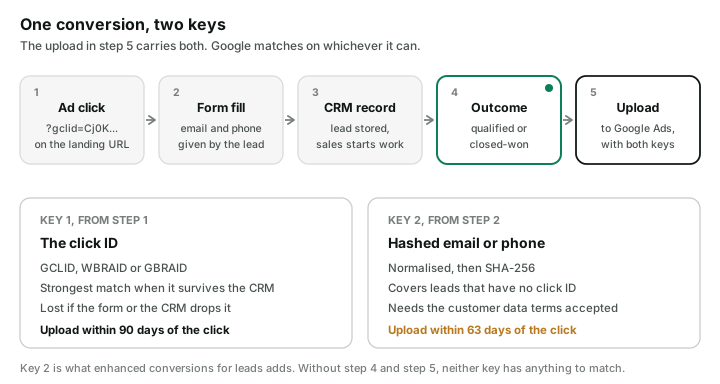
Standard offline conversion import has one key: the GCLID, the click identifier Google appends to your landing page URL. You capture it on the form, carry it through your CRM, and send it back with the conversion. If the GCLID survives the trip, the match is exact.
It often does not survive. The form has no hidden field for it. The CRM stores it on a lead record and drops it when the lead is converted to a contact. The person clicked the ad on a phone and filled in the form two days later on a laptop, so the click and the form never met.
Enhanced conversions for leads adds a second key. Per Google's documentation, the sequence is:
- Someone clicks your ad and lands on your site.
- They fill in a form. If the Google tag is set up for it, the tag sends a hashed copy of the email or phone to Google at that moment.
- The lead is stored in your CRM.
- Later, the lead converts: your team qualifies them, or the deal closes.
- You upload that conversion with the hashed email or phone. Google matches it against what the tag saw and against signed-in Google accounts.
Two details in that list decide whether it works.
The hash has to be built Google's way. Lowercase the email and trim the whitespace. For
gmail.com and googlemail.com addresses only, also remove the dots in the name and anything after a
plus sign, so Jane.Doe+Shopping@gmail.com becomes janedoe@gmail.com. Phone numbers go in E.164
format, with the plus sign and country code. Then SHA-256. Hash the wrong string and you get a
perfectly valid hash that matches nobody.
The click ID still goes in. Google says to include the GCLID "whenever possible" even with enhanced conversions running. The two keys are not alternatives. Send both and let Google use the stronger one.
What does it fix?
It fixes the leads you had already lost.
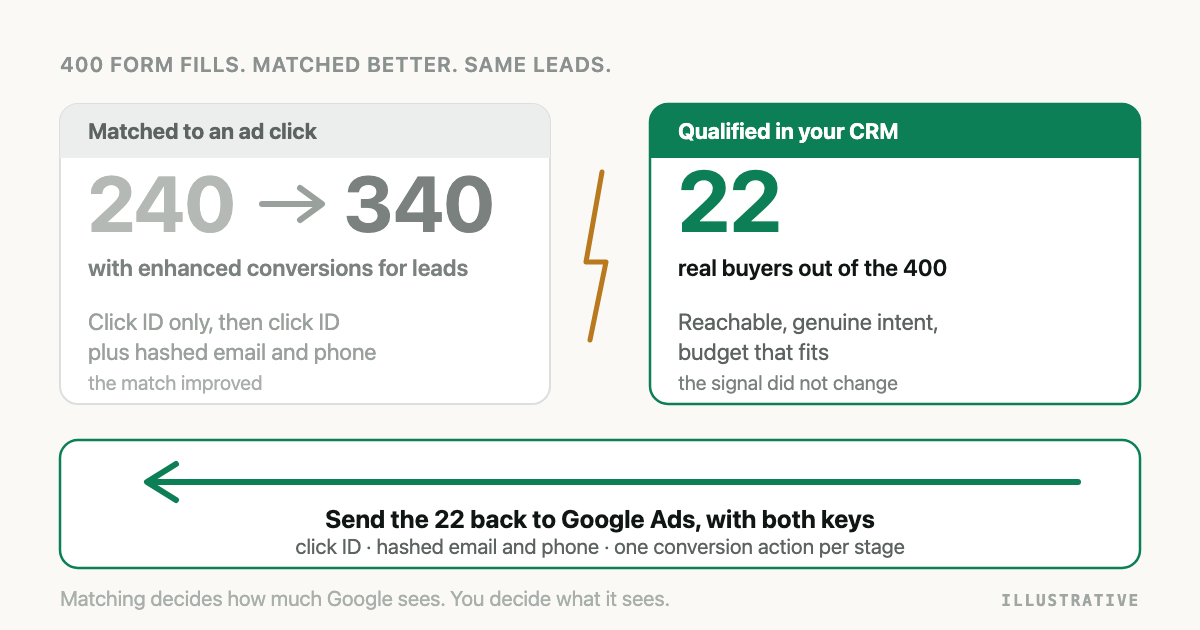
Here is an illustrative month. You get 400 form fills from Google Ads. On 240 of them the GCLID made it into the CRM. The other 160 have an email and a phone number and no click ID. Under plain offline import, those 160 are invisible to Google no matter what happens to them later. If your best deal of the quarter is among them, Google never learns which keyword found it.
With the second key, a share of those 160 can now be matched on email or phone. Not all of them. The person has to be recognisable to Google from the address or number they gave you, and a work email typed into a form is not always tied to a Google account. Google itself calls user-provided data alone "still useful", which is honest wording for "weaker than a click ID, better than nothing".
So the gain is real, and it is a gain in coverage. Keep that word in mind for the next section.
What does it not fix?
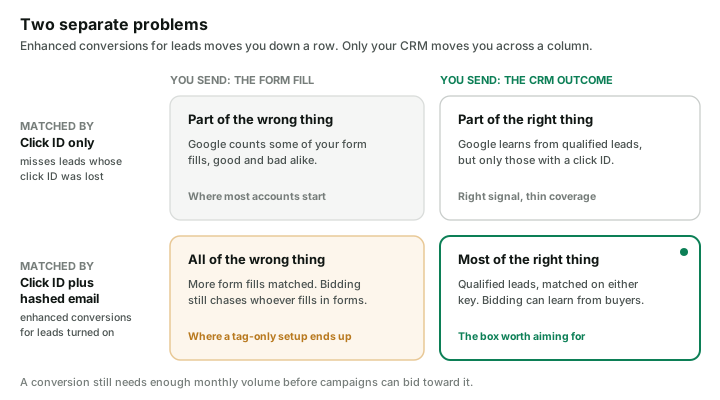
Coverage and signal are different problems, and this feature only touches the first.
Go back to the 400 form fills. Say your sales team works them and marks 22 as qualified: reachable number, real intent, budget that fits. The other 378 are job seekers, brokers, wrong numbers and people who wanted a brochure.
If the conversion you send Google is the form fill, then improving the match rate from 240 to 340 means Google now has a clearer picture of 340 form fills. Roughly 320 of them are the 378 you did not want. You have given the bidding system a sharper photograph of the wrong subject.
The usual way to end up here is a setup done entirely through the Google tag or Tag Manager. The tag part of enhanced conversions for leads is quick, and it feels like the whole job. But the tag only captures the hashed email at the form. It is step 2 of 5. If nothing is ever imported from the CRM, steps 4 and 5 never happen, and the feature has nothing to match. Google's diagnostics report even has an alert for this state: no attempted imports.
The signal problem is fixed by what you upload, and that is a decision about your funnel, not a setting in Google Ads:
- Upload the stage your sales team records, such as qualified, not only the form fill.
- Give that stage its own conversion action, so it can be the thing campaigns bid toward.
- Check there is enough of it. A conversion that happens four times a month is too thin for automated bidding to learn from, which is why closed deals alone rarely work as the target in long sales cycles. The reasoning is laid out in the lead-quality ladder.
One caution so I do not oversell this. Uploading CRM outcomes does not improve bidding by itself. It gives you a better conversion to bid toward. Campaigns only change behaviour once that conversion is the one they are optimizing for and it has the volume to support it.
If you want to see how many of your own form fills survive to a qualified stage, by campaign, Attribi shows that count next to what Google reported.
Enhanced conversions for leads vs offline conversion import
They get compared as if you pick one. You do not.
| Offline conversion import (click ID) | Enhanced conversions for leads | |
|---|---|---|
| What Google matches on | GCLID, WBRAID or GBRAID | Hashed email or phone |
| Where the key comes from | The landing page URL, captured by your form | The lead, typed into your form |
| What breaks it | The click ID never reaches the CRM record you upload from | Unaccepted terms, bad normalisation, an address Google cannot recognise |
| Latest upload after the click | 90 days | 63 days |
| Account setup | A conversion action | A conversion action plus accepting the customer data terms |
| Best used | Always, when you have the click ID | Always, as the second key on the same upload |
The row people miss is the fourth. The fallback has the shorter window. A deal that closes on day 75 can still be imported with a GCLID and cannot be imported on email alone. If your sales cycle runs past two months, enhanced conversions will not rescue your closed-won uploads. A mid-funnel stage that happens inside 63 days will.
The step-by-step build for one specific stack, including the request payload, is in Import Salesforce Closed-Won Deals into Google Ads.
Four ways it fails without telling you
None of these throw an error you would notice in the Google Ads interface.
1. The customer data terms were never accepted. Enhanced conversions for leads only works
after someone accepts Google's customer data terms in the conversion settings. When we built
Attribi's Google upload on the Data Manager API, the first request we sent with hashed emails came
back rejected. Not the one event: the whole request, with the reason
DESTINATION_ACCOUNT_ENHANCED_CONVERSIONS_TERMS_NOT_SIGNED. Every conversion in the batch,
refused because of one checkbox. If your upload job does not surface that, you find out weeks
later from an empty column.
2. The upload is late. Google will not import an enhanced conversion uploaded more than 63 days after the click. No warning. The conversion is simply absent.
3. The hash is wrong. Uppercase letters, a trailing space, a phone number without the country code, a Gmail address with its dots left in. Each one produces a valid-looking SHA-256 string that matches nothing. This is the hardest failure to see, because every individual upload succeeds.
4. Only the tag was set up. Covered above. The tag captures. It does not import.
To check where you stand, open Goals, then Summary, and select the Diagnostics tab. Google grades the setup as Excellent, Good, Needs attention or Urgent, and lists what it found. Imported conversions take about three hours to show up in the account, so do not judge a new upload in the first afternoon.
A setup order that works
- Accept the customer data terms in your Google Ads conversion settings. Do this first. It costs nothing and it removes failure number one.
- Create one conversion action per funnel stage you plan to send. Lead, qualified and closed-won is a sensible set.
- Capture the click ID on every form, and store it somewhere it will survive whatever your CRM does to lead records.
- Upload each stage when it happens, with the click ID and the hashed email and phone on the same event. Do not wait for month end. The 63 days are counting.
- After a week, read the diagnostics report. After a month, compare the count Google shows for your qualified conversion action with the count in your CRM.
- Only then decide which conversion action campaigns should bid toward.
How Attribi handles it
Attribi is the tool I build, so read this section knowing that.
When a lead reaches a stage you have mapped, Attribi uploads it to Google Ads through the Data Manager API with both keys on the event: the click ID its tracker captured at the ad click, and the hashed email and phone. Each of the three stages (lead, qualified, closed-won) goes to its own conversion action, and Attribi can create those conversion actions for you when you connect.
Two things it does that are specific to this article:
- It notices the unaccepted terms. If Google refuses a request because the customer data terms are not signed, Attribi resends it with the click ID only, so the leads that have one still match, and puts an "Accept Enhanced Conversions terms" prompt on your Connections page with a link to the right settings screen.
- It keeps the click ID outside the CRM. The click ID is held against the visitor from the moment of the click, so a CRM that discards custom fields on lead conversion does not break the match.
What it does not do: it cannot make Google recognise an email address Google has never seen, and a lead with neither a click ID nor a matchable identifier stays unmatched. Match rates on hashed data alone are lower than on a click ID. That is how the feature works, for everyone.
The detail of what gets sent is on the Google Ads integration page. Conversion uploads are a paid feature, and every new workspace starts with 30 days on the Pro plan with no card required, which is enough to run it on a real campaign and check the match yourself.
Frequently asked questions
Is enhanced conversions for leads the same as offline conversion import? No. Offline conversion import matches a CRM conversion to an ad click using the click ID. Enhanced conversions for leads adds a second way to match, using the hashed email or phone the lead provided. Google describes it as an upgraded version of offline conversion import, and both can be sent on the same upload.
Do I still need the GCLID if I use enhanced conversions for leads? Yes. Google recommends including the GCLID with uploaded conversions whenever possible. The click ID gives the most reliable match, and the hashed email or phone covers the leads where the click ID is missing.
How long do I have to upload an enhanced conversion for leads? 63 days from the last click. Google does not import enhanced conversions for leads uploaded after that. A standard offline conversion with a click ID has 90 days.
Why does my enhanced conversions for leads setup show as active while lead quality stays the same? Because the feature improves matching, not the choice of conversion. If the conversion you send is still the form fill, Google sees more of your form fills, including the poor ones. Lead quality changes only when you upload a CRM outcome, such as a qualified lead, and campaigns bid toward it.
Does enhanced conversions for leads work with only the Google tag installed? Only partly. The tag captures the hashed email or phone when the form is submitted. A conversion is recorded only when you later import the outcome from your CRM. With no imports, there is nothing for the tag data to match.
Is the customer data shared with Google in readable form? No. The email address and phone number are normalised and hashed with SHA-256 before they are sent, and Google matches on the hashed values.
The takeaway
Enhanced conversions for leads is worth turning on. It recovers leads that plain click ID import loses, and it costs one accepted checkbox and some care with hashing. Treat it as plumbing. It decides how much of your data reaches Google. You still decide what that data says. If you want the short route to both, try Attribi free and map a qualified stage on day one.