Pipedrive Attribution Reporting: Trace Campaigns to Won Deals
By Rajesh Kumar, Founder, Attribi ·
Pipedrive attribution reporting connects campaign evidence to the deals your sales team wins. Start with one row per deal, a defined reporting period and the deal's value and currency. Then compare first-touch and last-touch campaign views, keeping missing attribution visible. Pipedrive supplies the sales records and reporting tools; an attribution connection can supply additional campaign evidence. Your team still decides how to interpret and allocate credit.
A useful report lets a marketer answer three questions: which campaigns appear against won deals, what evidence supports that connection, and how much deal value remains unexplained?

Define the report before choosing a chart
Write a short specification that another person could use to reproduce the result:
- Unit: one unique Pipedrive deal ID per row.
- Outcome: deals marked won during the reporting period.
- Date basis: won time, with an explicit timezone and cutoff.
- Value: a consistently maintained contract-value field, with currency retained.
- Scope: named pipelines, regions and business types, such as new business versus expansion.
- Credit views: first touch and last touch, presented separately.
- Missing evidence: an "Unknown" category that remains in totals.
For example: "Won deal value, October 1 to 19, 2026, UTC, new-business pipeline, first-touch campaign, extracted October 20."
A deal created in August and won in October belongs in that October outcome report. A report of October-created opportunities answers a different question and may need months to mature. Keep both if they help, with distinct titles.
Also define what the number means. A $12,000 deal value might represent annual contract value. It does not establish that $12,000 was collected or recognized as accounting revenue. Use "won deal value" until the underlying measure justifies a more specific label.
Separate native Pipedrive data from campaign evidence
Pipedrive's native source fields describe how an opportunity entered the CRM and the associated source channel. "API" in source origin can describe record creation while the buyer's first marketing interaction came from paid search. Keep those concepts separate when naming report columns. See Pipedrive's source-field definitions.
Attribi's current Pipedrive integration provisions 16 fields on both Person and Deal and writes 14 attribution values. These include first-/last-touch source, medium and campaign, plus journey evidence. The two click-ID fields are populated by your forms.
Writeback reaches up to ten recently updated open deals linked to the person when that person converts. Won deals are not rewritten; deals opened later can remain empty until another conversion. Nothing is written to Organization records. Without the tracker, a CRM-only record does not provide a reconstructed multi-touch journey.
These boundaries matter when inspecting blanks. Treat the deal's recorded attribution as a snapshot; a person's current fields should not automatically replace it.
First step: review the Pipedrive connection's field and timing limits, then pick a small group of won deals to inspect.
Map fields into a reporting worksheet
Keep a field map beside the report. Use the actual column names available in your account; the labels below describe the worksheet you are building.
| Worksheet columns | Evidence to use | Reporting purpose |
|---|---|---|
| Deal ID; linked person ID | Pipedrive record identifiers | Count deals once; recognize repeat people |
| Status; won time; pipeline | Deal record | Determine eligibility for the selected cohort |
| Deal value; currency | Deal record | Preserve the original monetary basis |
| First-touch source, medium, campaign | Recorded attribution fields | Group by the beginning of the captured journey |
| Last-touch source, medium, campaign | Recorded attribution fields | Group by the end of that captured snapshot |
| Journey reference; evidence checked | Available journey link and reviewer notes | Explain the campaign connection |
| Attribution status; exclusion reason | Analyst-maintained worksheet columns | Distinguish missing evidence from exclusions |
The last row is a manual reporting convention, not a claim that Attribi supplies those columns.
Keep the raw campaign name and a separate normalized reporting label. A documented mapping can group "google," "Google Ads" and an agreed equivalent under one channel. It should not silently merge two different campaigns because their names look similar.
Use stable campaign IDs alongside names where your source provides them. If it does not, record the available evidence and the limitation. Never invent an ID to make a join succeed.
Build the native report, or export the evidence
Pipedrive documents the route Insights > + > Report > Deal > Performance. Its default filter uses deals created this year, and reports include archived and non-archived data by default. Review those defaults before comparing totals. The report has filters, a visual builder and an underlying table. Pipedrive deal performance documentation
For your first report:
- Select won deals and the intended won-time range. Remove conflicting creation-date filters.
- Restrict the agreed pipelines and business types. Record how archived deals are treated.
- Inspect the underlying deal table before grouping anything.
- Add the relevant attribution columns and compare several rows with their records.
- Group by the chosen source or campaign where your plan and field type support it.
- Save the period, value definition and credit view in the report title or accompanying notes.
Pipedrive currently requires Premium or higher for custom fields in report filters and the visual builder. All users can use custom fields in table views, and field-type restrictions still apply. Check the actual grouping options in your account. Pipedrive Insights documentation
If a campaign field cannot be grouped, use a controlled export and a spreadsheet pivot. Pipedrive supports CSV/XLSX exports; a deal list export can include related person and organization fields. Export access depends on permissions and record visibility. Pipedrive export documentation
Pipedrive also supports reporting with linked-item data, including related people in deal reports. Keep the reporting unit as deals and label person columns clearly. Access to a current person field does not make it a historical deal snapshot.
Spreadsheet grouping is a manual step. In Insights, choose the required table columns with the gear icon, then use the table's Export option for XLSX or CSV. Pipedrive Insights export guide
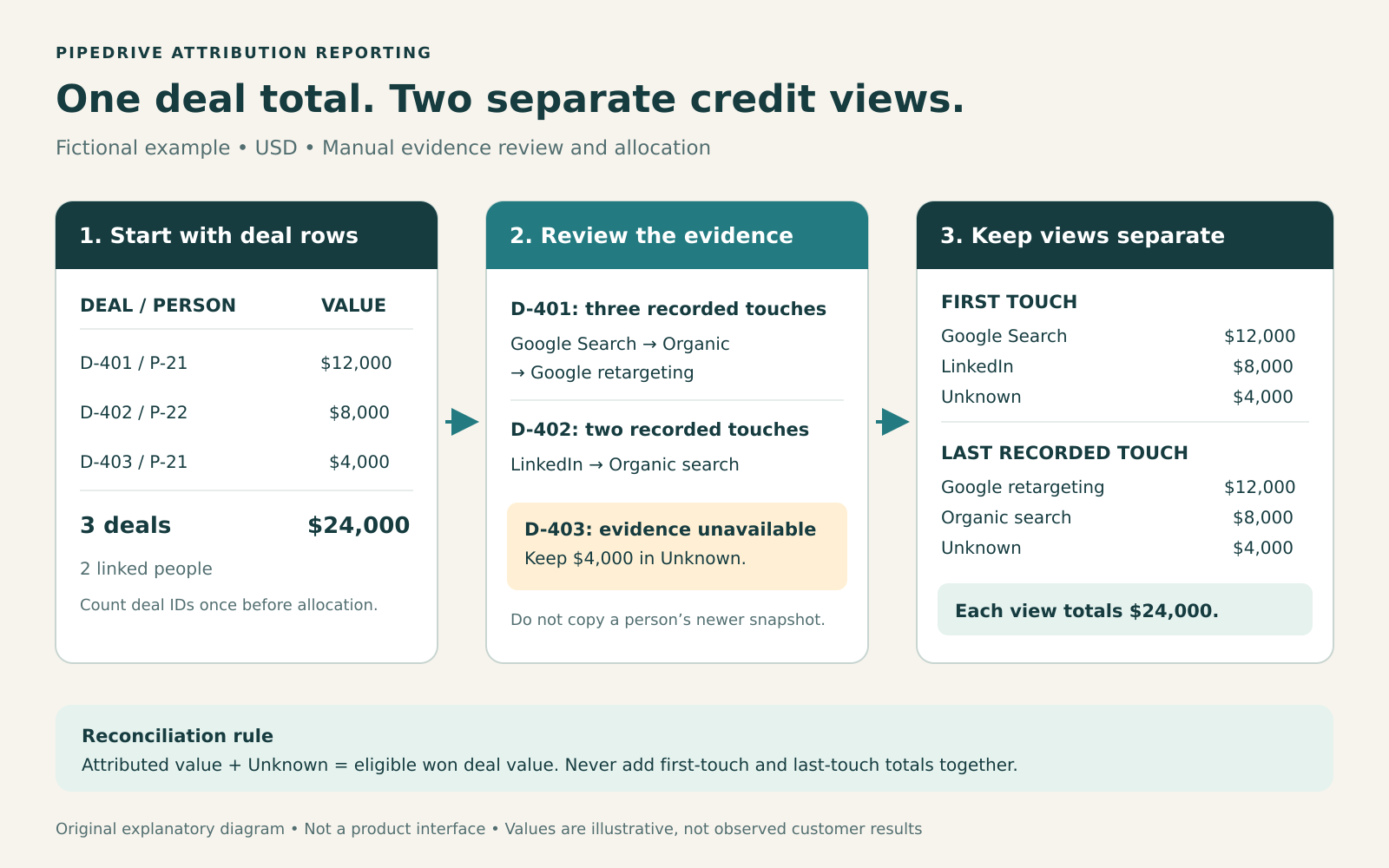
Illustrative reporting method. Each credit view must reconcile to the same eligible deal total; the diagram is not a product screenshot.
Worked example: three deals, two people, two views
Consider a fictional SaaS team reviewing October 1 to 19. All three deals use USD, so this example requires no currency conversion. The team has verified the deal-level evidence below.
| Deal | Person | Won value | First touch | Last recorded touch |
|---|---|---|---|---|
| D-401 | P-21 | $12,000 | Google Search: us-demo | Google retargeting: us-return |
| D-402 | P-22 | $8,000 | LinkedIn: eu-guide | Organic search |
| D-403 | P-21 | $4,000 | Unknown | Unknown |
D-401's recorded path contains three touches: Google Search, organic search and Google retargeting. D-402's contains LinkedIn and organic search. D-403 has no usable deal-level campaign evidence. The team leaves it unresolved rather than copying P-21's older journey onto a second sale.
The outcome total is three won deals and $24,000, linked to two people. Counting people would undercount deals. Joining each deal to every journey row and summing the repeated value would overcount them.
Under the first-touch view:
- Google Search receives $12,000.
- LinkedIn receives $8,000.
- Unknown retains $4,000.
Under the last-touch view:
- Google retargeting receives $12,000.
- Organic search receives $8,000.
- Unknown retains $4,000.
Each view sums to $24,000. Adding the views together would double-count the same business outcomes.
Evidence coverage is also worth showing: two of three deals have a usable campaign path, while $20,000 of $24,000 has attribution evidence. That is 66.7% coverage by deal count and 83.3% by value. These are fictional calculations, not product benchmarks.
This example describes a CRM reporting worksheet. It does not establish how many offline conversion events a connector uploads for repeat deals linked to one person. Verify that behavior separately before comparing report rows with ad-platform events.
What if you want fractional credit?
Specify the allocation rule explicitly. A manual equal-touch model would assign $4,000 to each of D-401's three touches. D-402's two touches would receive $4,000 each. D-403 would remain $4,000 unknown.
Those allocations require a separate calculation over verified touch rows. Populated first-/last-touch fields do not prove that fractional deal-revenue credit has been calculated in Pipedrive. For model selection, compare the assumptions in Attribi's multi-touch attribution model guide.
Before rolling this out: use the Pipedrive integration details to check whether the evidence your report needs is actually being captured on your deals.
Use a manual evidence worksheet for the first review
Copy this checklist into a spreadsheet or your team's reporting notes. Complete it for a small sample containing a straightforward win, a repeat person and a deal with missing attribution.
| Check | What the reviewer records | Pass condition |
|---|---|---|
| Eligibility | Deal ID, status, won time, pipeline | The row belongs in the report specification |
| Uniqueness | Number of rows for that deal ID | One outcome row before touch allocation |
| Monetary basis | Original value, currency, value definition | Value can be traced to the deal |
| Field origin | Deal field or current person field | No silent substitution between objects |
| Campaign evidence | First/last campaign and journey reference | Recorded evidence supports the chosen labels |
| Missingness | Blank, unavailable, or excluded, with reason | Unknown rows remain visible where eligible |
| Allocation | Model name, weights, calculation location | Credits sum to the eligible deal value |
| Review trail | Reviewer, extraction date, correction note | Another analyst can repeat the check |
Use an explicit exception log. "Deal D-403: campaign evidence unavailable; included in Unknown; awaiting record review" is more actionable than a blank cell.
If an investigation resolves a missing campaign, preserve the original export and record the correction. If it remains unresolved, retain Unknown. Reclassification should be supported by evidence, rather than the campaign that seems most plausible.
For multiple currencies, first review totals separately by currency. If the team needs one reporting currency, retain original amounts and document the conversion rate, date and method in the worksheet. Apply that method consistently across both credit views.
Keep access limited to the people reviewing the data. Deal IDs and links often provide enough traceability without spreading contact emails and phone numbers across every reporting copy.
Read the report as evidence for a decision
First touch helps explain where recorded journeys began. Last touch shows which recorded interaction ended the snapshot you are analyzing. Neither view proves that removing a campaign would remove the same amount of revenue.
A campaign appearing early in several paths deserves investigation even if it receives little last-touch credit. A campaign with one large deal needs a different conversation from one with many smaller wins. Show both value and deal count before recommending a budget change.
Also keep the unknown amount beside the campaign totals. An apparent improvement can come from better field coverage rather than better acquisition performance. Compare coverage between reporting periods before interpreting movement.
Once the reporting evidence is dependable, sending outcomes to an ad platform is a separate implementation step. Use the Pipedrive-to-Google Ads offline conversion guide for that workflow.
Frequently asked questions
Can Pipedrive report won deals by campaign?
It can report against data available in the account, subject to plan and field-type support. Validate the campaign columns on the underlying deal rows first. If the visual builder cannot group the field you need, export the selected rows and group them manually.
Is a deal's source the same as first-touch attribution?
Define each field separately. A record's creation mechanism, a source-channel label and the first observed marketing interaction can describe different things. Map your report to the field whose documented meaning matches the question.
Should I replace blank deal fields with the person's current attribution?
Only after checking that the person's evidence applies to that particular deal. A later interaction or another opportunity can make the current person snapshot inappropriate. Preserve the original value and label any supported manual correction.
Does attribution reporting show return on ad spend?
Campaign-associated won value is one input. A defensible return-on-ad-spend calculation also needs the relevant spend, currency basis, cohort and allocation rule. A closed-this-month view alone does not establish which month's spend generated those wins.
How should expansion and renewal deals be handled?
Give them explicit categories. A repeat deal can be commercially valuable without representing a newly acquired customer. Decide whether acquisition campaign credit should apply, document the policy and keep the original deal rows available for review.
Start with a report you can explain
Choose a bounded period, inspect the underlying deals and publish the unknown amount alongside first-/last-touch views. A small report with a clear trail from campaign evidence to deal value gives your team a sound basis for the next marketing decision.
Start an Attribi workspace to evaluate the connection with a small deal sample, and check current plans for CRM feature availability.
Connect your CRM once. Every closed deal reaches your ad platforms.
Attribi pulls stage changes from your CRM, matches each deal to the lead it already recorded, and uploads qualified and closed won conversions to Google, Meta, LinkedIn, TikTok and Microsoft.
No credit card. Free up to 500 visitors a month. New workspaces start with 30 days on Pro.