Pipedrive Marks the Deal Won. Nobody Tells Google Ads.
By Rajesh Kumar, Founder, Attribi ·
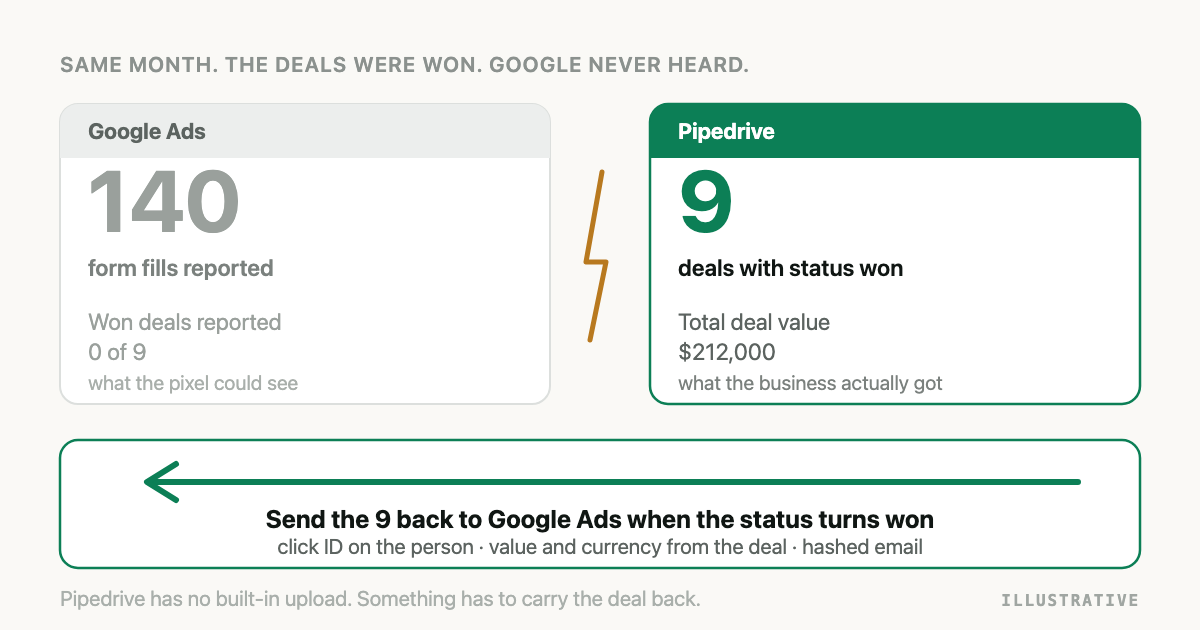
Pipedrive is good at the thing it is for. A rep drags a card to Won, the deal turns green, the forecast updates. Then the information stops. Google Ads, which paid for the click that started that deal, hears nothing. It goes on believing its best result this month was 140 form fills.
Pipedrive does not ship a Google Ads conversion upload of its own. Its own blog describes doing it through Zapier, and the marketplace has third-party apps. So somebody has to build the bridge, and the bridge has one hard part. It is not the upload. It is making sure that when a deal is won, you can still say which ad click it came from.
The short answer
Pipedrive to Google Ads offline conversions work by storing the Google click ID on the Pipedrive person when the lead is created, then, when a deal's status becomes won, uploading the deal value and currency to a Google Ads conversion action with that click ID and the person's hashed email. Trigger on deal status, not on a stage name.
If you want to see what that looks like on your own pipeline before building it, you can connect Pipedrive and Google Ads to Attribi and compare won deals against what Google reported.
What Pipedrive gives you to work with
Four facts about Pipedrive's data shape decide how this gets built.
A deal has a status, separate from its stage. Status is one of open, won or lost. Stage is a column in a pipeline that you named. When a deal is marked won, Pipedrive also records a won time. This distinction is the most useful thing in this article, and there is a section on it below.
The value and currency are on the deal. Each deal carries its own amount and its own currency code. If you sell in more than one currency, read the currency from the deal, not from your account settings.
The email and phone are on the person. A deal links to a person, and the person holds a list of emails and phones with one marked primary. That is where your match data comes from.
Custom fields have hash keys. Create a custom field called "GCLID" on the person and Pipedrive gives it an API key that is a 40-character hash, not the word gclid. Anything that writes or reads the field through the API has to use that key. You look it up once and store it.
Step 1: Get the click ID onto the person
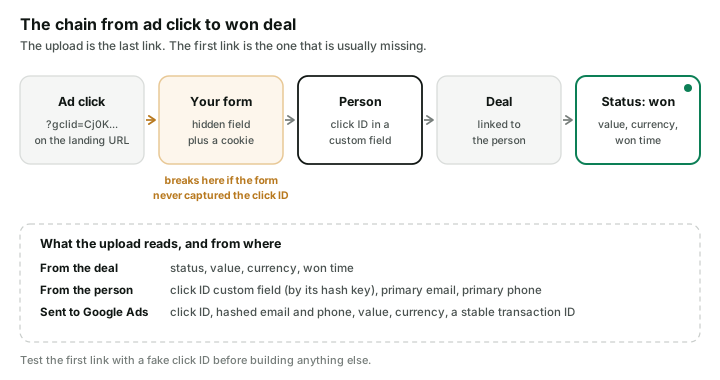
When someone clicks your ad, Google appends a gclid parameter to the landing page URL. You need
that value to end up on the Pipedrive person.
- In Pipedrive, create a custom text field on the Person, not on the deal. People outlive deals, and one person can have several.
- On your website form, add a hidden field and fill it from the URL parameter when the page loads. Keep the value in a first-party cookie too, because many visitors do not fill in the form on the page they landed on.
- When the form creates the person in Pipedrive, write the hidden field into your custom field using its hash key.
A caution on step 2. Whether a hosted form can fill a hidden field from a URL parameter depends on
the form tool. Pipedrive's Web Forms help article does not describe a way to do it, so if you use
Pipedrive's own forms, test with a real ?gclid=test123 link and check the person record before
you rely on it. Forms you host yourself, or a form builder that supports hidden fields, do this
without trouble.
Whatever you use, test it the same way. Click a link with a fake click ID, submit the form, open the person in Pipedrive. If the field is empty, nothing downstream can work, and nothing downstream will tell you.
Step 2: Trigger on status, not on stage
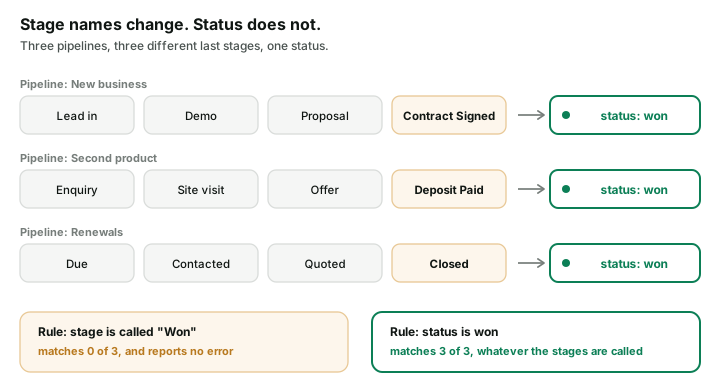
This is the step that fails quietly.
The natural way to set up the automation is "when a deal moves to the stage called Won". But Pipedrive pipelines are yours to rename, and teams do. One pipeline ends in "Contract Signed". The pipeline for a second product ends in "Deposit Paid". Someone tidies up in March and "Won" becomes "Closed". A rule keyed on the stage name keeps running, keeps reporting success, and matches nothing.
Status does not have this problem. However many pipelines you run and whatever the columns are called, a won deal has the status won. Build the trigger on that.
Stages are still the right tool for one thing: a mid-funnel conversion. If you also want to tell Google when a lead becomes qualified, that is a stage, and you should reference it by its numeric stage ID, not its label. The ID survives a rename.
Step 3: Send the conversion
There are two usual ways to make the upload.
An automation tool. Zapier has a Google Ads action for offline conversions, and Pipedrive's own blog describes pairing the two. You trigger on the deal, look up the person, and pass the click ID, a conversion time and a value. This is fine at low volume and it is quick to set up. Watch two things: that the trigger is the won status and not a stage, and that the value and currency come from the deal and are not typed in as constants.
The API. For more control you read won deals from Pipedrive's API on a schedule and send them to Google yourself. New Google integrations use the Data Manager API. The request format and its traps are covered in Import Salesforce Closed-Won Deals into Google Ads. Skip the Salesforce half. The Google half applies as written.
Either way, four rules:
- Send the hashed email and phone as well as the click ID. That is what enhanced conversions for leads is, and it rescues the deals where the click ID never made it onto the person.
- Use the won time as the conversion time, not the time your job happened to run.
- Give each upload a stable ID, such as the deal ID plus the stage, so a rerun does not count the deal twice.
- Mind the clock. Google will not import a conversion more than 90 days after the click, or 63 days when matching on email and phone alone.
Step 4: Check that Google received it
A successful upload means Google accepted the request. It does not mean a click was credited.
Give it about three hours, then look at the conversion action in Google Ads. If the count is rising, you are done. If it sits at zero while your uploads succeed, go back to step 1 and open one of the won deals. Usually the person's click ID field is empty, and the reason is on the website, not in Pipedrive or Google.
Three ways to build it
| Automation tool | Your own build | Attribi | |
|---|---|---|---|
| Setup effort | Low | High | Low |
| Click ID capture | You add the hidden field and cookie | You add the hidden field and cookie | Captured by Attribi's script at the click |
| Won detection | Whatever you configure, often a stage | Whatever you code | Deal status, always |
| Value and currency | Mapped by hand | From the deal | From the deal |
| Hashed email fallback | If the tool supports it | You implement it | Automatic |
| Other ad platforms | A separate automation each | A separate build each | The same connection |
| Ongoing cost | Per task | Engineering time | A monthly plan |
If you run only Google Ads, close a handful of deals a month, and are comfortable testing a hidden field, the automation route is a sensible choice. I would rather say that than pretend otherwise.
Doing this with Attribi
Attribi is the tool I build. Here is what it does on this stack.
You connect Pipedrive and Google Ads. Attribi reads deals once a day and asks Pipedrive for the ones whose status is won, so stage names and extra pipelines do not matter. Each won deal is uploaded to Google Ads with its value and currency. If a deal has no usable currency, that upload is held back. It is never sent as a guessed dollar amount.
The part that removes step 1: Attribi's script records the click ID when the visitor arrives and keeps it against that visitor. When a deal is won, Attribi matches the deal's person by email or phone to the visitor it already knows and uploads with the click ID it holds. You do not need a hidden field or a custom field for the match to work.
It also writes back. Attribi creates 16 custom fields on the person and fills fourteen of them: first and last touch source, medium and campaign, the path, the landing page and more. The same values are copied to that person's open deals, so a rep sees which campaign a deal came from on the deal itself. Creating custom fields works on every Pipedrive plan.
The limits:
- Deals are read daily, not at the moment a card is dragged.
- A won deal with no value uploads no revenue conversion.
- Qualified conversions need you to paste the numeric IDs of the stages you count as qualified. Leave that empty and only won deals are sent.
- CRM connections are on the Growth plan, 99 dollars a month. New workspaces start with 30 days on the Pro plan with no card, which is enough to watch a month of won deals reach Google Ads.
More detail is on the Pipedrive integration page.
Frequently asked questions
Does Pipedrive have a native Google Ads offline conversion integration? No. Pipedrive does not include a built-in upload of won deals to Google Ads. The usual routes are an automation tool such as Zapier, a marketplace app, a custom build on the Pipedrive and Google APIs, or an attribution tool that connects both.
Where should I store the GCLID in Pipedrive? In a custom text field on the person, not on the deal. A person can have several deals over time, and the click that brought them in belongs to the person. Remember that the field is addressed through the API by a hash key, not by its display name.
Should the Google Ads conversion fire on a Pipedrive stage or on the deal status? On the deal status for won deals. Status is always open, won or lost, whatever your pipelines and stages are called, so it keeps working when stages are renamed. Use a stage, referenced by its numeric ID, only for a mid-funnel conversion such as qualified.
What value should I send to Google Ads for a Pipedrive deal? The value and currency recorded on the deal itself. Do not send a fixed number, and do not assume the currency. Deals in a multi-currency account each carry their own currency code.
Why do my Pipedrive conversions upload successfully and never appear in Google Ads? Usually because the click ID field on the person is empty, so Google has nothing to match. The other common causes are a conversion uploaded more than 90 days after the click, and a trigger tied to a stage name that has since been renamed.
Can I send Pipedrive deals to Google Ads without capturing the GCLID? Partly. You can upload with the person's hashed email and phone through enhanced conversions for leads, which matches fewer conversions than a click ID and has a shorter 63 day limit. Capturing the click ID remains the more reliable method.
The takeaway
The upload from Pipedrive to Google Ads is the easy half, and there are three reasonable ways to do it. The half that decides whether any of them work happens weeks earlier, on your website, when a click ID either gets attached to a person or does not. Test that first, with a fake click ID and your own form. Then trigger on status. If you would rather not own either piece, try Attribi free for 30 days.