Salesforce to Meta Conversions Not Showing? Troubleshoot Delivery, Matching and Attribution
By Rajesh Kumar, Founder, Attribi ·
A won Salesforce Opportunity can be missing from Meta reporting for several different reasons. The integration may never have selected it. Meta may have rejected the request. The event may have arrived with weak identifiers, or it may have no eligible ad interaction to receive credit.
Start by finding the first missing piece of evidence for one Opportunity. Check source eligibility, the upload attempt, Meta's receipt, identity diagnostics and the advertising report in that order. Changing campaign settings before proving delivery usually makes the investigation harder.
This guide is for revenue operations and paid-social teams troubleshooting an existing Salesforce connection. It covers direct Conversions API builds and the current Attribi workflow, with product-specific limits called out where they change the diagnosis. For connection steps and an example request, use the Salesforce to Meta setup guide.
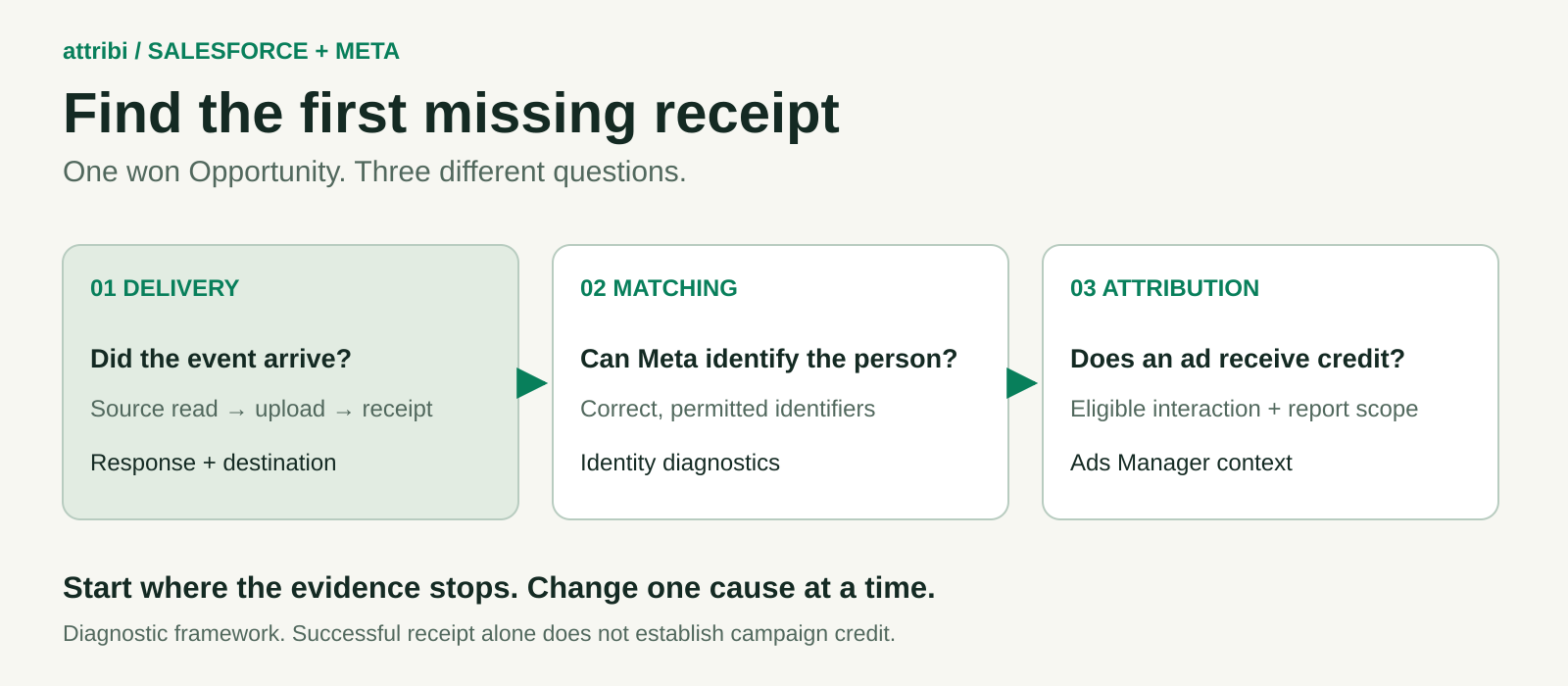
Choose the branch that matches the evidence
"Conversions are not showing" is a symptom, not yet a diagnosis. Decide which of these statements you can actually support before changing anything.
| What you can observe | First test | Likely investigation |
|---|---|---|
| No upload attempt for the Opportunity | Check source eligibility and the last successful read | Stage mapping, Contact association, amount, polling or connector limits |
| An upload attempt has an error | Read the response for that attempt | Destination, access, invalid fields or transport failure |
| Meta receives the event but campaign purchases stay empty | Compare identity diagnostics and reporting scope | Matching, attribution eligibility or report settings |
| Purchase count appears but revenue is wrong | Compare source and outgoing value and currency | Missing fields, parsing or an incorrect source amount |
| More purchases appear than expected | Trace event identities and producers | Retries, duplicate submissions or different outcome definitions |
Choose a small, recent cohort with a known outcome rather than an entire quarter of closed deals. Include a record that worked and one that failed. Keep test traffic separate from production, and avoid resending historical purchases just to see whether a number moves.
A successful control narrows the search. If two otherwise similar records use the same connection but only one has an upload attempt, investigate their source data and eligibility before replacing credentials or rebuilding the integration.
Build one traceable incident record
Record the Opportunity ID, associated Contact, relevant stage-change time, Amount and currency. Add the intended event name, destination data source, event ID if available, last source-read time, upload attempt and returned status. Keep the receiving data-source ID separate from the ad account ID.
For a direct build, inspect the final serialized request. The Salesforce query can be correct while a later mapping step drops a field. Store safe diagnostic metadata and a redacted payload shape, not access tokens or raw customer details in shared incident notes.
For Attribi, inspect the upload outcome for Meta and the relevant stage. Its offline-conversion workflow records outcomes by platform and stage, so a successful upload elsewhere does not prove that Meta received anything. If the product does not expose a needed detail, capture the record reference and timestamp for support rather than inventing an explanation.
Keep original and retry attempts distinguishable. An incident record should tell you whether a fix produced the first valid submission or another attempt at an already accepted event. That distinction becomes essential if someone proposes a bulk replay.
Evaluating a managed connection alongside this investigation? Start your 30-day Attribi Pro trial. No card required. Use a controlled Salesforce test cohort and check CRM revenue access on the current pricing page before rollout.
No event was received by Meta
Test whether the source record was selected
Look for an upload attempt before looking for a Meta error. No attempt means there may be nothing for Meta to diagnose. Verify that the record reached the stage your integration considers eligible, that the relevant change was read, and that required source data exists.
With Attribi, qualified stages are selected from your Salesforce stage list. Won detection follows the org's won definition, with an override available. A renamed stage alone does not establish the cause. Check the actual configuration and the Opportunity's status instead of assuming that every org must use the literal label "Closed Won."
Inspect the Contact roles too. Attribi reads the associated Contact, preferring the primary Contact, for email and phone matching. An Opportunity without a Contact role can be recorded without a usable person association. Adding a Contact should follow your CRM's real relationship; choosing an unrelated record just to complete a field creates a different failure.
Test the receiving destination and request
If an attempt exists, compare its destination with the data source open in Events Manager. Check that the connection is authorized for that destination and inspect the returned error. A request sent to the wrong source can leave the expected source empty even when the call itself succeeds.
For a direct integration, Meta's official response implementation exposes events_received, messages and fbtrace_id. Retain the response associated with the specific attempt. A queue status reading "processed" may only mean that your worker finished running.
If the response identifies an invalid event, check the field it names against the serialized request. A Salesforce display date, a Unix timestamp in milliseconds and Unix seconds are different representations. Meta's event model uses the actual occurrence time in Unix seconds. A unit conversion error can send a plausible-looking number that represents the wrong moment.
Check action_source if the error or diagnostics points there. It describes where the conversion occurred, rather than the fact that a background job transmitted it. The official action-source definitions distinguish phone, website and other sources. Choose the supported value that reflects the actual event and workflow; do not label every CRM outcome system_generated merely because the upload was automated.
Use the current Test Events workflow for an authorized test. The request implementation includes test_event_code. Confirm the selected data source and test configuration; do not expect a test session to prove that production campaign reporting is working.
Correct the named error before retrying. A transport interruption may merit a controlled retry. Missing required data needs a record or mapping fix. An access error needs the connection owner. Repeating an unchanged invalid request gives you another failure, not more evidence.
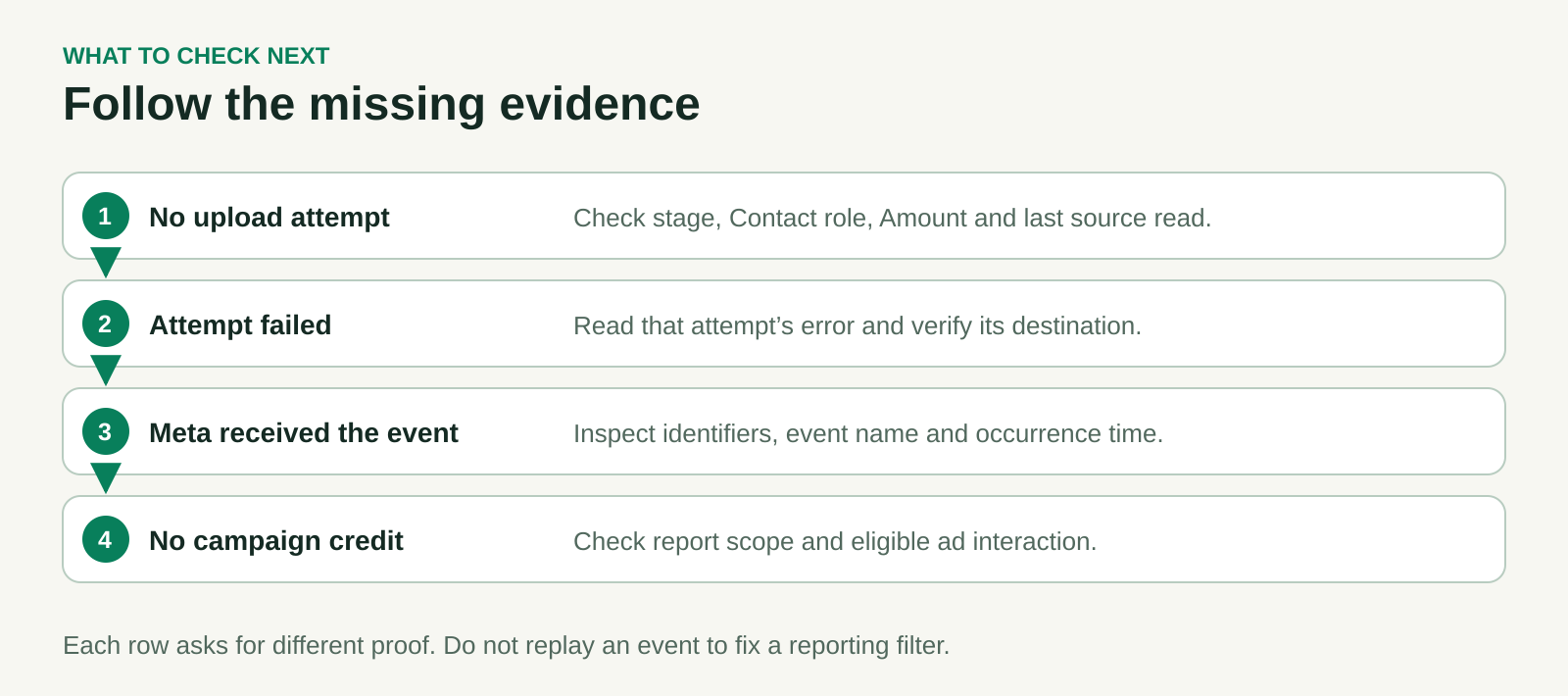
Meta received the event but Ads Manager shows no purchase
Delivery is the first checkpoint. Matching and campaign attribution require separate evidence. An accepted event is not a promise that Meta can identify the person or credit an ad.
First, confirm you received the event you meant to send. Compare event name, occurrence time and destination. In Attribi's current Meta integration, qualified outcomes map to Lead and closed-won outcomes map to Purchase. Looking only at a Purchase column while testing a qualified outcome can make healthy delivery look broken.
Next, inspect the identity information and available diagnostics. Was the Contact's email present? Was the right person's phone used? Did a transformation replace a real identifier with a blank or stale value? A high-level quality indicator cannot tell you that every individual Opportunity matched.
Then ask the paid-social owner to check the report itself. Confirm the account, event or conversion column, campaign filters, reporting period, time zone and relevant attribution settings. Verify that the selected report can include the occurrence you are investigating. A sale outside the period you opened should not trigger a replay.
Finally, consider whether there was an eligible ad interaction. Salesforce contains revenue from many sources. A sale from an existing relationship or another channel can be a valid CRM outcome with no Meta campaign credit. Even a correctly matched person may have no qualifying interaction under the selected attribution settings.
For long sales cycles, distinguish the sale's occurrence time from the earlier lead submission. Do not backdate the Purchase to the original form fill to make it fit a reporting window. That changes the event's meaning. Check current Meta requirements for the particular workflow and event age before replaying a delayed record; no universal acceptance window is assumed here.
The practical fix may therefore be a reporting correction, improved permitted identity capture, or an explanation of an uncredited sale. Do not force Meta's attributed purchases to equal all Salesforce wins by changing timestamps or manufacturing identifiers.
Identifiers are present but matching looks weak
A populated field can still contain unusable identity data. Inspect the transformation with a synthetic fixture whose expected output you can calculate, then check that the same code path handles production records.
For email, remove surrounding whitespace and normalize case before SHA-256 hashing according to the receiving specification. For phone, validate the country context and apply the required normalization. A European phone number should not acquire a US country code because a default was convenient.
A complete SHA-256 hexadecimal digest contains 64 characters. A 32-character example is not a complete SHA-256 hex digest. Length and hexadecimal validation are useful checks, but a valid-looking digest can still represent the wrong input, an empty string, or a different person.
Look for double hashing next. Establish whether your application, connector or SDK owns normalization and hashing. Some supported paths accept unhashed inputs and transform them. Passing an already transformed value through an inappropriate second step can break matching. Verify the exact method your implementation calls instead of assuming every SDK path behaves alike.
Meta's user-data implementation treats customer identifiers and fields such as fbc, fbp and lead_id separately. Do not hash every field indiscriminately, substitute a Salesforce record ID for a Meta lead ID, or manufacture missing browser identifiers. The email and phone normalization guide covers the preparation checks in more detail.
Attribi's Salesforce revenue matching currently uses the associated Contact's email and phone. A click ID sitting in a Salesforce field does not mean that the revenue connector uses it. Separately captured website identifiers serve a different part of the tracked journey. Diagnose the supported path rather than adding a field the connector does not read.
Hashing also leaves your consent and data-use responsibilities in place. Use only identifiers you are permitted to send, and redact customer-level evidence before sharing an incident outside the authorized team.
Purchases arrive with missing or unexpected revenue
Trace the amount through three places: the Salesforce Opportunity, the final outgoing event and the destination's received-event details. This shows whether the problem began in CRM data, transformation or reporting.
A direct build should validate numeric value and currency together for its revenue event. Meta's custom-data implementation describes a numeric value and an ISO 4217 currency code, such as 1250 and EUR. Check nulls, locale-formatted text, decimal separators and string-to-number conversion. A value displayed as "1.250,00" in a European workflow needs deliberate parsing; stripping punctuation without a rule can change the amount dramatically.
Inspect the currency source as well. Attribi documents Opportunity currency for multi-currency orgs and org currency for single-currency orgs. Do not silently substitute USD for an unknown code or add amounts across currencies and compare the result with a single-currency advertising total.
For Attribi, a won Opportunity with blank or zero Amount is recorded but does not produce a closed-won revenue upload. Its documented requirement is Amount greater than zero. If value exists only on another object or in line items, first establish whether Opportunity Amount contains the intended figure.
Correct the source and verify how the connector handles the updated record. The public documentation does not establish every historical backfill or replay behavior. Confirm that path before promising that filling Amount later will automatically recover every missed event.
If a previously accepted event carried the wrong amount, avoid assuming that resending its event ID updates historical revenue. Use the supported correction process for your implementation, or document a reporting reconciliation. A new event ID used as an improvised "edit" can create a second purchase.
Purchase counts look duplicated
Start with event identity, not just the Contact's email. Two attempts may describe the same sale, while two genuine sales may involve the same person. Compare source Opportunity, outcome, occurrence time, event name, event ID and each producer that submitted it.
For a direct build, a retry of one business outcome should retain its stable identity. If the retry code creates a fresh ID on every attempt, a temporary timeout can turn into several apparent purchases. Check concurrent jobs, manual imports and older integrations too; the currently visible connector may not be the only producer.
Attribi documents retry protection by lead and stage. That does not establish that a separately installed browser pixel shares the same event identity. If two producers report the same sale, verify their actual identifiers and configuration before relying on cross-channel deduplication. If they report different outcomes, first decide which count belongs in the comparison.
For the same event reported through browser and server paths, Meta's event implementation describes event_name and event_id as the paired identifiers used for deduplication. Confirm both values and the actual duplicate event, rather than assuming matching email alone prevents double counting.
Contain the duplicate-producing job, preserve the attempt history and test the correction on a controlled case before resuming a replay. This article's purpose is to locate the immediate fault. Designing a full cross-system deduplication policy deserves its own implementation review.
A recent win is missing or only the first deal appears
These two symptoms can reflect documented Attribi behavior rather than a broken Meta endpoint.
Attribi reads changed Salesforce Opportunities once a day. A deal won after the last successful read may simply be waiting for the next run. Compare the actual read time with the stage change, then check the subsequent upload outcome. Daily polling is a cadence, not a promise of an exact delivery minute or a guarantee that a failed run will recover immediately.
A different limit applies when the same Contact wins again. The Salesforce integration documentation says Attribi reports the first qualified and first won Opportunity per Contact. A later renewal or expansion for that Contact is not uploaded as another conversion today.
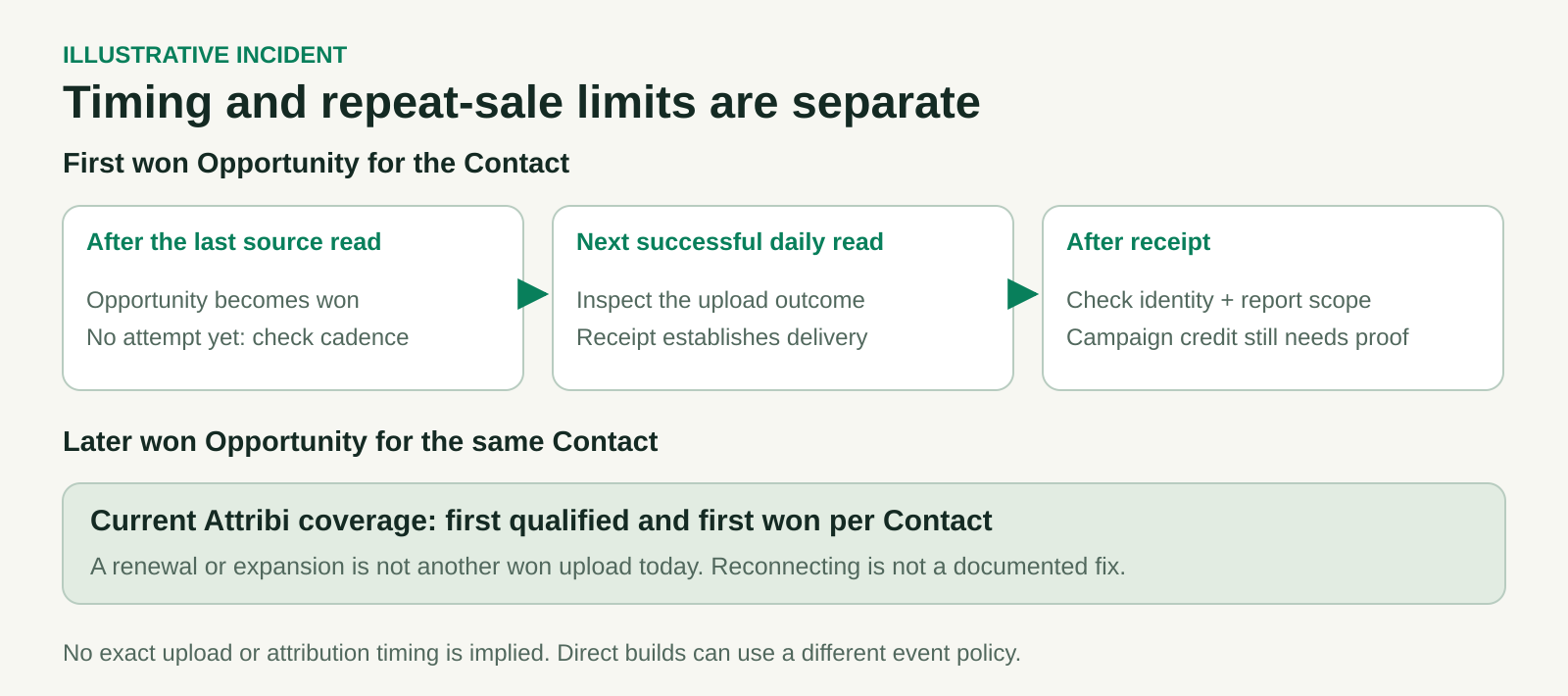
Check prior reported outcomes before debugging the later deal's hashes or reconnecting Meta. Reconnecting is not a documented way to create repeat-revenue coverage. Do not duplicate Contacts or alter legitimate relationships to work around the counting policy.
If your requirement is every renewal and expansion, record that coverage gap explicitly and evaluate a supported approach before relying on the feed for total customer revenue. A direct integration's business-event policy can differ; do not apply Attribi's per-Contact rule as a universal Conversions API restriction.
Check the workflow against your Salesforce reporting requirements. Try Attribi with a small Salesforce cohort. The 30-day Pro trial requires no card. CRM revenue sources require Growth or above after the trial; review current plans.
Work one incident through to a defensible result
Consider a synthetic case: a first-time customer's EUR 12,500 Opportunity becomes won after the last daily source read. The sales team sees it immediately in Salesforce, but the paid-social team sees no Purchase.
The first test finds no upload attempt. Because the last successful read predates the change, the team waits for the next scheduled read and inspects its result. If the record remains absent after a successful read, the investigation moves to eligibility, Contact association and Amount. It does not stay indefinitely in a "wait longer" state.
Suppose the next read produces an accepted Purchase with EUR 12,500. Delivery is now established. The team checks the person identifiers and report settings rather than resending the event. If no eligible Meta interaction can be established, the incident closes as a delivered CRM outcome with no demonstrated campaign credit. That is a useful finding even though the ad report did not gain a purchase.
For a second case, imagine a later EUR 4,000 expansion for the same Contact. In Attribi, the first-won-per-Contact limit can explain the absence of another upload. The corrective action is to acknowledge the coverage boundary, not to repeat the earlier API debugging steps.
When escalating an unresolved case, include the record reference, expected outcome, source-change time, last successful read, destination, safe response metadata and tests already completed. State the remaining question precisely: "No attempt after a successful source read" is more actionable than "Meta tracking is broken."
Close the incident at the layer you proved
A useful resolution names the cause, the correction, the evidence and any remaining limit. Confirm that the next intended event follows the corrected path. Preserve a brief record so another team does not replay the same sale during a later investigation.
Return to the setup guide when the connection itself needs rebuilding. For an existing connection, keep the diagnosis narrow: establish eligibility and delivery first, inspect identity next, then explain the advertising credit using the actual report and attribution context.
Ready to test the managed workflow with known Salesforce outcomes? Start your free Attribi Pro trial. Validate delivery and the documented coverage limits before expanding your rollout.