Hashing Emails for Google and Meta: SHA-256 Is the Easy Part
By Rajesh Kumar, Founder, Attribi ·
Your upload job reports success. Every row has a 64-character hash where the email used to be. The match rate is poor, and nothing anywhere says why.
The hash function is almost never the reason. SHA-256 is one line in every language and it is hard to get wrong. The part that goes wrong is the line before it: what the string looked like at the moment it was hashed.
Here is how to hash email for Google Ads. Lowercase the address and remove all whitespace. If the domain is gmail.com or googlemail.com, also remove the dots before the @ and cut the plus sign and everything after it. Then SHA-256 the result and send it as hex. Meta wants the first two steps only, which means one stored hash cannot serve both.
What does it mean to hash an email for a conversion upload?
Hashing an email for a conversion upload means turning the address a lead gave you into a fixed 64-character SHA-256 digest, after first rewriting it into the exact form the ad platform expects, so the platform can compare it against digests of its own users' addresses without receiving the readable address. The rewriting step is called normalisation.
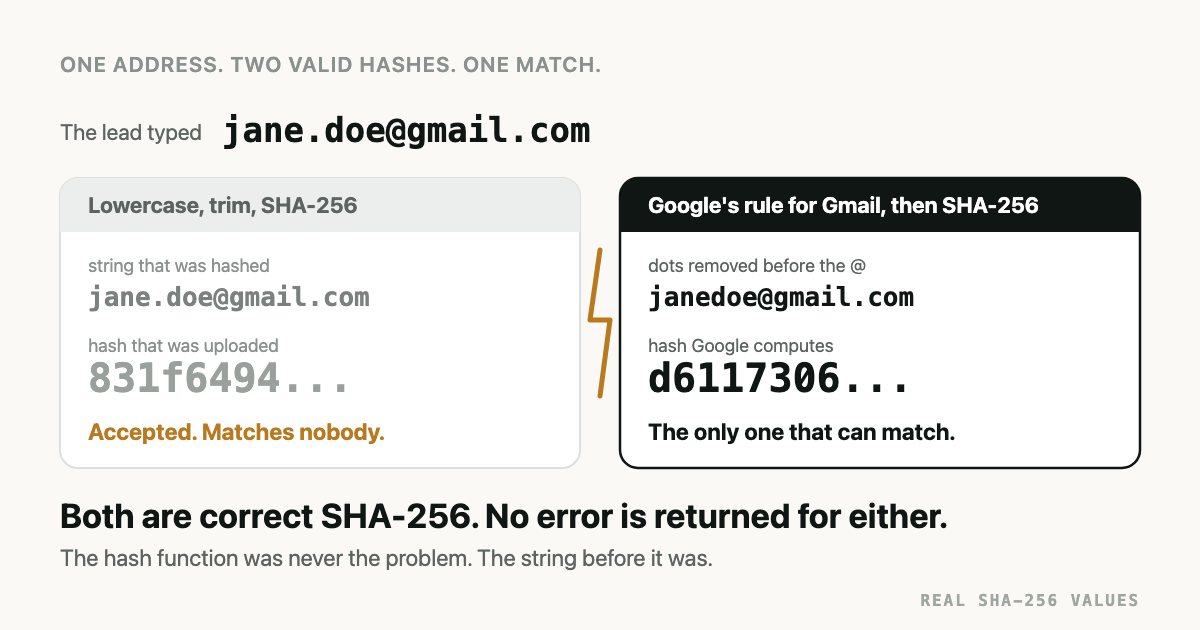
The two halves fail differently. A wrong hash function tends to get noticed. A wrong normalisation produces a perfectly formed SHA-256 digest of a string the platform never hashed on its side. It is accepted and it matches no one.
Why does a wrong hash never throw an error?
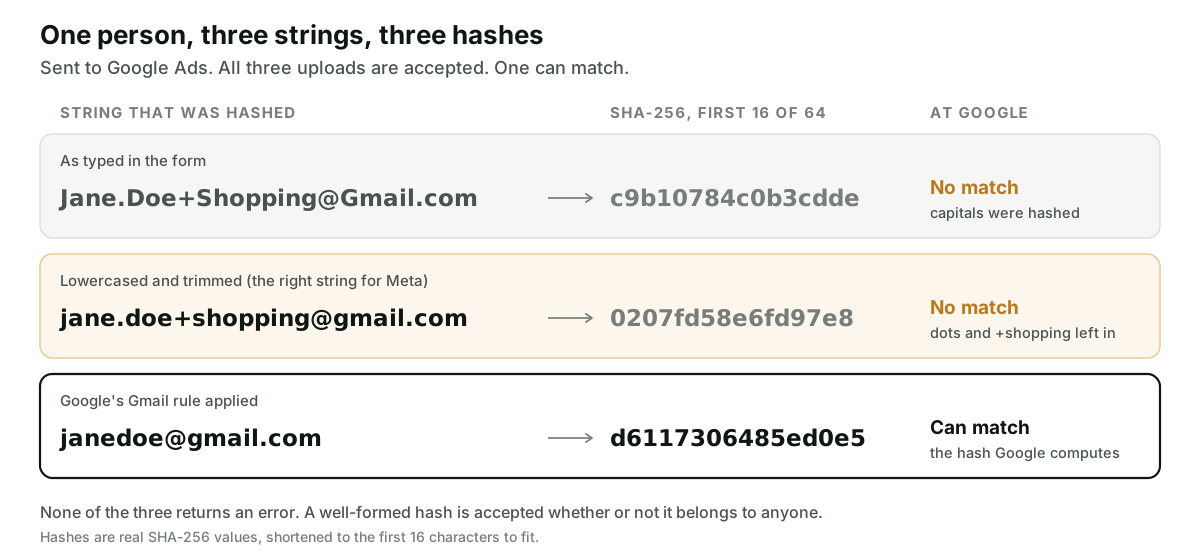
Because a hash is one-way. The platform cannot look at 0207fd58... and see a dot was left in.
It can only look the digest up, and "not found" is also what a real person with no account on
that platform looks like.
SHA-256 also has no notion of close. Change one character of the input and the whole output
changes. jane.doe@gmail.com and janedoe@gmail.com are the same inbox and their digests share
nothing:
jane.doe@gmail.comgives831f6494ad6be4fcb3a724c3d5fef22d3ceffa3c62ef3a7984e45a0ea177f982janedoe@gmail.comgivesd6117306485ed0e50afab3ac871e98f81699151f30281527d63ff5f233656c69
So the failure shows up as a lower match rate, weeks later, mixed in with every other reason a lead might not match. That is how it survived in our own pipeline.
How to hash email for Google Ads
Google publishes the rule in two developer guides that agree with each other: the Data Manager API formatting guide and the Google Ads API guide to enhanced conversions for leads. Both were read on 2026-10-05. In order:
- Convert the address to lowercase.
- Remove whitespace. The Data Manager guide says leading, trailing and intermediate, so a space in the middle of an address goes too.
- If the domain is
gmail.comorgooglemail.com, remove every dot before the@. - For the same two domains, remove the plus sign and every character after it, up to the
@. - Hash the result with SHA-256.
- Encode the digest as hex or Base64 and tell the API which.
Steps 3 and 4 apply to those two domains and no others. Google's own examples:
cloudy.sanfrancisco+shopping@gmail.com becomes cloudysanfrancisco@gmail.com, while
user.name+NYC@Example.com becomes user.name+nyc@example.com with its dot and its plus intact.
Strip dots from a work address and you have broken a hash that was fine.
One thing to know before you copy a rule from a Help Center page. Google's Help article on setting up enhanced conversions with Tag Manager lists the dot rule for gmail.com and googlemail.com and, when we read it on 2026-10-05, said nothing about the plus sign. The two developer guides list both. If you are writing code, follow the developer guides.
Encoding. The Data Manager API takes hex or Base64, and its
ingest request
has an encoding field that must be set whenever user data is sent. Google notes that case does
not matter for hex and does matter for Base64. That makes hex the safer choice.
Phone. E.164: a plus sign, the country code, then digits only. Google's example turns
(800)555-0100 into +18005550100. The plus sign is part of the string that gets hashed.
Names and address. Given name and family name are lowercased, trimmed and hashed, without prefixes such as Mrs. or suffixes such as Jr. Region code and postal code are sent as plain text.
The request itself is a different article. The Data Manager API guide covers the call, and the Salesforce walkthrough has a full payload.
How is Meta's Conversions API hashing different?
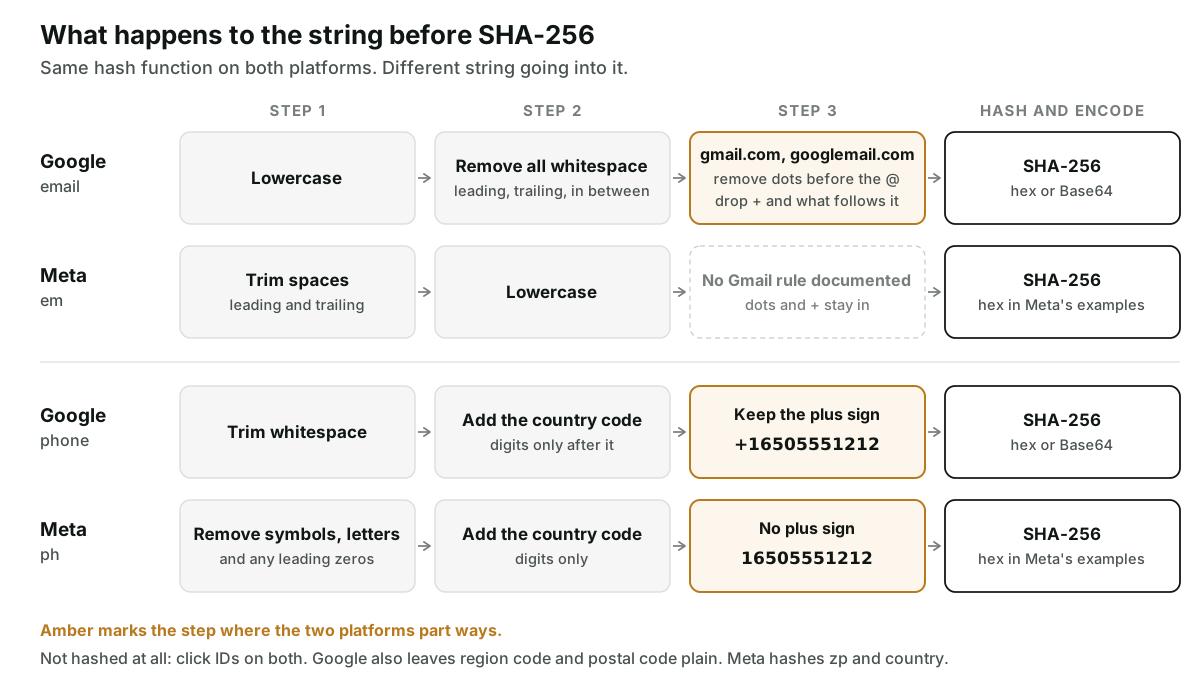
Meta's rules live on one page, the customer information parameters reference, also read on 2026-10-05.
For em, the instruction is to trim leading and trailing spaces and convert to lowercase. That
is all of it. The page documents no Gmail rule, and its example, John_Smith@gmail.com to
john_smith@gmail.com, has no dot or plus to settle the question. So as documented: dots stay,
plus suffixes stay.
For ph, Meta says to remove symbols, letters and any leading zeros, and to include the country
code. Its example turns (650)555-1212 into 16505551212. No plus sign. That one character is the whole difference from Google's format, and it makes
the two hashes unrelated.
Then the part that catches people who learned on Google first. Meta marks zp and country as
hashing required. Country is the lowercase two-letter ISO code, so us, hashed. Google wants
both in the clear.
Google vs Meta, field by field
| Field | Google (Data Manager API, Google Ads API) | Meta (Conversions API) |
|---|---|---|
| Lowercase, remove all whitespace. gmail.com and googlemail.com only: remove dots before the @, drop + and what follows. Hash. | em: trim leading and trailing spaces, lowercase. No Gmail rule documented. Hash. | |
| Phone | E.164 with the plus sign: +16505551212. Hash. | ph: digits only, country code included, no symbols, no leading zeros: 16505551212. Hash. |
| First and last name | Lowercase, trim, no prefixes or suffixes. Hash. | fn, ln: lowercase, no punctuation, UTF-8. Hash. |
| Postal code | Not hashed. | zp: lowercase, no spaces or dashes, first five digits in the US. Hash. |
| Country | Region code, two-letter ISO, not hashed. | country: lowercase two-letter ISO. Hash. |
| Click identifier | gclid, gbraid, wbraid: never hashed. | fbc, fbp: do not hash. |
| Encoding | Hex or Base64, declared in encoding. | Lowercase hex in the examples on Meta's page. |
One address, hashed for each platform
Take a lead who typed Jane.Doe+Shopping@Gmail.com. These digests were computed with shasum.
| String that gets hashed | SHA-256 (hex) | |
|---|---|---|
Meta em | jane.doe+shopping@gmail.com | 0207fd58e6fd97e845076b479943d66769329b04ef902c5d2ab0a0d46237b883 |
janedoe@gmail.com | d6117306485ed0e50afab3ac871e98f81699151f30281527d63ff5f233656c69 |
And the phone number (650) 555-1212, United States:
| String that gets hashed | SHA-256 (hex) | |
|---|---|---|
+16505551212 | 1e231c66011e7a2d867a9cfae267a6aff103cf4913640b6e71a99850fc0ffbc8 | |
Meta ph | 16505551212 | e323ec626319ca94ee8bff2e4c87cf613be6ea19919ed1364124e16807ab3176 |
A minimal version of the two email functions in Node:
const { createHash } = require('node:crypto')
const sha256 = (s) => createHash('sha256').update(s).digest('hex')

function hashEmailForMeta(email) {
  return sha256(email.trim().toLowerCase())
}

function hashEmailForGoogle(email) {
  const e = email.replace(/\s+/g, '').toLowerCase()
  const at = e.lastIndexOf('@')
  const domain = e.slice(at + 1)
  if (domain !== 'gmail.com' && domain !== 'googlemail.com') return sha256(e)
  const local = e.slice(0, at).replace(/\./g, '').split('+')[0]
  return sha256(local + '@' + domain)
}
The domain test is an exact comparison on the text after the last @, so notgmail.com and
mail.gmail.com are left alone. Real code needs a guard this sketch leaves out: +promo@gmail.com
has nothing left before the @ after stripping, and you should refuse to hash it. Otherwise
every such row gets the same digest.
What must not be hashed?
Anything the platform needs to read. Click IDs are the common casualty. A gclid, gbraid or
wbraid goes to Google exactly as it arrived on the URL, and
which of the three you have depends on the device and the surface.
Meta's fbc and fbp are marked do not hash, as are lead_id, the IP address and the user
agent.
And as above, Google's region code and postal code stay plain while Meta's zp and country
do not. A generic "hash all the PII columns" step in a pipeline will get one platform wrong
whichever way it is written.
How do you test a hash before uploading?
Test the normalisation, since that is where the bug will be. Four checks, cheapest first.
- Reproduce the vendor's own example. Meta publishes inputs with their expected digests.
Feed
John_Smith@gmail.comto your email function and you should get62a14e44f765419d10fea99367361a727c12365e2520f32218d505ed9aa0f62f. Feed it(650)555-1212as a phone and you should gete323ec62.... If either differs, stop there. - Run awkward inputs through the Google function.
Jane.Doe@Gmail.comandjanedoe+x@gmail.commust both collapse to thejanedoe@gmail.comdigest above.jane.doe@acme.commust keep its dot. - Check the string outside your code.
printf '%s' 'janedoe@gmail.com' | shasum -a 256in a terminal. Useprintf, notecho.echoappends a newline and you will hash that too. - Send one event in test mode. The Data Manager API accepts
validateOnly: true, which validates the request without executing it. Meta hastest_event_code, which makes the event show up in the Test Events tab of Events Manager. Read Meta's warning first: events sent with a test code are not dropped and do count for measurement, so remove the code afterwards.
Step 4 proves the request is well formed. Neither test mode tells you that a hash belongs to a real user. Only steps 1 to 3 catch a normalisation bug before it costs you a month of matches.
If the hashes are right and enhanced conversions still shows nothing, the cause is somewhere else. That checklist is in Enhanced Conversions for Leads Not Working, and what the feature is for is in the enhanced conversions for leads explainer.
What we got wrong in our own code
Attribi had this bug until the week this was written. The fix is commit 7dfd19b in our
repository, and the account below comes from that change and its commit message.
All three of our Google upload paths hashed the lowercased, trimmed email. That is Meta's rule.
It is also correct for Google on every domain except two. For a lead who typed
jane.doe@gmail.com, we uploaded a digest Google does not compute, so the match on email could
not succeed for that lead. When we counted, about one in six of the leads with an email in production were
Gmail addresses with a dot or a plus alias.
Nothing failed. Click-ID matching was unaffected, so a lead that carried a click ID still matched on it. The leads affected were the ones relying on the email, and those are exactly the leads the second key exists for.
The obvious fix was to change the email hash. We could not. The same stored hash is sent to Meta, LinkedIn, TikTok and Snapchat, and it is the key we use internally to match a CRM deal back to a lead. Changing it would have fixed Google and broken the rest. So Google got its own stored variant in a new column, computed by its own function, and the shared one was left alone.
Leads stored before the fix have no Google variant. For those, the upload re-hashes the raw email to Google's rule at send time, so they are corrected on their next upload. The unit tests now pin the function to the two examples in Google's formatting guide.
How Attribi handles hashing, and where it stops
Attribi is the tool I build. Hashing happens on our servers, when the lead is received. Each
lead gets separate stored variants, among them a standard email hash for Meta and the platforms
that share its rule, a Google email hash, an E.164 phone hash and a digits-only phone hash. Each
upload reads the variant its platform expects. Google uploads go out with encoding set to HEX. The
offline conversions page describes the upload itself, and the
Google Ads integration page lists what is sent.
Our two paths do differ, and I would rather say how. The Google path removes whitespace anywhere in the address. The Meta path trims the ends only. Both follow the vendor's wording, so an address with a space in the middle produces a cleaned hash for Google and an unmatched one for Meta.
The limits:
- We do not guess a country code. A phone number captured as
050 123 4567has no country in it. For Meta we hash the digits as they are, leading zero included, which is not what Meta's rule asks for. For Google, a number stored without a plus sign gets one prepended to its digits, which is only right if the digits already began with the country code. Collect phones in international format on your form. We cannot repair them afterwards. - We send email and phone only. No names, no postal code, no country, on either platform.
- A correct hash is not a match. If the lead used an address the platform has never seen, nothing we do to the string changes that.
Conversion uploads are a paid feature, starting on the Starter plan. Every new workspace starts with 30 days on the Pro plan, no card required, which is long enough to upload a month of real leads and watch what matches. The wider picture of the upload routes is in the Google Ads offline conversion import guide.
Frequently asked questions
Do I remove the dots from every email address before hashing for Google Ads? No. Google's rule applies only to addresses at gmail.com and googlemail.com. For every other domain the dots and any plus suffix stay in, and removing them produces a hash that will not match.
Does Meta want Gmail dots and plus suffixes removed before hashing? Meta's customer information parameters reference does not say so. For em it documents two steps, trimming leading and trailing spaces and converting to lowercase. Following the page as written, dots and plus suffixes stay in the string you hash.
Can I store one hashed email and send it to both Google and Meta? Only for addresses outside gmail.com and googlemail.com that contain no internal whitespace. For a Gmail address with a dot or a plus alias, the two platforms expect different strings, so the hashes differ. Store one variant per rule, or keep the raw address long enough to hash it for each destination.
Should the SHA-256 hash be sent as hex or Base64? Google's Data Manager API accepts either and requires you to declare which in the encoding field. Meta's documentation shows lowercase hex in all of its examples. Hex is the safer default, because Google treats hex as case-insensitive while Base64 is case-sensitive.
Should I hash the country and postal code? It depends on the platform. Google wants the two-letter region code and the postal code sent unhashed. Meta marks both zp and country as hashing required, with the country as a lowercase two-letter code.
Why does my hashed phone number match on Meta and fail on Google? Most likely the plus sign. Google expects E.164, where the plus is part of the hashed string, as in +16505551212. Meta's example hashes digits only, 16505551212. The two digests have nothing in common, so a hash built for one cannot be reused for the other.
The takeaway
When hashed matching underperforms, do not start with the hash. Print the string that went into it, for one Gmail lead and one phone number, and hold it against the vendor's page. If that string is not character for character what Google or Meta would have built from the same person, no amount of correct SHA-256 after it will help. If you would rather not own that code, start with 30 days on the Pro plan.