Best Offline Conversion Tracking Software in 2026: Choose the Category Before the Tool
By Rajesh Kumar, Founder, Attribi ·
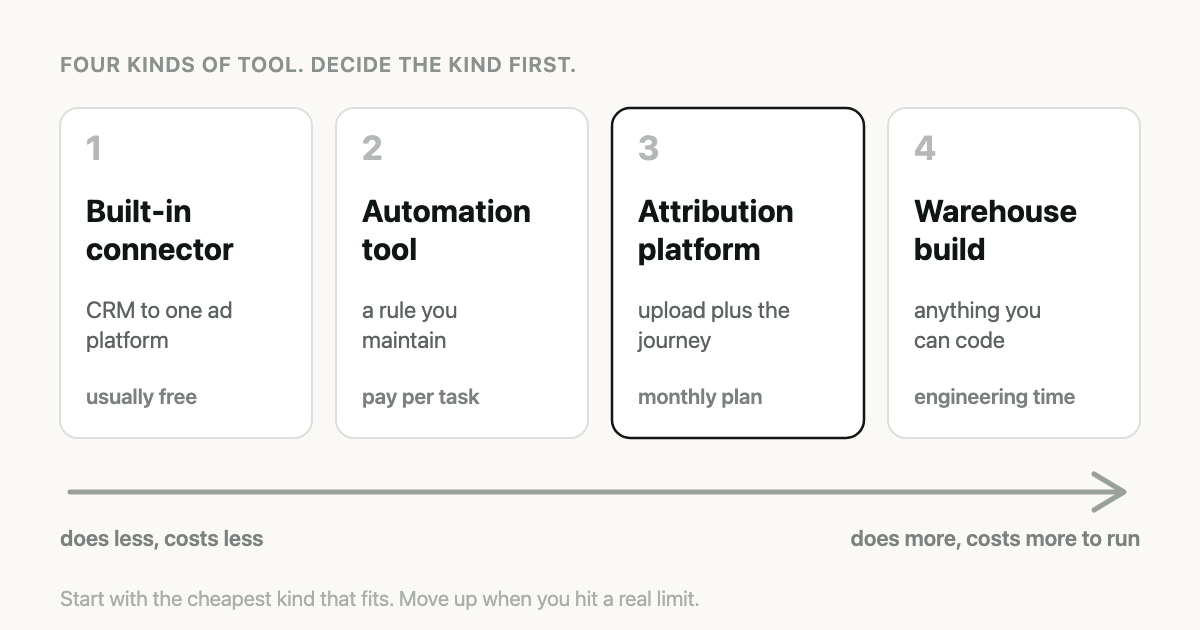
I make one of the tools on this list, so read it with that in mind. I have tried to write the article I would want if I were buying: what each kind of tool does, who it suits, and where Attribi is the wrong choice. There are a few places where it is.
Most "best software" lists rank eight products by feature count. That is not much help here, because the products are not doing the same job. A free connector inside your CRM and a 2,000 dollar a month attribution platform both "track offline conversions". Comparing them head to head misses the decision that matters, which is the category.
What is offline conversion tracking software?
Offline conversion tracking software sends sales outcomes recorded outside your website, such as a qualified lead or a closed deal in a CRM, back to ad platforms like Google Ads and Meta, matched to the ad click that produced the lead. The ad platform can then report on, and bid toward, revenue instead of form fills.
Every tool in this article does some version of that. They differ in three ways: what they read from, where they send to, and whether they do anything besides the sending.
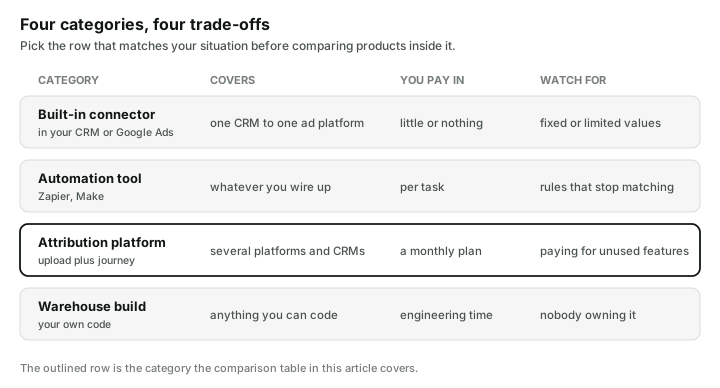
The four categories
1. The connector you already own
Before paying for anything, check what your CRM and Google Ads will do between themselves.
Google Ads Data Manager has direct connections to some CRMs. Google's help centre documents one for HubSpot, built on lifecycle stages. HubSpot has its own ad conversion events in Marketing Hub Starter and above, which send lifecycle stage changes to Google Ads at a fixed value you set.
Good for: one CRM, one ad platform, similar deal sizes, and a team that wants something working this week.
Runs out when: you need the real deal amount, more than one ad platform, or a CRM that has no connector. The HubSpot case is worked through in HubSpot Tells Google Ads a Contact Became a Customer.
2. Automation tools
Zapier, Make and similar tools can watch a CRM for a change and send a conversion to an ad platform. For CRMs with no connector of their own, this is the usual first step. Pipedrive's own blog describes doing it this way.
Good for: low volume, one or two ad platforms, and someone on the team who is comfortable maintaining the automation.
Runs out when: volume grows, when you need hashed email matching as a fallback, or when the rule silently stops matching because someone renamed a pipeline stage. You are also still responsible for capturing the click ID on your own forms. The details are in Pipedrive Marks the Deal Won.
3. Attribution platforms
These do the upload and also record the journey before the lead: which channels someone touched, in what order, and what the deal was worth. This is the category Attribi is in, along with several larger and older products.
Good for: more than one ad platform, a sales cycle long enough that "which channel started this" is a real question, and a need to show revenue by campaign to someone who signs off the budget.
Runs out when: your needs are simple enough for category 1, or specialised enough for category 4.
4. A build on your data warehouse
If your company already has a data team and a warehouse, the CRM data is probably there, and reverse ETL tools or your own code can send it to the ad platforms' APIs.
Good for: companies with engineers to spare and requirements no product meets.
Runs out when: nobody owns it. These pipelines fail quietly, and the APIs change. Google alone closed two of its older import routes between May 2025 and June 2026.
The attribution platforms, compared
This is the part where I have to be careful, and I would rather show the gaps in what I know than fill them in.
The facts about other vendors below come from their own public pages, checked on 6 August 2026. Where a vendor's site did not say something, the cell says "not stated". That means not stated. It does not mean "no". Products change, so check anything that matters to you before you rely on it.
| Ruler Analytics | HockeyStack | Hyros | Triple Whale | Attribi | |
|---|---|---|---|---|---|
| Built for | B2B and lead gen | B2B, larger companies | Info products, call-based sales | Ecommerce | Lead gen with a CRM |
| Sends conversions to Google Ads | Referenced | Yes, via enhanced conversions | Not stated | Not stated | Yes |
| Sends conversions to Meta | Not stated | Not documented | Yes | Yes | Yes |
| Sends conversions to LinkedIn | Not stated | Yes | Not stated | Not stated | Yes |
| Sends conversions to Microsoft Ads | Yes | Not stated | Not stated | Not stated | Yes |
| Reads revenue from a CRM | Yes, 11 listed | Salesforce and HubSpot | Yes, 11 listed | None listed | Yes |
| Call tracking | Yes | Not stated | Not stated | Not stated | No |
| Marketing mix modelling | Yes, top tier | Not stated | Not stated | Yes, enterprise | No |
| Data warehouse connections | Yes | Yes | Not stated | Yes | No |
| Prices on the website | Yes, as indicative tiers | No | Partly, a call is required | Yes, including a free tier | Yes |
Some notes on reading that table.
Ruler Analytics is the closest in shape to Attribi: CRM revenue sent back to ad platforms for B2B. It has call tracking, which Attribi does not, and that matters a great deal if your leads phone you.
HockeyStack is aimed at larger B2B teams and connects to intent data providers and data warehouses. If you have a revenue operations team and an account-based motion, it is built for you in a way Attribi is not.
Hyros focuses on businesses that sell through calls and long funnels, and documents a two-way integration with Meta.
Triple Whale is an ecommerce product. If you run a Shopify store, look there first. It listed no CRM integrations when we checked, which tells you who it is for.
There are longer, sourced comparisons for each: Ruler Analytics, HockeyStack, Hyros and Triple Whale.
Where Attribi fits, and where it does not
Attribi is for a specific buyer: a business that generates leads with paid ads and closes them in a CRM, spends on more than one ad platform, and does not have a data team.
What it does:
- Uploads lead, qualified and closed-won conversions to six ad platforms: Google, Meta, LinkedIn, Microsoft, TikTok and Snapchat.
- Reads closed deals and their values from CRMs including Salesforce, HubSpot, Pipedrive, Zoho and Odoo, and from Shopify.
- Writes the source, campaign and journey of each lead back into the CRM record, so sales can see it.
- Shows revenue by channel under several attribution models.
- Recommends when an account has enough qualified volume to bid on qualified leads instead of form fills, and makes the change on Google Ads and Meta when you approve it.
What it does not do, and you should buy something else if you need these:
- No call tracking. If a large share of your leads arrive by phone, Attribi will not see them.
- No marketing mix modelling or incrementality testing.
- No data warehouse export or public API.
- Microsoft Ads spend is not imported. Conversions upload to Microsoft, but spend and return on ad spend for Microsoft are missing from Attribi's reports.
- CRM deals are read once a day, not in real time.
Pricing is on the website. Plans run from free to 499 dollars a month by monthly visitors. Uploading conversions to one ad platform starts on the 49 dollar plan, and CRM connections start on the 99 dollar Growth plan. New workspaces get 30 days on the Pro plan with no card, so you can run it against your own CRM before paying anything.
How to choose in five questions
1. Where does the sale close? In a CRM: categories 1 to 3. In an online checkout: an ecommerce tool. On the phone: you need call tracking, so start with a product that has it.
2. How many ad platforms do you spend on? One: a built-in connector or an automation may be all you need. Two or more: each extra platform is another integration to build and maintain, and an attribution platform starts to pay for itself.
3. Do your deal sizes vary? If every customer is worth about the same, a fixed value per conversion is fine. If one deal can be twenty times another, you need the real amount to reach the ad platform.
4. Who will maintain it? Be honest. An automation that nobody owns will break within the year and nobody will notice, because these things fail without an error.
5. Do you need to explain the numbers to someone else? If a finance lead or a client asks which campaigns produced revenue, you need journey reporting as well as the upload.
Whatever you choose, check these four things
These hold for every category, including a build of your own.
- It sends both keys. The click ID, and the hashed email or phone as a second way to match. The reason is in Enhanced Conversions for Leads Fixes the Match.
- It uses a route that still works. For Google Ads, new integrations should be on the Data Manager API.
- It detects a won deal by the CRM's own flag, not by a stage name that someone can rename.
- It tells you when a match fails. Ask the vendor, or yourself, how you would find out that uploads had been matching nothing for a month.
Frequently asked questions
What is the best offline conversion tracking software? It depends on where your sale closes and how many ad platforms you use. A built-in CRM connector suits one CRM and one ad platform. An attribution platform suits several ad platforms and a longer sales cycle. Ecommerce stores and call-based businesses are better served by tools built for those models.
Is there free offline conversion tracking software? Yes, within limits. Google Ads Data Manager and HubSpot's built-in ad conversion events can send CRM stages to Google Ads without a separate product, though HubSpot's requires a paid Marketing Hub plan. They cover one ad platform and use limited or fixed conversion values.
Do I need an attribution platform to upload offline conversions? No. A CRM connector or an automation tool can upload conversions. An attribution platform becomes worthwhile when you advertise on several platforms, need real deal values, or need to report which channels produced revenue.
Which offline conversion tracking tools support call tracking? Among the tools compared here, Ruler Analytics documented call tracking on its own site when checked in August 2026. Attribi does not offer call tracking, so confirm it with any other vendor you are considering.
Can one tool send offline conversions to Google, Meta and LinkedIn? Some can. Attribi uploads to Google, Meta, LinkedIn, Microsoft, TikTok and Snapchat from one CRM connection. Other vendors document some of these platforms, so check the specific ones you use on each vendor's integration pages.
What should I check before buying offline conversion tracking software? Check that it sends both the click ID and hashed contact data, that it uses a current ad platform API, that it identifies won deals by the CRM's own won flag, and that it reports failed matches instead of failing silently.
The takeaway
Start with the cheapest category that fits. If your CRM's built-in connector does the job, use it and keep the money. Move up when you hit a real limit: a second ad platform, deal values that vary, or a question about revenue you cannot answer. If that is where you are, and your leads close in a CRM and do not arrive by phone, Attribi was built for your case, and you can try it free for 30 days.