CRM Offline Conversion Tracking QA Checklist: Prove Each Step Before You Change Bidding
By Rajesh Kumar, Founder, Attribi ·
CRM offline conversion tracking is ready for use when you can trace a real business outcome from its CRM record to the correct advertising destination, explain any missing or duplicate events, and confirm which campaigns can use that signal. A successful upload is only one part of that test.
Before changing bidding, check the event definition, record relationships, permitted identifiers, timestamp, value, destination, retry behavior and reporting settings. Then distinguish delivery, matching, attribution and bidding activation. Each answers a different question and needs different evidence.
This checklist is for marketing operations teams testing a new connection, replacing an uploader or investigating a pipeline that appears healthy while revenue is missing. It complements the platform setup guides with a repeatable acceptance process, and agencies running it across several clients can pair it with the agency operating guide. The examples are illustrative, not customer results or guaranteed match rates.
For a hands-on evaluation, start an Attribi workspace. Every new workspace starts with 30 days on Pro, with no card required; ongoing CRM revenue integrations are included from Growth. Current pricing lists the applicable limits.
Define what passing actually means
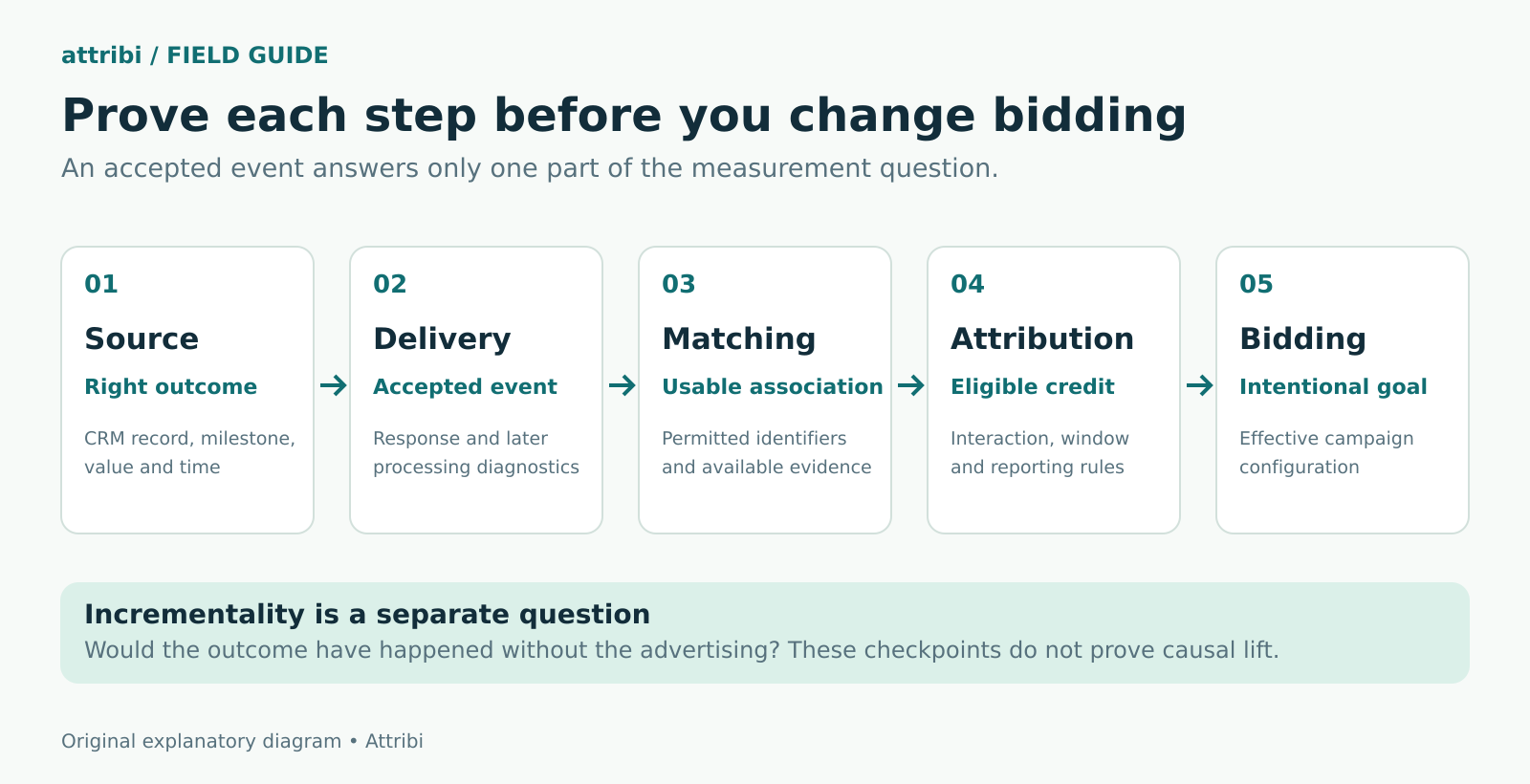
Use five separate checkpoints rather than a single green integration badge.
- Source accuracy means the CRM recorded the intended milestone, person, amount and time.
- Delivery means the receiving system accepted or processed the event, subject to its diagnostics.
- Matching means the destination could associate permitted identifiers with an eligible user or interaction.
- Attribution means the platform credited an eligible advertising interaction under its reporting rules.
- Bidding activation means the intended campaign is configured to optimize toward that conversion.
An event can pass an earlier checkpoint and fail a later one. A person may be identifiable without having an eligible ad interaction. An attributed event may be observation-only. None of these checkpoints demonstrates incremental lift, which asks whether advertising changed the outcome compared with what would otherwise have happened.
Write the acceptance standard before opening a dashboard. A useful standard is that every sampled source outcome is either represented correctly or has a documented exclusion, pending state or failure. Requiring every CRM sale to appear in an ad platform encourages people to conceal legitimate differences.
Build a small test ledger
Start with a manageable sample that covers the difficult paths, not just the easiest recent wins. Include a qualified lead, a won deal, an unmatched record, a retry, a blank value and a consent exclusion. Add a repeat purchase if repeat business matters to your reporting.
For each case, keep the following in an access-controlled ledger:
- CRM record reference and associated person reference
- Milestone and original occurrence time with time zone
- Value basis, amount and currency
- Identifier type, without copying raw personal data into a shared spreadsheet
- Destination account and conversion action or rule
- Stable event reference and uploader route
- Expected result, observed result and supporting diagnostic reference
- Owner of the next action
Use one row per business occurrence and destination. Keep a separate attempt log if an occurrence is retried. Otherwise three network attempts can look like three sales before the data reaches an advertising platform.
This ledger is a recommended operating practice, not a claim that every tool exposes each field. If your connector hides request-level evidence, record the evidence it does expose and ask which failures remain invisible. That visibility gap belongs in the acceptance decision.
Test one business milestone at a time
Check the meaning of qualified and won
Have sales and marketing describe the milestone in ordinary language. For example, a qualified lead might require an accepted discovery meeting plus a documented fit assessment. A booked meeting alone would not meet that definition if no one has reviewed it.
Then map the definition to the actual CRM fields. Inspect a record that should qualify and one that should not. Test a stage rename, a second pipeline and a reopened deal when those situations exist. A stage label is not sufficient evidence that the integration reads the same rule your team uses.
Preserve the distinction between a lead, a contact, an opportunity and a sale. Two contacts associated with one deal do not automatically represent two sales. One contact with two deals does not automatically represent one lifetime purchase either. Decide the counting unit before deciding the event key.
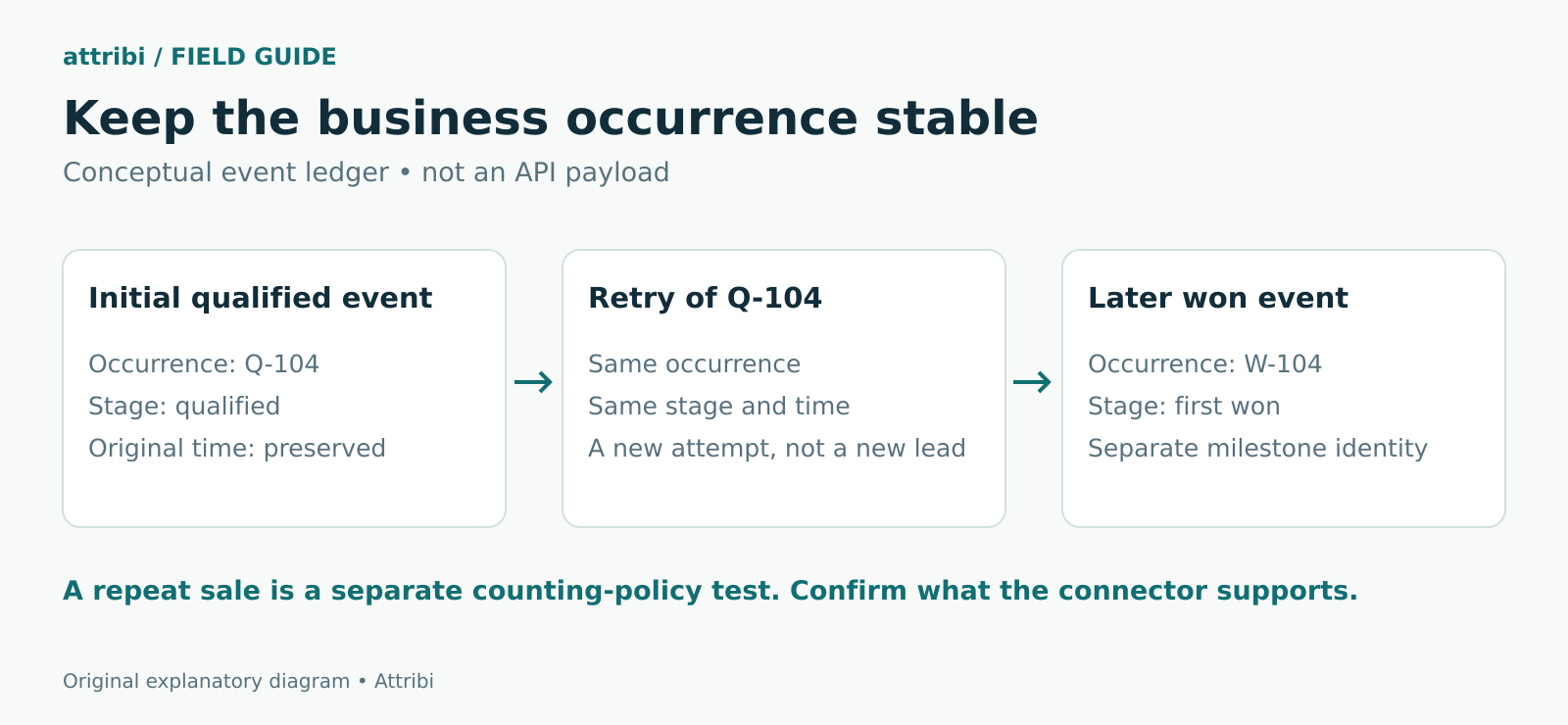
The expected result should state what happens when a record moves backward and forward. For a first-qualified acquisition signal, repeating the stage should not manufacture another qualification. For a genuinely separate transaction, the business identity may need to be different. The connector must support the counting unit you selected.
Follow the relationships to the revenue
Open the actual records behind the sample. Verify that the won opportunity or deal is associated with the right person and that the person has the permitted identifier the upload route uses. An amount on an opportunity cannot repair an email address attached to the wrong contact.
Pay particular attention to CRM migrations, merged contacts and lead conversion. A field that exists on the original lead may not exist on the contact used later. A dashboard total can hide that broken relationship because it still counts the deal correctly inside the CRM.
Attribi's Salesforce integration distinguishes contact-based matching from click IDs held by its website tracker. Its public integration page still marks reading Salesforce-owned click IDs for revenue matching as planned. Test the supported route you actually use; a populated Salesforce click-ID field alone does not establish that Attribi consumed it.
Test identifiers without fabricating attribution
There are two different tests here. A synthetic marker can prove that a form field reaches the CRM. Only an eligible real advertising interaction and supported matching data can establish whether an event is attributed.
For a field-transport test, use an unmistakable synthetic marker in a sandbox or local test path, then confirm that the same value appears in the intended CRM field. Stop that fixture before production advertising uploads. A made-up GCLID is not a real Google ad click and cannot be used as evidence that Google matched or credited a conversion.
For the production acceptance sample, examine genuine, authorized customer outcomes that already occurred. Check whether the expected identifier survived the form, CRM association and outbound route. Do not create fake sales, click your own ads to manufacture evidence, or replace missing identifiers with invented values.
If the route uses customer-provided information, validate the destination's normalization and hashing requirements with a non-customer test fixture. Hashing the wrong normalized value consistently still produces the wrong match input. Attribi's email hashing guide covers those preparation differences.
Record identifier coverage separately from match rate. Coverage asks how many eligible records contain the data your route needs. A platform's matching metric asks a different question and may have a different denominator. If the platform does not expose record-level match status, say that it is unknown rather than inferring it from a successful request.
Check consent before checking delivery
A technically valid event can still be inappropriate to send. Confirm that the business has approved the data source, recipient and measurement purpose, and that your implementation respects the applicable user choices and platform requirements.
Google's customer data policies require relevant disclosures, consent where required and compliance by authorized third-party uploaders. They also restrict certain data, including sensitive-category conversion information. Hashing does not remove those responsibilities.
Include a negative test: a record that must be withheld should remain withheld. Confirm the exclusion at the outbound boundary, not merely in the CRM interface. Test what happens when a missing consent field is encountered; do not silently turn an unknown state into permission.
US-led businesses with European customers should include the relevant regional paths in the test set. Google's consent guidance explains the requirements for its upload use cases. Have the responsible privacy reviewer approve your implementation; a conversion checklist does not establish legal compliance.
Preserve time value and currency
Keep occurrence time separate from processing time
Record when the business outcome happened, when the connector detected it and when the destination processed it. Those are three useful timestamps. Replacing occurrence time with each retry time can move the same sale between reporting periods and undermine deduplication.
Check time zones explicitly. A US sales team's late-evening update can fall on the next UTC date. A European office may have a different local offset, including seasonal changes. Keep the original timestamp with its offset and show the reporting time zone in the ledger.
Also distinguish the platform's upload deadline from its attribution window. Google's offline import guidelines state a 90-day limit after the associated last click, with a 63-day limit for enhanced conversions for leads. That does not make every event inside those limits attributable. The applicable conversion settings and matching conditions still matter.
Never make an old outcome appear recent merely to get it accepted. If a long sales cycle exceeds the usable window, retain the revenue in CRM reporting and evaluate a meaningful earlier milestone separately. The existing long sales cycle guide addresses that design decision.
Define the amount before reconciling it
State whether the value is booked contract value, first-year value, collected cash or another approved measure. Test a normal amount, a decimal amount, a missing amount and a zero. Decide how cancellations and later corrections are handled before they arrive.
Keep USD and EUR totals separate unless your reporting process deliberately converts them using a documented exchange-rate policy. Sending 12,000 EUR as 12,000 USD is a data error even if the destination accepts the event.
An estimated value on a qualified lead should remain visibly separate from won revenue. If a lead has an estimated value of $300 and later closes for $8,000, summing both as $8,300 of actual revenue misstates the business result. Check which columns, goals and exports include each stage.
Prove that retries remain the same occurrence
Interrupting an integration is not necessary to test its identity logic. In a sandbox or validation harness, process the same fixture twice and compare the generated event identity, milestone, occurrence time and destination. They should stay stable for a retry.
Then process a genuinely different fixture for the same person. The expected result depends on your counting policy and connector capabilities. A new opportunity may require a new event in a transaction-level design; a first-win-per-contact workflow may intentionally exclude it. Document that exclusion rather than calling it a lost upload.
Platform deduplication rules are specific. Google's offline import guidance describes duplicate detection using the identifier, conversion name and conversion time. LinkedIn's deduplication documentation describes matching event IDs across browser and server rules for the same occurrence. Neither gives permission to send unrelated events with one shared ID.
Inventory every writer: native CRM sync, website tag, manual import, automation and managed connector. Two working integrations can still create overlapping conversion actions. Deduplication within one route does not prove that all competing routes are reconciled.
Read diagnostics after the request succeeds
Use the platform's supported validation tools before sending production data. Google's Data Manager API offers validation-only requests that perform initial checks without ingesting events. Its error documentation explicitly distinguishes those checks from asynchronous processing errors that become visible only after ingestion.
For live events, retain the request or batch reference and inspect subsequent diagnostics. Separate authentication failures, invalid records, pending processing and accepted records. Retrying all of them on the same schedule obscures the cause and can create a backlog that ages past a deadline.
Use the original source record to investigate a failed event. Fix the underlying field or permission, confirm that the corrected payload is still the same business occurrence, then follow the destination's supported retry or adjustment method. Changing an event ID to make an error disappear can turn a correction into another sale.
Attribi's offline conversion workflow records upload outcomes by platform and stage. Its CRM connections read outcomes on a schedule. Establish the observed delay for the account you test instead of assuming every connector is instantaneous.
If you want to check whether your CRM's record model fits that workflow, book an Attribi demo. Bring one qualified lead, one first win and one repeat-deal example so the review covers your real counting requirements.
Reconcile a cohort before activating bidding
Compare the same milestone over the same occurrence-date range, in the same time zone and currency. Segment by conversion action. Google's standard reporting and conversion-time reporting can place outcomes in different dates; its import guidelines explain using conversion-time columns for this comparison.
Here is an illustrative reconciliation for 24 first-win CRM records in a single USD cohort:
- 3 are excluded by the business's approved data-sharing rules
- 2 are held because the amount is missing
- 19 are eligible for submission
- 18 are accepted by the destination and 1 is rejected
- 14 appear as attributed conversions after the relevant reporting delay
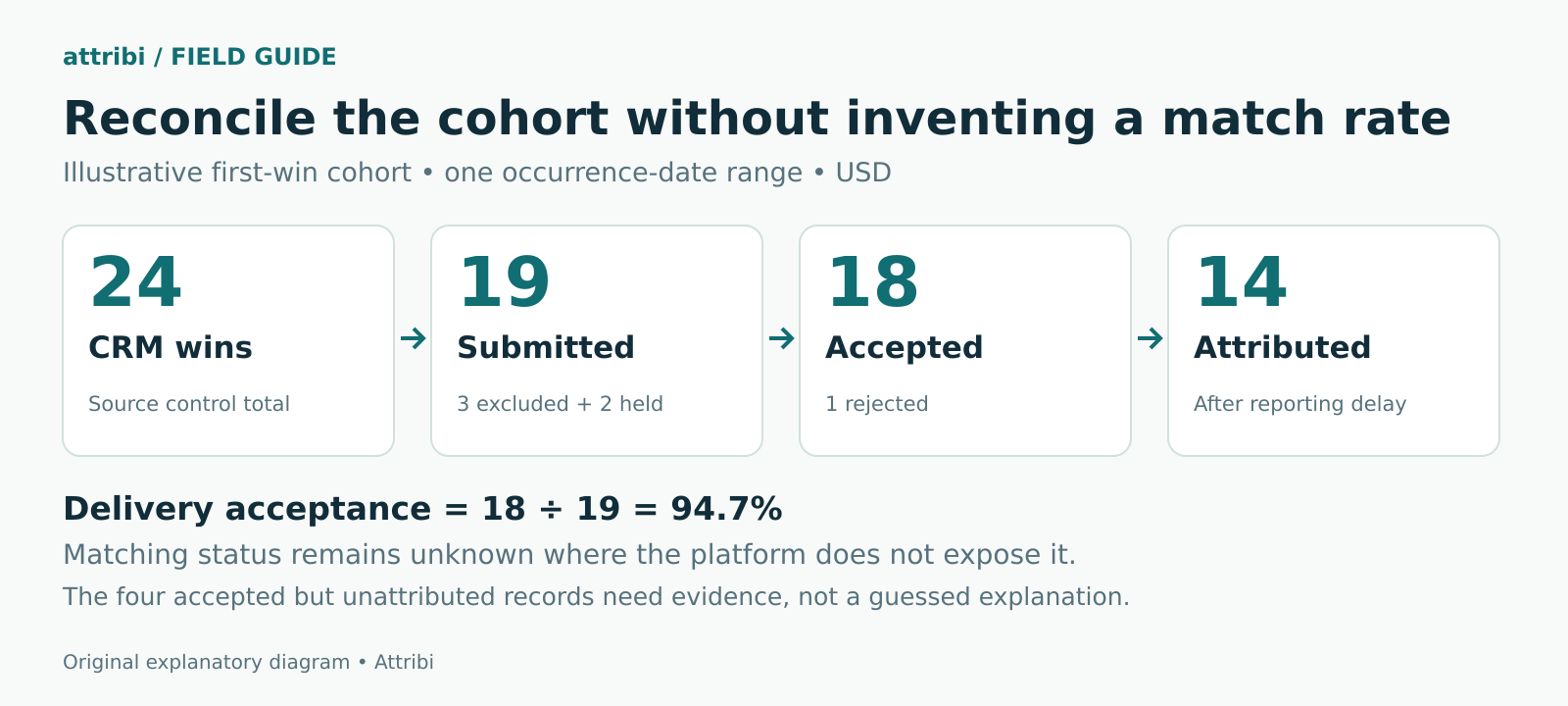
The ledger accounts for all 24 records. The delivery acceptance rate is 18 divided by 19, or 94.7 percent. That is not a 94.7 percent match rate. Nor can you automatically label the other four accepted records unmatched: attribution eligibility, settings, timing or unavailable diagnostics may explain them.
The next actions are specific: investigate the rejection, repair missing amounts without inventing them, and review evidence for the accepted-but-unattributed group. There is no reason to change bidding merely because the acceptance percentage looks high.
Record a reconciliation cutoff and reopen recent periods as delayed events arrive. Comparing yesterday's immature ad report with today's finalized CRM export produces a misleading defect list.
Sign off on the campaign goal separately
Have the media buyer inspect the actual campaign goal after connection and mapping. In Google Ads, primary actions can be used for bidding when the relevant standard goal is used; secondary actions normally support observation. However, secondary actions included in a custom goal can still be used for bidding. Check the primary and secondary action rules rather than relying on the label alone.
This matters with Attribi: its conversion feature documentation says mapping an existing Google or Microsoft conversion can set it to count toward bidding. A connection review must therefore include the effect of saving the mapping. Do not describe every setup change as observation-only.
Check that two equivalent events are not both training the same campaign unintentionally. Document the prior goal, intended goal, owner and rollback decision. Reliable measurement is a prerequisite for a bidding experiment, not proof that the account has enough timely outcomes for a particular strategy. Attribi's low conversion volume guide covers that separate question.
Keep the test useful after launch
Keep the same compact test set for changes to forms, pipelines, CRM associations, upload routes and campaign goals. Add a new case when a real failure reveals a missing path. A growing collection of realistic edge cases is more useful than repeating only the happy path.
Review freshness as well as errors. A job that stops running may report no failures because it makes no requests. Track the last successful source read, newest outcome processed and oldest unresolved event where your tools expose them.
Assign an owner to each failure category. Sales operations owns incorrect stages and relationships; the integration owner handles delivery; the media buyer owns conversion goals; the privacy reviewer owns the permission decision. That division is a suggested operating model. Your team should adapt it to its responsibilities.
Frequently asked questions
Does a successful upload prove attribution?
No. It establishes a delivery or validation result at a particular stage. Matching, attribution rules, reporting delay and campaign configuration must be checked separately. Where the platform does not expose a match result, preserve that uncertainty.
Can a fake GCLID test the whole workflow?
It can test field transport in an isolated fixture. It cannot establish a genuine ad interaction or attributed sale. Prevent synthetic identifiers and fake outcomes from entering production conversion reporting.
Should every CRM win appear in Google Ads?
No. Permission exclusions, unsupported or missing identifiers, timing rules and the absence of an eligible interaction can create legitimate differences. Reconcile the reason for each difference rather than forcing the totals to agree.
Does Attribi upload every repeat HubSpot or Salesforce deal?
Validate that requirement before choosing the route. Attribi's HubSpot and Salesforce integration pages describe once-per-contact-per-stage reporting. The Salesforce page also excludes blank or zero amounts from revenue uploads. That acquisition-stage behavior should not be presented as a full repeat-purchase or lifetime-revenue ledger.
How often should we run this checklist?
Run it before first use and after a material change. Keep ongoing freshness and failure checks in between. Choose the review cadence from the sales cycle, upload route and consequences of delayed or incorrect data, rather than assuming one schedule suits every account.
The final acceptance check
A usable conversion pipeline has a defensible event definition, traceable records, explainable exclusions and an intentional bidding configuration. Keep the evidence together so a new teammate can understand the result without reconstructing it from several dashboards.
Start an Attribi trial with one CRM and the ad platforms you actually use, then apply this checklist to the supported outcomes. New workspaces receive 30 days on Pro, no card required. Confirm ongoing plan fit on the pricing page before the trial ends.