Your Sales Cycle Is Longer Than Google's Memory
By Rajesh Kumar, Founder, Attribi ·
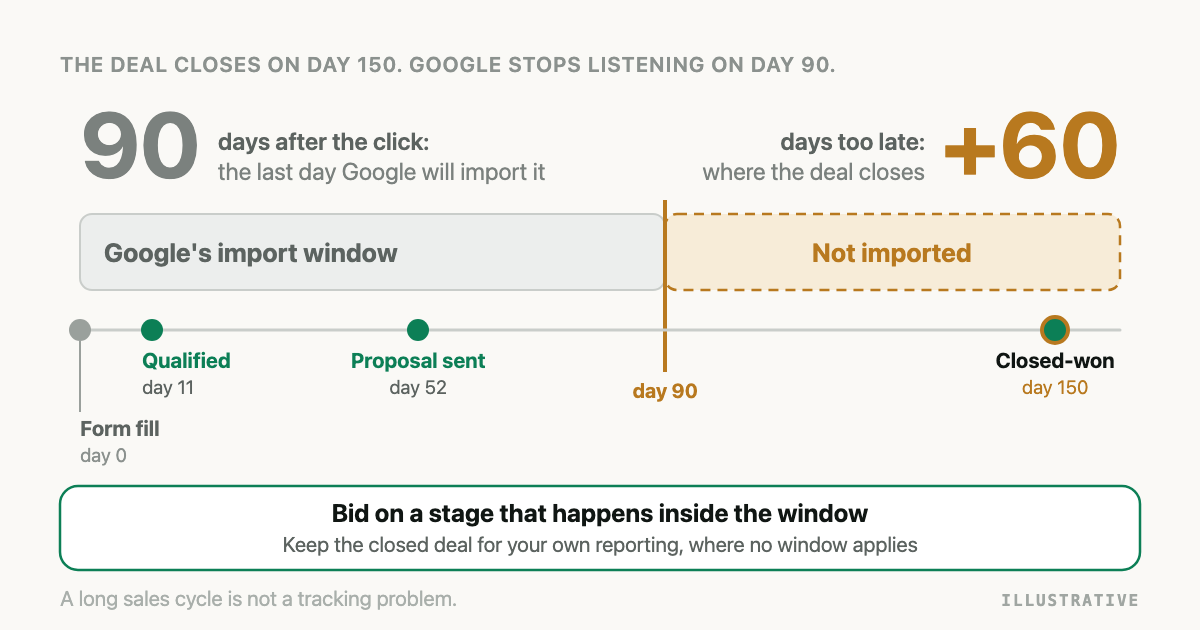
The click ID was captured. The CRM is connected. The upload job runs every night without an error anyone has noticed. Then a deal that started with a Google ad in March closes in August, and the closed-won conversion action in Google Ads still reads zero.
Your tracking is fine. The deal is too old for Google to take.
If your sales cycle is longer than 90 days, Google Ads cannot use the closed deal as a conversion. The Google Ads conversion window for a click tops out at 90 days, and an offline conversion uploaded more than 90 days after the last click is not imported. Send an earlier CRM stage for bidding, and keep closed deals in your own reporting.
You cannot beat this limit with better tracking, so stop trying. There are in fact three limits, and people mix them up.
What is the Google Ads conversion window for offline conversions?
The Google Ads conversion window is the number of days after an ad click during which a conversion can still be credited to that click. Each conversion action has its own click-through window, set between 1 and 90 days with a default of 30. For imported offline conversions, a conversion that falls outside the window, or is uploaded more than 90 days after the click, is not recorded.
Google's conversion windows help page gives the range, and adds that Smart Bidding counts and optimizes on whatever window you choose. The window is the edge of what the bidding system is allowed to know.
Ninety days is the ceiling. None of the Google pages cited in this article describes an exception.
Which 90-day limit is which?
There are three clocks. They start at the same moment, the last ad click, and they stop at different things.
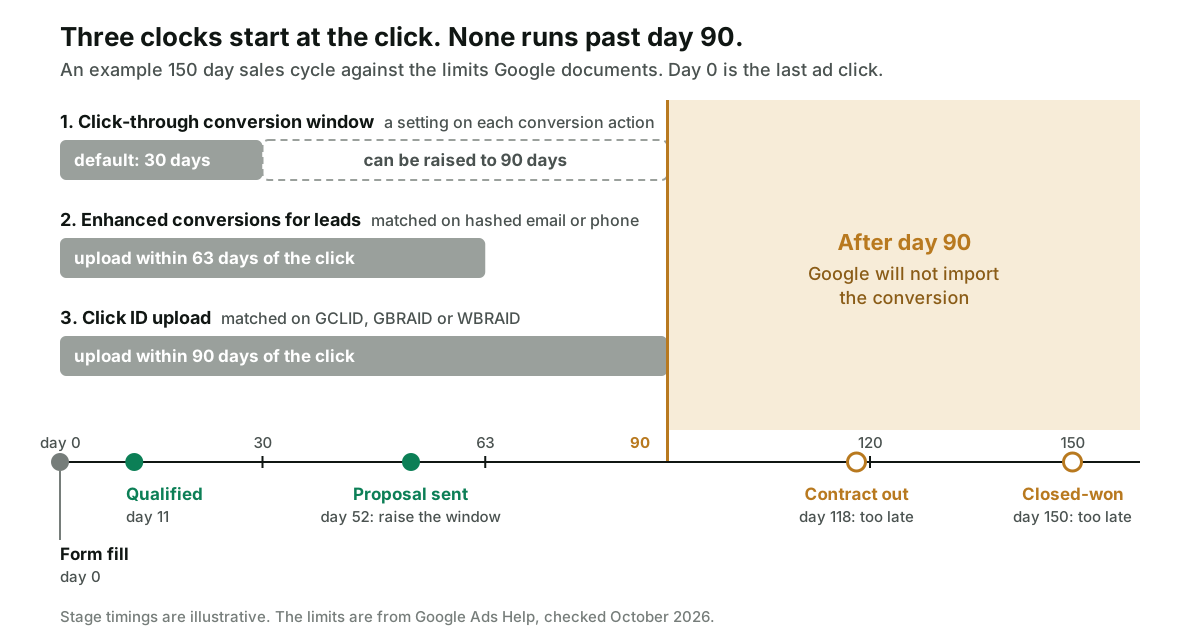
| Clock | Limit | Measured from the click to | Where Google says so |
|---|---|---|---|
| Click-through conversion window, set per conversion action | 1 to 90 days, default 30 | The time the conversion happened | About conversion windows |
| Upload deadline for a conversion matched on a click ID | 90 days | The day you upload it | Guidelines for importing offline conversions |
| Upload deadline for enhanced conversions for leads | 63 days | The day you upload it | Same page, in the note under the 90 day rule |
The first clock is a setting you control. In the API it is
click_through_lookback_window_days
on the conversion action. The other two are not settings. They are how long Google keeps the click
available to match against, and its
offline import FAQ says the GCLID is
retained for 90 days only.
Two consequences catch people out.
A conversion action left on the 30 day default cuts you off at day 30, not day 90. If your qualified stage usually arrives on day 40, open the conversion action and raise the window.
And the upload deadlines measure the upload, not the deal. A deal that closed on day 80 and sat in a monthly export until day 95 is gone, even with the window set to 90. A batch job shortens your real window by the length of the batch.
The 63 day clock applies when the match depends on a hashed email or phone and not on a click ID. That fallback is covered in enhanced conversions for leads not working.
What happens when you upload a conversion after the limit?
It depends on how you upload, which is why some teams see an error and others see nothing.
| Upload path | What you get back for a too-old click |
|---|---|
| File or scheduled upload in the Google Ads interface | A row error reading This click is too old for its conversion to be imported |
Google Ads API, UploadClickConversions | EXPIRED_EVENT: the click occurred before the conversion action's click-through window |
| Data Manager API | The request is accepted. Event problems are reported afterwards in the request status, where the listed reason for an over-age conversion is PROCESSING_ERROR_REASON_EVENT_TOO_OLD |
The interface wording is from the
offline import FAQ, EXPIRED_EVENT from
the
ConversionUploadError reference,
and the Data Manager reason from the
request status reference.
The third row looks like silence. When we built Attribi's Google upload on the Data Manager API, the success response we got back was a request ID and nothing else. A conversion can be accepted at the door and dropped in processing, and unless something reads the request status afterwards, the only symptom is a conversion column that never moves.
Do not try to rescue an old deal by changing its date. The deadline compares the click with the day of the upload, so a backdated conversion time is still an upload on day 150. The other upload errors have their own article: Google Ads offline conversion import errors.
What can you do when your sales cycle is longer than 90 days in Google Ads?
Send Google something that happens sooner.
This is Google's own advice. In the FAQ entry about the too-old click, its fix for conversions that happen after 90 days is to "upload an offline conversion event that happens within 90 days".
Which event? My rule: pick the latest stage that reliably happens inside the window. Latest, because a later stage says more about revenue. Reliably, because a stage that makes the deadline half the time gives Google a biased half of your pipeline: the fast deals.
Here is an illustrative 150 day sales cycle. The numbers are invented to show the method.
| Stage | Median day after click | Share reached by day 63 | Share reached by day 90 |
|---|---|---|---|
| Form fill | 0 | 100% | 100% |
| Qualified by sales | 11 | 97% | 99% |
| Proposal sent | 52 | 68% | 91% |
| Contract out | 118 | 6% | 19% |
| Closed-won | 150 | 2% | 9% |
Closed-won is out: nine deals in a hundred make the 90 day deadline. Proposal sent is the interesting row. With a click ID on the record, 91% of proposals arrive in time, which is usable. If much of your matching leans on email and phone, the limit is 63 days and only 68% arrive.
So this account bids on proposal sent if its click ID capture is solid, and on qualified if it is not.
To run the same check on your own account:
- Export opportunities from the CRM with the lead's created date and the date each stage was entered.
- For each stage, compute days from the created date to the stage date. The created date stands in for the click, which is fair when the form fill follows the click closely.
- Count the share that reached each stage within 63 days and within 90 days. Medians hide the slow tail.
- Take the latest stage where that share is high. I would want nine in ten. That threshold is my judgement, not Google's.
- Give that stage its own conversion action and set its click-through window to cover it, up to 90 days.
- Upload each stage change the day it happens. Google's FAQ asks for uploads at least daily.
Step 4 has a second test this article does not cover: the stage also needs enough volume for automated bidding to learn from. That side, including the Target CPA arithmetic, is in Not Enough Conversions for Smart Bidding?. A stage has to pass both tests.
An earlier stage is worth less than a closed deal, and Google should be told so. How to set a value per stage is in value-based bidding for lead generation.
If you would rather not build the spreadsheet, start a workspace with 30 days on the Pro plan, no card required, connect the CRM, and read the stage dates off the leads.
Why does the most recent month always look worse than it was?
The other half of the time problem is in your reports, and it bites even when every conversion arrives inside 90 days.
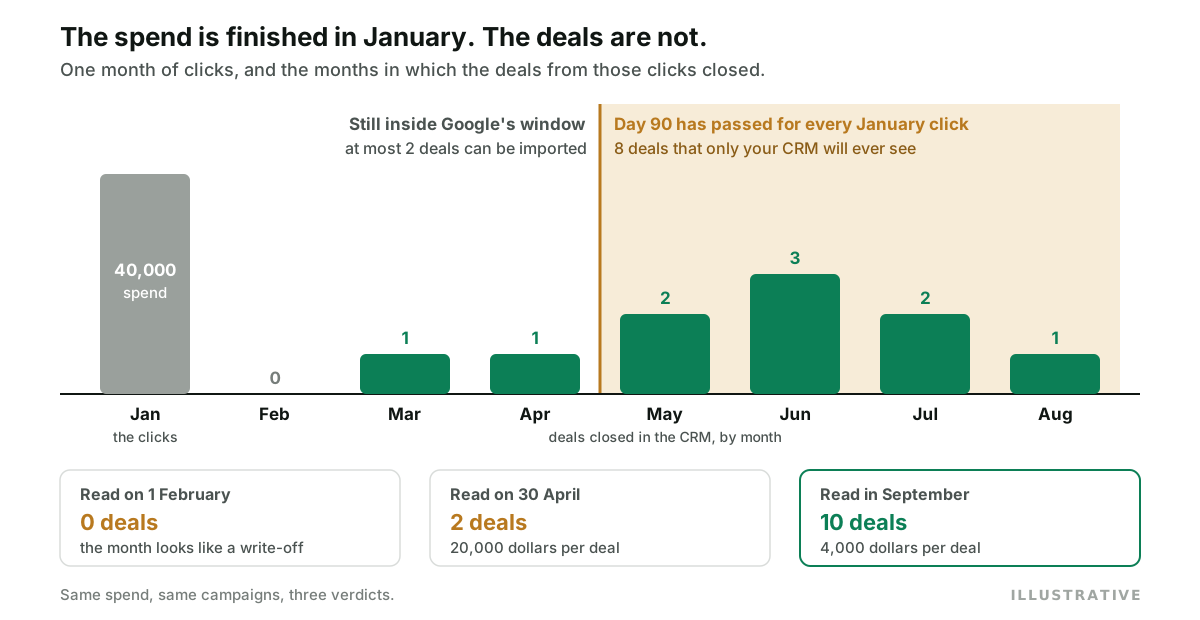
Google's standard conversion columns count a conversion on the date of the click, not the date it happened. Its announcement of the "by conv. time" columns gives the reason: spend is reported at the time of the click, so the conversion goes there too.
So recent periods are always unfinished. January's spend is complete on the first of February. January's conversions keep arriving for as long as the window is open. Google's page on conversion delay says recent performance can look weaker for exactly this reason, and suggests ending a report's date range at least 30 days back, or further with a longer window.
In the illustrative picture above, 40,000 dollars of January spend produces ten deals over seven months. Read on the first of February, that is no deals at all. Read at the end of April, two deals at 20,000 dollars each. Read in September, ten deals at 4,000 each. Same spend, three verdicts.
Compare cohorts of the same age: January at 60 days old against December at 60 days old.
How does Smart Bidding handle a long conversion delay?
Only partly, and Google is fairly open about the limits.
Smart Bidding works in conversion cycles, meaning the time a click takes to become a conversion, and for imported conversions that includes the time they take to be reported. The bid strategy report estimates how many conversions are still to come. After a target change, Google says to wait one to two conversion cycles before judging the result.
If your bid stage arrives 50 days after the click, that is two to three months before you can fairly judge one target change. If it arrives on day 11, it is about three weeks.
I have not found a Google page that says how much delay is too much, so I will not give a number.
Do Meta and LinkedIn have the same limit?
No. Each one draws the line somewhere else, and they measure different things.
| Platform | What its documentation states | What that means for a long cycle |
|---|---|---|
| Google Ads | Click ID upload within 90 days of the last click, 63 days for enhanced conversions for leads | The click expires |
| Meta Conversions API | event_time can be up to 7 days before you send the event. Older than that and the whole request is rejected | Send the event within a week of it happening |
| LinkedIn Conversions API | conversionHappenedAt must be within the past 90 days, or the call fails with INVALID_CONVERSION_TIME_FIELD_VALUE | Send the event within 90 days of it happening |
Meta's and LinkedIn's rows are about the age of the event when you send it. Whether an old click still gets the credit is decided by each platform's attribution window. Meta's default is a 7 day click. LinkedIn's API documentation lists post-click windows of 1, 7, 28, 30 and 90 days for a conversion rule, with 180 and 365 days supported for some conversion types. How those windows change the totals each platform reports is in why ad platforms count conversions differently.
How Attribi handles a long sales cycle
I build Attribi, so weigh this section accordingly. First, what it cannot do: Attribi cannot extend Google's window. A deal that closes on day 150 will not become a Google Ads conversion through Attribi or through anything else.
What the code does, as of this writing:
- It sends three stages, each to its own conversion action. Lead, qualified and closed-won are uploaded separately, so the stage inside the window can be the bid target.
- It dates each conversion at the stage change, not at the upload.
- Its attribution reports have no conversion window. Credit under the five models (first touch, last touch, linear, position-based and time decay) is computed from the touchpoints Attribi stored for that visitor, and the revenue comes from the closed-won value on the lead, whenever the deal closes.
- Its bid target suggestions allow for lag. Funnel graduation measures your median time from lead to qualified and shifts the spend it compares against by that much.
And the limits:
- The conversion actions Attribi creates for you get a 30 day click-through window, Google's default. If your bid stage regularly lands later, raise the window in Google Ads yourself.
- Attribi does not check a click's age before uploading, and it does not read back the Data Manager request status. A closed-won upload for a five month old click is recorded on Attribi's side as accepted by Google, and it will not appear in Google Ads.
- There are exactly three stages, and one of them is mid-funnel: qualified. A later stage such as proposal sent has no conversion action of its own in Attribi.
The upload paths themselves are in the guide to Google Ads offline conversion import. Conversion uploads are a paid feature, and every new workspace starts with 30 days on the Pro plan, no card required, which is long enough to watch a qualified stage reach Google inside the window.
Frequently asked questions
Can the Google Ads click-through conversion window be set longer than 90 days? No. Google lets you set it anywhere from 1 to 90 days depending on the conversion source, with a default of 30 days. Offline conversions uploaded more than 90 days after the last click are not imported whatever the setting.
What error does Google Ads show when a click is too old to import? In a file or scheduled upload the row fails with "This click is too old for its conversion to be imported". The Google Ads API returns EXPIRED_EVENT. The Data Manager API accepts the request and reports event problems afterwards in the request status, where the reason listed for an over-age conversion is PROCESSING_ERROR_REASON_EVENT_TOO_OLD.
Is the click-through conversion window the same thing as the 90 day upload limit? No. The window is a setting on each conversion action and measures the gap between the click and the time the conversion happened. The upload limit measures the gap between the click and the day you upload. A deal that closed on day 80 and was uploaded on day 95 passes the first test and fails the second.
Can I backdate a closed deal so Google Ads accepts it after 90 days? No. The deadline compares the click with the day of the upload, so changing the conversion time does not make an old click young again. A conversion time earlier than the click is rejected as CONVERSION_PRECEDES_EVENT.
Why does cost per conversion look worse for recent months when the sales cycle is long? Because spend is complete as soon as the month ends and its conversions are not. Google's standard columns count a conversion on the date of the click, so a recent month keeps gaining conversions for as long as the window is open. Compare months at the same age.
The takeaway
A long sales cycle is not a tracking problem, so no amount of tracking fixes it. Google remembers a click for 90 days. Find the stage of your pipeline that reliably happens inside that, bid on it, and upload it the day it happens. The closed deal still matters more than anything else you measure. It just has to be measured by you.