Google Ads Conversion Adjustments for CRM Revenue
By Rajesh Kumar, Founder, Attribi ·

Google Ads conversion adjustments let you correct a previously reported outcome when a deal is cancelled, a customer receives a refund or the recorded value changes. Use a restatement for a revised value and, where the upload route supports it, a retraction to remove the conversion. The first check is your delivery route: Google's Data Manager API supports value restatements but does not support retractions.
For a revenue operations team, the hard part is rarely calculating the refund. It is identifying the exact event already sent to Google, deciding what that event represents and proving that the correction reached the right conversion action. A CRM amount changing is not, by itself, evidence that Google Ads has changed.
This guide explains how to build that correction workflow for lead generation and sales-led businesses, including a fictional worked example, identity checks and a practical reconciliation process.
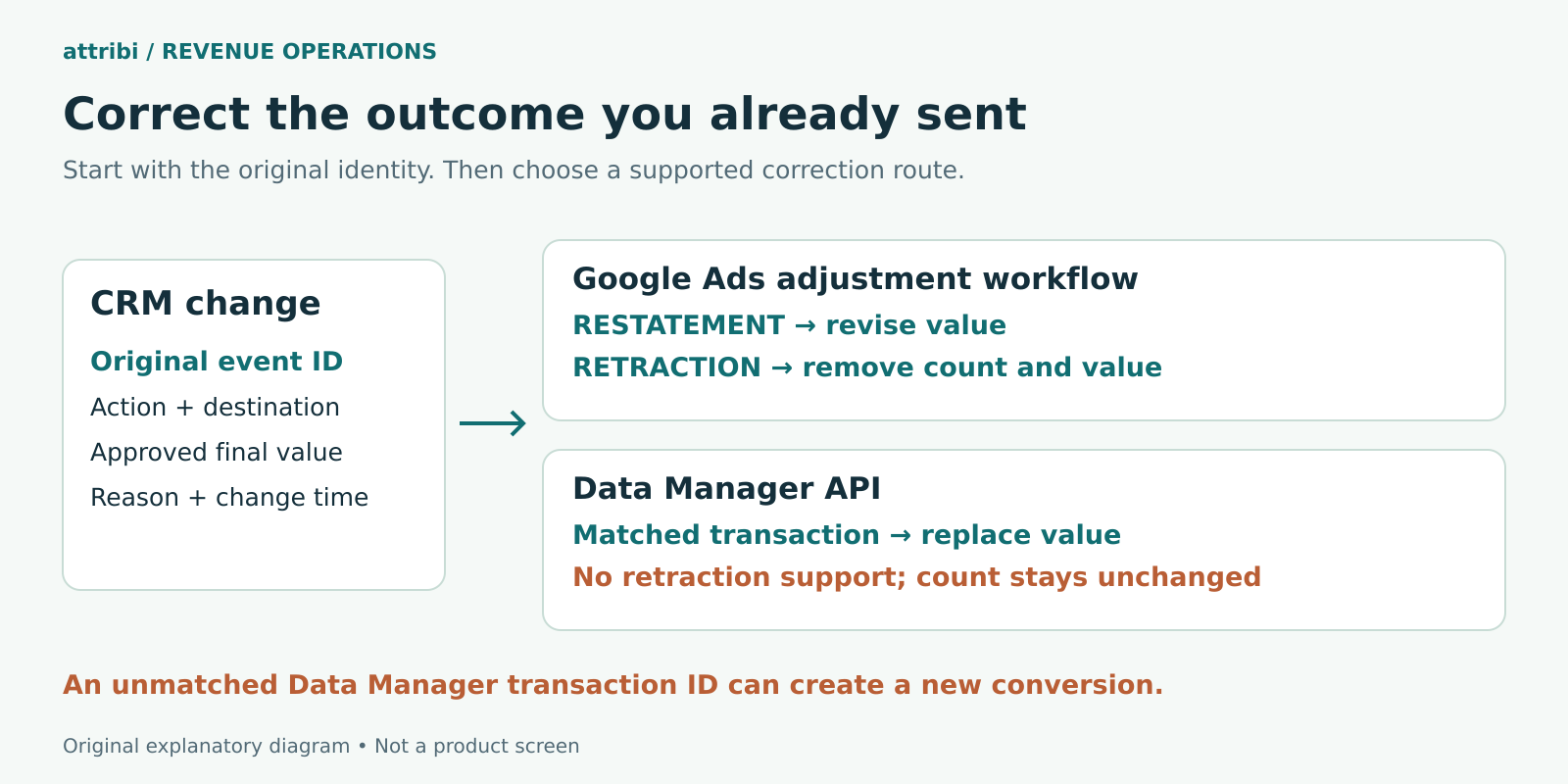
Decide what the original conversion promised
Before choosing an adjustment, write one sentence defining the original outcome. For example: "A closed-won conversion represents the first signed contract, valued at its agreed net contract amount in the contract currency." That definition determines which later changes belong to the same event.
A cancelled contract may invalidate that outcome. A reduced scope may leave the sale valid but change its value. An additional purchase three months later may be a genuinely new sale. Treating all three as "deal updated" gives an integration too little information to make a safe decision.
Your policy should also distinguish contract value, invoiced revenue, cash collected and gross profit. They can all be useful business measures, but they are not interchangeable. If you initially upload annual contract value, a later deposit payment should not silently replace it with cash received. If you choose net revenue, decide whether discounts, tax, shipping and credits are included before generating any corrections.
Keep the decision with the team that owns the commercial definition. Marketing can operate the upload, but finance or revenue operations should approve what a cancellation or credit means. Record the policy alongside the conversion action mapping so a new employee does not need to reconstruct it from historical spreadsheets.
For the initial value model, read Attribi's guide to value-based bidding for lead generation. Corrections work best when the starting value has a clear meaning.
Restatement and retraction have different effects
A restatement changes the value of an existing conversion. It is appropriate when the underlying sale remains valid but the amount needs correcting. A retraction removes a conversion and its value. In the Google Ads adjustment workflow, retraction is a consequential action: Google warns that a retracted conversion cannot subsequently be adjusted. Its guidance also treats a restatement to zero as terminal in that workflow. Google's explanation of conversion adjustments describes these effects.
Do not turn a temporary CRM status into an irreversible instruction. A salesperson reopening a deal to correct a field is different from a confirmed cancellation. One useful control is to require an explicit cancellation reason and approval before the event enters the retraction queue.
Likewise, do not submit a refund amount as though it were the replacement total. If an eligible USD 12,000 sale becomes worth USD 9,000, the intended new value is USD 9,000. Your internal ledger can record the USD 3,000 reduction separately. Separating the final value from the movement makes the review much easier.
Choose the route before building the correction
Google Ads has several upload interfaces. Similar terminology does not mean identical behaviour. Start by finding the original sender, destination account, conversion action and stored event identity. Attribi's offline conversion import guide provides broader context on the available routes.
Google Ads file uploads
Google's adjustment template uses RESTATE or RETRACT, the original order ID, the exact conversion action name and an adjustment time. For eligible offline conversions without an order ID, the documented alternative is the original GCLID and conversion time; GBRAID adjustments require the order ID. New conversions and adjustments belong in separate files.
The adjustment time must be after the conversion and before upload. Google identifies duplicate spreadsheet adjustments using the order ID, conversion name and adjustment time. Preserve that timestamp when retrying the same correction. Its file adjustment instructions explain the accepted formats and currency fields.
Google Ads API
The Google Ads API uses a dedicated ConversionAdjustmentUploadService with RETRACTION or RESTATEMENT. Google recommends order_id over a GCLID and conversion-time pair. An order ID is required for website conversions and whenever the original conversion supplied one. The API's adjustment guidance supports GCLID and GBRAID, not WBRAID.
The conversion must already exist. Submit from the account that manages the conversion action, check its supported type and handle partial failures per operation. Google's API adjustment requirements are the implementation reference; an account-wide successful request is not sufficient evidence that every row succeeded.
Data Manager API
Data Manager uses IngestEvents for both initial events and adjustments. A matching transactionId within the same conversion action identifies an update; an unmatched transactionId can create a new conversion. Send the original destination and action, the same transaction ID, required event fields and identifiers, plus the revised conversionValue and currency. A matched value replaces the recorded total without adding another conversion. Google's Data Manager adjustment guide defines this behaviour.
Crucially, Data Manager does not support conversion retraction. Its count remains unchanged when a value is restated. Do not transfer the file workflow's zero-value removal assumption into this API. Google explicitly distinguishes the two in its API migration comparison.
If a cancellation requires count removal, establish an eligible supported retraction process rather than assuming your current connector supplies one. Confirm access to the original identity and action before committing to that process.
Need to establish what your CRM currently sends? Book an Attribi demo and bring one closed-won record, its conversion action and the correction you need to support.
Keep a correction ledger outside the current CRM snapshot
A CRM usually tells you the deal's current state. An adjustment workflow also needs to know what was previously delivered. Those are different records. Maintain an event ledger that lets an operator answer "what did we send?" without relying on memory or reconstructing overwritten fields.
For each original event, retain the source record reference, event identity, destination account, conversion action, original occurrence time, amount, currency, delivery route and processing result. For each proposed correction, add the business reason, approved replacement value or removal decision, change time, reviewer, submission attempt and outcome.
Use a stable event ID rather than an email address or a display name. A single contact can have several deals, and names can change. The ID should describe the particular business occurrence your conversion policy counts. Store the mapping between that ID and any route-specific order ID or transaction ID.
Keep these distinctions explicit:
- The original conversion time records when the business outcome occurred.
- The business change time records when the correction became valid or known.
- The submission time records when your system attempted delivery.
- The processing result records what the destination accepted or rejected.
Do not regenerate the event ID or move the original occurrence time to "now" simply because a job retries. That turns a correction into a potential new event. Maintain a separate attempt identifier for operational logging, while keeping the business identity stable.
For US and European teams, store unambiguous timestamps with their timezone context. A date such as 10/11/2026 is easy to interpret differently across teams. Preserve the source timestamp and convert it deliberately into the destination's accepted format. Daylight saving changes deserve a test case, especially when an overnight job crosses midnight in another account timezone.
A fictional example of a refund and a cancellation
The following example is invented to demonstrate the workflow. It is not an Attribi customer result, performance claim or API payload. Assume two eligible closed-won events were successfully recorded in the same Google Ads conversion action and remain eligible for the corrections being considered.
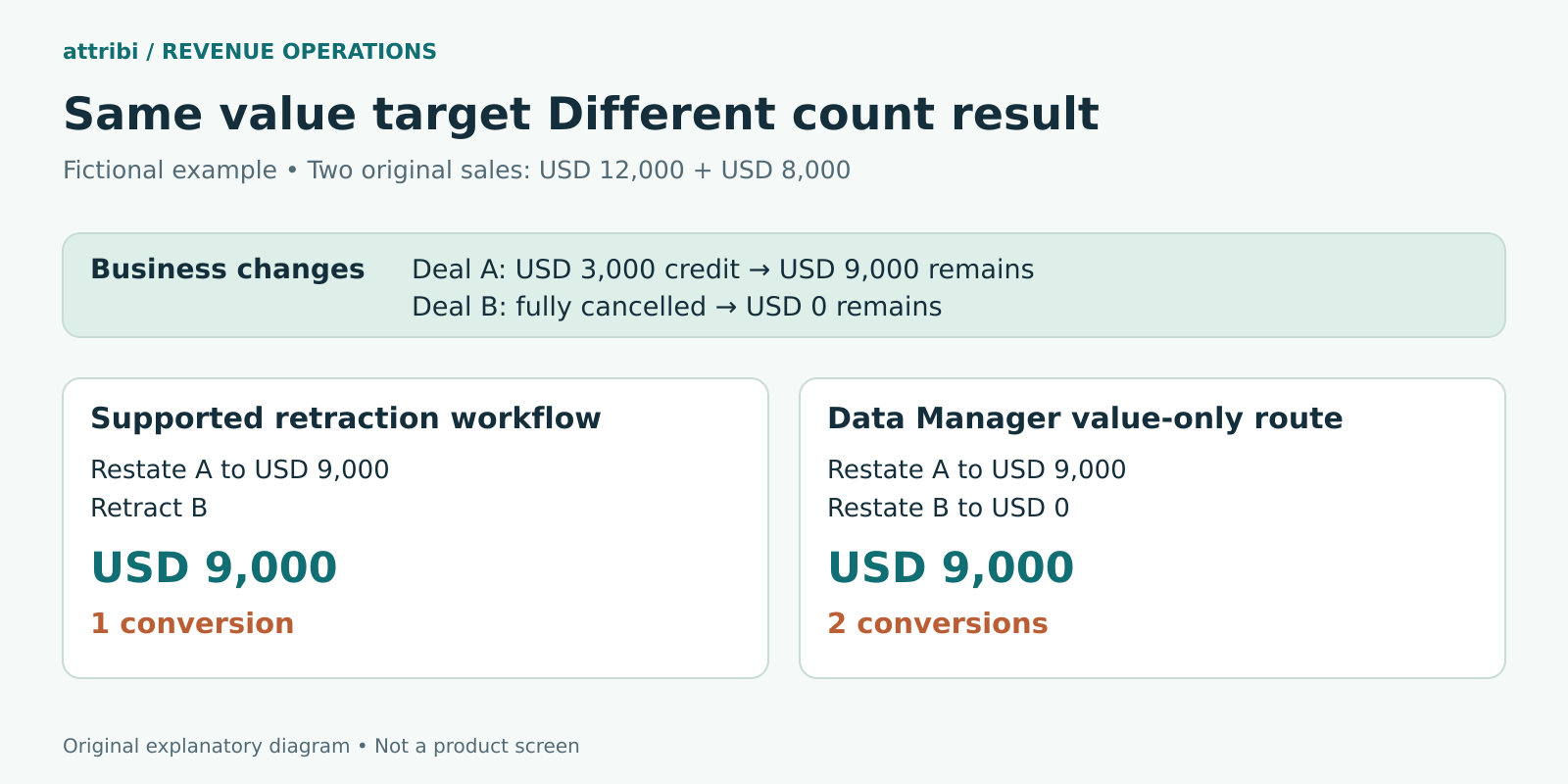
On 1 October, deal A was reported at USD 12,000 and deal B at USD 8,000. The starting total is two conversions and USD 20,000 of value. On 8 October, finance approves a USD 3,000 reduction on deal A. On 9 October, deal B is fully cancelled.
For deal A, the approved replacement value is USD 9,000. It is neither a new USD 9,000 sale nor a negative USD 3,000 conversion. Reuse the identity of the original USD 12,000 event and submit the correction through the verified route.
For deal B, the desired business outcome is removal of the cancelled sale. If an eligible retraction succeeds through the Google Ads adjustment workflow, the intended result across the pair is one conversion and USD 9,000. Keep the cancellation in your ledger even though the original conversion is removed from the advertising total.
If your operating route is Data Manager value restatement only, the implementation has a different boundary. Restating A to USD 9,000 and B to zero targets USD 9,000 of total value, but does not remove B from the conversion count. The intended count remains two under that route. Do not label the resulting cost per conversion as cost per retained sale.
Now suppose deal A receives a second approved reduction of USD 1,000. Calculate its latest eligible value from the source ledger: USD 8,000. Do not subtract USD 4,000 from the already corrected USD 9,000 value. That would apply the first credit twice.
The example also illustrates why a count-only dashboard can conceal a revenue problem. A campaign can retain the same number of conversions while its value falls. Conversely, a true retraction changes both the count and the value. Review the two measures together, with the route documented.
Run the correction as a controlled workflow
1. Establish the original event
Find the original accepted upload and its conversion action. Check that the proposed correction refers to that same occurrence, not a second deal belonging to the contact. If you cannot establish the identity, hold the record for investigation. Guessing is particularly dangerous when an unmatched event could become a new conversion.
2. Approve the business change
Confirm whether the outcome remains valid, whether only its value changes, and which currency and valuation policy apply. Use a reason such as partial credit, contract reduction, confirmed cancellation or source-data error. Keep an approval reference that an operator can inspect without uploading customer correspondence to Google.
3. Validate the destination and route
Check the conversion-owning account, action and supported operation. Do not assume the account receiving ad spend is necessarily the account owning the conversion action. For a Data Manager implementation, confirm the destination's operating account is the conversion customer, as specified in Google's migration guidance.
4. Review a small batch
Before a broad correction, review a few known records against their original payloads. Include a partial refund, a cancellation, a retry and a record that should be excluded. Compare the expected final count and value before submission. This is a test of the entire workflow, not just the spreadsheet formula.
5. Record the result and investigate exceptions
Keep success and failure outcomes per event. Separate invalid identifiers, missing original conversions, ineligible timing and unsupported operations. If only part of a batch failed, do not rebuild the successful records with new identities. Investigate the failed subset and preserve the approved correction's identity on retry.
Attribi's guide to offline conversion import errors is useful for distinguishing visible failures from silent measurement gaps. A lack of an error should never replace reconciliation.
Timing matters but there is no safe universal deadline
As checked in October 2026, Google's file adjustment instructions state an overall 54-day adjustment period and recommend waiting at least 24 hours after the original conversion. Its offline conversion FAQ says up to 55 days from first recording. The file guide also describes a shorter period for autobidding readability. These pages should not be collapsed into a blanket promise that every route accepts every correction for 55 days. Review the current FAQ alongside the route-specific instructions.
Operationally, process approved corrections promptly and set an internal deadline comfortably earlier than the applicable limit. Measure how long it takes your team to discover a cancellation, approve it and submit it. A daily upload cannot repair a cancellation that remains unrecorded for weeks.
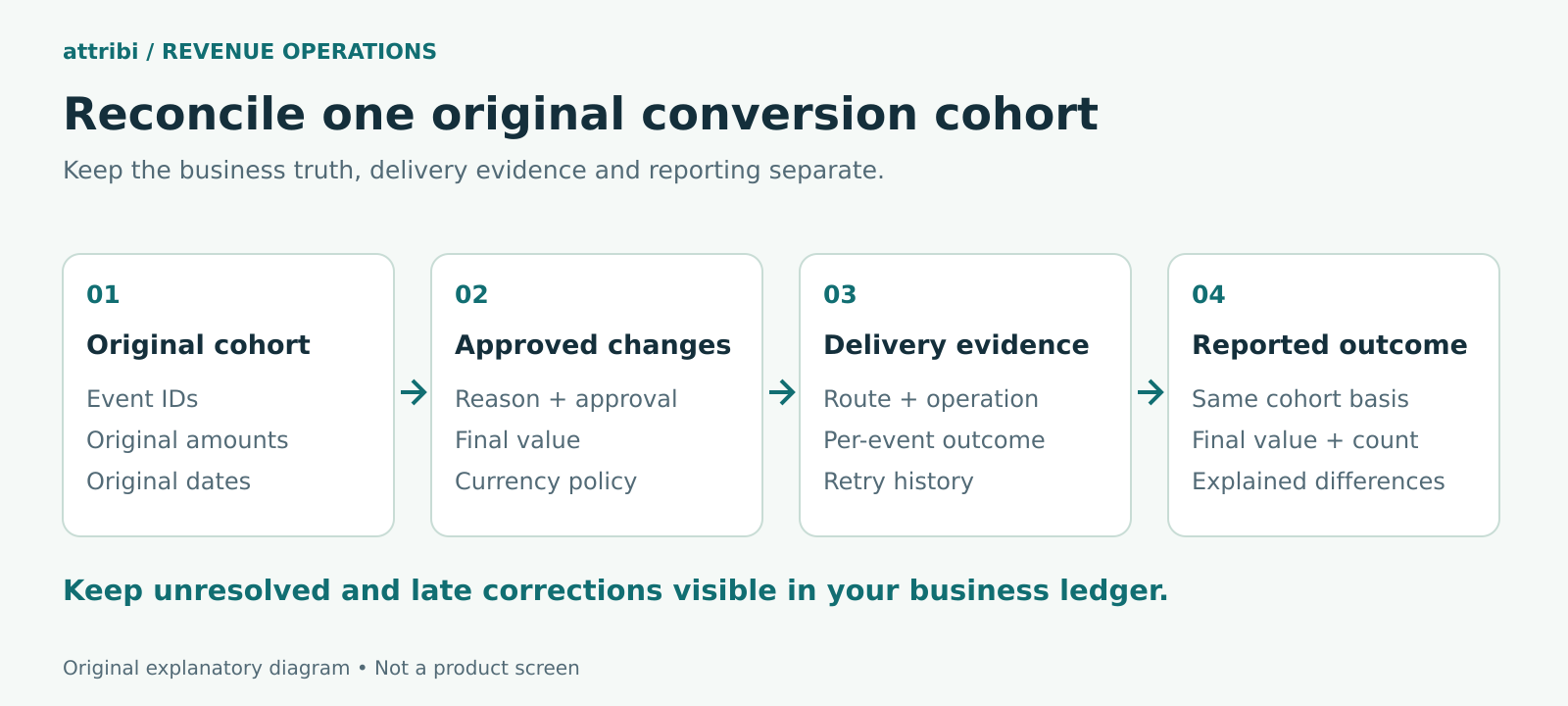
Keep late corrections in the business ledger even when the advertising platform cannot accept them. Report that difference openly: "CRM retained revenue includes later credits that are outside the advertising adjustment process." Do not invent a fresh sale date to force an old correction through.
Reconcile the same events rather than unrelated totals
Choose a cohort of original conversions, then reconcile its initial value, approved movements and latest retained value. Include the adjustment status for each event. Comparing this month's CRM cancellations with this month's ad-click revenue mixes different date bases and can create a discrepancy that no upload will solve.
A practical review has three views: what the business now considers correct, what the correction process attempted, and what Google Ads reports after processing. The difference between the first two is an operational backlog. The difference between the latter two needs destination evidence, eligibility checks and reporting context.
Keep USD, EUR and GBP separate in the source reconciliation unless you have an explicit reporting conversion policy. If your dashboard translates them, record the rate and date used. A foreign-exchange movement should not be mistaken for a missed refund.
Assign an owner to exceptions and review ageing items before they become uncorrectable. Useful controls include missing original IDs, cancellations without a removal route, approved changes not submitted and submissions awaiting verification. These measures are more actionable than one reassuring "sync healthy" indicator.
If your team is rebuilding this process, book an Attribi demo to review your CRM-to-Google Ads mapping and identify where a separate correction workflow is needed.
What Attribi documents today
Attribi's Google Ads integration documents daily CRM reads, stage-specific conversion actions and closed-won value uploads through Google's Data Manager API. Those capabilities help establish the original outcome flow. They do not, on their own, establish automatic cancellation retractions or value corrections after an event has been sent.
Scope also depends on the CRM integration. The HubSpot integration documentation describes first-contact-per-stage behaviour and states that a second won deal for the same contact is not uploaded. Confirm how your actual event policy fits that model before assuming every deal or repeat sale becomes a separate advertising conversion.
When evaluating the setup, ask for a demonstration of the specific correction case: original event, stored identity, changed CRM value, outgoing operation and verified destination result. For cancellations, ask separately whether the process changes value, count or both. This is a better acceptance test than asking whether the system "syncs revenue".
Frequently asked questions
Should I upload a refund as a new negative conversion?
For an adjustment to an existing sale, design the correction around that original event. Record the refund movement internally, then use the supported mechanism to reach the intended final value. A separate negative event can obscure the relationship and does not establish that the original conversion was corrected.
Does editing a CRM deal automatically update Google Ads?
Only if the particular integration explicitly supports and performs that correction. Verify the outgoing operation and destination result. A daily CRM read or a successful initial upload is insufficient evidence of later adjustment support.
Can I use the same rule for a cancellation and a repeat purchase?
No. A cancellation concerns the validity of an earlier outcome. A genuine repeat purchase may be a separate business occurrence under your counting policy. Confirm that your connector supports that event model before generating another upload.
What should I do when the original identity is missing?
Hold the correction and recover the original upload evidence. Do not invent an order ID or alter the timestamp to make the upload succeed. Preserve the unresolved difference in your reconciliation until you can establish a supported correction path.
How do I know the process is working?
Use a small known cohort with expected final values and counts, inspect event-level delivery results and reconcile the reporting on a consistent date basis. Repeat the check for retries and cancellations, not only straightforward value increases.
Start with one real correction case. Book an Attribi demo to discuss the original conversion flow, confirm the supported scope and plan the checks your team will need.