Google Ads Offline Conversion Import in 2026: Six Routes, Three Worth Building On
By Rajesh Kumar, Founder, Attribi ·
You search for how to send closed deals back to Google Ads. The first guide walks you through a
Salesforce link inside Google Ads. The second has you request a developer token and call
UploadClickConversions. You follow one carefully and it does not work, and nothing in the
guide says the route it describes was closed before you started.
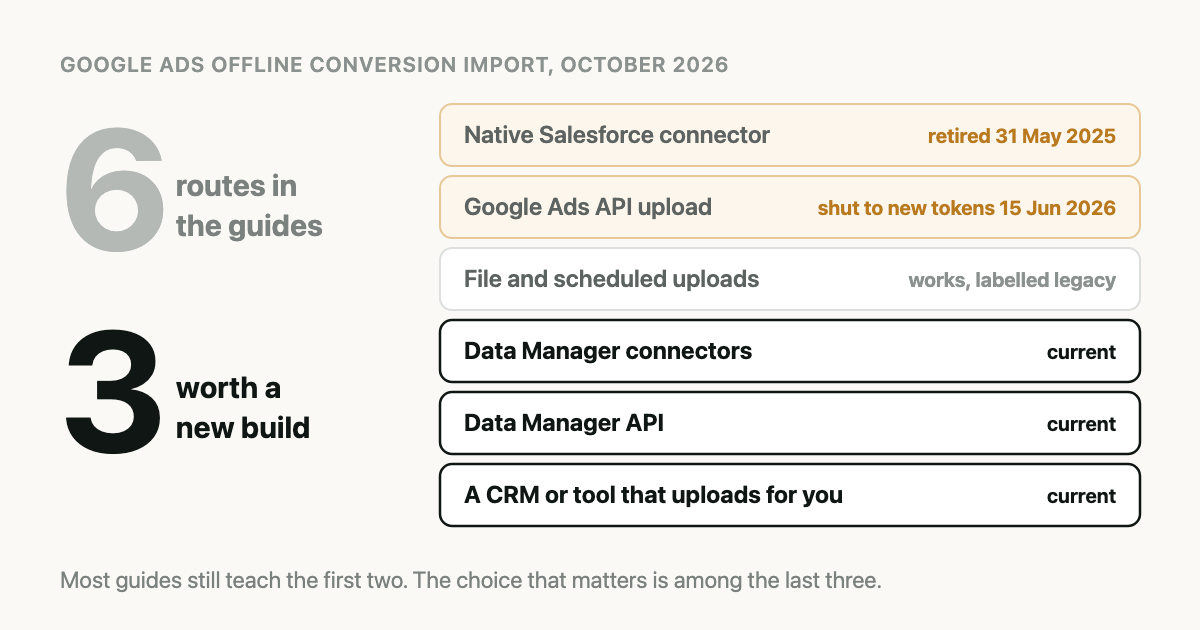
The short version: Google Ads offline conversion import has six routes people still write about. One is retired, one is closed to anyone starting now, and one works but carries Google's own "legacy" label. The three that a new setup should choose between are a Data Manager connector inside Google Ads, the Data Manager API, and a CRM or tool that does the upload for you.
That count was checked against Google's documentation on 5 October 2026.
What is an offline conversion import in Google Ads?
An offline conversion import is a record you send to Google Ads after the click, saying that a specific ad click later turned into something your website could not see, such as a deal marked won in your CRM. Google matches the record to the click, counts it under a conversion action you chose, and can then report and bid on it.
The import exists because a lead-gen website only ever sees the form fill. The sale happens later, usually in a CRM. Without an import, the form fill is the last thing Google hears about that person.
One caution before the routes. Importing a conversion does not, by itself, change how Google bids. Bidding changes when the imported conversion action is the goal a campaign optimises toward, and when it arrives in enough volume to learn from. That second condition is its own problem, covered in our article on low conversion volume.
What does one uploaded conversion need to contain?
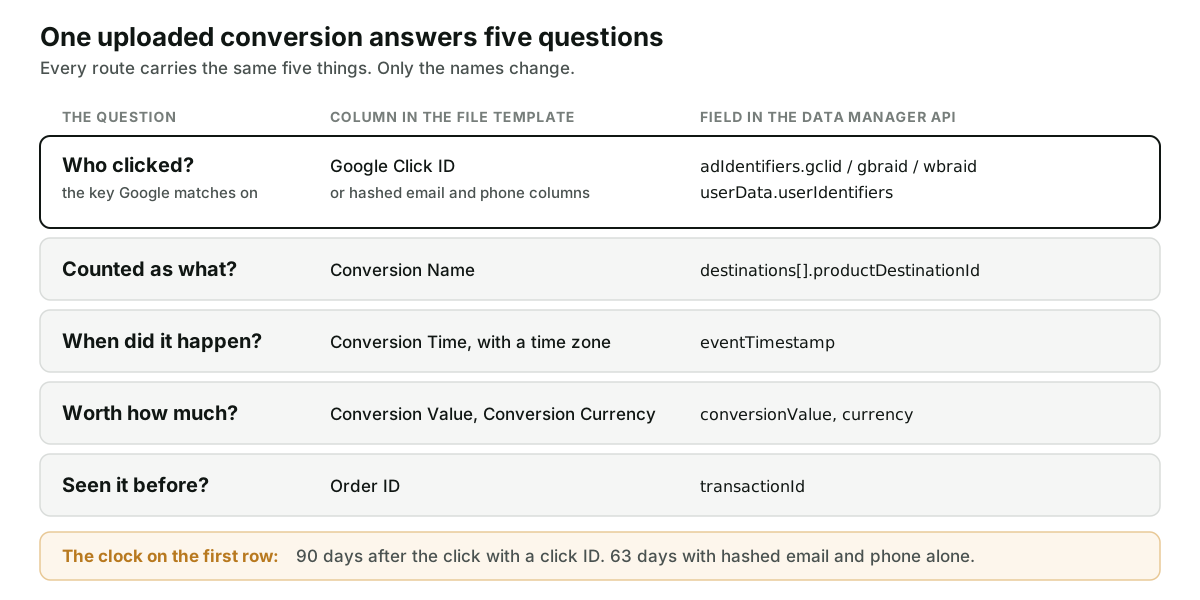
Every route below carries the same five things. Only the names differ.
| The question | In Google's file template | In the Data Manager API |
|---|---|---|
| Who clicked? | Google Click ID, or hashed email and phone | adIdentifiers.gclid, gbraid or wbraid, or userData.userIdentifiers |
| Counted as what? | Conversion Name | productDestinationId on the destination |
| When did it happen? | Conversion Time, with a time zone | eventTimestamp |
| Worth how much? | Conversion Value, Conversion Currency | conversionValue, currency |
| Seen it before? | Order ID | transactionId |
The first row is the one that fails. The other four can always be filled in from the CRM.
The key. Google needs either a click ID or hashed customer data. There are three click IDs, not one, and which one you get depends on the device and the surface. That is the subject of GCLID, GBRAID, WBRAID. Getting the ID from the landing page URL into a CRM field is a separate job with its own failure points, covered in How to Get the GCLID into Your CRM.
Hashed email and phone. Sending these alongside the click ID, or instead of it, is what Google calls enhanced conversions for leads. The values are normalised, then hashed with SHA-256, and the normalising is where uploads quietly lose matches. The rules are in Hashing Emails for Google and Meta, and what the feature changes is in Enhanced Conversions for Leads.
Value and currency. Send the real amount and the real currency code from the deal. A missing currency is not a dollar. What to send before a deal closes is in Value-Based Bidding for Lead Gen.
The time. Use the moment the stage changed in the CRM, not the moment your upload ran.
How long do you have to upload a conversion?
Google publishes two limits in its guidelines for importing offline conversions:
- A conversion uploaded more than 90 days after the last click is not imported.
- For enhanced conversions for leads, the limit is 63 days after the last click.
The same page says imported conversions take about 3 hours to show in the account. There are two shorter waits as well. Google's file import instructions tell you to wait 4 to 6 hours after creating a new conversion action before uploading to it, and its import troubleshooting page says an upload for a click less than 6 hours old should be retried later.
If your sales cycle is longer than that, no route in this article fixes it. You need a milestone that happens sooner, which is the argument of Your Sales Cycle Is Longer Than Google's Memory.
Which Google Ads offline conversion import routes still work in 2026?
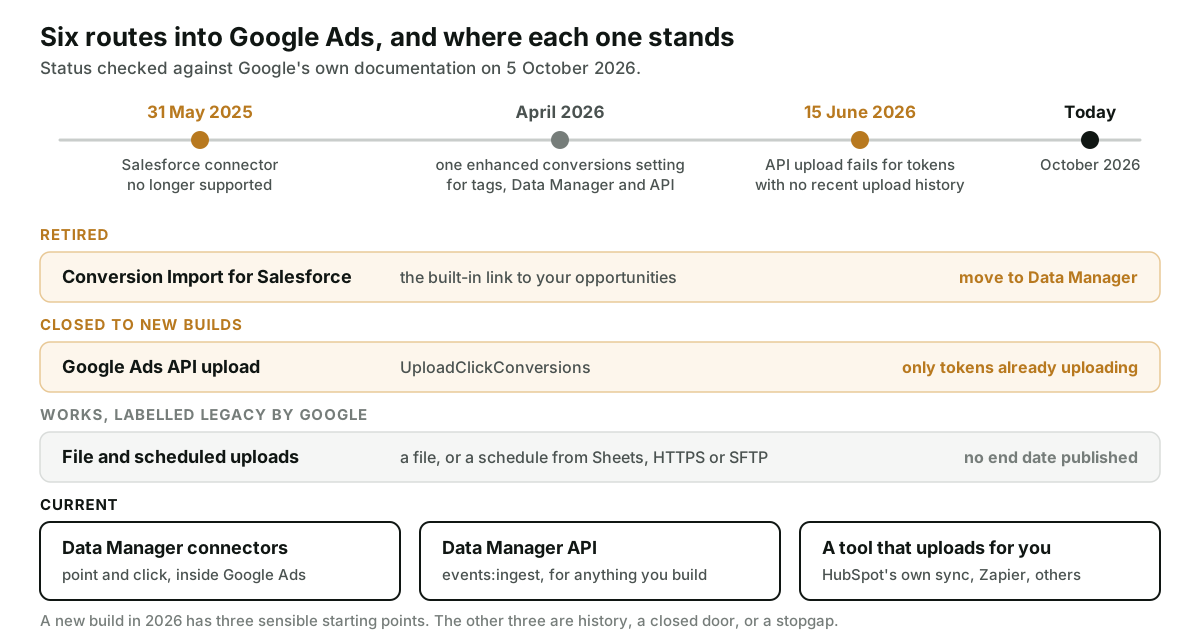
Here are all six, in the order they stopped being a good idea.
1. The native Salesforce connector: retired
Google Ads used to include Conversion Import for Salesforce, a built-in link between a Salesforce account and a Google Ads account. Google's help page for it is now titled "(Legacy)" and states that the legacy Salesforce integration is not supported from 31 May 2025, with an instruction to migrate to Data Manager.
A guide that sends you to a "Salesforce" tab under Conversions predates that change. The current route for Salesforce is in Import Salesforce Closed-Won Deals into Google Ads.
2. The Google Ads API upload: closed to new builds
This is the one that catches developers. For years, the programmatic route was the
UploadClickConversions call in the Google Ads API. Google's
API documentation for offline conversions
now carries this notice: starting 15 June 2026, those requests fail if the developer token has
not previously sent requests to upload offline conversions or enhanced conversions for leads. It
tells you to use the Data Manager API. The
deprecations page gives the exact
test: a token with no offline conversion upload requests between 17 December 2025 and 15 June 2026
is restricted. So "previously" means inside that window. A token that last uploaded in 2024 is
treated like a new one.
The call was not switched off. It was closed to newcomers. A tool that was uploading in the months before the date sees nothing change. A team that gets a developer token this month and follows an older tutorial gets a failure the tutorial never mentions.
We hit this from the wrong side. Attribi's current developer token had no upload history, which is why our own Google upload moved to the Data Manager API before the date.
3. File uploads and schedules: working, labelled legacy
You can still build a file and hand it to Google Ads. Under Goals, then Conversions, then Uploads, you can upload a file from your computer or pull one from Google Sheets, HTTPS or SFTP. Under Schedules you can have Google fetch the file on a recurring basis from a linked Google Sheet, an HTTPS address or an SFTP server. The steps are on Google's file import page.
That page's title now ends in "(legacy)", and Google's upgrade guide describes offline conversion import as a legacy feature without the durability of enhanced conversions for leads. Google has not published an end date for file uploads that we could find, so this is a label and not a deadline.
My reading: a scheduled sheet is a reasonable way to start and a poor thing to depend on for years. The case for it is in Offline Conversions from a Google Sheet.
4. Data Manager connectors: current, and Google's default answer
Google Ads Data Manager is the import tool inside Google Ads. Google describes it as a point-and-click way to bring customer data from outside Google into Google Ads, and its file import page now tells you to use it.
It connects straight to a source and maps fields in the interface. Google's list of supported sources shows offline conversion import available from, among others, Salesforce, HubSpot, Zoho CRM, BigQuery, Snowflake, MySQL, PostgreSQL, Amazon S3, Google Sheets, HTTPS and SFTP. Pipedrive was not on the list when we checked. Check the list for your own CRM before planning around it.
5. The Data Manager API: current, for anything you build
The Data Manager API is the programmatic replacement for route 2. You post events to an ingest endpoint. Google's published limits allow 2,000 events per request, 10 user identifiers per event and 10 destinations per request.
In our own integration, the request carries only an
OAuth token with the datamanager scope and no developer token header at all. The conversion
value is a plain currency amount, not micros. The differences, side by side, are in
The Data Manager API Replaced the Upload You Are Probably Still Using.
6. A CRM or tool that uploads for you: current
Google's own pages name two third parties. HubSpot has a built-in sync: its knowledge base says ad conversion events are available on Marketing Hub Starter, Professional and Enterprise and sync lifecycle stage changes to Google Ads. What that sync leaves out is in our HubSpot to Google Ads guide.
Google also documents Zapier as an integration partner for CRMs that Data Manager does not connect to, and notes that it needs a paid Zapier account. Pipedrive users usually land here, as described in Pipedrive Marks the Deal Won. Nobody Tells Google Ads. Attribution tools, ours included, belong in this group.
Which route should you pick?
Start from what you have, not from what sounds most serious.
| Your situation | Sensible route | Why |
|---|---|---|
| A few conversions a week, Google Ads only, no developer | A scheduled Google Sheet | Nothing to build. Accept that Google calls it legacy. |
| Your CRM is on Data Manager's source list | A Data Manager connector | Google's recommended route, no code, mapped in the interface. |
| HubSpot, and lifecycle stages are enough | HubSpot's ad conversion events | Already inside the CRM. Read its limits first. |
| A CRM that Data Manager does not list | An automation tool or an attribution tool | Somebody has to bridge it. |
| A data warehouse and an engineer | The Data Manager API | Full control over timing, values and retries. |
| An integration with API upload history | Keep it running, plan the move | It still works. Do not add new work to it. |
A new build on UploadClickConversions | Do not | A token with no history is refused. |
Three checks settle most cases.
- The click ID. Is it already in your CRM? If not, the route does not matter yet. Fix capture first, or plan to rely on hashed email with its shorter 63-day limit.
- The value. Some built-in syncs send a stage change and little else. If you bid on value, check what value the route can carry before choosing it.
- The other platforms. Every route here ends at Google Ads. If Meta or LinkedIn need the same deal, you build the bridge again for each.
Whatever you pick, expect the first uploads to report errors. The error names are specific, and they are decoded in Google Ads Offline Conversion Errors.
How Attribi handles the import, and where it stops
Attribi is the tool I build. It sits in the sixth group. Its script records the Google click ID when a visitor lands. When that lead is marked qualified or won, in the app or in a connected CRM, Attribi uploads the conversion to the Google Ads conversion action you mapped for that stage. The upload goes through the Data Manager API. It carries the click ID together with the hashed email and phone, the stage's own timestamp, the value and currency, and a transaction ID built from the lead and the stage, so a retry is not counted twice. Hashing happens on our server. A lead with no click ID, no email and no phone is not uploaded at all.
The old API call survives in one place. A Google Ads connection made before we added the
datamanager permission does not have that scope, so for those connections the upload falls back
to UploadClickConversions until the account is reconnected. It is a bridge for old connections.
The limits, plainly:
- Attribi does not extend Google's window. A deal that closes on day 120 is too late through Attribi as well.
- CRM deals are read once a day, not at the moment a stage changes.
- If your Google Ads account has not accepted the customer data terms, Google rejects the hashed part. Attribi then resends that conversion with the click ID alone and shows a prompt to accept the terms.
- A lead you mark as won by hand with no currency is sent as USD today. Deals read from a CRM with no usable currency are held back instead.
- There is no call tracking, so phone-only leads have nothing for Attribi to match.
- Uploads to one ad platform start on the Starter plan at 49 dollars a month, and CRM connections on Growth at 99 dollars. Every new workspace starts with 30 days on the Pro plan, no card required, which is long enough to see whether your closed deals reach Google Ads.
Setup is on the Google Ads integration page. The other ad platforms are on offline conversions.
Frequently asked questions
Is offline conversion import being discontinued in Google Ads? No end date has been published. Google now labels file-based offline conversion import a legacy feature and recommends Data Manager and enhanced conversions for leads instead. Two specific routes have closed: the legacy Salesforce connector on 31 May 2025, and the Google Ads API upload for developer tokens with no history on 15 June 2026.
Can I still use UploadClickConversions in the Google Ads API? Only if your developer token sent offline conversion upload requests between 17 December 2025 and 15 June 2026. Google's documentation says requests from tokens with no uploads in that window fail. New integrations are directed to the Data Manager API.
What is the difference between Google Ads Data Manager and the Data Manager API? Data Manager is the point-and-click tool inside Google Ads that connects to sources such as a CRM, a warehouse or a sheet. The Data Manager API is the programmatic interface for sending the same kind of data from your own code. Both end at the same conversion actions.
Do scheduled uploads from Google Sheets still work for offline conversions? Yes. Google Ads still lets you schedule a recurring import from a linked Google Sheet, an HTTPS address or an SFTP server. Google describes file imports as legacy, so treat a sheet as a workable start and not a permanent design.
How long after uploading do offline conversions appear in Google Ads? Google's guidelines say about 3 hours for imported conversion statistics to show in the account. Its file import page adds that full processing can take 24 to 48 hours. Wait 4 to 6 hours after creating a new conversion action before the first upload.
Which CRMs can connect to Google Ads Data Manager directly? Google's supported sources list includes Salesforce, HubSpot and Zoho CRM for offline conversion import, along with warehouses, databases and file sources. Pipedrive was not listed when we checked in October 2026. The list changes, so confirm your CRM on Google's page.
The takeaway
Before you follow any guide on this, look at its date and at which route it uses. A
Salesforce tab inside Google Ads is gone. A fresh developer token calling UploadClickConversions
is refused. What is left is a smaller and more ordinary decision: a connector Google gives you,
an API you build on, or a tool that owns the plumbing. If you would rather not own it,
start with 30 days on the Pro plan and watch one won deal make the trip.