Value-Based Bidding for Lead Gen: A Missing Currency Is Not a Dollar
By Rajesh Kumar, Founder, Attribi ·
You switch a lead gen campaign to Target ROAS. Reported return looks excellent for a month. Then finance adds up the invoices and the number in Google Ads is not close to the number in the bank.
No upload failed. The values were wrong, and the bidding system did what it was told with them.
Value based bidding for lead generation works only when every uploaded conversion carries a value you would defend to your finance team, in a currency you actually read from the deal. A placeholder value, a rep's pipeline guess or an assumed currency does more harm than sending no value, because the bidder cannot tell a wrong number from a real one.
That last case, the assumed currency, is the one I want to spend time on. We shipped that bug ourselves and fixed it this week.
What is value-based bidding, and what does it need?
Value-based bidding is automated bidding that tries to maximise the total value of the conversions a campaign produces, not the count of them. In Google Ads it is the Maximize conversion value strategy, with or without a target return on ad spend (Target ROAS). It bids higher in auctions it predicts will produce more valuable conversions, using the values you supplied as its only evidence.
Google's requirements, checked on Google's own help pages on 2026-10-05:
| What Google says | Where |
|---|---|
| Before applying Target ROAS you need to set values for the conversions you track | About Target ROAS bidding |
| Search and Shopping campaigns: at least 15 conversions in the past 30 days at the conversion tracking level | Same page |
| Maximize conversion value with a target ROAS set behaves like a Target ROAS strategy. Without one it tries to spend the full daily budget | About Maximize conversion value bidding |
| Pick a single stage of the lead-to-sale funnel as the bid goal, with a short conversion delay and at least 15 conversions a month | Value-based Bidding Best Practices |
| Upload data consistently for at least 4 weeks or 3 conversion cycles before switching | Same page |
| Measure at least 2 unique values across at least 2 different actions, neither of them zero | Conversion Values Best Practices |
Which stage has enough volume to carry a bid target is a separate argument, made in Not Enough Conversions for Smart Bidding?. This article starts where that one stops: you have picked the stage. What number goes on it?
Which values work for value-based bidding in lead generation?
An ecommerce purchase arrives with its value attached. A lead does not. You have three ways to put a number on it.
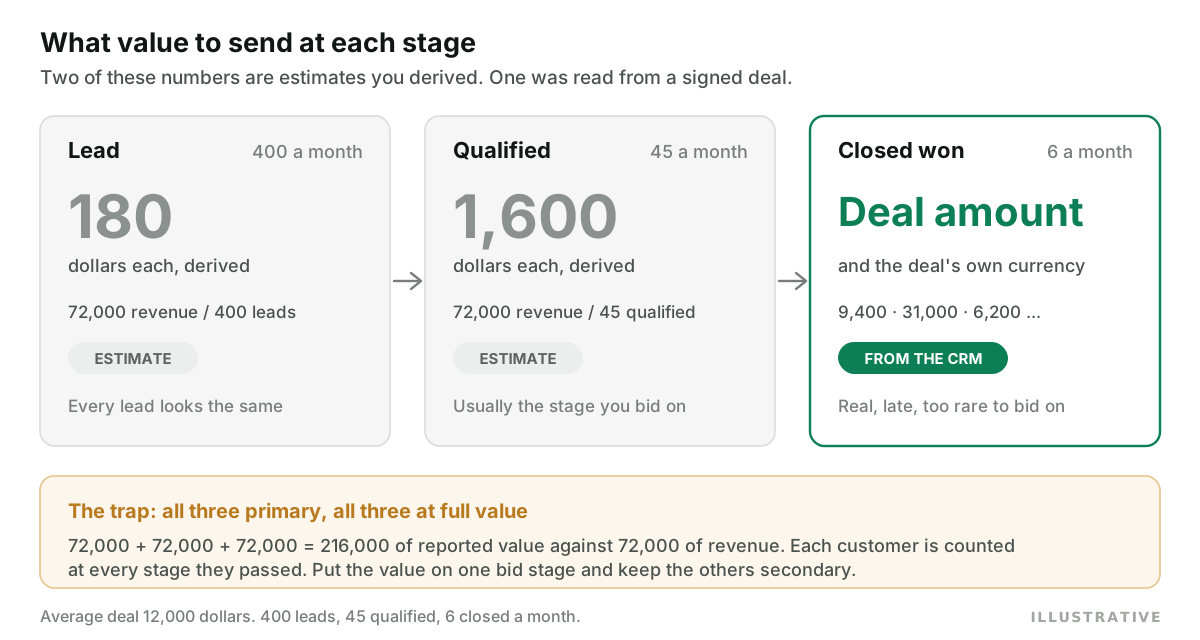
Take the same illustrative account as the smart bidding article: 400 leads a month, 45 qualified, 6 closed. Assume an average closed deal of 12,000 dollars. Every number in this table is illustrative.
| Method | Lead | Qualified | Closed won | What the bidder learns |
|---|---|---|---|---|
| Static placeholder | 1 | 50 | 1,000 | That a qualified lead is worth 50 leads. Nothing about which leads |
| Stage-probability value | 180 | 1,600 | 12,000 | A fair average per stage. Every lead in a stage still looks identical |
| Actual deal amount | none | none, or the open deal amount | 9,400, 31,000, 6,200... | Which clicks produce large deals. Late, and at low volume |
The second row is plain arithmetic. Six deals at 12,000 dollars is 72,000 dollars of revenue. Divide by 400 leads and a lead is worth 180. Divide by 45 and a qualified lead is worth 1,600.
Static placeholders are what most accounts run. Google's own page says a single value per action "is easier to set up" and "may not fully capture the varying values of each transaction". For lead gen that is generous. A static value is a weighting. It tells the bidder how much you prefer one stage to another. A ROAS computed from weightings is not a return on anything. Do not show it to finance.
Stage-probability values are better, and they carry a trap. Each stage's total comes to the same 72,000. If all three actions are primary at full value, the account reports 216,000 dollars of conversion value against 72,000 of revenue, because each customer was counted at every stage they passed through. This is the arithmetic behind Google's advice to pick a single stage as the bid goal. Give one stage its value and keep the others as secondary actions.
Actual deal amounts are the only values in the table that did not come from your own spreadsheet. They are also the slowest and the rarest. Six a month does not clear Google's floor of 15.
So most lead gen accounts end up bidding on qualified leads with a derived value, and uploading closed deals with real amounts as a secondary action for reporting. That is a sound setup, as long as you remember which of its numbers are measured and which are estimated.
One caution on the "open deal amount" option. The amount on an open deal is usually typed by a rep before anything is signed. Send it at the qualified stage and you are bidding on optimism.
Which conversion action does the bidder actually read?
Value only matters on the action the campaign bids on. Google splits conversion actions into primary and secondary. Primary actions are reported in the Conversions column and used for bidding. Secondary actions are for observation and appear in All conversions. The exception is a custom goal: a secondary action placed in one is used for bidding there.
So a carefully valued closed-won action that is secondary changes nothing about bidding, however accurate it is. Check the status of every action in the goal before you look at a single value.
How does Google Ads treat the currency on an uploaded conversion?
This is the part that is easy to get wrong without any error appearing.
Each upload path has a currency field, and on each one it is optional:
| Upload path | Value field | Currency field | Required? |
|---|---|---|---|
| Data Manager API | conversionValue | currency | Both optional |
| Google Ads API click conversions | conversion_value | currency_code | Optional |
| File import (legacy) | Conversion Value | Conversion Currency | Both optional |
The Data Manager API reference
describes currency as "the currency code associated with all monetary values within this
event" and marks it optional. The Google Ads API
upload guide and
the file import help page treat theirs
the same way, in 3-character ISO 4217 codes.
What Google does with the currency afterwards is documented on its conversion settings page. Conversion values are always reported in the account's billing currency. A value reported in another currency is converted into the account currency using the average daily foreign exchange rate. With cross-account conversion tracking, values use the manager account's currency unless you specify a different one.
Here is what I could not find. The Data Manager reference does not say which currency applies
when currency is left out. I am not going to guess at it. Send the code on every event.
What follows from the documented parts is enough. Google converts from whatever currency you name. It has no way to know the deal was really in another one, and no error code exists for "this was actually dirhams". Most upload failures do return errors, listed in the offline conversion import errors guide. This one returns success.
What happens when a deal is read in the wrong currency?
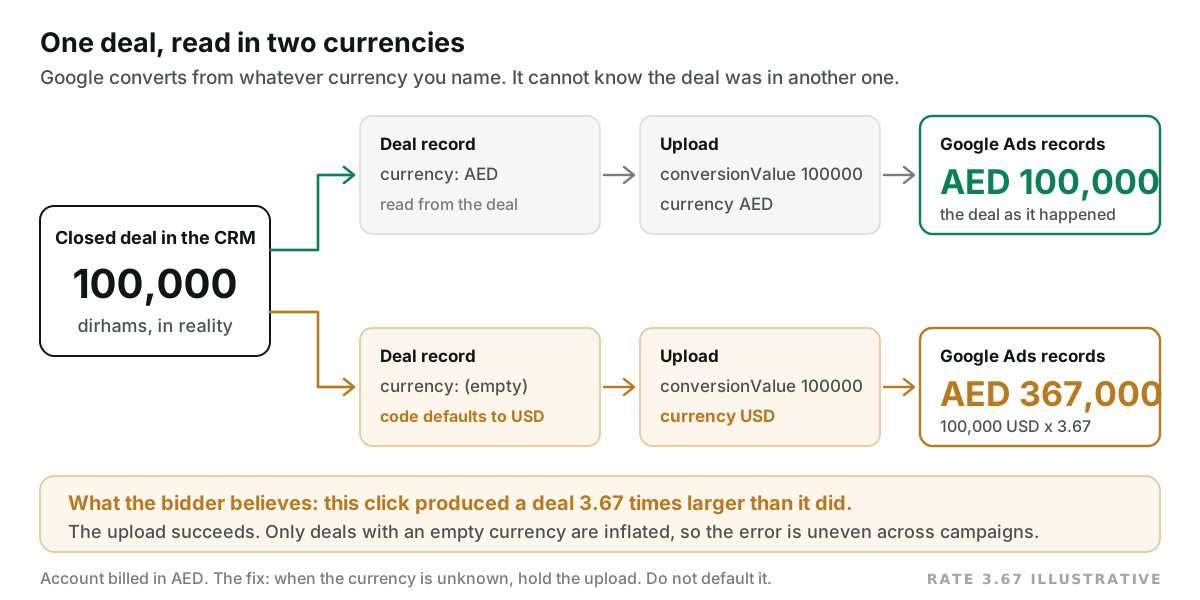
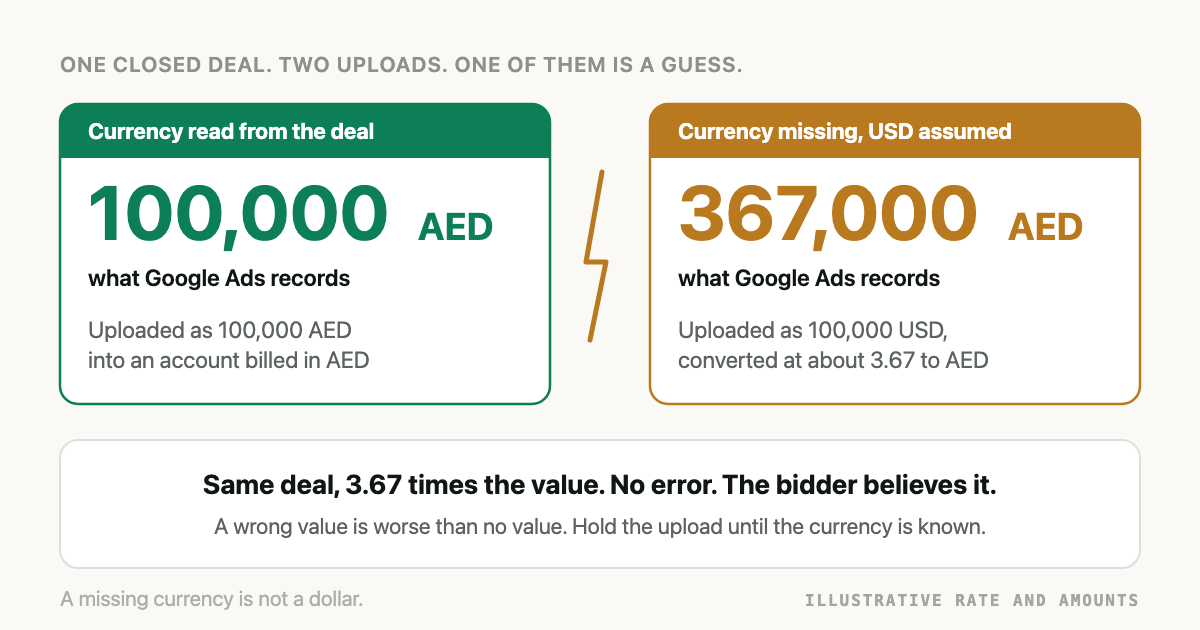
Take a deal of 100,000 dirhams in an account billed in dirhams. Use an illustrative rate of 3.67 dirhams to the dollar.
Uploaded with currency set to AED, it lands as AED 100,000.
Uploaded as USD, because the deal record had no currency and the code filled in a default, Google converts 100,000 dollars and records about AED 367,000. One deal now looks like nearly four.
If every deal were inflated by the same factor you could live with it. Your Target ROAS would be off by a constant and the ranking of campaigns would survive. That is not how it happens. In a multi-currency CRM some deals carry a currency and some do not, and only the ones without get the default. Which deals those are depends on something irrelevant to quality: which rep created the record, which pipeline, which import. The bidder finds whatever those deals share and pays more for it.
It runs the other way too. A deal of 10,000 pounds labelled USD is understated, and the campaign that produced it looks worse than it was.
There is a correction mechanism, with a short fuse. Google lets you restate or retract a conversion, and says you have up to 7 days after a conversion is first recorded for the change to be readable by automated bidding, and 54 days for adjustments overall. A currency bug you find after a quarter can be cleaned up in your own reporting. What the bidder learned from it stays learned.
Deals that close long after the click are a separate timing problem. If your cycle runs past a quarter, read sales cycles longer than 90 days in Google Ads before you decide which stage carries the value.
What we got wrong in our own code
I build Attribi, and until this week two of its CRM readers did exactly the thing described above.
The Odoo reader took the currency name from the sales order and, if it was empty, used USD. The
line was currency_id name || 'USD'. The HubSpot reader looked at deal_currency_code, then
hs_currency_code, and if both were empty returned USD.
The HubSpot case is the instructive one, because the empty case is not rare. On a portal with a single currency, a deal with no currency property is normal, and the amount is in the portal's company currency. So for a portal run in pounds, closed deals went out labelled as dollars.
Both are fixed, in pull requests #537 and #538, merged 2026-10-05. The rule now:
- Use the currency on the deal, if it is a real ISO 4217 code. Three letters is not enough. A
CRM's custom currency or a typo like
INDfor INR is treated as unknown. - If the deal has none, use a currency the CRM itself states for the account. For HubSpot that
is
companyCurrencyfrom its account details endpoint. A hand-set default on the connection takes precedence where one exists. - If neither is known, hold the closed-won upload back. Do not send it.
Step 3 is the opinion in this article turned into code. An upload that does not happen costs you one conversion. An upload in the wrong currency teaches the bidder something false.
I will also say where our own check stops. The HubSpot account lookup was written from HubSpot's published API reference. We have not yet run it against a live production portal.
How Attribi handles conversion values, and where it stops
Attribi reads closed deals from your CRM and uploads each to Google Ads with the deal's own
amount and currency. None of that changes bidding until a campaign bids on that action and the
action has volume. The same value and currency go to Meta, whose
Conversions API
marks currency as required for purchase events and value as required for any event used in
value optimisation. Meta publishes its own
eligibility requirements for optimising
on value.
With funnel graduation switched on, Attribi also sets a default value on each of its three Google conversion actions. You can edit them.
The limits, plainly:
- The default stage values are 1, 50 and 1,000. Those are static placeholders, the first row of the table above. Attribi does not compute stage-probability values for you. Replace the defaults with numbers derived from your own funnel.
- A closed deal with no usable currency is held and retried on the next few daily reads. If it is still unknown after that, it is skipped and the connection reports it. Fix the currency in the CRM. Attribi will not invent one.
- The guard covers deals read from a CRM. A lead marked closed-won by hand inside Attribi with the currency left blank is still recorded in USD. So is a Shopify order that arrives without one. That is open work.
- A qualified lead with no amount is uploaded with a value of 0.
- If your spend spans more than one currency, the dashboard groups totals by currency and shows no blended ROAS. It never sums across currencies, so the one combined number is not there.
CRM connections are on the Growth plan at 99 dollars a month. Every new workspace starts with 30 days on the Pro plan, no card required, which is long enough to see what your closed deals look like next to Google's numbers. The mechanics of the upload itself are in the Google Ads offline conversion import guide, and the HubSpot specifics are on the HubSpot integration page.
Frequently asked questions
Can I use Target ROAS if my leads have no revenue attached yet? You can, if you assign each lead stage a value yourself, because Google requires conversion values before Target ROAS can be applied. The ROAS Google then reports is a ratio of your estimates to spend, so treat it as a steering number, not as revenue.
How do I calculate a conversion value for a qualified lead? Divide the revenue your closed deals produced in a period by the number of qualified leads in that same period. In an illustrative account with 72,000 dollars from 45 qualified leads, each qualified lead is worth 1,600 dollars.
What currency does Google Ads use if I upload a conversion value without a currency code? The currency field is optional on Google's upload paths, and Google reports conversion values in the account's billing currency. The Data Manager API reference does not state which currency it assumes when the field is omitted. Send a 3-letter ISO 4217 code with every value so the question never comes up.
Does Google Ads convert conversion values from other currencies automatically? Yes. Google's help pages say values reported in a currency other than the account's are converted using the average daily foreign exchange rate. It converts from whatever currency you named, so a mislabelled value is converted from the wrong starting point without any error.
Should every funnel stage be a primary conversion with its own value? Usually not. If lead, qualified and closed-won are all primary and each carries its full expected value, one customer is counted at every stage and total conversion value overstates revenue. Google's guidance is to pick a single stage as the bid goal.
Can I correct a conversion value after it was uploaded in the wrong currency? You can restate or retract it. Google says adjustments are readable by automated bidding for up to 7 days after the conversion was first recorded, and can be made for up to 54 days overall. Later corrections tidy your reports and leave the bidding history as it was.
The takeaway
Value-based bidding hands the steering to a number, so the number has to be one you can trace. A derived stage value is fine if you know it is derived. A real deal amount is better when you have enough of them. A value with a guessed currency is neither, and it will pass every validation Google runs. Open five closed deals in your CRM today and look at the currency field. If any are empty, find out what your upload does with them before the bidder does. To watch real deal amounts arrive next to Google's reported value, start 30 days on the Pro plan.