Salesforce Opportunity Attribution: Contact Roles, Repeat Deals and Revenue Coverage
By Rajesh Kumar, Founder, Attribi ·

Salesforce Opportunity attribution connects marketing activity to the people involved in a deal, then assigns credit to that Opportunity's revenue. Reliable reporting needs three separate decisions: which Contacts belong to the deal, which marketing interactions count, and whether revenue is counted per Opportunity or per person. A populated Contact Role is a relationship, not proof that an advertisement caused a sale.
That distinction matters when an initial contract has several stakeholders or one customer buys again. A report can overcount revenue by repeating an Opportunity's amount for every Contact. A conversion feed can underrepresent repeat business if it reports only the first won outcome for each person. Neither problem is fixed by choosing a different attribution model.
This guide is for marketing operations teams and agencies assessing Salesforce revenue coverage before using it to explain campaign performance. The examples are fictional and the analysis worksheet is a recommended manual process, not an Attribi feature.
Start with the question, not the connector
Three questions often get bundled into "Salesforce attribution":
- Relationship: Who participated in this Opportunity?
- Credit: Which recorded marketing interactions should receive a share of its value?
- Activation: Which eligible business outcome should be sent to an advertising platform?
A Contact Role addresses the first question. An attribution model addresses the second. A conversion integration addresses the third. Their outputs can be connected, but they are not interchangeable.
Write a one-sentence report specification first: "Show distinct won Opportunities closing this quarter, with their original currency, linked Contacts and the marketing evidence available for each deal." Separately define an activation specification: "Send the supported qualified and won milestones for eligible people to the selected advertising account."
The reporting ledger may need every renewal, while a particular feed supports only a person's first won event. Recording that difference is more useful than labeling one total incorrect without examining its scope.
What Opportunity Contact Roles establish
Salesforce's Opportunity Contact Role identifies a Contact's role in a particular deal. Its fields include the Contact, the Opportunity, the role and a primary designation. The developer field reference exposes these relationships as ContactId, OpportunityId, Role and IsPrimary. Salesforce field reference
A person can participate in more than one deal, and a deal can involve several people. Keep the relationship record separate from the Contact and the Opportunity in your analysis. An account-level list of employees does not, by itself, establish that each employee participated in a specific purchase.
Salesforce lets users designate a primary Contact when managing Opportunity Contact Roles. That designation identifies a person for the Opportunity; it is not the same as selecting a primary marketing campaign. Contact Role fields
Add relationships because they are accurate
When the commercial relationship is missing, the sales owner should add the actual participants and meaningful roles. Salesforce's documented process uses the Opportunity's Contact Roles related list and permits a primary designation. Read and edit access affect what an operator can inspect or change. Add and manage Contact Roles
Do not select an unrelated Contact because it has a convenient email address. A technically complete record can still tell the wrong commercial story. Where the team cannot establish the relationship, retain an explicit unresolved case rather than silently assigning credit.
One deal, two people: where revenue doubles
Consider this fictional USD account:
| Opportunity | Business outcome | Amount | Linked Contacts |
|---|---|---|---|
| O-101 | Initial contract won | $20,000 | A, primary; B, evaluator |
| O-102 | Expansion won later | $5,000 | A, primary |
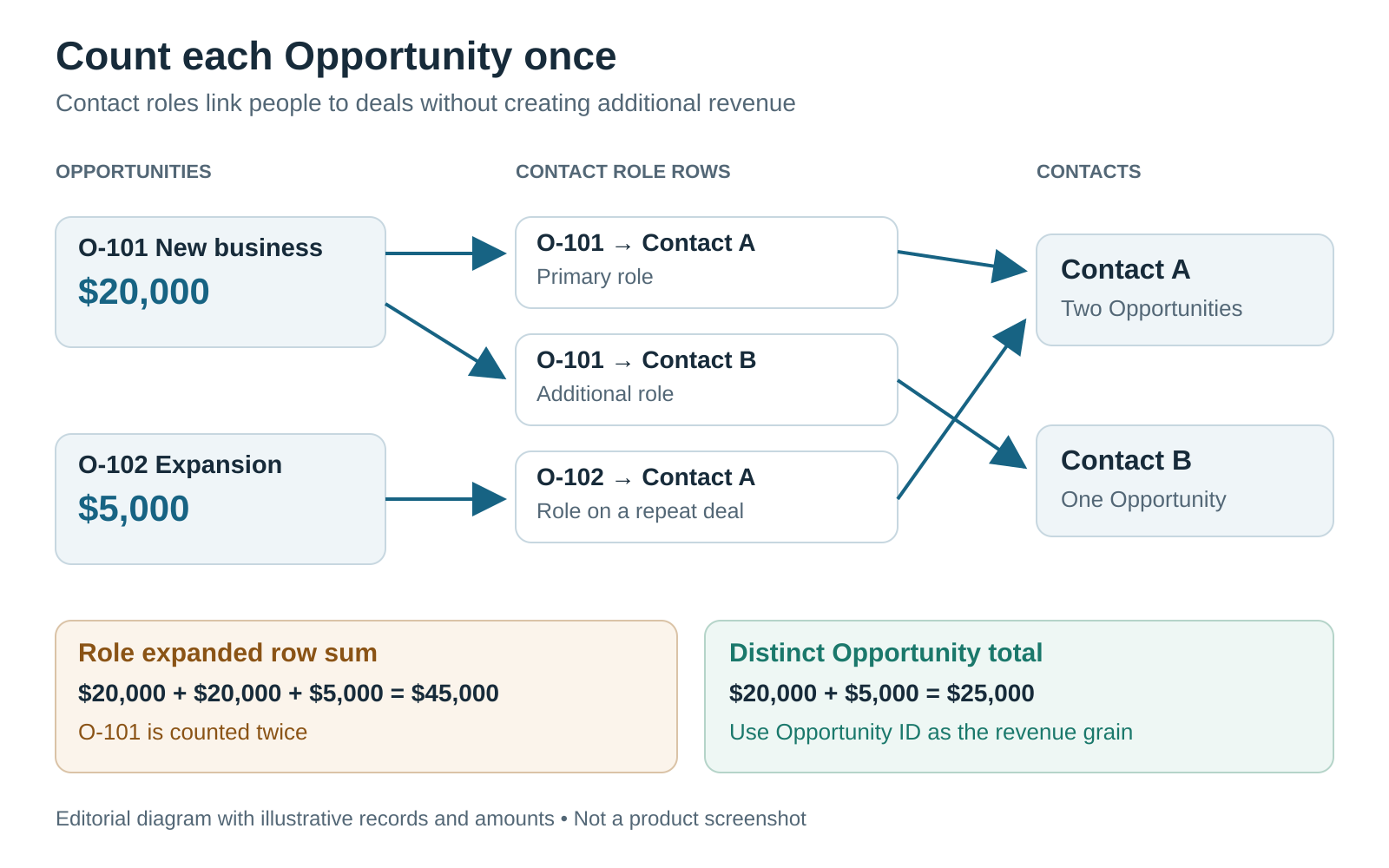
Illustrative manual analysis, not a product screenshot or exported Attribi result.
There are two distinct Opportunities and $25,000 of won amount. Expanding the data to one row per Contact Role creates three rows: O-101/A, O-101/B and O-102/A.
If every row carries its Opportunity's full amount, summing that column produces $45,000. No extra sale happened. The join changed the row structure, not the underlying revenue.
Keep a distinct-Opportunity ledger as the control total. A separate relationship table can retain all stakeholders without multiplying the amount. If you later allocate credit across people or campaigns, define the allocation rule explicitly and reconcile the allocated total back to the original Opportunity amount.
For example, a manually chosen 50/50 allocation of O-101 gives $10,000 to each of two analytical shares, not $20,000 to each. That illustration is arithmetic, not a recommended attribution model or a supported product setting. Contact participation does not tell you how much marketing credit each person deserves.
A useful validation asks: "When this Opportunity has another Contact Role added, does our total won amount change?" If the answer is yes without another commercial transaction, inspect the aggregation before interpreting campaign performance.
Repeat deals are different from repeated delivery
An initial contract and a later expansion can involve the same Contact and still be two legitimate Opportunities. Conversely, several upload attempts can all describe one business outcome.
Separate these cases in your design:
| Case | What the reporting ledger should preserve | What to verify in the feed |
|---|---|---|
| Same won event retried | One business outcome | Stable identity and supported retry behavior |
| New expansion Opportunity | A separate deal with its own amount | Whether repeat revenue is supported |
| Opportunity reopened | Its state history | Whether re-entry creates another event |
| Amount corrected after close | The corrected commercial record | Whether a supported adjustment path exists |
This is a specification for evaluation, not a claim that every integration implements each case. In particular, a new event identifier is not automatically a safe way to correct an old amount. Keep correction and replay decisions with the owner of the actual upload implementation.
Do not duplicate Contacts or create artificial Opportunities to circumvent a connector's counting rules. That can corrupt both the CRM and the resulting measurement.
What Attribi currently supports with Salesforce
The current Salesforce integration documentation describes a daily read of changed Opportunities. It uses the associated Contact Roles, preferring the primary Contact, and reports the first qualified and first won Opportunity per Contact. A later renewal or expansion for a Contact already reported as won is not uploaded as a second conversion today.
That makes the coverage question concrete: if you need every Opportunity, including repeat business, do not treat this feed as a complete Opportunity-level revenue ledger. Compare the documented behavior with your requirement before rollout.
Attribi documents won outcomes with their amount and currency. Blank or zero amounts produce no revenue upload. Multi-currency organizations use the Opportunity's currency; single-currency organizations use the organization's currency setting. A missing Contact Role leaves no associated person for email or phone matching.
The integration writes attribution fields onto Salesforce Leads. That is separate from an automatically maintained Opportunity-level campaign-allocation table. This guide's relationship and revenue worksheet is manual analysis, not a promised report or join inside Attribi.
For Salesforce-derived revenue, matching uses Contact email and phone, hashed before upload. Reading a click ID stored in Salesforce to match won revenue remains listed as planned, not live. Website-script capture is a separate route for collecting the visitor journey and click identifiers. Neither route guarantees that an advertising platform will attribute a conversion.
For destination-specific implementation, use the existing Salesforce to Google Ads guide or Salesforce to Meta guide. Do not infer platform eligibility or bidding configuration from the presence of an Opportunity in Salesforce.
Build a coverage worksheet before trusting totals
Use an authorized export or approved internal reporting environment. Keep production contact details out of public documents and screenshots. The worksheet needs record references and evidence states, not a copied address book.
1. Define the control population
Choose the time basis and outcome. A close-date cohort of won Opportunities answers a different question from a cohort of leads acquired during that period. State which one you are using and do not change it halfway through the comparison.
Retain Opportunity ID, won status, close date, amount and currency. Keep currencies separate unless your organization supplies an explicit conversion policy. A $20,000 Opportunity and a €20,000 Opportunity are not a $40,000 total.
2. Add relationships without changing the total
Record Contact Role IDs, linked Contacts and the primary flag separately. Identify Opportunities with no roles, several roles or unexpected primary designations. Reconcile distinct Opportunity count and amount before and after adding relationships.
Current records are not necessarily a historical snapshot. Salesforce notes that merges can affect primary status and can leave multiple Contact Role records referring to the merged Contact. Inspect such cases instead of assuming every relationship row is a distinct stakeholder. Salesforce Contact Role considerations
3. Classify feed coverage separately
For each Opportunity, record a coverage reason such as eligible first won outcome, repeat deal outside the documented feed, missing person association, or missing positive amount. Add the date the source was checked. Daily polling means a recent change and an old unresolved exception need different investigations.
Do not call every absent upload "lost revenue." The commercial revenue may be correctly recorded while the activation feed intentionally represents a narrower population.
4. Preserve evidence at each checkpoint
Track source eligibility, source ingestion, destination acceptance and attributed reporting as separate states. "Sent" does not mean "matched," and "matched" does not establish a causal contribution from advertising.
The CRM offline conversion QA guide provides the broader acceptance-testing workflow. Here, the additional check is whether the population itself matches what your revenue report claims to represent.
Run a small, deliberately varied pilot
Pick cases that expose your actual sales process, not only the cleanest first-time customer. Include a deal with two stakeholders, a missing Contact Role, a repeat win, a zero amount and a recent stage change waiting for the next source read.
Have sales operations confirm the relationships and commercial amounts. Have the integration owner confirm what was selected and submitted. Have the reporting owner explain which totals are comparable. Record exclusions alongside totals so a month-end reader does not mistake partial coverage for total revenue.
This is especially useful for US and European agencies managing different clients: keep each client's currency, revenue definition, permissions and activation rules explicit. Hashing identifiers is not a substitute for an approved data-sharing process.
If the requirement is complete per-Opportunity activation or buying-committee attribution, evaluate a separately supported implementation. Do not describe those requirements as available in Attribi merely because the CRM stores the necessary objects.
Evaluate the workflow before choosing a plan
As checked on October 21, 2026, new Attribi workspaces receive 30 days on Pro without a card. CRM revenue sources are included from Growth, currently $99 per workspace per month, with up to 10,000 visitors. Prices are USD, monthly, excluding applicable taxes. The Free plan covers up to 500 visitors but is not the ongoing CRM revenue-source plan. Current pricing and trial conditions
Use that evaluation to test whether the supported coverage meets your needs. A successful pilot should leave you with a reconciled population, known exclusions and an agreed operational owner, not just an encouraging dashboard total.
Frequently asked questions
Does a primary Contact receive all the attribution credit?
Not automatically. The primary designation identifies a Contact for an Opportunity. Attribution credit depends on the reporting model and available marketing evidence. A connector's preference for that Contact is a matching choice, not proof of sole influence.
Can Attribi upload every renewal for the same Salesforce Contact?
Not under the currently documented Salesforce workflow. It reports the first qualified and first won Opportunity per Contact; later renewals and expansions are not uploaded as second conversions today. Keep a full Opportunity ledger separately if you need total repeat revenue.
Why does my Contact-level export show more revenue than Salesforce's deal total?
Check whether the full Opportunity amount appears once for every Contact Role. Reconcile by distinct Opportunity ID before summing or allocating revenue. Also check dates, currencies and record filters rather than assuming a connector is at fault.
Does adding a Contact Role guarantee ad attribution?
No. It establishes a CRM relationship. Usable identifiers, permitted processing, destination requirements and eligible advertising interactions are separate conditions. An accepted upload is not a guarantee of attributed revenue or incremental impact.
Connect your CRM once. Every closed deal reaches your ad platforms.
Attribi pulls stage changes from your CRM, matches each deal to the lead it already recorded, and uploads qualified and closed won conversions to Google, Meta, LinkedIn, TikTok and Microsoft.
No credit card. Free up to 500 visitors a month. New workspaces start with 30 days on Pro.