GCLID, GBRAID, WBRAID: Three Click IDs, and Your Form Probably Keeps One
By Rajesh Kumar, Founder, Attribi ·
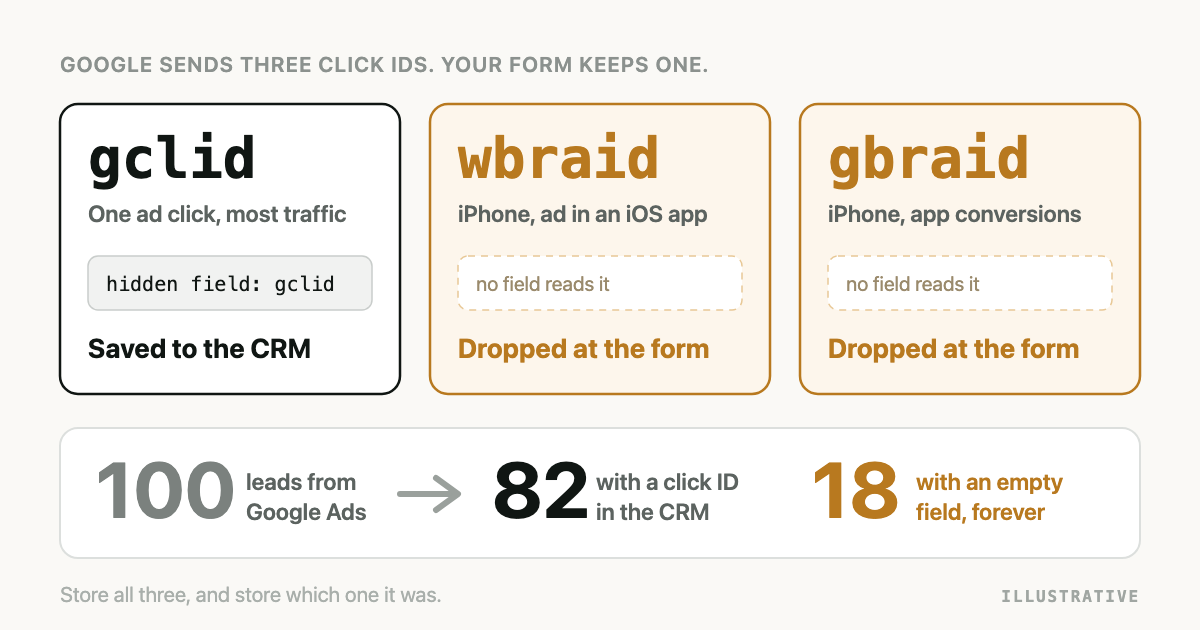
Open your CRM and filter Google Ads leads by the click ID field. Some are blank. The campaign is right, the lead is real, and the one value Google needs to recognise the click is missing. If you record the device, check it on those rows. Expect iPhones.
The form did not break. It did what it was built to do, which is look for one parameter called
gclid. Google has been sending two others since 2021.
GCLID vs GBRAID vs WBRAID, in short: all three are click identifiers that Google Ads adds to your landing page URL. GCLID identifies one ad click. WBRAID and GBRAID stand in for it on some iPhone and iPad traffic, WBRAID for conversions on your website and GBRAID for conversions in your app. Each one is uploaded in its own field.
Every Google fact below was read on Google's own pages on 5 October 2026 and links to its source. This area has changed more than once.
What are GCLID, GBRAID and WBRAID?
GCLID (Google Click Identifier) is a URL parameter that Google Ads appends to the landing page address when someone clicks an ad, and it identifies that single click and the campaign behind it. Google's own wording is that it "identifies the campaign along with other attributes of the click".
WBRAID is the URL parameter Google Ads uses instead of a GCLID when someone on iOS 14 or later clicks an ad inside an iOS app and lands on your website, and it is used to attribute web conversions. The Google Ads API reference calls it "the URL parameter for clicks associated with web conversions".
GBRAID is the URL parameter Google Ads adds on iOS clicks to attribute app conversions, such as a click on a web ad that opens your iOS app. The same reference calls it "the URL parameter for clicks associated with app conversions".
Google does not word the pair identically everywhere. The offline conversions guide says a wbraid is present when a user "clicks on an ad in an iOS app and is directed to your webpage" and a gbraid when a user "clicks on an ad on the web and is directed to your iOS app". The Data Manager API reference sorts them by event, web or app. Both agree on what matters to a lead form: if the conversion happens on a website, the one you will meet is WBRAID.
Which clicks get a GCLID, and which get a GBRAID or WBRAID?
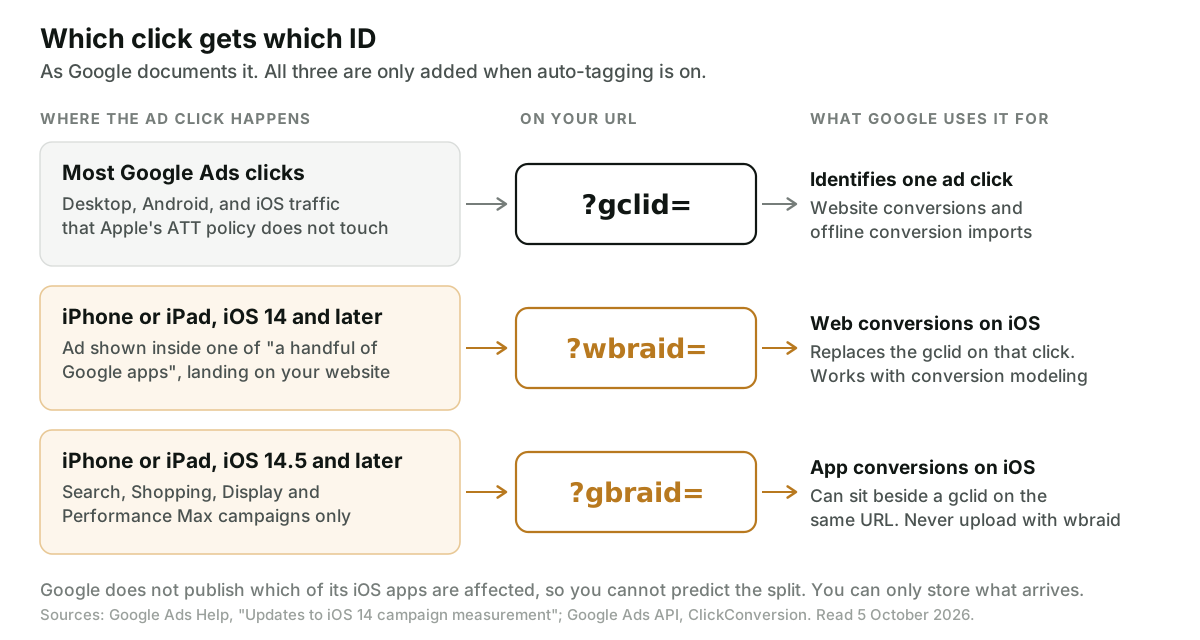
All three depend on one setting. Auto-tagging is what appends the parameter to your URL, and Google says it is on by default for new accounts. If it is off, you get none of them.
With auto-tagging on, the GCLID is the default.
The exception began on 26 April 2021, when Apple's App Tracking Transparency policy took effect.
Google's help page on iOS 14 campaign measurement
says that from that date it no longer sends the GCLID "for iOS 14 traffic coming from ads on a
handful of Google apps". On that traffic the gclid is not appended and the {gclid} ValueTrack
parameter comes through as empty text. The same page warns of fewer reported offline conversions
imported from clicks.
In its place Google introduced wbraid in March 2021, to "attribute conversions back to your ad
campaigns and work with conversion modeling". Then gbraid in May 2021, for app conversions,
added to landing page URLs "for all iOS14.5+ clicks" when auto-tagging is on, and
"currently applicable to Search, Shopping, Display, and Performance Max campaigns only".
What that page does not do is name the apps. "A handful of Google apps" is as specific as Google gets. I could not find a list on a Google page, so there is none here, and you cannot work out in advance what share of your clicks will arrive without a GCLID. You can only store what arrives and count afterwards. Nor is there a setting for it: nothing in your Google Ads account turns WBRAID on or off separately from auto-tagging.
Can they appear together?
Sometimes. Google's offline conversions guide says "in some cases you may be able to associate both a gclid and a gbraid with a conversion", and recommends sending both when that happens.
GBRAID and WBRAID are the pair that cannot travel together on an upload. The Google Ads API has a
dedicated error for it, GBRAID_WBRAID_BOTH_SET:
"Can't use both gbraid and wbraid parameters."
GCLID vs GBRAID vs WBRAID: the comparison
| GCLID | WBRAID | GBRAID | |
|---|---|---|---|
| URL parameter | gclid | wbraid | gbraid |
| Introduced | The original | March 2021 | May 2021 |
| Which clicks | Any click with auto-tagging on, except the affected iOS traffic | iOS 14 and later, ad in an iOS app, landing on your website | iOS 14.5 and later; Search, Shopping, Display and Performance Max only |
| What it is for | One ad click, for website conversions and offline imports | Web conversions on iOS, with conversion modeling | App conversions on iOS |
| Upload field, Google Ads API | gclid | wbraid | gbraid |
| Upload field, Data Manager API | adIdentifiers.gclid | adIdentifiers.wbraid | adIdentifiers.gbraid |
| With hashed email or phone on the same event | Yes | Not stated by Google either way | Yes, since October 3, 2025 |
| With another click ID | With a gbraid | Never with a gbraid | With a gclid, never with a wbraid |
| Conversion action count setting | One or Every | Every | Every |
| Custom conversion variables | Supported | Not supported | Not supported |
| Earliest upload after the click | 6 hours | 6 hours | 6 hours |
| Time to appear in reports | Typically under 12 hours | Up to 72 hours | Up to 72 hours |
Sources for the lower half are in the upload section below.
Why does a GCLID-only form lose the lead?
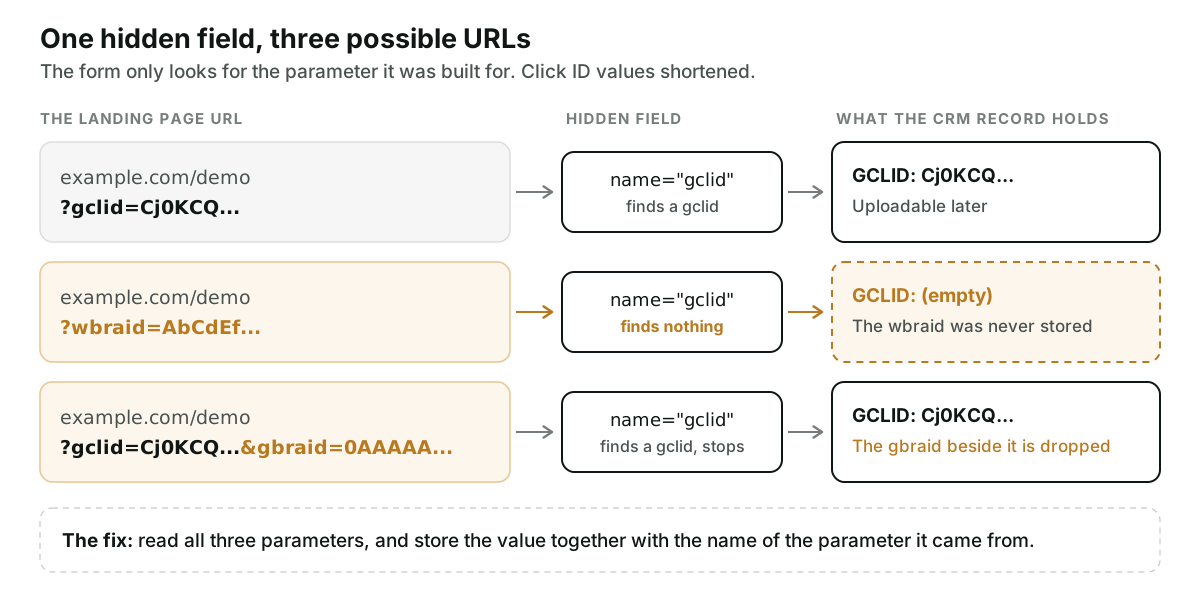
The usual capture setup is a hidden form field and a few lines of script that read gclid from
the URL and put it in that field. Google's own
setup instructions for offline imports are
written around the GCLID.
So when the URL arrives as ?wbraid=..., the script looks for gclid, finds nothing, and submits
an empty field. No error anywhere. The lead is created, the salesperson calls, the deal may close.
Weeks later the upload job has no click identifier for that record.
Here is an illustrative month, with invented numbers: one hundred leads from Google Ads. On 82 the
URL carried a gclid and the CRM has it. On 18, all iPhone, the URL carried a wbraid and the
CRM field is empty. Those 18 are not worse leads. They are the ones Google cannot be told about
by click ID.
Capturing all three is the same job as capturing one, with two more parameter names. The step-by-step, including where the value falls out on multi-page and embedded forms, is in How to Get the GCLID into Your CRM.
The design decision is how you store them. Either three fields, or one value field plus a second field holding the parameter name. Do not pour all three into a single field called "GCLID". At upload time the job has to know which field to put the value in.
There is a second net under this one. Upload the lead's hashed email or phone with the conversion and Google can match some of those 18 without any click ID. That is enhanced conversions for leads, and it has a shorter deadline, covered below.
What changes when you upload a GBRAID or WBRAID?
The upload paths are covered in the guide to Google Ads offline conversion import. These rules apply only to the two iOS parameters.
- Put it in its own field. The Google Ads API has separate
gclid,gbraidandwbraidfields on a conversion, and the Data Manager API has the same three underadIdentifiers. A value Google cannot decode is rejected withUNPARSEABLE_GCLID,UNPARSEABLE_GBRAIDorUNPARSEABLE_WBRAID. The wording on the last two is "Check if your wbraid parameter was not modified", so do not trim, lowercase or re-encode the value. Google also notes that the GCLID is case sensitive. - Never send GBRAID and WBRAID on the same conversion. That is
GBRAID_WBRAID_BOTH_SET. - Set the conversion action to count Every. The error is
ONE_PER_CLICK_CONVERSION_ACTION_NOT_PERMITTED_WITH_BRAID: "Conversion actions that use one-per-click counting can't be used with gbraid or wbraid parameters." Google's upgrade guide for offline imports says the same. This one catches lead gen accounts, because counting One is the sensible setting for leads. - Leave custom variables off. Per the offline conversions guide, "Google Ads does not support custom conversion variables in combination with wbraid or gbraid."
- Give it three days before you call it missing. A click less than six hours old is refused
with
TOO_RECENT_EVENTwhichever identifier you send. After upload, Google's troubleshooting page says processing "typically takes less than 12 hours, but can take up to 72 hours if you use GBRAID and WBRAID-keyed conversions."
One rule has loosened, and many pages still carry the old version. The older Google Ads API guide required exactly one of the three identifiers per conversion, and its sample code still checks for that. Google's upgrade guide now states that "gBraids and GCLIDs, along with other user-provided data, can be in a single row for each conversion upload without triggering an error starting from October 3, 2025." So a GBRAID next to a GCLID, with a hashed email on the same event, is allowed today. A GBRAID next to a WBRAID still is not.
The full list of upload errors and what each one means is in Google Ads Offline Conversion Errors, Decoded.
How long is each click ID usable for upload?
Google's guidelines for importing offline conversions give two numbers. Conversions uploaded more than 90 days after the associated last click are not imported. For enhanced conversions for leads, the limit is 63 days.
The 90-day figure is stated most directly for the GCLID: "We only keep the GCLID for 90 days." Google's troubleshooting page files that under the heading "Identifiers or iOS URL parameters are too old", which puts GBRAID and WBRAID under the same error. I did not find a separate retention figure for them on a Google page, so treat 90 days as the ceiling for all three.
Two things shorten it. A conversion outside the conversion action's own click-through window is
rejected with EXPIRED_EVENT. And a lead that lost its WBRAID at the form and is matched on
hashed email alone has 63 days. If your deals take longer to close, the fix is a different
conversion, not a later upload:
what to do when your sales cycle outlasts the window.
How Attribi handles the three click IDs
Attribi is the product I build. Everything in this section was checked against the code.
Capture does not depend on a hidden field. The tracker sends the page URL to our server, and the
server reads gclid, wbraid and gbraid from it and stores the value against the visit
together with which of the three it was. When the lead later reaches a stage you have mapped, the
upload puts that value in the matching field (adIdentifiers.wbraid on the Data Manager API, for
example) with the hashed email and phone on the same event. A WBRAID is never sent in the GCLID
field. The Google Ads integration page has the rest of what is sent.
If you run without the tracker and let your own form write to the CRM, Attribi reads two fields back from the CRM record: the click ID value and the name of the parameter it came from. That is the two-field design recommended above.
Now the limits.
- One click ID per visit. When a URL carries a
gclidand agbraidtogether, we keep thegclidand do not store thegbraid. Google recommends sending both. We send one. - The conversion actions Attribi creates count One per click. That is the right default for lead gen and the wrong one for the two iOS parameters, per the error in rule 3. We have not yet tested a WBRAID upload against those conversion actions on the Data Manager API, and we send the hashed email with it, a pairing Google's pages confirm for GBRAID and do not mention for WBRAID. So I will not claim the iOS share works end to end. If iPhone traffic matters to you, change the count setting to Every on the mapped conversion actions in Google Ads and check the upload result on those leads.
- Nothing recovers a parameter that never reached the page. If a redirect strips the query string before the page loads, there is nothing for any tracker to read.
Conversion uploads are a paid feature. Every new workspace starts with 30 days on the Pro plan, no card required, which is long enough to run uploads on a real campaign and check the iPhone leads yourself.
Frequently asked questions
Is a WBRAID the same thing as a GCLID? No. A GCLID identifies one ad click. A WBRAID is the parameter Google Ads sends in its place on some iOS 14 and later traffic, and Google describes it as working with conversion modeling. Each is uploaded in a separate field.
Can I upload a GBRAID and a WBRAID on the same conversion? No. The Google Ads API rejects that with the error GBRAID_WBRAID_BOTH_SET. A GBRAID can be sent together with a GCLID, and Google's upgrade guide says that combination, with user-provided data on the same row, has been accepted without an error since October 3, 2025.
Why is the GCLID missing on some iPhone clicks from Google Ads? Since April 26, 2021, Google no longer sends the GCLID for iOS 14 traffic coming from ads on what it calls a handful of Google apps, because of Apple's App Tracking Transparency policy. Those clicks carry a WBRAID or GBRAID instead. Google does not publish which apps are affected.
Do I have to turn on GBRAID and WBRAID in Google Ads? There is no separate switch. Both are added by auto-tagging, the same account setting that adds the GCLID, and Google says auto-tagging is on by default for new accounts. Your website has to accept the extra URL parameters and your form or tracker has to store them.
Which conversion count setting works with GBRAID and WBRAID uploads? Every. Google documents that conversion actions using one-per-click counting cannot be used with gbraid or wbraid, and the upload returns ONE_PER_CLICK_CONVERSION_ACTION_NOT_PERMITTED_WITH_BRAID. A conversion action set to count One still accepts GCLID uploads.
Can I store a GBRAID or WBRAID in my existing GCLID field? You can store it there, and you will regret it at upload time. Google has a separate field for each of the three, and a value it cannot decode in the field you chose is rejected. Keep either three fields or one value field plus a field naming the parameter.
The takeaway
Go and look at one thing this week: the script behind your form's hidden field. If it reads
gclid and nothing else, every iPhone lead that arrived with a wbraid has been saved with a
blank, and no upload tool downstream can put it back. Read two more parameters, store which one
you got, then check the count setting on the conversion action. If you would rather not own that
script, start with 30 days on the Pro plan and let the tracker read the URL.