How to Get the GCLID into Your CRM, and the Five Places It Falls Out
By Rajesh Kumar, Founder, Attribi ·
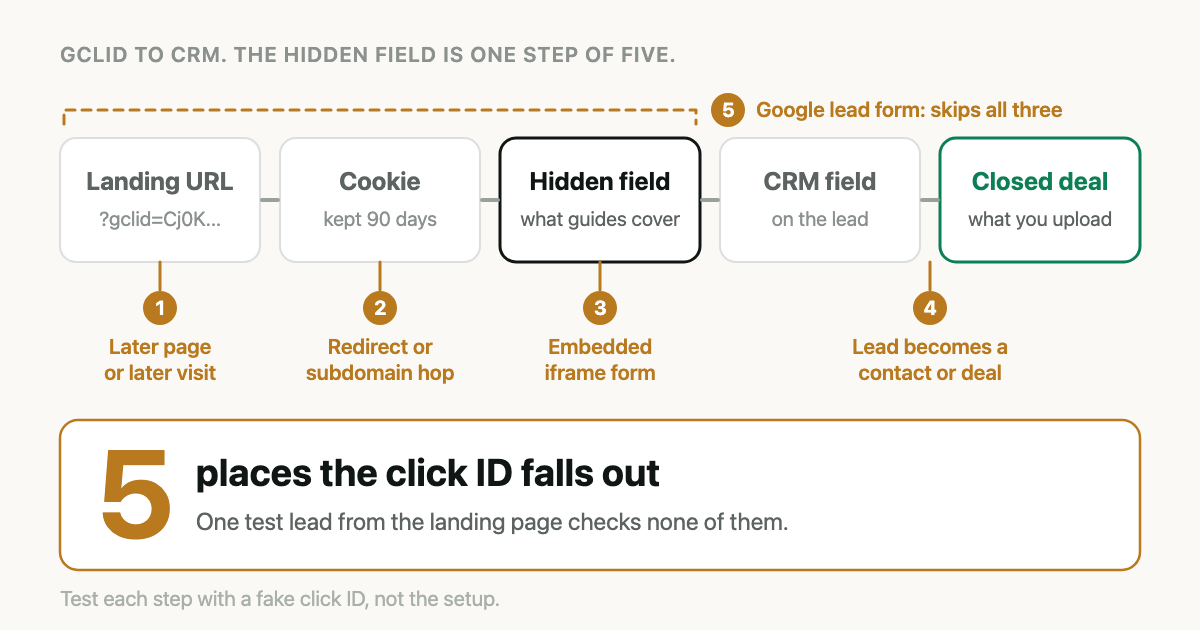
You added the hidden field. A test lead showed the GCLID in the CRM. Three months later you export closed deals for upload and a large share have an empty click ID field. Nothing errored. Nobody changed the form.
The usual advice to capture GCLID in CRM records is "add a hidden field", and that advice describes one link in a chain of five. To capture the GCLID in your CRM reliably, read it from the landing page URL, keep it in a first-party cookie for 90 days, write it into a hidden field on every form, map that field to the CRM record your upload reads from, and then test each of those steps separately. The ID is lost at predictable points, and one passing test on the landing page checks none of them.
What does it mean to capture the GCLID in your CRM?
Capturing the GCLID in your CRM means taking the Google click identifier that Google Ads
appends to your landing page URL as ?gclid=..., storing it in the visitor's browser, submitting
it with your lead form in a hidden field, and saving it on the CRM record so that a later
qualified or closed-won outcome can be uploaded to Google Ads against the original ad click.
Google's own setup page lists the same jobs: store the ID on every page "via cookie or local storage", add a hidden form field, and have your backend store it with the prospect. Its sample script expires the stored value after 90 days. What that means for slow deals is in Your Sales Cycle Is Longer Than Google's Memory.
Two more parameters, gbraid and wbraid, can arrive in place of gclid on some iOS traffic.
GCLID, GBRAID, WBRAID explains them. Capture all three the same way.
Vendor behaviour described below was checked against the linked vendor pages on 5 October 2026.
How does the click ID travel from the ad to the closed deal?
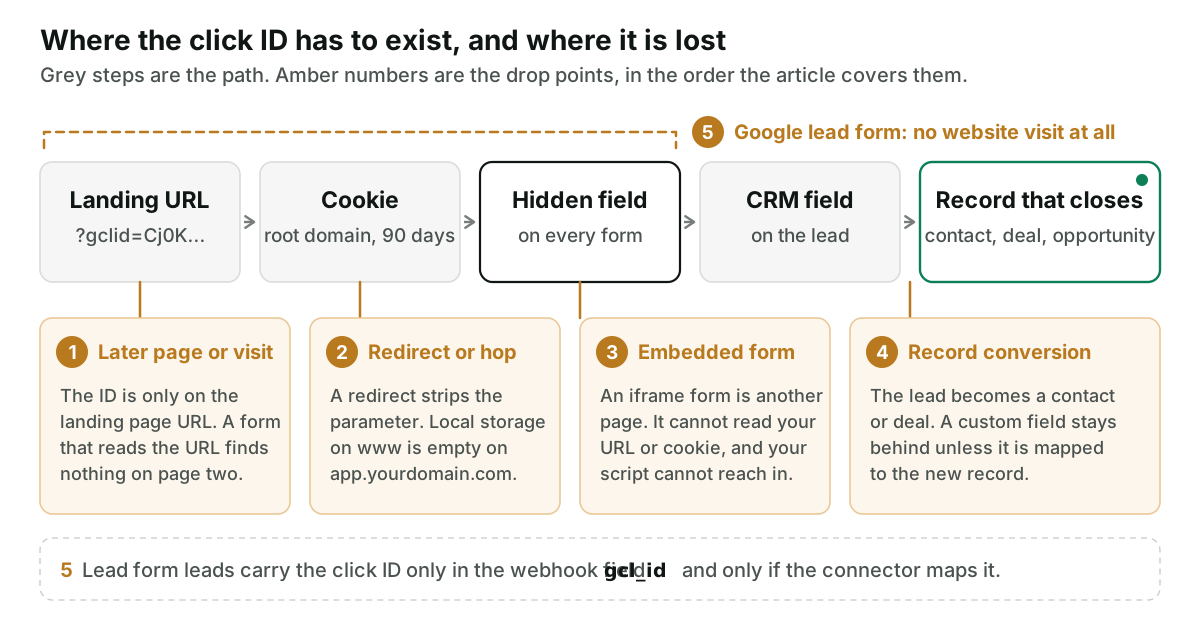
The ID has to exist in five places, in order: the URL, browser storage, the hidden field, the CRM field, and the record you eventually export. Most guides assume the first three happen on one page in one sitting. The losses come from every case where they do not.
| Drop point | What you see in the CRM | Test that exposes it |
|---|---|---|
| 1. Later page or visit | Landing page leads have the ID, Contact page leads do not | Land with a test ID, browse two pages, submit there |
| 2. Redirect or subdomain hop | Whole campaigns or whole forms with no IDs | Load the final URL with a test ID, then submit on the other subdomain |
| 3. Embedded or third-party form | Field exists in the form tool, always empty | Read the submission inside the form tool |
| 4. Record conversion | Filled on the lead, empty on the contact or deal | Convert a test lead and open the new record |
| 5. Native lead form | Leads with no website visit at all | Check the webhook mapping for gcl_id |
Where does it fall out when the visitor does not convert on the landing page?
The gclid parameter is on one URL: the page the ad pointed to. Click through to the pricing page
and it is gone. Come back on Thursday by typing the domain and it was never there.
A form that fills its hidden field from the current URL therefore works only for visitors who submit on the landing page, on the first visit, without navigating. Hosted form tools often work this way. HubSpot's documentation, for example, says a hidden field can take information from a query string or page URL. On page two there is nothing to read.
The fix is the storage step. Write the value to a cookie when it first appears, and fill every form from the cookie, not from the URL. On a multi-step form, make sure the hidden input is in the step that submits.
A short, generic version:
(function () {
  var IDS = ['gclid', 'gbraid', 'wbraid'];
  var DAYS = 90;
  var DOMAIN = '.example.com'; // your root domain, with the leading dot

  function readCookie(name) {
    var m = document.cookie.match('(?:^|; )' + name + '=([^;]*)');
    return m ? decodeURIComponent(m[1]) : '';
  }

  function writeCookie(name, value) {
    var expires = new Date(Date.now() + DAYS * 864e5).toUTCString();
    document.cookie = name + '=' + encodeURIComponent(value) +
      '; expires=' + expires + '; path=/; domain=' + DOMAIN +
      '; SameSite=Lax; Secure';
  }

  // URL to storage. Never change the case of the value.
  var params = new URLSearchParams(window.location.search);
  IDS.forEach(function (id) {
    var value = params.get(id);
    if (value) writeCookie('ad_' + id, value);
  });

  // Storage to hidden fields named gclid, gbraid, wbraid.
  function fill() {
    IDS.forEach(function (id) {
      var value = readCookie('ad_' + id);
      if (!value) return;
      document.querySelectorAll('input[name="' + id + '"]')
        .forEach(function (el) { el.value = value; });
    });
  }

  fill();
  // Forms injected after page load (popups, form builders).
  new MutationObserver(fill).observe(document.documentElement, {
    childList: true, subtree: true
  });
})();
Google states that the GCLID is case sensitive, so nothing in your pipeline may lowercase it. Some form libraries keep their own copy of field values and ignore one set from outside, so a filled input on screen is not proof: check what was submitted. And storing an advertising identifier in a cookie may need consent where you operate.
Why do subdomains and redirects lose the GCLID?
A redirect drops the parameter before your page ever sees it. The ad points at
example.com/offer, the server redirects to www.example.com/offer/, and the redirect rule does
not carry the query string. Google's auto-tagging page says that if your site uses redirects,
the GCLID must be passed to the final landing page.
Paste your ad's final URL with ?gclid=TeSt-123_abC on the end and look at the address bar after
the page loads. If the parameter is gone or its capitals have changed, every click on that ad
arrives without an ID.
The stored value does not follow the visitor to another subdomain. This one is quieter. The
sample script on Google's setup page stores the GCLID in local storage. Local storage belongs to
one origin, so a value saved on www.example.com does not exist on app.example.com. If your
signup or booking form sits on a different subdomain, the visitor arrives there with an empty
store. A cookie set on the root domain, as in the snippet above, is readable on every subdomain.
Neither method crosses to a different domain altogether. If the form lives on a scheduling tool's own domain, the ID has to be handed over in the link, as a parameter you append.
Why is the hidden field empty on embedded and third-party forms?
Because the form is often not part of your page.
A form embedded as an iframe is a separate page loaded from the form vendor's domain. Its own
URL does not contain your visitor's gclid, and the browser does not let it read the address or
cookies of the page around it. Your script on the outer page cannot reach in either. So the
hidden field exists, is configured correctly, and stays empty.
How you get a value across depends on the vendor. Two examples:
- HubSpot forms. Fields, including hidden ones, can be
populated from a query string,
and the parameter name has to be the property's internal name. A property called "Google Click
ID" with the internal name
google_click_idis not filled by?gclid=. HubSpot also warns that with "Pre-populate fields for returning visitors" switched on, hidden field values may be overwritten. More on HubSpot is in the HubSpot guide. - Typeform embeds. Parameters on your page are not passed to the embedded form by default. You
list the ones to forward in the embed code with
data-tf-transitive-search-params. Leavegclidoff the list and it is ignored.
Why does the ID disappear inside the CRM?
The lead record has the value. Then the lead is qualified and the CRM creates something new: a contact, an opportunity, a deal. Your upload reads from that new record, because that is where the stage and the amount are. A custom field does not follow unless you tell it to.
In Salesforce this is the lead conversion field mapping. Standard lead fields carry over, and for custom fields you specify how each one converts to the account, contact or opportunity. The full walk-through is in Import Salesforce Closed-Won Deals into Google Ads. In Pipedrive the question is which object holds the field, the person or the deal, and the Pipedrive guide explains why it should be the person.
Does a Google lead form give you a GCLID at all?
Lead form assets are filled in on Google's side. The visitor never loads your site, so there is no URL, no cookie and no hidden field.
The ID comes through the delivery instead. Google's
lead form webhook documentation
lists a gcl_id field in the payload, described as the Google click ID, next to lead_id and an
is_test flag. Whether it reaches your CRM depends on whoever built the webhook mapping. Use the
Send test data option on the form and
look for the click ID on the record it creates.
If you download these leads by hand, Google says leads expire after 60 days.
How do you test every step by hand?
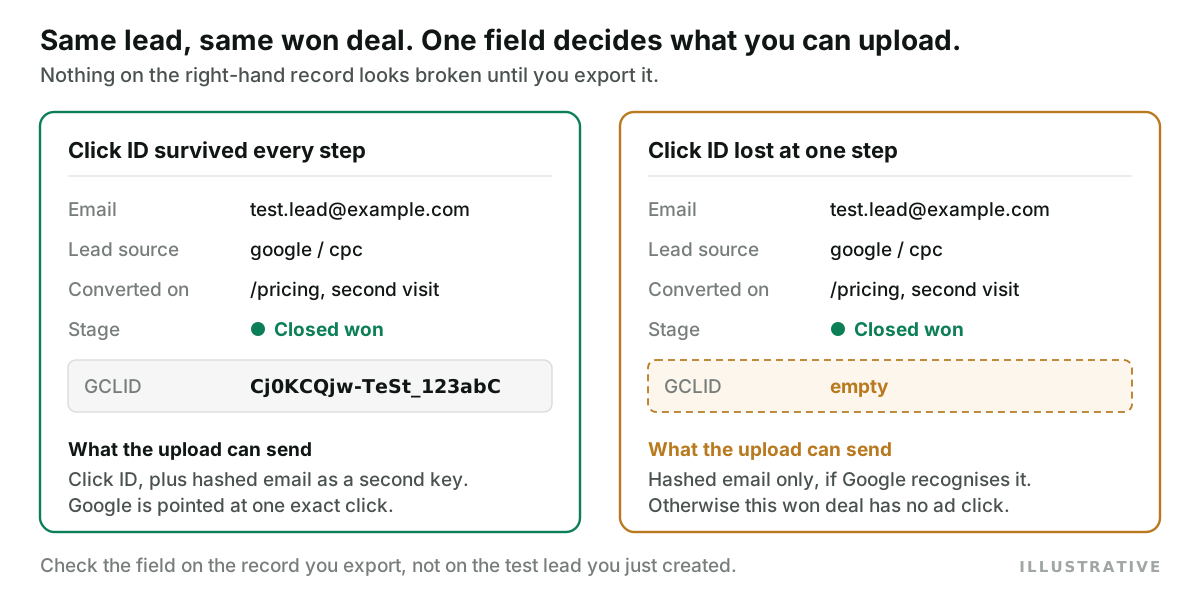
Run this once per form, and again after any change to the site, the form tool or the CRM layout. Use a private window so an old cookie does not hide a failure.
- Redirect test. Open your ad's final URL with
?gclid=TeSt-123_abCappended. Pass: the page loads and the parameter is still in the address bar with its capitals intact. - Storage test. In the browser's developer tools, open Application, then Cookies. Pass: a
cookie holding
TeSt-123_abC, set on.yourdomain.com, expiring about 90 days out. - Later-page test. Click through two internal pages to a form that is not on the landing page, on another subdomain if you have one. Inspect the hidden input. Pass: it holds the test ID.
- Return-visit test. In the same window, open a new tab, type the domain with no parameters, and submit a form. Pass: the test ID is still submitted.
- Form tool test. Open the submission inside the form tool itself, before any CRM sync. Pass: the value is there. This separates a form failure from a mapping failure.
- CRM test. Open the new lead. Pass: the custom field holds the complete value, character for character.
- Conversion test. Qualify or convert the test lead the way your sales team does, then open the contact, opportunity or deal it becomes. Pass: the value is on the record your upload reads.
Then repeat steps 1 and 6 with ?gbraid=TeSt-456 and with ?wbraid=TeSt-789.
A fake ID proves the plumbing and nothing more, so keep the test records out of your upload. If real uploads later fail with click errors, start with Google Ads Offline Conversion Errors, Decoded.
What if the click ID is already gone?
You cannot recover a click ID that was never stored. You can send a second key: the lead's hashed email or phone, through enhanced conversions for leads. Treat it as cover for the gaps, not a reason to skip the capture. How the upload paths fit together is in the offline conversion import guide.
How does Attribi handle click ID capture?
Attribi is the tool I build, and it takes a different route from the hidden field.
Our tracking script sends each page URL to our server, and the server reads the click ID from it:
gclid, gbraid and wbraid, each stored as its own type so the upload uses the right field.
The ID is saved against a visitor ID held in a first-party cookie on your root domain, with local
storage as a fallback, so a visitor who lands on the marketing site and signs up on an app
subdomain is still one visitor. When a form is submitted, the lead is stamped with the click IDs
from that visitor's first and last touch. No hidden field is involved.
When a deal is later won in a connected CRM, Attribi matches it to the lead by email, then phone, and uploads with the click ID it already holds. More on that is on the offline conversions page.
The limits, plainly:
- Attribi does not write the GCLID into your CRM. It writes source, medium, campaign and journey fields. The two click ID fields it creates are left for your own form to fill. If a rep needs to see the raw ID on the record, you still need the hidden field.
- A form inside another vendor's iframe is invisible to our script, for the same browser reason it is invisible to yours.
- The visitor cookie does not cross to a different root domain. Subdomains are fine.
- Excluding paths can cost you the ID. The script has a setting that limits page tracking to listed paths. If your ad lands on a path that is not listed, no page view is recorded, so no click ID is stored. The lead is still captured, with no click attached.
- Google lead form assets are not ingested.
Uploads to one ad platform start on the Starter plan at 49 dollars a month, CRM connections on Growth at 99 dollars. Every new workspace starts with 30 days on the Pro plan, no card required, long enough to compare your CRM's click ID coverage with what the script captured.
Frequently asked questions
How long should the GCLID cookie last? Ninety days is the figure in Google's own sample script for storing the GCLID. A shorter cookie loses the ID for visitors who come back to convert after it expires.
Should I store the GCLID in a cookie or in local storage? Google's setup page allows either, and its sample uses local storage. Local storage is limited to one origin, so a value saved on your www site is not available on an app or booking subdomain. A cookie set on the root domain is readable across subdomains.
Why is the GCLID field empty on some CRM leads and filled on others? The usual pattern is that leads who submitted on the ad's landing page have the ID and leads who submitted on another page, another subdomain or a later visit do not. That points to a form reading the ID from the current URL with no stored copy behind it.
Can a hidden field inside an iframe form read the GCLID from my page URL? Not by itself. An iframe from another domain is a separate page and cannot read the address or cookies of the page it sits in. The form vendor has to provide a way to pass values in.
Does a Google Ads lead form submission include a click ID? Google's lead form webhook payload includes a field named gcl_id for the Google click ID. It only reaches your CRM if the webhook or connector maps that field to a property. Send a test lead from the form and check the record.
The takeaway
A hidden field is a container. Whether anything is in it depends on four other steps that happen on other pages, other days and other systems, and each of them fails without an error. Run the seven-step test with a fake ID on every form you have, then watch one number each week: the share of Google paid leads that carry a click ID. If you would rather have the ID held outside the form and the CRM altogether, start with 30 days on the Pro plan and see how the two counts compare.