The Data Manager API Replaced the Upload You Are Probably Still Using
By Rajesh Kumar, Founder, Attribi ·
Your offline conversion job ran last night. It reported success, the way it has for a year or two. Nothing in that log tells you the method it calls was closed to newcomers in June, or that Google now describes a different API as the main one for this work.
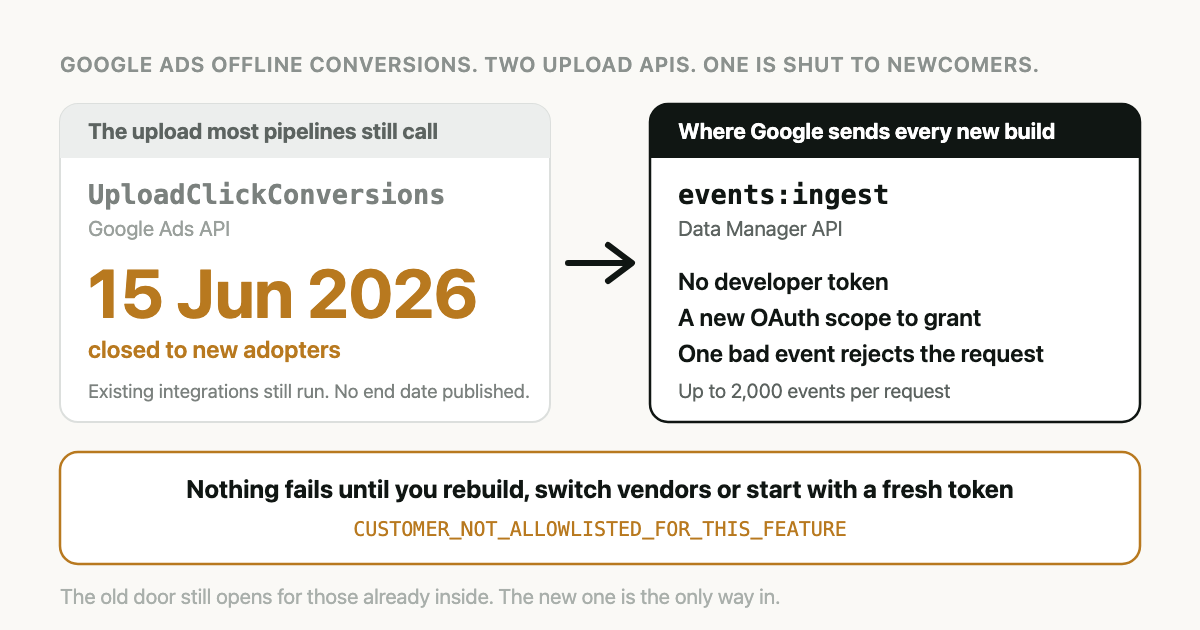
Nothing breaks for the people already inside. It breaks the day you rebuild the integration or start again under a new developer token.
Google Ads Data Manager API conversions are offline conversions sent to the events:ingest
method of the Data Manager API, which became Google's primary upload route on 15 June 2026. The
older UploadClickConversions method still runs for integrations that uploaded between 17
December 2025 and that date. Everyone else gets an error, and nobody has been given an end date.
What is the Data Manager API?
The Data Manager API is a Google API for sending first-party data to Google's advertising
products through one request format. For Google Ads it accepts offline conversions and enhanced
conversions for leads at a single endpoint, events:ingest, and it authenticates with an OAuth
scope of its own. It does not use a Google Ads developer token.
Most of what changes in the move is plumbing. Two things reach a marketer: somebody may have to click through a Google consent screen again, and a batch of conversions now fails in a different way.
Google's overview lists more under this API: audience data such as Customer Match, conversion events for Campaign Manager 360, Search Ads 360 and Display & Video 360, and events for Google Analytics. This article stays with Google Ads conversions. I have only run that part.
What changed on 15 June 2026, and what is the deadline?
Google announced it on 15 May 2026: from 15 June the Google Ads API stops accepting new adopters of offline conversion imports, enhanced conversions for leads included. The post calls the Data Manager API "the primary API for importing offline conversions".
The exact rule is on the Google Ads API deprecations page.
A developer token with no offline conversion upload requests between 17 December 2025 and 15 June
2026 is restricted. Its UploadClickConversions calls return
CUSTOMER_NOT_ALLOWLISTED_FOR_THIS_FEATURE.
Two details in that rule are easy to get wrong.
It is a window, not a lifetime record. It is tempting to read this as a block on tokens with no upload history at all, and we worded it that way ourselves at first. That is too generous. A token that uploaded in 2024 and then went quiet through the first half of 2026 is on the wrong side of the line, the same as a token created last week.
There is no published shut-off for everyone else. The announcement says developers who had already adopted offline conversion imports can continue with the Google Ads API while they integrate with the Data Manager API. I looked for a date when that stops, on the deprecations page and in the announcement, on 5 October 2026. There is none. Anyone who quotes you a hard deadline for existing integrations is guessing.
For a new build, then, the deadline passed in June. For a working integration it has not been set.
I would still not wait. This is the third time Google has run the same move in one year. Session attributes and IP address data in conversion imports were closed to new adopters on 2 February 2026, and Customer Match through the Google Ads API on 1 April 2026, both pointing at the Data Manager API. A route that takes no new users is not where new features land.
Who needs to act?
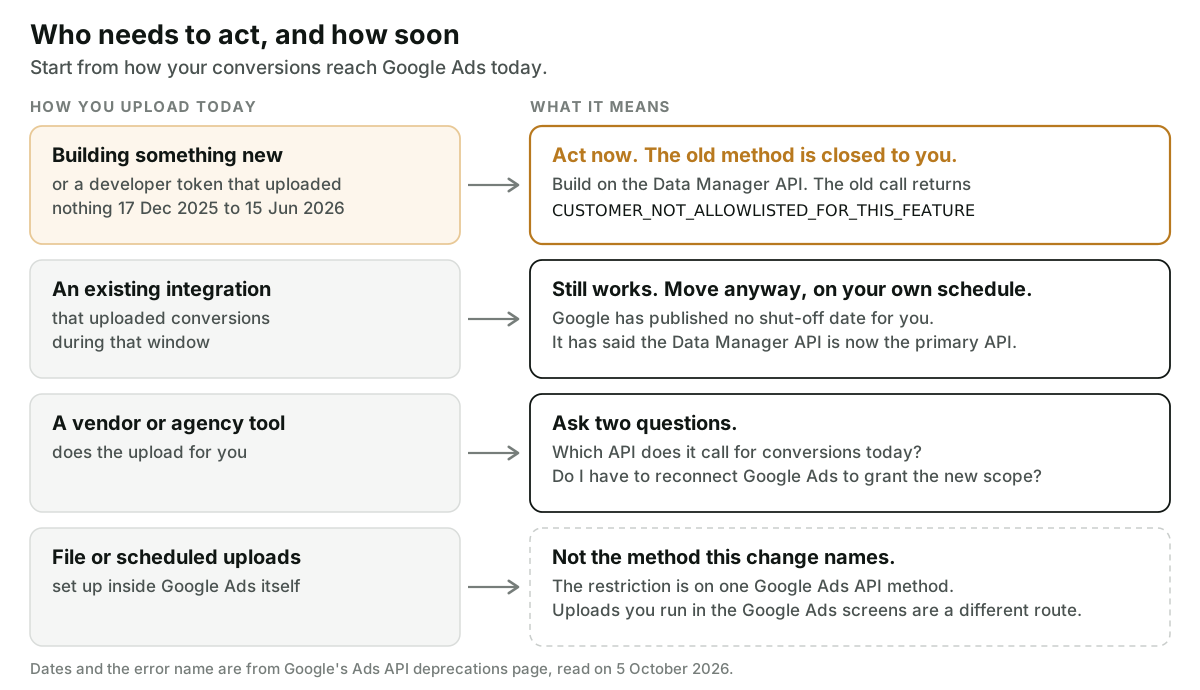
Start from how conversions reach your Google Ads account today.
You are building something new. Use the Data Manager API. There is no other door.
You have a custom integration that has been uploading all year. It works. Plan the move as ordinary engineering work, with a test account and a rollback, not as an incident.
A vendor or agency tool uploads for you. You cannot see which method it calls, so ask. The questions are further down.
You upload a file or run a scheduled upload inside Google Ads. The restriction names one method of the Google Ads API. An upload you set up in the Google Ads screens is a different route. The state of every route, including that one, is in Google Ads offline conversion import.
How do Google Ads Data Manager API conversions differ from the old upload?
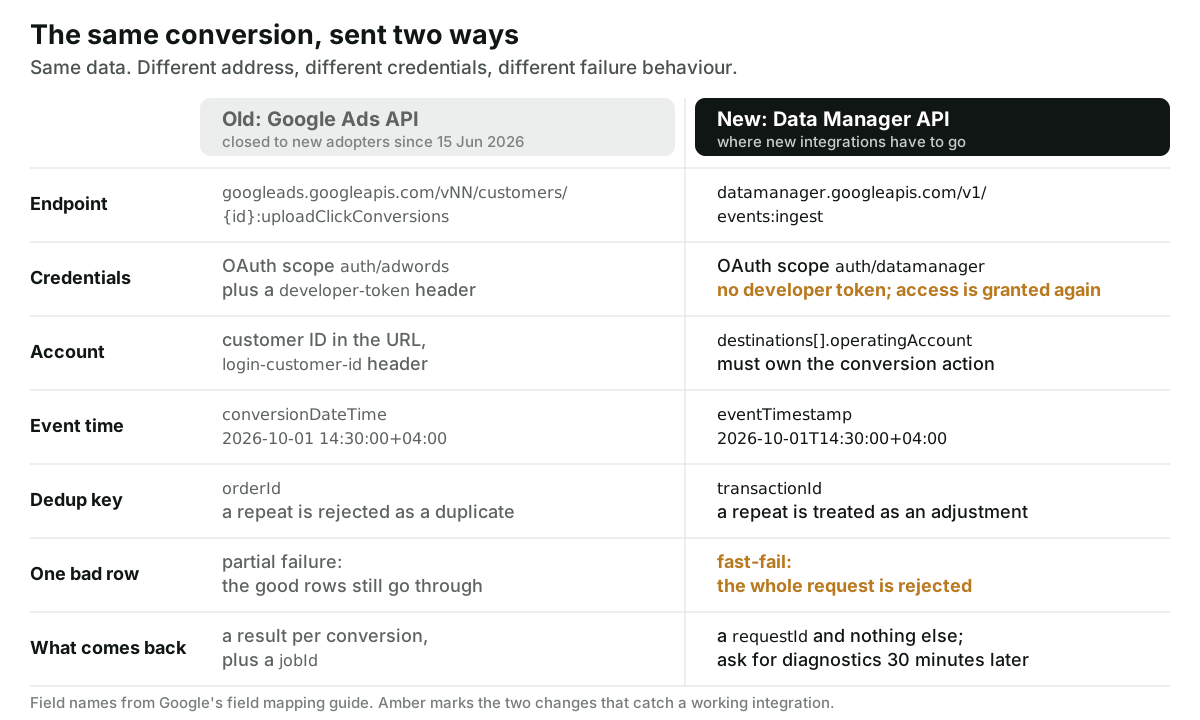
The conversion itself is the same. What changes is where it goes, what proves you may send it, and what happens when something is wrong. Field names below come from Google's field mapping guide and the events:ingest reference.
| Google Ads API (old) | Data Manager API (new) | |
|---|---|---|
| Endpoint | googleads.googleapis.com, customers/{customer_id}:uploadClickConversions | POST https://datamanager.googleapis.com/v1/events:ingest |
| OAuth scope | https://www.googleapis.com/auth/adwords | https://www.googleapis.com/auth/datamanager |
| Developer token | Required, as the developer-token header | Not required |
| Which account | customer_id in the path, login-customer-id header. The conversion account, or a parent or child of it | destinations[].operatingAccount. Must be the account that owns the conversion action |
| Conversion action | conversion_action, a resource name | productDestinationId, the numeric ID only |
| Event time | conversion_date_time, as yyyy-mm-dd HH:mm:ss+HH:mm | eventTimestamp, RFC 3339, with a T |
| Dedup key | order_id. A second upload with the same ID fails | transactionId. A second upload is handled as an adjustment |
| Hashed identifiers | user_identifiers[] with hashed_email, hashed_phone_number | userData.userIdentifiers[] with emailAddress, phoneNumber, plus a required encoding of HEX or BASE64 |
| Consent | consent on each conversion | consent on the request, overridable per event: adUserData, adPersonalization |
| Event source | Not a field | eventSource is required, for example WEB |
| Error model | Partial failure. partial_failure must be true | Fast-fail. One invalid field rejects the whole request |
| Response | results, partial_failure_error, job_id | requestId, plus fieldWarnings if any |
| Diagnostics | Offline data diagnostics, grouped by job_id | RetrieveRequestStatus with the requestId |
| Limits | Quotas tied to the developer token | 2,000 events, 10 destinations and 10 user identifiers per event; 300 requests a minute and 100,000 a day per Cloud project |
| Removing a conversion | Retraction, through a separate adjustment service | Value can be restated. Retraction is not supported |
The limits are on Google's limits page, and the adjustment and account rules are on the upgrade overview.
The smallest request that carries one conversion looks like this:
{
  "destinations": [{
    "operatingAccount": { "accountType": "GOOGLE_ADS", "accountId": "1234567890" },
    "productDestinationId": "987654321"
  }],
  "encoding": "HEX",
  "events": [{
    "eventTimestamp": "2026-10-01T14:30:00+04:00",
    "transactionId": "deal-4471:closed_won",
    "eventSource": "WEB",
    "adIdentifiers": { "gclid": "Cj0KCQ..." },
    "conversionValue": 4200,
    "currency": "AED"
  }]
}
The IDs and amounts are illustrative. The full payload with hashed email and phone, and the notes on each field, are in Import Salesforce Closed-Won Deals into Google Ads. The Google half of that guide applies to any CRM.
What breaks when you move?
Your token is not enough. The stored OAuth grant behind an existing integration carries the
adwords scope and not the datamanager one. Google's
upgrade steps
say plainly that new credentials are needed. In a tool that connects on behalf of customers, every
connected customer goes through the consent screen again.
One bad row now takes the batch with it. The old method required partial failure: 1,999 good conversions went through and you got an error for the one with a malformed timestamp. The new one validates the request as a whole and rejects all of it. A nightly job that sends everything in one call can lose a full day to one record. Validate each event before you batch, or keep batches small. Reading the errors themselves is covered in Google Ads offline conversion import errors.
A 200 tells you less. The old response listed a result for every conversion. The new one
returns a requestId. To learn what happened, you call RetrieveRequestStatus with it. Google's
diagnostics guide says to
wait 30 minutes before the first check and allows up to 24 hours for processing. If your code
throws the requestId away, you have no way to ask later.
The account must be the owner. Sending with a manager account's customer ID, or a child's,
stops working. operatingAccount has to be the account that owns the conversion action.
A resend is no longer an error. Sending the same transactionId twice used to fail as a
duplicate. Now it is read as an adjustment: the value can change and the count stays at one. That
is kinder to retries. It also means you cannot zero out a conversion that should never have been
sent.
Hashed email and phone need more than the click ID does. The Google Ads account must have agreed to the terms for enhanced conversions for leads. Normalising the address before the hash is its own subject: hashing emails for conversion uploads.
What did we hit when we migrated?
Attribi is the tool I build. Its Google upload moved to the Data Manager API in four pull requests on 19 May 2026, a month ahead of the cut-off, because the developer token we were running on at the time was new and had no upload history. This is what the code and its commit log record.
The first test calls needed only the OAuth bearer token, and a conversion with a click ID alone went through without any setup in the Google Ads account.
Then we added a hashed email and the request was rejected with
DESTINATION_ACCOUNT_ENHANCED_CONVERSIONS_TERMS_NOT_SIGNED. The test account had not accepted the
terms. What mattered was the scope of the rejection: the whole request failed, the click ID with
it. So the upload now retries without the hashed identifiers when it sees that reason and a click
ID is present, and flags the connection so the customer is asked to accept the terms in Google
Ads. The conversion still arrives, matched on the click alone. The other causes behind a
non-matching upload are in
enhanced conversions for leads not working.
The scope problem shaped the design. Every workspace connected before the change held a grant
without datamanager. We did not want uploads to stop until each customer reconnected, so every
upload goes through a wrapper: Data Manager first, and the old method only when the stored grant
is missing the new scope. Any other failure is returned as it is, because falling back would hide
it.
And we introduced a bug. The rewrite sent a value of zero for every qualified-stage conversion and stamped those events with the time of the upload, not the time the lead qualified. The old code did both correctly. It was found and fixed on 3 July 2026, six weeks later, with tests that pin the value and timestamp for each stage. Compare what the old and new paths send for the same lead before you trust the new one.
What should you ask your developer or vendor?
- Which method does our upload call today,
UploadClickConversionsorevents:ingest? - If it is the old one, did our developer token upload conversions between 17 December 2025 and 15 June 2026? If we ever rebuild under a new token, what happens?
- Does our stored Google authorisation include the
datamanagerscope, and who has to reconnect to add it? - When one conversion in a batch is invalid, what happens to the rest?
- Do we keep the
requestId, and does anything check the status of a request afterwards? - Has the Google Ads account accepted the terms for enhanced conversions, so hashed email and phone can be sent?
How does Attribi handle this?
You connect Google Ads and a CRM. When a lead reaches a stage you have mapped, Attribi sends the
conversion to events:ingest with the click ID it captured, the hashed email and phone (hashed
on our server), the value and currency, and a transactionId built from the lead and the stage,
so a retried job does not add a second conversion. The
Google Ads integration page has the setup.
The limits, checked against the code on 5 October 2026:
- Connections made before 19 May 2026 may still be on the old method. The wrapper keeps them
uploading through
UploadClickConversionsuntil they reconnect. If Google ever closes that method to existing users, those workspaces stop until someone reconnects. - One event per request. We do not batch, so fast-fail cannot take out a neighbour.
- No
consentobject is sent. Google's documentation for the old API recommends populating it. We do not yet, on either path. - We do not call
RetrieveRequestStatus. A successful upload in Attribi means Google accepted the request. Whether a click was credited is something you confirm in Google Ads. - It does not make an upload matter. A conversion only changes bidding when it is the goal the campaign bids toward and there is enough of it.
Uploads to one ad platform start on the Starter plan at 49 dollars a month, and CRM connections on Growth at 99. Every new workspace starts with 30 days on the Pro plan, no card required, which is long enough to connect Google Ads and see which API your conversions go out on.
Frequently asked questions
Is UploadClickConversions being shut down? Not on a published date. Since 15 June 2026 it is closed to developer tokens that sent no offline conversion uploads between 17 December 2025 and that day. Google says integrations that had already adopted it can continue while they move to the Data Manager API, and as of 5 October 2026 it has not said when that ends.
What does CUSTOMER_NOT_ALLOWLISTED_FOR_THIS_FEATURE mean on a conversion upload? It is the error the Google Ads API returns when a developer token outside the allowed group calls UploadClickConversions. The token made no offline conversion uploads in the qualifying window, so the method is closed to it. The fix is to send the conversions through the Data Manager API, not to change the request.
Does the Data Manager API need a Google Ads developer token? No. It authenticates with OAuth credentials that carry the datamanager scope, and the API has to be enabled in your Google Cloud project. The developer-token and login-customer-id headers from the Google Ads API are not used. Account details move into the destinations object in the request body.
Do I have to reconnect Google Ads when my tool moves to the Data Manager API? Usually yes, once. The new API needs an OAuth scope that an older authorisation does not include, so the person who connected the account has to approve it again. A tool can keep uploading through the old method in the meantime, but only for as long as Google leaves that method open to it.
Can one invalid conversion block a whole Data Manager API request? Yes. The Data Manager API uses a fast-fail model, so if any field in the request fails validation the entire request is rejected. The Google Ads API used partial failure, where the valid conversions were still imported. Validate events before batching them, or send smaller batches.
The takeaway
The old upload still answers, and that is exactly why this is easy to put off. Find out which method your conversions go out on this week, while the answer costs one question. If it is the old one, schedule the move before a new token or a new vendor schedules it for you. And if you would rather not own the plumbing, start with 30 days on the Pro plan and let ours do it.