Meta Conversions API for Lead Generation: Send CRM Stages, Not Just the Form Fill
By Rajesh Kumar, Founder, Attribi ·
The Meta Conversions API (CAPI) is Meta's server-to-server endpoint for sending conversion events from your own systems instead of, or alongside, the browser pixel. For an ecommerce store that mostly means a sturdier copy of the Purchase event. For lead generation it should mean something else: the stages your CRM records after the form, sent back so Meta can tell a lead that bought from a lead that never answered the phone.
My position is simple. A lead-gen Conversions API setup that only re-sends the form-submit event is mostly a deduplication project. It may recover some form fills the pixel missed, but Meta still optimizes toward people who fill in forms. The value is in the CRM stages. This guide covers what CAPI is, what Meta's "Conversions API for CRM" integration asks for, which match keys and limits matter, the setup routes, and where Attribi fits and where it does not. Every Meta fact was re-read on Meta's developer pages on 2026-10-26.
What is the Meta Conversions API?
The Meta Conversions API is a server-side interface that sends events such as Lead or Purchase from your server, website platform, app or CRM directly to a Meta dataset. Meta uses those events to measure results and optimize delivery. Unlike the pixel, it does not depend on the visitor's browser still being open when the conversion happens.
Meta's Conversions API overview describes it as a connection between an advertiser's marketing data and Meta's systems, and lists a CRM as one of the sources that data can come from. Each event is a JSON object posted to /{dataset_id}/events on the Graph API, with four things that matter most: an event_name, an event_time in Unix seconds, an action_source saying where the conversion happened, and user_data identifying the person.
"Facebook Conversions API", "Meta CAPI" and "Conversions API" are the same product. The endpoint still lives on graph.facebook.com.
Meta does not position CAPI as a pixel replacement. Its deduplication guide recommends running the Conversions API alongside the pixel, which it calls a redundant setup. That recommendation is about website events. CRM stages are a different case, because the pixel never had them to begin with.
Why does a lead-gen advertiser need more than the form-submit event?
Because the form fill is the only stage the pixel can see, and it is the stage least connected to revenue. If Meta only receives Lead events, its optimization treats every form fill as equally good. Sending later CRM stages, such as qualified, opportunity and won, gives Meta evidence about which leads became customers.
Ecommerce has an easy time here. The purchase happens on the website, the pixel sees it, and CAPI is a backup channel for the same event. Lead generation has a gap of days or months between the form and the money, and that gap happens inside a CRM, on phone calls and in sales meetings that no browser script observes. A Conversions API setup that mirrors the pixel's Lead event closes none of that gap.
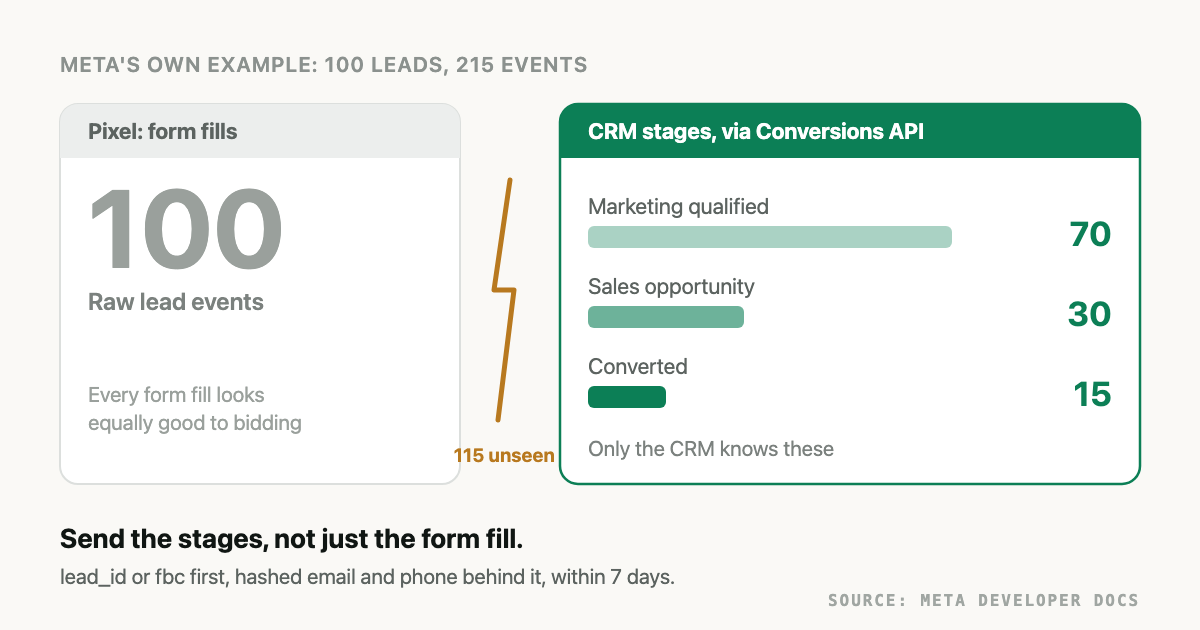
Meta's own implementation guide makes the point with numbers. In its Conversions API for CRM implementation page, 100 leads from a campaign should produce 215 events: 100 raw leads, 70 marketing qualified, 30 sales opportunities and 15 converted. The pixel accounts for the first 100. The 115 events that describe lead quality come from the CRM or nowhere.
The cost of skipping them is concrete. An ad set optimizing toward form fills will keep finding cheap form fills, including the people who type a fake number to see a price. If you have watched cost per lead fall while sales complain about lead quality, this is the likely mechanism, and it is covered in more depth in why ad platforms optimize on the wrong conversions.
What is Meta's Conversions API for CRM?
Conversions API for CRM is Meta's documented integration for sending CRM stage events about leads from Meta Instant Forms. Each event carries the Meta lead ID, action_source: "system_generated" and two CRM markers. Meta uses the stages to train the conversion leads optimization goal toward the stage you pick, rather than toward raw form submissions.
The name confuses people, because it sounds like "any CRM event sent through CAPI". It is narrower. Meta's Conversion Leads integration page lists its prerequisites, and the first is that you use Facebook or Instagram Lead Ads (Instant Forms). Website form leads can still be sent from a CRM through the Conversions API, as standard events. They do not train the conversion leads goal.
These are Meta's requirements for the Instant Form route, as stated on its pages today:
| Requirement | Meta's rule | Source |
|---|---|---|
| Lead source | Facebook or Instagram Lead Ads (Instant Forms) | Conversion Leads integration |
| Lead volume | At least 200 leads per month | Same page, and the platform guide |
| Target stage | Reached within 28 days of lead generation, at a conversion rate between 1% and 40% | Conversion Leads integration |
| Stages sent | Minimum of two, three or more recommended, including the initial lead stage | Platform guide, payload specification |
action_source | system_generated for all Conversion Leads events | Payload specification |
| CRM markers | custom_data.event_source: "crm" and custom_data.lead_event_source set to your CRM's name | Same page |
event_name | Free form: your own CRM stage names | Same page |
| Lead coverage | At least 60% of leads with matching events uploaded | Platform guide |
| Learning time | 2 to 4 weeks on the integration page, 3 to 4 weeks on the platform guide | Both pages above |
One correction worth making. Some vendor guides in the current search results put the volume threshold at 250 leads a month. Meta's own pages say 200. Use Meta's number, and treat any third-party threshold as something to check rather than repeat.
The 28-day rule matters more than it looks. If your sales cycle is four months, "closed won" cannot be the stage you optimize toward, because most wins land outside the window. Pick an earlier stage that sales agrees means something, such as a booked call or a qualified opportunity, and keep sending the win for reporting and value. The same problem shows up on Google, where it is discussed in not enough conversions for Smart Bidding.
Which match keys should a lead event carry?
Send the strongest identifier you have and every hashed fallback alongside it. For Instant Form leads that is the Meta lead ID, unhashed. For website leads it is the fbc click identifier built from the fbclid. Hashed email and hashed phone go with both, because they are the only keys left when neither ID survives into the CRM.
Meta's payload specification ranks lead ID and click ID highest, then hashed email, then hashed phone, then other hashed contact fields, and requires at least one customer information parameter per event.
| Match key | Where it comes from | Hash it? | Notes |
|---|---|---|---|
lead_id | The 15 to 17 digit leadgen_id on an Instant Form submission, stored in the CRM | No | Meta rejects an event with an invalid lead_id |
fbc | The _fbc cookie, or built from the fbclid on the ad click, format fb.1.{creation_time}.{fbclid} | No | Only exists for website leads that arrived from a Meta ad click |
fbp | The _fbp browser cookie | No | Useful for website events, absent for CRM-only records |
em | Email, trimmed and lowercased, then SHA-256 | Yes | Matches only if it is the email on the person's Meta account |
ph | Phone, digits only, leading zeros dropped, country code included, then SHA-256 | Yes | Meta says the country code is required for matching |
external_id | Your own stable ID for the person | Recommended | Helps tie events about one person together |
Hashing rules are from Meta's customer information parameters page.
The lead ID is the key that makes Instant Form leads easy, and the one most often lost. Your lead sync writes it to the CRM, then a lead conversion or a manual re-entry drops it, and every later stage event falls back to hashed email. The phone rule is the other quiet failure: a UK number stored as 07700 900123 hashes to a different value than 447700900123, and Meta cannot match it. How email and phone normalization differs between Google and Meta, and why one stored hash cannot serve both, is in the hashing guide for conversion uploads.
How do you deduplicate pixel and Conversions API events?
Give the browser event and the server event for the same action the same event name and the same event ID. Meta compares eventID on the pixel event with event_id on the server event, and if they match within 48 hours it counts the action once. Without a shared ID, a form fill reported by both channels is counted twice.
The rules, from Meta's server event parameters page and its deduplication guide:
- The browser
eventmust equal the serverevent_name, and the browsereventIDmust equal the serverevent_id. - Matching events received within 48 hours of each other are counted once.
- When a browser and server event arrive within about 5 minutes of each other, Meta favors the browser event. Otherwise it generally keeps whichever arrived first.
- A fallback method using
fbporexternal_idexists, but Meta says it generally works only when the browser event arrives first.
For lead generation, deduplication only applies to the form-submit stage, since that is the only stage both channels can see. CRM stages have no browser twin, so their event IDs exist to protect you from yourself: a retried job or a re-run sync. Derive the ID from the business outcome, for example the CRM record ID plus the stage, so a retry reuses it and a genuinely new sale gets a new one. Remember the 48-hour limit. A replay next week is a new event to Meta, whatever the ID says.
Which funnel stages should you send, and how fast?
Send every stage as it changes, including the raw lead, within 7 days of the stage change and at least once a day. Meta rejects an entire request if any event in it is older than 7 days. Real-time sending is preferred, and hourly or daily batches are acceptable.
These are the timing limits that break CRM jobs most often:
| Limit | Meta's rule | Source |
|---|---|---|
| Event age | event_time at most 7 days before you send. One older event fails the whole request and no events in it are processed | Server event parameters |
| Event order | For CRM lead events, event_time must be after the lead generation time, or the event may be discarded | Payload specification |
| Cadence | At least once a day. Real time preferred, hourly or daily batching acceptable | Implementing the CRM integration |
| Backfill | Up to 7 days. Do not rewrite event_time to reach further back | Same page |
| Batch size | Up to 1,000 events per request. An error discards the entire batch | Same page |
A workable stage map for a typical B2B or high-ticket service funnel looks like this. The stage names are illustrative, because Meta leaves event_name to you on the Instant Form route.
- Raw lead. Sent for every lead, at creation. For website leads this is the
Leadevent your pixel and server already send, deduplicated. - Contacted or qualified. The first stage sales controls. Usually the best optimization target, since it tends to fall inside 28 days and inside Meta's 1% to 40% band.
- Opportunity or booked appointment. Fewer events, stronger signal.
- Won. Send it as a
Purchasewith the real deal value and currency, so reporting and any value-based bidding see revenue. A placeholder value does damage, as the value-based bidding guide explains.
Two details trip people. First, the 7-day ceiling is about upload lag, not sales cycle length: a deal can close in month five and still be sent, as long as it goes within 7 days of closing. Second, a lead that moved through three stages between two batch runs should produce three events, so queue stage changes rather than reading a snapshot of the current stage.
One retired route still shows up in older guides. Meta's Graph API v17.0 changelog states that the Offline Conversions API stopped supporting offline events from v17.0, and v16.0 was the last version that did. CRM outcomes now go through the Conversions API itself.
How do you set up the Meta Conversions API for leads?
There are five realistic routes: Meta's one-click setup for website events, a native CRM partner integration, a no-code automation tool such as Zapier, a managed tool that joins web and CRM data, or your own server. Only the last three send CRM stages for website leads. Choose by where your leads come from and who will own the job.
Meta's Conversion Leads page itself lists a developer implementation, a Zapier implementation, and other partner integrations such as Salesforce Webhooks as the ways to send CRM events back.
| Route | Sends CRM stages? | Good for | Watch out for |
|---|---|---|---|
| Events Manager one-click CAPI for an existing pixel (overview) | No, website events only | Recovering browser events quickly | Leaves lead quality untouched |
| Native CRM partner integration (for example Meta's Salesforce Webhooks route) | Yes | Instant Form leads in a supported CRM | Lead ID must survive in the CRM; setup is per CRM |
| Zapier or a similar automation tool | Yes | Low volume, one CRM, simple stages | Per-task pricing, no ledger of what was sent, easy to break silently |
| A managed attribution tool | Yes | Website leads where the click and the CRM record must be joined | You depend on its event mapping and limits |
| Your own server | Yes | Full control, custom stage names, high volume | You own hashing, retries, the 7-day rule, token refresh and monitoring |
Salesforce users have two dedicated guides: the Salesforce to Meta setup walkthrough, which covers fields, flows and a sample payload, and Salesforce to Meta troubleshooting for a connection that already exists. If you send no pixel events at all and want CRM-only measurement, start with offline conversion tracking without a pixel.
Whichever route you pick, verify in this order: the event arrived in the right dataset (Events Manager, or test_event_code in the Test Events tab), it matched (lead coverage for Instant Forms, identifiers present for website leads), and only then whether campaigns credit it. Meta's numbers will not equal your CRM's or Google's for the same buyers, for reasons covered in how ad platforms count and report conversions differently.
What does Attribi send to Meta, and what does it not do?
Attribi is the managed-tool row in that table, built for website leads. Its tracker records the visit and click IDs, the lead lands in your CRM, and stage changes in the CRM go back to Meta through the Conversions API connection. Here is exactly what the code sends today.
- At form capture, a
Leadevent withaction_source: "website", hashed email, phone and name parts, a hashed visitor ID asexternal_id, IP address, user agent, and the_fbcand_fbpcookies when the visitor's browser has them. Its value is 0. - When the CRM marks a lead qualified, another
Leadevent carryingcontent_category: "qualified_lead". - When the CRM marks a deal won, a
Purchaseevent with the deal value and currency, matched on thefbclidthe tracker captured, or on hashed email and phone. - Event IDs are fixed per lead and stage, so a retry does not create a second qualified lead or a second sale. For Shopify orders, the server
Purchasereuses the order ID so it deduplicates against Shopify's own pixel. event_timeis when Attribi recorded the stage change. For CRMs read on a schedule, that is the time of the read, which keeps events inside Meta's 7-day limit at the cost of some lag.
CRMs that can feed those stages are HubSpot, Salesforce, Zoho CRM, Pipedrive, Freshsales, LeadSquared, Meritto and Odoo, plus a generic webhook.
What it does not do, plainly:
- It only sends the Meta lead ID for Instant Form leads it pulled itself. Those stage events carry
lead_idwithaction_source: "system_generated"andevent_source: "crm", the shape Meta's CRM integration expects. Instant Form leads that reach your CRM some other way are matched on hashed email and phone instead. Instant Form sync needs extra Meta permissions at connect time, so confirm it is enabled for your account before you plan the conversion leads goal around it. - It does not send custom stage names. The mapping is fixed:
Lead,Leadwith a qualified marker, andPurchase. An ad set optimizing on the standardLeadevent sees form fills and qualified leads together. - It does not share an event ID with your browser pixel's
Leadevent and does not fire the pixel itself. If your site also fires a pixelLeadon the same form, Meta can count that form fill twice. Pick one source for the form-submit event. - It does not add a country code to phone numbers. It hashes the digits as stored, so store phones in international format.
The Free plan includes neither CRM connections nor conversion uploads. Uploads to one ad platform start on Starter at 49 dollars a month, and CRM revenue sources start on Growth at 99 dollars (plans). Every new workspace gets 30 days on Pro, which is enough to connect Meta and your CRM and watch real stage events arrive in Events Manager before you pay. Start the trial.
Frequently asked questions
Is the Facebook Conversions API the same as the Meta Conversions API? Yes. It is one product under two names. Facebook Conversions API is the older name from before the company became Meta, and the endpoint still lives on graph.facebook.com. Guides that say Facebook CAPI, Meta CAPI or simply Conversions API are describing the same server-side events.
Do I still need the Meta Pixel if I use the Conversions API? For website events, yes. Meta recommends running the Conversions API alongside the pixel and deduplicating with a shared event name and event ID. For CRM stages such as qualified or won there is no pixel event to pair with, so those go through the Conversions API alone.
Can website form leads use Meta's Conversions API for CRM? Not for the conversion leads optimization goal. Meta lists Facebook or Instagram Instant Forms as a prerequisite for that integration. Website leads can still send CRM stages through the Conversions API as standard events, matched on the fbc click identifier and hashed email and phone.
How many leads a month does conversion leads optimization need? Meta's pages say at least 200 leads per month, with the stage you optimize toward reached within 28 days by 1 to 40 percent of leads. Some third-party guides quote 250. Meta's documentation, checked on 2026-10-26, says 200.
Does Attribi send the Meta lead ID for Instant Form leads? Only for Instant Form leads Attribi pulled from Meta itself. Their qualified and won events carry the lead ID with action_source set to system_generated. Leads that reach your CRM another way are matched on hashed email and phone. Confirm Instant Form sync is enabled for your account before relying on it.
The takeaway
The Meta Conversions API is worth setting up for lead generation only if it carries what the pixel cannot: the CRM stages that separate a buyer from a form fill. Send every stage, within 7 days, with the strongest match key you have and hashed email and phone behind it. If your leads come from Instant Forms and you want the conversion leads goal, use Meta's CRM integration with the lead ID intact. If they come from your website, join the click to the CRM record and send the stages as standard events, which is the job Attribi does. Start 30 days on Pro and check the events in your own Events Manager.
Send closed deals to Meta as Conversions API events.
Attribi matches each CRM outcome back to the lead it recorded and sends it through the Conversions API with hashed identifiers.
No credit card. Free up to 500 visitors a month. New workspaces start with 30 days on Pro.