Server-Side Tracking for Lead Generation: Two Things Called the Same Name
By Rajesh Kumar, Founder, Attribi ·
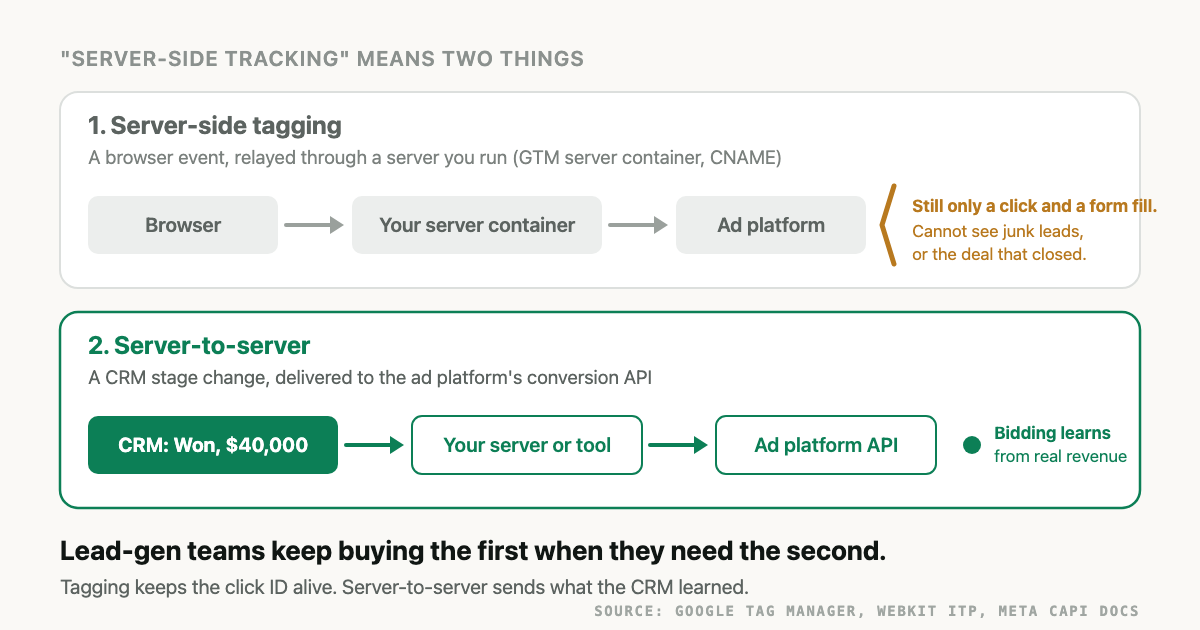
Server-side tracking is the practice of sending marketing data to analytics and ad platforms from a server instead of, or in addition to, the visitor's browser. That one phrase covers two different projects. The first moves your browser tags onto a server you run. The second generates conversion events from your own systems, usually a CRM, and delivers them to the ad platform's API. Lead generation teams keep buying the first when what they need is the second.
My position: if you sell through a sales team and have budget for one tracking project, server-to-server delivery of CRM stages is worth more than a server-side tag manager. The server container fixes real problems with cookies, ad blockers and page weight, but the data passing through it is still what the browser saw. It cannot know that a lead was junk, or that it closed for 40,000 dollars six weeks later. This guide separates the two meanings, compares them against a plain browser tag, walks through a lead-gen setup, and says what Attribi does and does not do in each lane. Every vendor fact was re-read on the vendor's own page on 2026-11-16.
What is server-side tracking?
Server-side tracking means a server, not the visitor's browser, is the thing that talks to your analytics or ad platform. In the first form, a server you control receives browser events and forwards them. In the second, your own systems create the event, often from a CRM record, and post it directly to the platform's conversion API with a click ID or hashed email.
Vendors use the term for both because the difference is invisible on an architecture slide: in each case an arrow leaves a server and lands on Google or Meta. The difference is what the event knows.
- Server-side tagging is the Google Tag Manager meaning. Google's server-side tagging introduction describes a server container that "doesn't run in the user's browser or on their phone" and "runs on a server that you control", typically in your own Google Cloud project or another environment you choose. The browser still fires a small client; the heavy tags move to the server, which relays to GA4, Google Ads, Meta and the rest.
- Server-to-server conversion delivery is the Conversions API meaning. Meta's Conversions API overview describes a connection "from an advertiser's server, website platform, mobile app, or CRM to Meta systems". Google's equivalent is offline conversion import, now through the Data Manager API. LinkedIn, TikTok and Microsoft each have a similar endpoint.
The same two meanings sit behind "server side tracking", "server-to-server tracking" and "S2S tracking". UK readers will see the identical term, with "modelling" sometimes attached when the platform fills gaps with estimates rather than observed data.
How does server-side tracking work?
In the tagging form, the browser sends one request to your subdomain, your server parses it, sets cookies in the HTTP response and forwards events to each platform. In the server-to-server form, there is no browser at all: a job reads a record, builds a conversion event with an identifier, and posts it to the platform's API.
The tagging form first, since it is what most guides describe.
- You point a subdomain of your own site, for example
track.yourdomain.com, at the server container with a CNAME record. Google's setup pages recommend installing "on your first-party domain" before production traffic. - A small script on the page sends page views and events to that subdomain. Because the host is a subdomain of your site, the request is first-party.
- The server sets or refreshes the visitor cookie in the HTTP response rather than from JavaScript. That matters on Safari: WebKit's ITP 2.1 post (21 February 2019) says persistent cookies created through
document.cookieare capped to a seven-day expiry, and that "only cookies created through document.cookie are affected". ITP 2.2 (24 April 2019) tightened that to one day when a domain classified as a cross-site tracker navigated the user to a page whose URL carries a query string or fragment, which describes a decorated ad click. - The server fans each event out to GA4, Google Ads, Meta and whatever else you configure, from a host that ad blockers are less likely to have on a list.
Now the server-to-server form.
- A visitor clicks an ad. The landing URL carries a click ID:
gclid,fbclid,msclkid,li_fat_id,ttclid. Someone has to capture it and store it on the lead record, which is the one place the two meanings touch. - The lead enters the CRM. Weeks pass. A salesperson marks it qualified, then won with a deal value.
- A job notices the stage change and builds an event: the conversion action or event name, the time, the value and currency, and an identifier. For Google that is the click ID or hashed email and phone. For Meta it is
fbcbuilt from thefbclid, or hashed email and phone, or the Instant Form lead ID. - The job posts the event to the platform's API. Meta's customer information parameters page says email must be trimmed and lowercased before hashing, phone numbers need the country code, and
fbc,fbpandlead_idare sent unhashed. - The platform matches the event to the click and credits the campaign. Bidding now has evidence about which clicks turned into revenue.
Note what step 3 of the tagging form cannot do. The server container only sees what the browser told it. A form fill is the last thing the browser knows about a lead. Everything that decides whether the lead was worth paying for happens after that, in a system the browser never touches.
What is the difference between server-side tagging and server-to-server tracking?
Server-side tagging changes where a browser event is processed. Server-to-server tracking changes where the event comes from. The first still measures page views, clicks and form submits. The second measures qualified leads, opportunities and closed deals, because those only exist in the CRM. For lead generation, the second is the leg that changes bidding.
| Browser tag | Server-side tagging | Server-to-server CRM events | |
|---|---|---|---|
| What fires the event | JavaScript in the visitor's browser | JavaScript sends one request to your server; the server fires the platform tags | A job reading your CRM or database |
| What it fixes | Nothing; it is the baseline | Safari's cap on JavaScript-set cookies (unless Safari sees the subdomain as cloaked), some ad-blocker loss, page weight from many vendor tags | The gap between "filled a form" and "paid us". Platforms learn which clicks produced revenue |
| What it still cannot see | Anything after the browser closes | The same. Lead quality, pipeline stage, deal value, refunds | Anonymous visits before the form, unless something stored the click ID at that point |
| Needs the click ID stored on the lead | No | No, though it can help you capture it | Yes, or hashed email and phone as a fallback |
| Who maintains it | Marketing or whoever owns GTM | A developer or agency who understands DNS, cloud instances and the tag server | Whoever owns the CRM data plus the API connections |
| What it costs | Nothing beyond the tags | Cloud instances you pay for. Google's App Engine setup guide recommends a minimum of three servers and puts each at roughly 40 dollars a month in production configuration, before anyone's time | A managed tool, an automation platform, or developer time to own hashing, retries and each API's limits |
| Changes what the ad platform optimizes toward | No | No | Yes, if you send the later stages as conversions |
Two caveats about the right-hand column. It does nothing for the anonymous part of the journey: if nobody stored the click ID when the visitor arrived, the event falls back to hashed email and phone, which match fewer leads. And it is only as good as the CRM discipline behind it. A sales team that marks deals won three weeks late sends three-week-late conversions.
Why does lead generation need server-to-server delivery more than a server container?
Because the form fill is the stage least connected to revenue, and it is the only stage either browser setup can report. An ad platform optimizing toward form fills will find more form fills. Sending qualified and won stages from the CRM is the only way to show it which form fills were worth having.
Ecommerce gets away with the tagging meaning because the purchase happens in the browser. The server container sees it, forwards a sturdier copy, and the platform's optimization target already equals the business outcome. Lead generation is different in kind. The business outcome happens on a phone call or in a contract, days or months later, and no amount of relaying browser events through a server changes what those events contain.
Take an illustrative month. 200 form fills arrive from paid search. The sales team disqualifies 90 as students, competitors and wrong numbers. 40 become opportunities. 6 close, for an average of 40,000 dollars. A server-side tagging setup reports 200 conversions, maybe 210 if it recovered a few the browser tag missed. The platform sees every one of the 200 as equally good and keeps bidding for the cheapest of them. A server-to-server setup sends 110 qualified events and 6 purchase events with values. Now the platform can see which campaigns and keywords produced the 6, and bid toward them. The mechanics of that mismatch are covered in why ad platforms optimize on the wrong conversions.
The platforms are explicit that they want these later stages. Google describes offline conversion import on its help page as a way to "measure what happens in the offline world after your ad results in a click or call to your business", keyed on the Google Click ID it issues "for every click". Meta's CRM integration guidance, covered in the Meta Conversions API for lead generation pillar, expects a sequence of CRM stages rather than a single lead event.
So where does server-side tagging fit for a lead-gen team? As a prerequisite, and only insofar as it keeps the click ID alive long enough to be stored on the lead. On Safari, a visitor who clicks an ad on Monday and fills the form on the following Wednesday has outlived a JavaScript-set cookie. A cookie set by an HTTP response lasts longer only if Safari does not treat your subdomain as a disguised third party. WebKit caps HTTP-response cookies at 7 days when the subdomain resolves through a third-party CNAME, and it later applied the same cap to cloaked third-party IP addresses. A server container reached through a CNAME, the setup in step 1 above, can fit that description, so test it in Safari before relying on it. If your forms read the click ID from a cookie and the cookie does survive, the tagging leg protects the server-to-server leg. If your forms read the click ID from the landing URL and write it to a hidden field on the same visit, you do not need a server container for this at all. Both patterns are in how to capture the GCLID in your CRM.
How do you set up server-side tracking for lead generation?
Store the click ID on every lead, decide which CRM stages count as conversions, send each stage change to the platform's API with the click ID and hashed contact data, and only then consider a server container for the browser leg. That order puts the revenue signal first and treats the tagging project as optional hardening.
- Make the click ID survive to the lead record. Capture
gclid,gbraid,wbraid,fbclid,msclkid,li_fat_idandttclidfrom the landing URL and write them to the form submission. Google's import page says auto-tagging must be enabled and that "the GCLID is case sensitive". The three Google identifiers and when each appears are in GCLID vs GBRAID vs WBRAID. - Pick the stages. Three is enough for most funnels: lead, qualified (the first stage sales controls), and won with a value. Name them in the CRM so a stage change is a clean event, not a free-text note.
- Create the conversion targets on each platform. A Google Ads conversion action per stage, a Meta event name per stage, a LinkedIn conversion rule, a Microsoft offline conversion goal. Microsoft's OfflineConversion reference says to wait two hours after creating the goal before the first upload. Google's import page says to wait four to six hours after creating the action.
- Normalize and hash contact data per platform, not once. Meta lowercases and trims email and strips symbols and leading zeros from phone. Microsoft wants SHA-256 email and an E.164 phone. Google has its own Gmail rule. One stored hash cannot serve all of them, which is the point of how to hash emails for conversion uploads.
- Send every stage change, fast, with a stable ID. Each platform has an age limit. Google's click-through conversion window can be set up to 90 days, depending on the conversion source (conversion windows), and a click outside the window is rejected:
EXPIRED_EVENTin the Google Ads API, an expired-click processing error in the Data Manager API. LinkedIn's Conversions API rejects events whose conversion time is not within 90 days. Microsoft fails an upload whose conversion time is more than 90 days old. Meta rejects a request containing any event older than 7 days. Derive each event's ID from the lead and the stage so a retry does not create a second sale. - Deduplicate where a browser event exists. Only the lead stage has a browser twin. Meta's deduplication page requires the Pixel
eventIDto match the serverevent_idand the Pixeleventto matchevent_name, within 48 hours. Qualified and won stages have no pixel event to pair with. - Verify in the platform, not in your logs. A 200 from the API means the request parsed. Check the conversion arrived in the right action or dataset, then that it matched, then whether campaigns credit it. The checklist for that is CRM offline conversion tracking QA.
- Then, if Safari leads are a large share, harden the browser leg. A first-party subdomain with HTTP-set cookies, either through a server container or through a tracking vendor that sets cookies from its server, can extend how long a returning Safari visitor keeps an identity, unless Safari treats the subdomain as cloaked, in which case the limit is still 7 days. Measure the share of leads that arrive without a click ID before and after. If it was already small, stop here.
Step 8 last is the opinion in this article. Most lead-gen teams that ask about server-side tracking are being sold step 8 as the whole project, with steps 1 to 7 left as an exercise.
What does Attribi do in each lane, and what does it not do?
Attribi sits in the server-to-server lane, with a small browser script whose only job is to get the click ID and visit to the server. Here is what the code does today.
The browser leg. The tracker script does no URL parsing in the browser. It sends the raw page URL, the referrer, the site ID and its visitor ID to Attribi's server, with cookies included. Everything else happens server-side: the /api/track endpoint parses the URL, reads the five UTM parameters, and resolves the click ID against a list of eleven recognized parameters in precedence order: gclid, fbclid, wbraid, gbraid, ttclid, msclkid, li_fat_id, ScCid, dclid, twclid and a utm_mta fallback. Adding a new click ID is a server change, not a script change. The visitor cookie (one year) and session cookie (30 minutes, sliding) are set by Set-Cookie on the /api/track response, as HttpOnly cookies. The script also keeps its own copy of the visitor ID, in a document.cookie cookie on your registrable domain with localStorage as the fallback, so a visitor can be followed across subdomains. The server uses the HTTP cookie when it arrives and the script's copy when it does not, so Safari's limits on JavaScript-set cookies still apply to that copy.
The first-party subdomain. Customers on the Business plan and above can serve the script and the endpoint from track.yourdomain.com through a CNAME that Attribi registers automatically; the install docs describe the request as first-party when the script src is on that subdomain, and as third-party when it is on a shared host. Attribi's own docs are blunt that even a correct first-party install does not escape Safari's seven-day cap on returning-visitor identity, and that click-ID matching is unaffected because it is recovered from the landing URL on the server.
The server-to-server leg. When a connected CRM marks a lead qualified or won, Attribi uploads that stage to every connected ad platform from one fan-out: Google Ads, Meta Ads, LinkedIn Ads, TikTok Ads, Snapchat Ads and Microsoft Ads. Google uploads go through the Data Manager API events:ingest endpoint with a transaction ID derived from the lead and stage, so a retry deduplicates. Meta events carry fbc built from the stored fbclid, or hashed email and phone, or the Instant Form lead ID when Attribi pulled the lead itself. Identifiers are hashed per platform: a standard lowercased SHA-256 email for Meta, LinkedIn, TikTok and Snapchat, Google's Gmail-normalized variant for Google, Microsoft's variant for Microsoft, and E.164 or digits-only phone hashes depending on who is asking. Leads that never touched the tracker can still be matched through the CRM's own click-ID field, the pixel-less mode described in offline conversion tracking without a pixel.
What Attribi does not do, plainly:
- It is not a GTM server container and does not host one. It does not proxy GA4, replace a tag manager, or relay your other vendors' tags. The script calls two endpoints,
/api/trackand/api/convert, and nothing else. Where GTM still belongs in the stack is in the GA4, GTM and CRM measurement architecture. - It does no consent management. Consent banners and the choice of what to fire before consent remain yours; see the privacy-first approach for what is hashed and what is stored.
- It does not do marketing mix modeling (MMM) or any modeled conversions. What is uploaded is a CRM stage that happened, matched to a click or a hashed contact, or nothing.
- It does not recover the anonymous part of a journey for a lead whose click ID was never stored. Hashed email and phone are the fallback, and they match fewer leads than a click ID.
The Free plan is the browser leg only: up to 500 visitors a month, journeys and lead capture, with no CRM connections and no conversion uploads. Uploads to one ad platform start on Starter at 49 dollars a month, and CRM revenue sources with all six ad platforms start on Growth at 99 dollars (plans). Every new workspace gets 30 days on Pro, which includes the custom tracking subdomain, so you can test both lanes before paying for either. Start the trial, connect Google Ads or Meta Ads and your CRM, and watch a real stage change arrive in the platform.
Frequently asked questions
Is server-side tagging the same as server-to-server tracking? No. Server-side tagging moves browser tags into a server container you run; the data is still what the browser observed. Server-to-server tracking generates the event in your own systems, such as a CRM, and posts it to the ad platform's API. Vendors call both "server-side tracking", which is why lead-gen teams buy the wrong one.
Does server-side tracking bypass ad blockers? Partly. A server container on your own subdomain is less likely to be on a blocklist than a well-known vendor host, so some events that a browser tag would lose get through. It does not help with a visitor who blocks all scripts, and it does nothing for the conversions that happen after the browser closes, which is where lead-gen revenue lives.
Do I need a GTM server container to send CRM conversions to Google Ads or Meta? No. Offline conversion import and the Conversions API accept events from any server with a valid token, keyed on a click ID or hashed contact data. A server container can help keep the click ID alive in a cookie on Safari, but a form that reads the click ID from the landing URL on the first visit does not need one.
How long do I have to send a CRM conversion after the ad click? It depends on the platform. Google rejects clicks outside the conversion action's click-through window, which can be set up to 90 days. LinkedIn and Microsoft reject events whose conversion time is more than 90 days old. Meta rejects any request containing an event older than 7 days from when you send it, which limits upload lag rather than sales-cycle length.
What does Attribi's tracker do in the browser? It sends the raw page URL, the referrer, the site ID and its visitor ID to Attribi's server; there is no parameter parsing in the script. The server extracts UTMs and the click ID from eleven recognized parameters and also sets visitor and session cookies in its HTTP response. CRM stage changes are then uploaded server-to-server to six ad platforms.
The takeaway
"Server-side tracking" is two projects wearing one name. Server-side tagging hardens the browser leg: HTTP-set cookies on your own subdomain, fewer blocked requests, lighter pages. Server-to-server delivery changes what the ad platform learns, because qualified and won only exist in the CRM. For a lead-gen team, do the second first, keep the click ID alive long enough to store it, and treat the server container as optional hardening once the revenue signal is flowing. If you want the second lane without building it, start 30 days on Pro and send your first CRM stage to Google or Meta this week.
Send closed deals to Meta as Conversions API events.
Attribi matches each CRM outcome back to the lead it recorded and sends it through the Conversions API with hashed identifiers.
No credit card. Free up to 500 visitors a month. New workspaces start with 30 days on Pro.